How to Track Ecommerce Metrics and KPIs for Customer Service

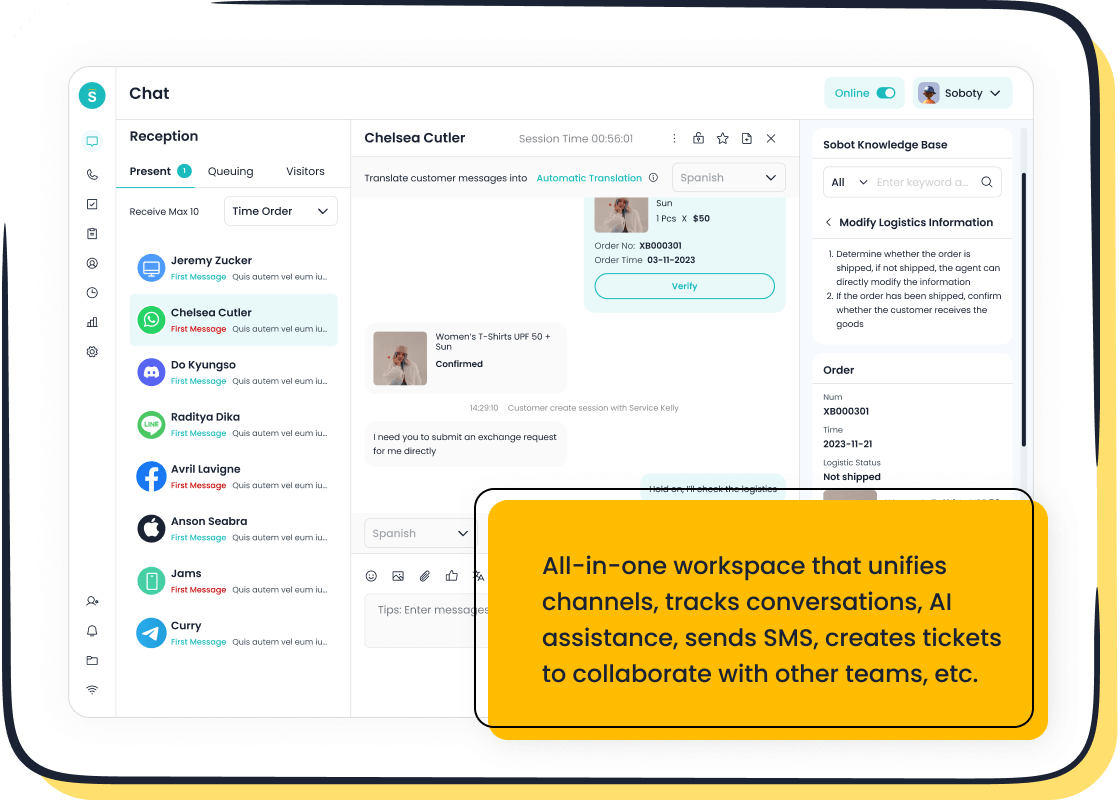
You can track ecommerce metrics and KPIs for customer service by monitoring scores like CSAT and NPS, which reflect how satisfied and loyal your customers feel. Metrics such as response time, resolution rate, and complaint rate help you see how well your team handles issues. Tracking these ecommerce metrics supports better customer experiences and helps your business grow. Sobot gives you the tools to collect, analyze, and act on this data using advanced omnichannel analytics.
Ecommerce Metrics and KPIs for Customer Service
Key Definitions
You need to understand the main ecommerce metrics and kpis before you start tracking them. These measurements help you see how well your customer service works. The table below explains some of the most important ecommerce metrics for customer service:
| Metric | Definition | Calculation Method |
|---|---|---|
| Customer Satisfaction Score (CSAT) | Measures customer satisfaction with their experience. | Ask customers to rate satisfaction on a scale of 1-5 and calculate: (Total number of 4 and 5 responses / total responses) x 100. |
| Net Promoter Score (NPS) | Measures customer loyalty based on likelihood to recommend. | Calculate: % of promoters - % of detractors. Promoters (9-10), Passives (7-8), Detractors (0-6). |
| Average Resolution Time (ART) | Time taken to fully resolve a customer issue. | Total duration of resolved conversations / number of resolved conversations. |
You can use these key performance indicators to measure how happy your customers feel and how quickly your team solves problems. These ecommerce metrics and kpis give you a clear picture of your service quality.
Why Metrics Matter in Ecommerce
Tracking ecommerce metrics helps you make smart decisions for your business. You can use these numbers to understand what your customers need and how they behave. Here are some reasons why ecommerce metrics and kpis matter:
- Ecommerce metrics help you grow your business in a healthy way.
- You can use these numbers to improve customer loyalty.
- When you track ecommerce metrics, you can find ways to increase your revenue.
- Ecommerce metrics and kpis show you how to make your team work better.
- You can use the data to make your service faster and more helpful.
- Tracking the right ecommerce metrics helps you stay ahead of your competition.
You can see better customer satisfaction when you measure and improve your service. Your team will know where to focus and how to get better results. Ecommerce metrics and kpis are important tools for every ecommerce business.
Essential Ecommerce Metrics to Track
Response Time and Resolution
You need to track response time and resolution rates to understand how quickly your team helps customers. These ecommerce metrics show how fast you answer questions and solve problems. Customers value their time. Studies show that 77% of people say quick replies are crucial for satisfaction. Fast response and resolution times can boost your sales conversion rate by up to 30%. You should aim for stellar response times. For live chat, under one minute is best. For email, under one hour is ideal. The table below shows industry benchmarks for response times across channels:
| Channel | Unacceptable | Average | Stellar |
|---|---|---|---|
| Multiple days | 12-24 hours | Under 1 hour | |
| Live Chat | Over 1 hour | 10 minutes | Under 1 minute |
| Social Media | Multiple days | 12-24 hours | Under 15 minutes |
Tracking these key metrics helps you improve your ecommerce funnel and customer satisfaction.
Customer Satisfaction (CSAT) and NPS
CSAT and NPS are key metrics that measure how happy and loyal your customers feel. The average NPS score for ecommerce is 62. Higher NPS scores lead to more revenue and lower churn rates. You can use CSAT after support calls, product feedback, and delivery evaluations. NPS tracks brand loyalty and predicts churn. These ecommerce metrics and kpis help you understand your funnel and improve your sales conversion rate.
Tip: Use CSAT and NPS surveys after every major interaction to get real feedback.
Refund, Return, and Retention Rates
Refund and return rates are key metrics that show how well your products and service meet customer expectations. The average ecommerce return rate is 20-30%. Clothing can reach up to 88%. High return rates may signal quality issues or misleading descriptions. Tracking these ecommerce metrics helps you spot problems in your funnel and improve retention. Returns data can reveal trends and help you fix sizing or quality issues.
- High return rates can hurt profitability.
- Trackable return labels make the process easier for customers.
- Analyzing return reasons helps you improve products and service.
Conversion and Repurchase Rates
Conversion and repurchase rates are key metrics that show how well your ecommerce funnel turns visitors into buyers and keeps them coming back. The average conversion rate for online stores is 2.86%. A good repeat customer rate is 25-30%. High repurchase rates mean customers are happy and loyal. These ecommerce metrics help you measure the effectiveness of your funnel and sales conversion rate.
"Poor customer service drives churn more than any other factor. Service quality directly correlates with loyalty outcomes."
Tracking these key metrics lets you see where your funnel works best and where you need to improve. You can use the guide "How to Track Ecommerce Metrics and KPIs for Customer Service" to optimize every stage of your ecommerce funnel.
How to Track Ecommerce Metrics with Sobot Live Chat
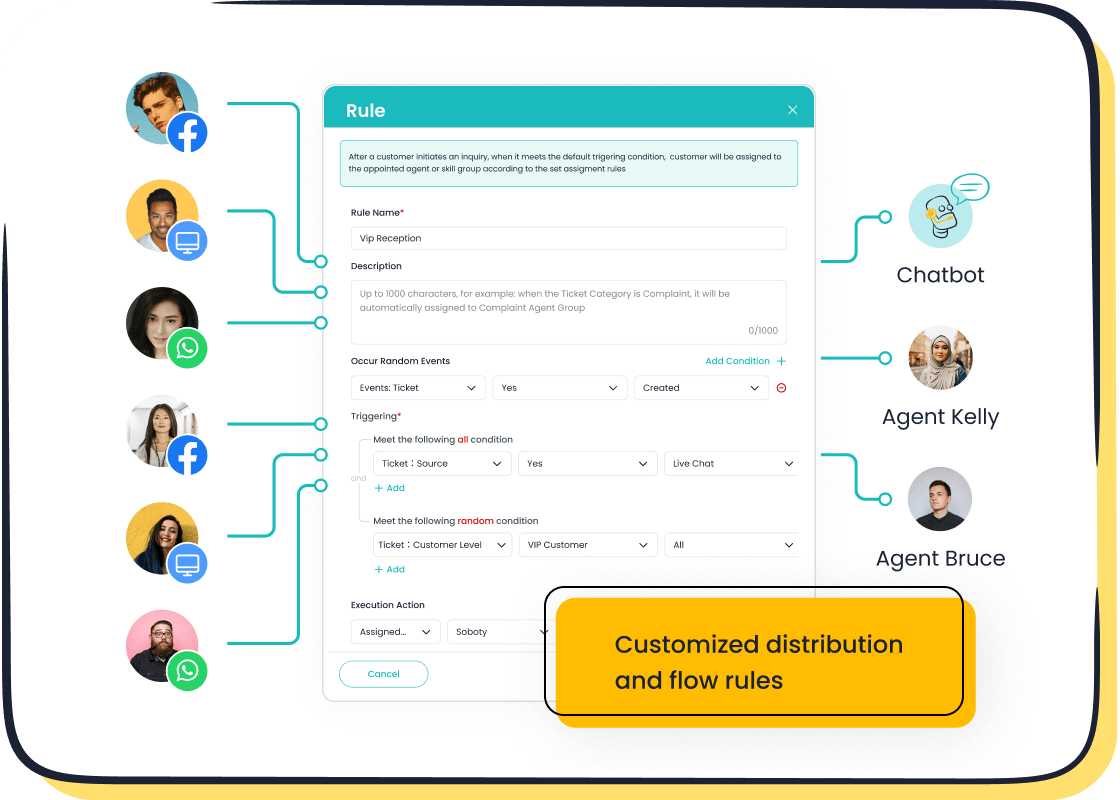
Tracking ecommerce metrics is simple and effective when you use Sobot Live Chat. You can see all your customer conversations, measure your team’s performance, and improve your ecommerce business. Sobot brings together live chat, chatbot, AI Agent, voice, voicebot, ticketing system, and a full customer contact center into one platform. This unified approach helps you track essential kpis and boost your ecommerce performance.
Step-by-Step Tracking Process
You can start tracking metrics in Sobot Live Chat by following these steps:
-
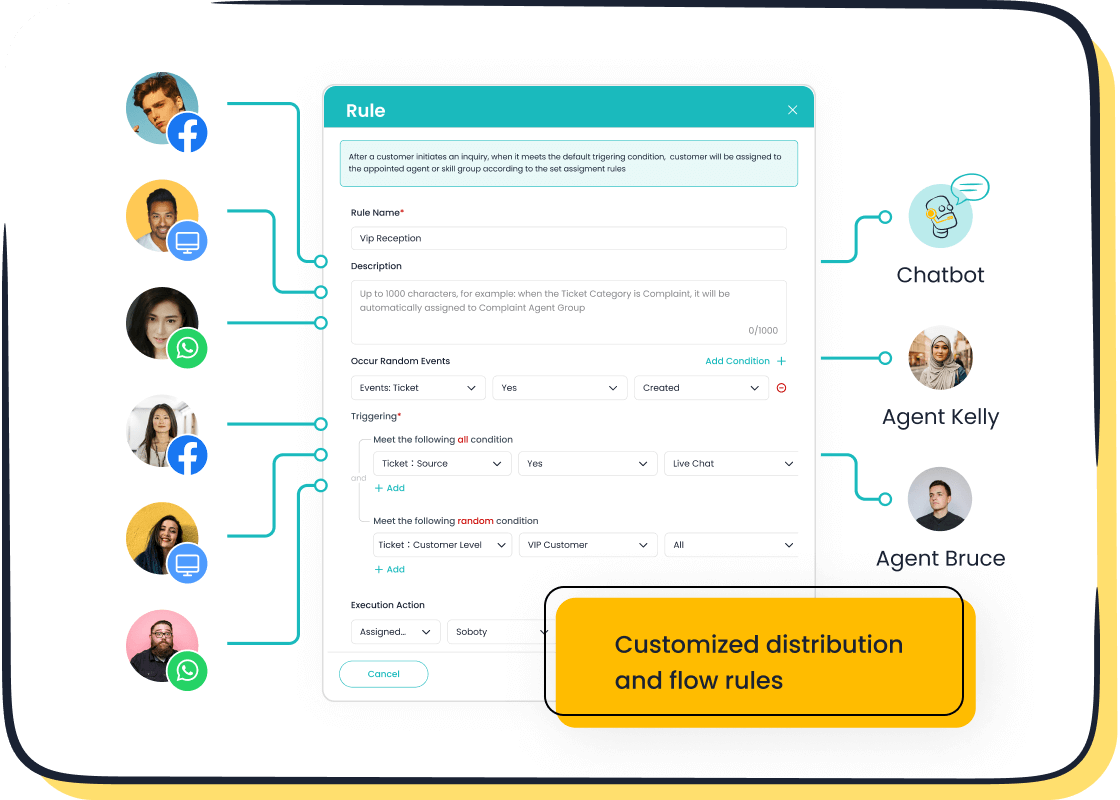
Set Up Your Channels
Connect your website, app, and social media accounts like WhatsApp, Facebook, and Instagram to Sobot Live Chat. This lets you talk to customers wherever they are. -
Create Your Unified Workspace
Use Sobot’s unified workspace to see all customer messages in one place. You can track every chat, call, and ticket. This helps you measure key ecommerce metrics such as response time, resolution rate, and customer satisfaction. -
Define Your KPIs
Choose the ecommerce metrics and kpis that matter most to your business. For example, you might track CSAT, NPS, average resolution time, and conversion rate. -
Monitor Conversations in Real Time
Watch live chats and calls as they happen. Sobot’s real-time monitoring helps you spot problems and fix them fast. -
Collect Customer Feedback
Use built-in surveys to ask customers about their experience. You can measure CSAT and NPS right after each interaction. -
Review Analytics and Reports
Check your dashboard for daily, weekly, or monthly reports. You can see trends and compare your results to industry benchmarks. -
Adjust Your Goals Regularly
Review your KPIs often. Set SMART goals (Specific, Measurable, Achievable, Relevant, Time-bound) to keep improving your ecommerce metrics.
Here is a table showing how Sobot’s unified workspace helps you track multiple customer service KPIs:
| Metric | Value |
|---|---|
| Customer satisfaction (reported) | >95% |
| Inbound volume reduction | ~20% |
| Conversion lift | ~38% |
Michael Kors, a global fashion brand, used Sobot to unify all customer channels. They saw an 83% drop in response time, a 95% customer satisfaction rate, and a 20% increase in conversion. This shows how tracking metrics with Sobot can transform your ecommerce business. Read the full story.
Using Built-in Analytics and Reports
Sobot Live Chat gives you powerful analytics tools to track ecommerce metrics. You can use these features to make smart decisions and improve your team’s performance.
-
Real-Time Monitoring & Analytics
See how your team is doing at any moment. Supervisors can watch live chats, check agent response times, and spot trends. -
Customizable Reports
Create reports that show the ecommerce metrics you care about. You can track CSAT, NPS, resolution time, and more. -
Automated Data Collection
Sobot collects data from every chat, call, and ticket. You do not have to do it by hand. -
Easy-to-Read Dashboards
View your ecommerce metrics in simple charts and graphs. This makes it easy to spot problems and successes. -
Survey Integration
Add CSAT and NPS surveys to your chat and email flows. Get instant feedback from customers.
Sobot’s analytics help you see where your team shines and where you need to improve. You can compare your results to industry standards and set new goals. Regular review of your reports helps you keep your ecommerce performance on track.
Integrating Omnichannel Data
When you bring together data from all your channels, you get a full picture of your customers. Sobot Live Chat makes it easy to integrate omnichannel data. This helps you track ecommerce metrics more accurately and make better decisions.
-
Connect All Customer Touchpoints
Link your website, app, social media, and phone support. Sobot’s omnichannel support lets you see every customer interaction in one place. -
Build Detailed Customer Profiles
Collect data from every chat, call, and order. This helps you understand what your customers want and how they behave. -
Automate Routine Inquiries
Use Sobot’s chatbot and AI Agent to answer common questions. This saves your team time and lets you focus on complex issues. -
Improve Personalization
With all your data in one place, you can offer personalized service. This boosts customer satisfaction and loyalty.
A McKinsey study found that companies using customer insights see an 85% increase in sales growth. Bain & Company reports that a 5% rise in client retention can lead to a 25–95% jump in earnings. When you integrate omnichannel data, you can track ecommerce metrics that matter and drive real results.
To avoid joining the 80% of businesses that see limited ROI from AI, you need systems that act, learn, and deliver measurable value.
For example, a leading luggage brand switched from a basic chatbot to an AI-powered platform. They automated 65% of customer inquiries and cut support costs by 40%. This shows how integrating smart automation can improve your ecommerce metrics and kpis.
Tip:
Most ecommerce companies use AI every day, but many do not get the full benefit because their systems are not well integrated. Make sure your tools work together to get the best results.
Tracking metrics with Sobot Live Chat helps you see the big picture. You can measure, analyze, and improve your ecommerce performance. Set clear goals, review your progress, and use your data to make smart changes. This is how to track ecommerce metrics and kpis for customer service and grow your business.
Analyzing and Improving Ecommerce Metrics
Interpreting Data for Insights
You need to look at ecommerce metrics to understand what your customers want. Start by reviewing performance data regularly. Use a structured approach to turn findings into actions. For example, cohort analysis groups customers by shared traits or experiences. This helps you spot trends in customer awareness and loyalty. You can use feedback from surveys, social media metrics, and transactional data to learn more about customer satisfaction and engagement. Asking customers for their insights gives you real feedback. Combine data from blogs, newsletters, and complaint programs to get a full picture. Predictive analytics lets you anticipate future needs. The table below shows how you can break down your data by stage:
| Stage | Focus | Example Insights |
|---|---|---|
| Acquisition | User discovery & traffic sources | Channel performance, user demographics |
| Activation | Initial engagement & interaction | Onboarding success, first purchase rates |
| Retention | Ongoing usage & return visits | Repeat customer rate, session frequency |
| Revenue | Conversion & purchase analysis | Order values, conversion funnel bottlenecks |
| Referral | User-driven growth & sharing | Referral traffic, customer advocacy |
Setting Benchmarks and SMART Goals
You need to set benchmarks for ecommerce metrics like customer acquisition cost, customer retention rate, and customer lifetime value. Compare your results to industry standards and your own past performance. Use SMART goals to guide your progress:
- Specific: Define clear objectives for cost per acquisition and repeat customer rate.
- Measurable: Track metrics like customer acquisition cost, customer retention rate, and customer lifetime value.
- Achievable: Set goals based on your data.
- Relevant: Align goals with your business strategy.
- Time-bound: Give each goal a deadline.
Track benchmarks such as customer acquisition cost, average order value, conversion rate, customer lifetime value, customer retention rate, and cost per acquisition. Use these benchmarks to see where you stand and where you can improve.
Continuous Improvement Strategies
You need to keep improving your ecommerce metrics. Compare your performance to internal, industry, and competitive benchmarks. Use best-in-class benchmarking to inspire long-term goals. Set clear, measurable goals for cost per acquisition and customer retention rate. Identify your northstar metric, such as customer lifetime value. Choose leading indicators like repeat customer rate. Decide how often to measure each metric. Assign ownership for tracking and improving metrics. Take action by reviewing data and making changes. Form hypotheses, run A/B tests, analyze results, and iterate. Regular analysis helps you optimize user experiences and boost customer satisfaction. Improving customer retention rate and customer lifetime value leads to higher loyalty and revenue. Use the guide "How to Track Ecommerce Metrics and KPIs for Customer Service" to support your continuous improvement journey.
You need to track and optimize ecommerce metrics and KPIs for customer service to keep your business growing. Ignoring conversion rates can hurt your long-term success. When you focus on improvement, you boost revenue and customer loyalty. Tools like Sobot Live Chat help you save costs, automate routine tasks, and personalize service. The table below shows how tracking key metrics leads to better results:
| KPI | Example Impact |
|---|---|
| Customer Retention Rate | More repeat customers |
| Average Order Value | Higher sales per transaction |
| Customer Satisfaction | Stronger loyalty and brand advocacy |
Keep using data from "How to Track Ecommerce Metrics and KPIs for Customer Service" to make smart choices and see your business thrive.
FAQ
What is the difference between shopping cart abandonment rate and cart abandonment rate?
You track shopping cart abandonment rate to see how often shoppers add items but do not finish buying. Cart abandonment rate means the same thing. Both show how many visitors leave before checkout. You use these metrics to improve your sales process.
Why should you monitor cart abandonment rate in ecommerce?
You monitor cart abandonment rate to find out why shoppers leave before buying. High rates can mean confusing checkout steps or slow websites. When you track this metric, you can fix problems and increase sales. You also improve customer satisfaction.
How does shopping cart abandonment rate affect your business growth?
Shopping cart abandonment rate shows lost sales opportunities. If you lower this rate, you can boost revenue. You also build trust with customers. Tracking this metric helps you spot issues in your checkout process and make smart changes.
What tools help you reduce cart abandonment rate?
You can use Sobot Live Chat to answer questions fast and guide shoppers through checkout. Automated reminders and clear calls to action also help. These tools lower your cart abandonment rate and improve your conversion rates.
How do you use cart abandonment rate data to improve customer service?
You review cart abandonment rate data to see where shoppers get stuck. You can then train your team to help customers at these points. This approach improves service and helps you understand how to track ecommerce metrics and KPIs for customer service.
See Also
Enhancing Customer Satisfaction Through E-commerce Chatbots
Increasing Sales With E-commerce Live Chat Solutions
Improving Call Center Efficiency Through Effective Monitoring

