Top Strategies to Engage Audiences on Live Instagram Chat

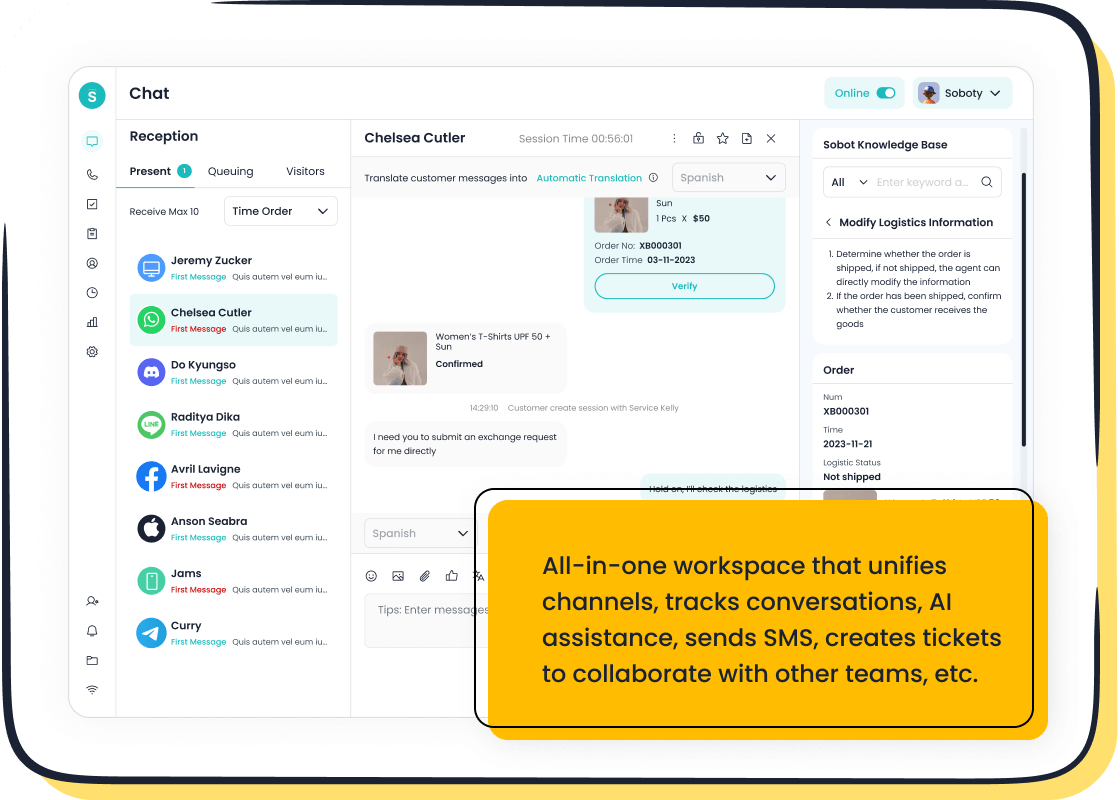
Instagram Live has become a game-changer for connecting with your audience in real time. It’s not just about broadcasting; it’s about creating a two-way conversation that keeps viewers hooked. Tools like Sobot Live Chat take this interaction to the next level. They let you respond to comments instantly, build a sense of community, and turn a simple live session into a lively discussion. Imagine answering questions on the spot or reacting to feedback as it happens. This kind of engagement transforms your live instagram chat into an unforgettable experience for your audience.
Preparing for a Successful Instagram Live Chat
Setting Clear Goals and Objectives
Define the purpose of your live session.
Before you hit the "Go Live" button, ask yourself: What do you want to achieve? Are you launching a product, sharing tips, or simply connecting with your audience? Defining your purpose helps you stay focused and ensures your session delivers value. For example, if you're a fitness coach, your goal might be to demonstrate a quick workout routine while answering questions about healthy habits. A clear purpose keeps your content aligned with your audience's expectations.
Identify key takeaways for your audience.
Think about what your viewers should gain from your session. Is it actionable advice, behind-the-scenes insights, or answers to their burning questions? Write down 2-3 key takeaways that will resonate with them. For instance, if you're hosting a Q&A, let your audience know they'll leave with solutions to their most common challenges. This strategy not only boosts engagement but also builds trust in your expertise.
Optimizing Your Technical Setup
Test your internet connection and camera quality.
A smooth stream is non-negotiable. Start by ensuring your internet speed meets the requirements for Instagram Live. Aim for at least 10 Mbps upload speed for full HD streaming. Use Ethernet instead of WiFi for a stable connection. If that's not an option, upgrade your router or modem to avoid interruptions. A quick test of your camera quality ensures your visuals are sharp and professional.
Ensure proper lighting and sound for a professional appearance.
Good lighting can make or break your live session. Position yourself in front of a natural light source or use a ring light for even brightness. Invest in a high-quality microphone to ensure your voice comes through clearly. If you're feeling adventurous, try a multi-camera setup or split-screen interviews to add variety. These small tweaks elevate your session and keep your audience hooked.
Promoting Your Instagram Live Session
Use Instagram Stories and posts to announce your session.
Promotion is key to getting viewers to tune in. Announce your Instagram Live session a few days in advance using Stories and posts. Share visually appealing graphics or short clips that highlight what you'll cover. For example, if you're hosting a cooking demo, post a teaser video of the ingredients you'll use. This builds anticipation and ensures your audience knows when to join.
Engage followers with teasers and countdowns.
Keep the excitement alive with countdown stickers and interactive teasers. Use Instagram Stories to share behind-the-scenes glimpses or ask your followers what they want to see during the session. For instance, if you're interviewing a guest, post a poll asking viewers to submit questions. These strategies create a buzz and make your audience feel involved even before the session begins.
Creating Engaging Content for Instagram Live
Hosting Interactive Q&A Sessions
Encourage viewers to submit questions in advance.
Interactive engagement thrives on preparation. Before your Instagram Live session, ask your audience to submit questions through Instagram Stories or the "Questions" sticker. This not only builds anticipation but also ensures you address topics they care about. For example, if you're a skincare brand, you could ask, "What’s your biggest skincare challenge?" This approach makes your live session more relevant and engaging.
Answer questions live to foster real-time interaction.
Live Q&A sessions are a fantastic way to connect with your audience. Responding to their questions in real time creates a dynamic and authentic experience. You can even use prompts like, "What motivates you most to learn about this topic?" to spark deeper conversations. Here’s why live Q&A sessions work so well:
| Benefit | Description |
|---|---|
| Real-Time Interaction | Enables immediate interaction with the audience, fostering authenticity. |
| Building Trust | Openly addressing audience questions demonstrates transparency and builds trust. |
| Demonstrating Expertise | Showcases industry knowledge, positioning the brand as a thought leader. |
| Boosting Engagement | Encourages audience participation, leading to more comments, likes, and shares. |
| Humanizing Your Brand | Seeing and hearing from real people makes the brand more relatable and memorable. |
By answering questions live, you create a sense of community and keep viewers engaged throughout the session.
Sharing Behind-the-Scenes Insights
Showcase your workspace, team, or creative process.
Behind-the-scenes content adds a personal touch to your Instagram Live. Show your audience where the magic happens—whether it’s your workspace, your team brainstorming ideas, or your creative process in action. For instance, a fashion brand could share a sneak peek of their design studio or fabric selection process. This transparency fosters trust and makes your brand more relatable.
Offer exclusive content to make viewers feel valued.
Everyone loves feeling special. Use your live sessions to share exclusive content, like a first look at a new product or a "day in the life" of your team. This not only keeps your audience intrigued but also strengthens their loyalty. Sharing candid moments or stories about your brand’s journey can create memorable experiences that resonate deeply with viewers.
Collaborating with Influencers or Guests
Invite industry experts or influencers to join your live.
Collaborating with influencers or experts can elevate your Instagram Live sessions. Invite a guest who aligns with your brand values to discuss trending topics or demonstrate your product. For example, Benefit Cosmetics often partners with beauty influencers to showcase makeup tutorials. These collaborations attract a larger audience and add credibility to your content.
Leverage their audience to expand your reach.
When you collaborate, you gain access to your guest’s followers, broadening your reach. Joint sessions also feel more conversational and engaging. For instance, Huda Kattan’s live event with Dubai Cares not only highlighted social responsibility but also drew in a diverse audience. By teaming up with the right people, you can amplify your message and make your live sessions unforgettable.
Real-Time Interaction Techniques for Instagram Live Engagement
Engaging with Viewers Through Comments
Acknowledge viewers by name to create a personal connection.
When someone takes the time to join your Instagram Live, calling them out by name can make their day. A simple “Hi, Sarah! Thanks for joining!” instantly makes the interaction feel personal. This small gesture encourages others to participate too. It’s like being at a party where the host greets you warmly—it sets the tone for the entire session. By acknowledging viewers, you create a welcoming atmosphere that fosters real-time engagement and builds a sense of community.
Respond to questions and comments promptly.
Real-time interaction thrives on quick responses. When viewers drop a question or comment, reply as soon as possible. For example, if someone asks, “What’s your favorite tool for live sessions?” you could share your experience with Sobot Live Chat, which helps streamline audience interactions. Responding promptly not only keeps the conversation flowing but also shows you value their input. This back-and-forth interaction transforms your session into a lively dialogue, keeping viewers hooked.
Using Instagram Features to Boost Engagement
Create polls, quizzes, or use the "Questions" sticker.
Interactive tools like polls and quizzes are game-changers for enhanced engagement. You can use polls to let your audience vote on fun topics, like choosing the next product color or deciding on a live session theme. For example, Ketnipz once used polls to co-create a design with followers, making them feel like part of the creative process. Quizzes can test your audience’s knowledge about your brand, while the "Questions" sticker invites them to share their thoughts. These features make interactions more dynamic and enjoyable.
Pin important comments to guide the discussion.
Pinning a comment is like putting a spotlight on key points. For instance, if you’re running a giveaway, pinning the rules ensures everyone knows how to participate. It also helps guide the conversation, keeping the focus on what matters most. This simple feature enhances audience interactions by making your session more organized and engaging.
Encouraging Active Participation
Ask viewers to share their opinions or experiences.
Your audience loves being heard. Ask open-ended questions like, “What’s your favorite way to use this product?” or “Have you tried this before?” These prompts encourage active participation and turn your live session into a two-way conversation. Real-time feedback not only keeps the energy high but also helps you understand your audience better. This approach strengthens viewer engagement and makes your session more memorable.
Use call-to-actions like "Tag a friend" or "Share this live."
Call-to-actions are powerful tools for boosting participation. Phrases like “Tag a friend who needs to hear this!” or “Share this live with someone who’d love it!” create a sense of urgency and excitement. Starbucks, for example, often invites followers to share their coffee moments, fostering a sense of community. You can also offer time-sensitive deals, like discounts that expire within 24 hours, to encourage immediate action. These strategies amplify audience interactions and expand your reach.
Post-Session Strategies to Maximize Instagram Live Impact
Analyzing Engagement Metrics
Review viewer count, comments, and likes to assess performance.
After your Instagram Live session, dive into the numbers to see how well it resonated with your audience. Look at metrics like viewer count, peak viewers, and audience retention to understand how many people tuned in and stayed engaged. Comments, likes, and shares reveal how interactive your session was. For example, if you notice a spike in viewers during a specific segment, it’s a sign that part of your content hit the mark. Use Instagram’s built-in analytics or tools like Iconosquare to track these stats and uncover valuable audience insights.
Use insights to refine future live sessions.
Metrics aren’t just numbers—they’re a roadmap for improvement. If your audience retention drops halfway through, it might mean your content needs more variety or interaction. Did you gain new followers during the session? That’s a sign your content is attracting fresh eyes. Use these insights to tweak your format, timing, or topics for your next live session. By continuously refining, you’ll build trust with your audience and create more successful Instagram Live experiences.
Repurposing Instagram Live Content
Save the live session and share it as an IGTV video.
Don’t let your hard work disappear after the session ends. Save your Instagram Live and upload it to IGTV so viewers who missed it can catch up. This extends the life of your content and keeps the conversation going. For example, a fitness coach could save a live workout session and share it as a tutorial for followers to revisit. Repurposing content saves time and helps you reach a wider audience.
Create short clips or highlights for Instagram Stories.
Turn your live session into bite-sized clips for Instagram Stories. Highlight key moments, like a guest’s insightful comment or a fun audience interaction. These snippets grab attention and encourage viewers to watch the full session. For instance, a brand unveiling a new product could share a clip of the big reveal. This strategy maximizes engagement and keeps your content fresh across platforms.
Continuing the Conversation with Sobot Live Chat
Respond to unanswered questions using Sobot Live Chat.
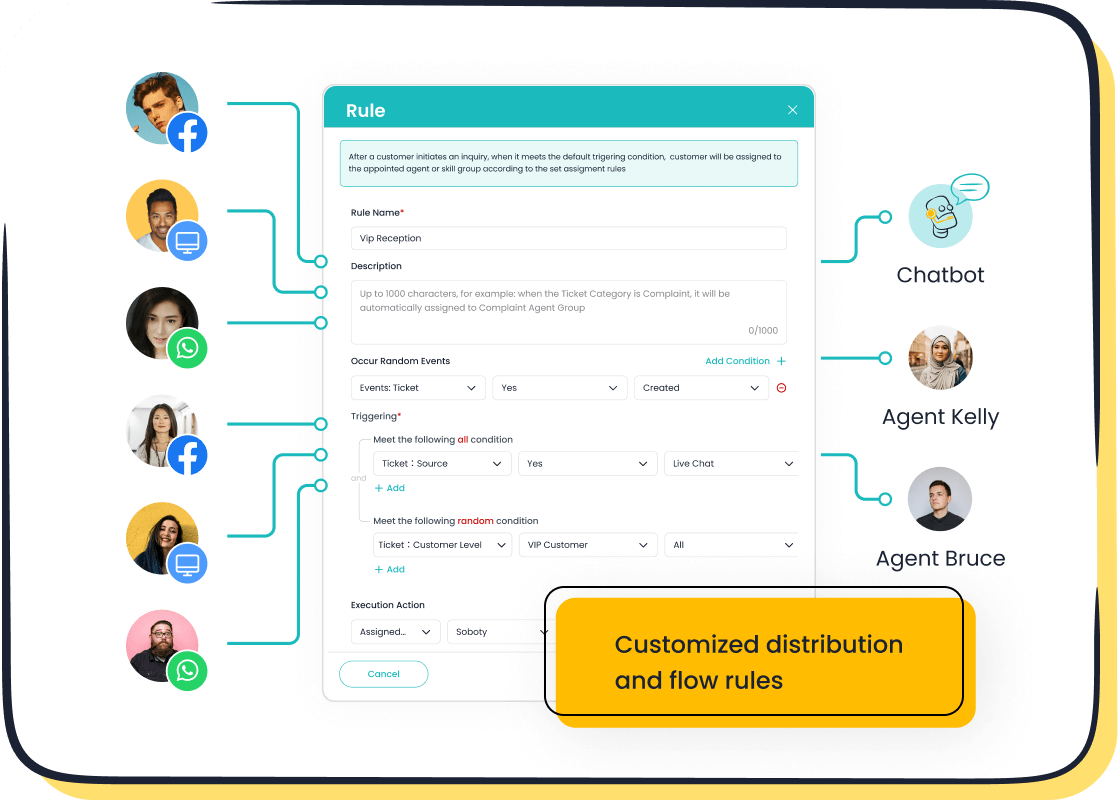
Not every question gets answered during a live session, but that’s where Sobot Live Chat shines. After the session, use it to follow up with viewers who had unanswered questions. Its omnichannel support lets you connect seamlessly on Instagram and other platforms. For example, if someone asked about product availability, you can respond directly through Sobot Live Chat, showing your commitment to customer satisfaction.
Automate follow-ups and maintain engagement with Sobot’s tools.
Sobot Live Chat doesn’t just help you respond—it helps you stay connected. Use its AI-powered tools to automate follow-ups, like sending thank-you messages or sharing links to your IGTV video. Intelligent routing ensures questions go to the right team, reducing wait times and enhancing the viewer experience. By keeping the conversation alive, you build trust and foster long-term relationships with your audience.
Success on Instagram Live starts with preparation and ends with meaningful follow-ups. By setting clear goals, tailoring your content, and using interactive features, you can keep your audience engaged and coming back for more. Whether you're hosting Q&A sessions, sharing behind-the-scenes moments, or collaborating with influencers, these strategies are all about capturing attention and building connections.
Consistent engagement doesn’t just grow your audience—it creates a loyal community. Businesses like Synergogy and KMD Books have used Instagram Live to unveil products and host guest speakers, proving how impactful these sessions can be. Tools like Sobot Live Chat make it even easier to manage interactions, respond quickly, and maintain your audience’s attention. With its omnichannel support and AI-powered features, Sobot helps you turn every live session into a memorable experience.
So, start planning your next Instagram Live and watch your audience grow!
FAQ
What is the best way to prepare for a live instagram chat?
Start by setting clear goals for your session. Decide what value you want to provide your audience. Test your internet connection, camera, and lighting to ensure a professional setup. Promote your session in advance using Instagram Stories and countdowns to build excitement.
How can I make my instagram live chat more interactive?
Use Instagram’s built-in features like polls, quizzes, and the "Questions" sticker. Encourage viewers to share their opinions or experiences during the session. Tools like Sobot Live Chat can help you respond to comments instantly, making the interaction seamless and engaging.
Can I save and repurpose my live instagram chat content?
Absolutely! Save your session and upload it as an IGTV video. You can also create short clips for Instagram Stories or Highlights. This keeps your content alive and allows followers who missed the live session to catch up later.
How does Sobot Live Chat enhance instagram live chat sessions?
Sobot Live Chat lets you manage audience interactions effortlessly. It supports omnichannel communication, so you can respond to comments in real time. Its AI-powered tools help automate follow-ups, ensuring no question goes unanswered, which keeps your audience engaged even after the session ends.
What metrics should I track after an instagram live chat?
Focus on viewer count, audience retention, and engagement metrics like comments and likes. These insights help you understand what worked and what didn’t. Use tools like Instagram’s analytics or Sobot Live Chat’s built-in analytics to refine your future sessions.
See Also
Essential Strategies for Achieving Depop Live Chat Success
Effective Management Techniques for Live Chat Agents
Ten Strategies to Enhance Customer Satisfaction via Live Chat

