10 AI Chatbots to React to Customers More Quickly

Slow responses cost you sales. Businesses that communicate quickly win 35-50% more opportunities. You can use AI-powered chatbots to provide faster responses and instant resolution, 24/7. This AI-driven customer support is essential to reduce response time and improve customer satisfaction. Explore these top customer service tools, from platforms like Sobot to other specialized customer support tools. The right AI tools for customer service will help you react to customers more quickly.
1. Sobot Live Chat

Best for: All-in-One Omnichannel Engagement
Sobot offers an all-in-one contact center solution built for efficiency. You can manage all customer interactions from a single platform. This approach helps you react to customers more quickly by unifying your support channels. It provides a complete system with a chatbot, live chat, ticketing system, and voice call center to create a seamless customer journey.
Key Features for Speed
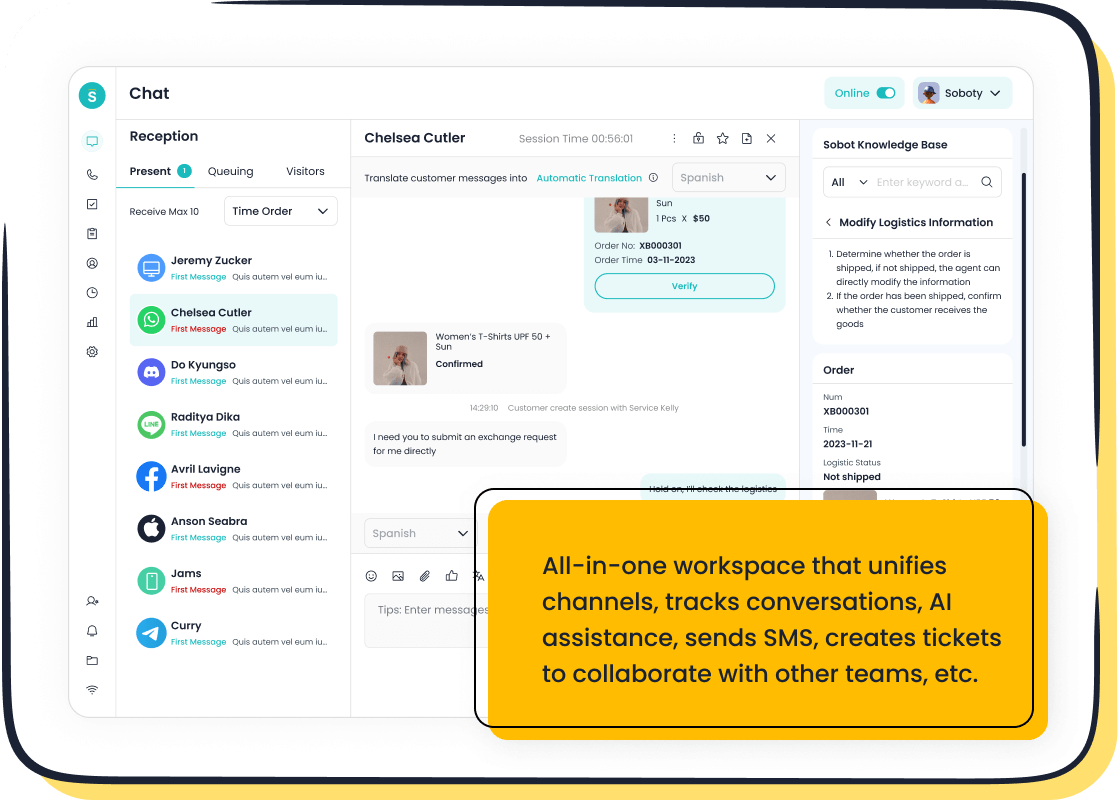
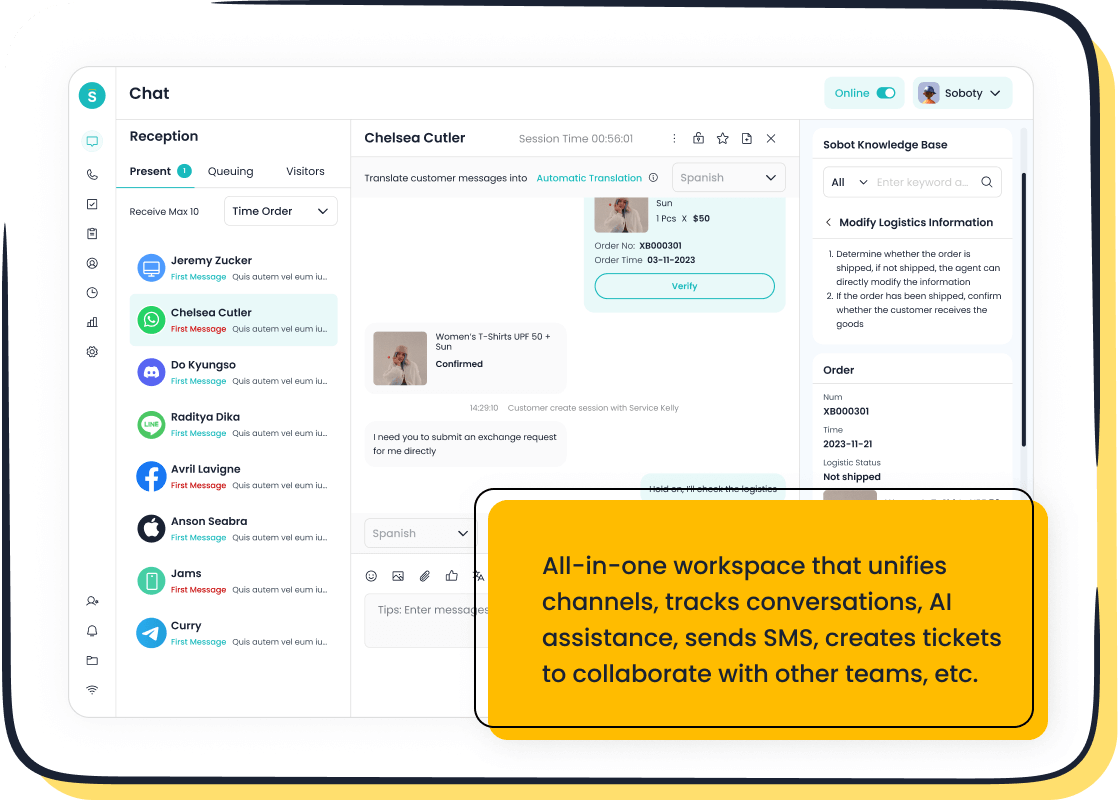
Sobot's live chat software excels at accelerating response times through a combination of omnichannel support and intelligent automation. You can connect with customers on their preferred channels, including your website, app, WhatsApp, and other social media platforms. All conversations flow into one unified workspace, giving your agents the context they need to respond instantly.
The platform provides powerful ai powered tools to boost agent productivity. These features help you automate conversations and provide superior ai-driven customer support.
- Real-Time Assistance: The chatbot acts as an agent's assistant, delivering order details or solution suggestions during a live chat.
- Automated Routing: Intelligent assignment directs conversations to the right agent, reducing wait times.
- AI-Powered Suggestions: The system offers real-time suggestions to agents, ensuring they provide fast and accurate answers.
- Unified Data: Integration with platforms like WhatsApp unifies customer data, so agents don't waste time switching between systems.
By using precise profiling and tailored services, Sobot helps you achieve a 38% gain in conversion, turning visitors into loyal customers.
Leading brands like OPPO use Sobot's ai-powered chatbots to improve service. They achieved an 83% chatbot resolution rate, proving the platform's ability to provide instant answers and increase satisfaction. The system also supports real-time sentiment analysis for better real time engagement.
Pricing
Sobot offers flexible pricing models tailored to your business needs. You can choose from subscription-based plans or usage-based options, which are ideal for businesses with fluctuating demand. For a detailed quote based on your specific requirements, such as the number of users and desired features, you should contact Sobot directly for a custom enterprise pricing plan. A free trial is also available on their website.
2. Intercom: Leading AI Tools for Customer Service
Best for: Proactive Sales & Engagement
Intercom is a customer communications platform designed for proactive engagement. You can use it to capture leads, onboard new users, and announce product updates. Its approach combines automation with a human touch, making it ideal for sales and marketing teams that want to initiate conversations and guide customers through their journey. This focus on proactive customer service helps you build relationships from the very first interaction.
Key Features for Speed
Intercom's AI agent, Fin, is one of the most powerful ai tools for customer service available. These ai-powered chatbots are built to provide instant, accurate answers, which helps your team react to customers more quickly. Fin can resolve up to 50% of your common support questions on its own. This frees up your human agents to handle more complex problems.
Key features that accelerate your ai-driven customer support include:
- Instant Resolutions: Fin draws answers directly from your help center articles, public URLs, and other support content to provide trustworthy information immediately.
- Natural Conversations: The AI understands complex questions and can ask clarifying questions to get to the right answer, mimicking a natural human interaction.
- Smart Escalation: You control when Fin answers and when it passes a conversation to a human agent, ensuring complex issues get the right attention.
- Multilingual Support: Fin can converse with customers in 45 languages, providing fast support to your global user base.
The platform also offers tools for real-time sentiment analysis, giving you deeper insight into customer satisfaction during every conversation.
Pricing
Intercom offers several plans designed for different business sizes. You pay per agent seat, with costs decreasing for annual billing. The Fin AI agent is available as an add-on for $0.99 per resolution, meaning you only pay when it successfully solves a customer's problem.
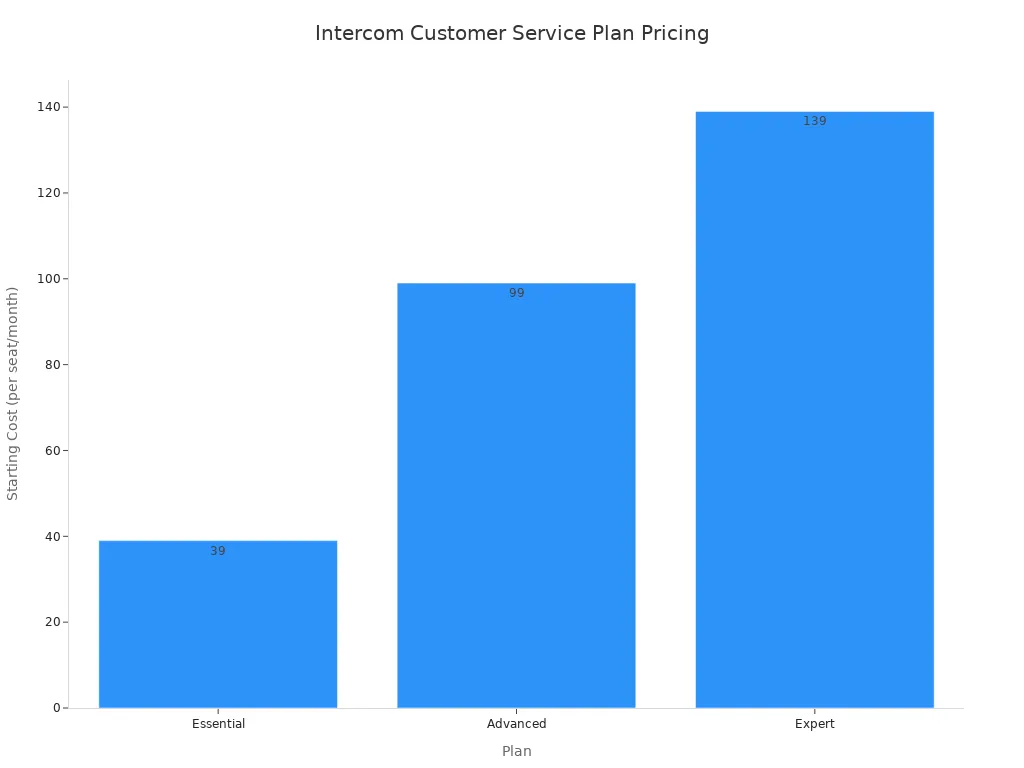
Here is a breakdown of the main customer service tools offered in their plans:
| Plan | Starting Cost (per seat/month) | Best For |
|---|---|---|
| Essential | $39 | Small businesses needing core support features. |
| Advanced | $99 | Growing businesses that require more automation. |
| Expert | $139 | Large teams needing advanced customization and security. |
Additional add-ons for product tours, WhatsApp integration, and surveys are also available.
3. Drift
Best for: B2B Conversational Marketing
Drift is a revenue acceleration platform built for B2B companies. You can use it to connect your sales team with qualified buyers in real time. The platform focuses on conversational marketing to shorten the sales cycle. It helps your marketing and sales teams work together to turn website visitors into sales opportunities.
Key Features for Speed
Drift provides several features that help your team react to customers more quickly by engaging high-intent buyers instantly. The platform uses AI to identify your most valuable website visitors and deliver a personalized experience. This allows you to automate conversations and accelerate your sales pipeline.
- AI Chat Agents: The chatbot qualifies leads 24/7. It can answer questions, book meetings, or connect a buyer directly with a sales representative.
- Buyer Identification: Drift identifies visitors from target accounts. It gives your team important data like company name and browsing history to personalize the chat.
- Intelligent Routing: When a qualified buyer is on your site, the system automatically routes them to the correct salesperson for a live conversation.
- Fastlane: This feature identifies your best leads from forms. It allows them to skip the form and start a conversation immediately, reducing drop-off.
Pricing
Drift offers different plans, including free versions for chat and video that have a limited number of contacts. For its main paid plans, Drift does not list public prices.
You must request a demo to get a custom quote. The pricing for its Advanced and Premier plans depends on your team size, business goals, and current software.
Be aware that some plans require a minimum one-year contract. The custom quote ensures you get a package tailored specifically to your revenue acceleration needs.
4. Zendesk: Integrated Customer Support Tools
Best for: Enterprise Support Ecosystems
Zendesk provides a complete service solution that brings all your customer interactions into one place. You can use its powerful customer support tools to manage a large volume of inquiries. The platform is designed for enterprises that need a single, unified system to handle support across every channel. It connects your teams and data for a more consistent customer experience.
Key Features for Speed
Zendesk helps your team react to customers more quickly by combining AI automation with a powerful agent workspace. The AI chatbot works within Zendesk Messaging to answer simple questions automatically. This frees up your human agents to solve more complex problems. When an issue needs a person, the bot seamlessly passes the conversation to an agent without losing context.
This integrated approach provides excellent ai-driven customer support.
- Omnichannel Messaging: You can deploy messaging solutions across your website, mobile app, WhatsApp, and social media. All conversations appear in one unified view for your agents.
- Seamless Handoff: Agents receive the full chat history when they take over from a bot. This prevents customers from having to repeat themselves.
- Intelligent Triage: The system uses intent detection and real-time sentiment analysis to automatically classify and route tickets to the right agent or department.
- Deep Integrations: Zendesk connects with other business systems like Salesforce and WooCommerce. This allows agents to see a full customer profile directly within the platform.
Pricing
Zendesk includes its AI agents in every Zendesk Suite plan. The price you pay depends on the features you need. Advanced AI capabilities, like an agent builder for custom conversation flows and ai-powered analytics, are available as an add-on.
Here is a look at the starting prices for their main customer service tools when billed annually:
| Plan | Starting Price (per agent/month) |
|---|---|
| Suite Team | $55 |
| Suite Growth | $89 |
| Suite Professional | $115 |
For enterprise-level features or the Advanced AI add-on, you will need to contact their sales team for a custom quote.
5. Tidio
Best for: Small Business & E-commerce
Tidio is a great starting point if you run a small business or e-commerce store. You get a powerful combination of live chat, chatbots, and marketing automation in one simple tool. Its user-friendly interface makes it easy to set up and manage without needing a developer. You can start engaging visitors and providing support right away.
Key Features for Speed
Tidio gives you the tools to react to customers more quickly and turn visitors into buyers. You can manage messages from your live chat, email, and Instagram DMs all in one shared inbox. This unified view means you spend less time switching between apps and more time helping customers.
The platform uses AI and automation to speed up your responses.
- Flows (No-Code Automation): You can use over 40 templates to build automated workflows. These can recover abandoned carts, offer discounts, and generate leads 24/7.
- Live Visitor List: See who is on your website in real time. You can start a chat proactively to offer help or provide a special deal.
- Ticketing System: When you are offline, Tidio creates tickets from chats and emails. This ensures no customer query gets lost and you can follow up efficiently.
- Automatic Chat Assignment: New conversations are automatically sent to available agents. This simple feature drastically reduces customer wait times.
Tidio's AI chatbot, Lyro, can answer up to 70% of common customer questions. This frees you and your team to focus on more complex sales or support issues.
Pricing
Tidio offers a very generous free plan, making it an excellent choice for new businesses. The paid plans are designed to scale with your company's growth.
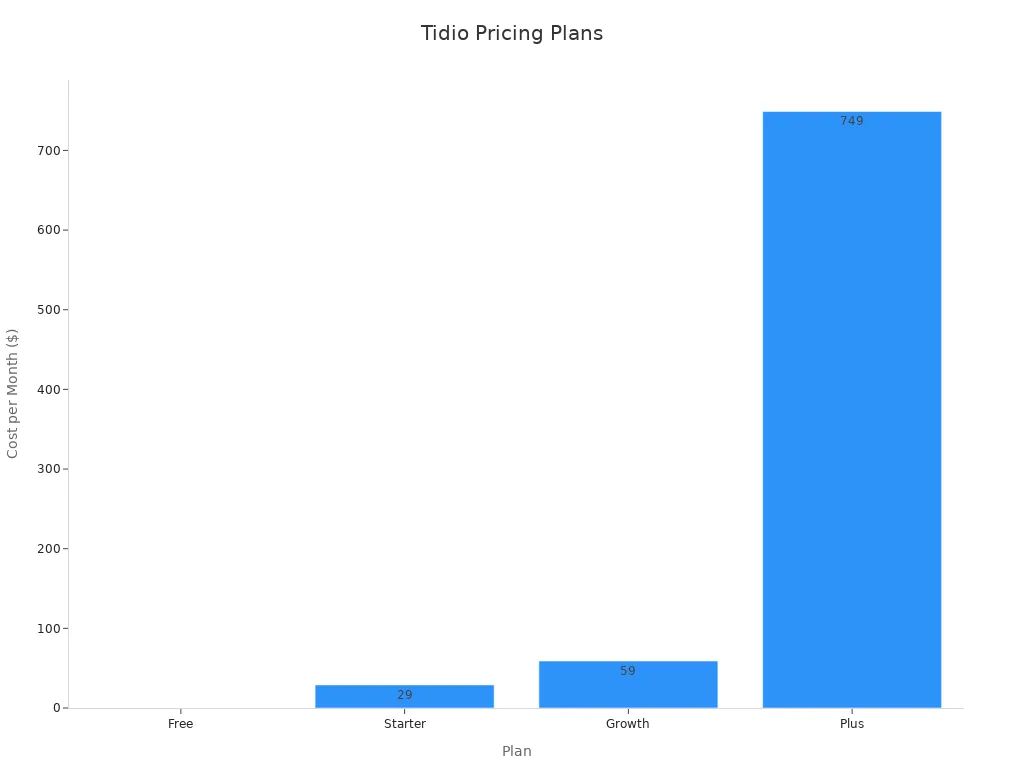
Here is a simple breakdown of what you get with each plan:
| Plan | Monthly Cost | Live Chat Conversations | AI Conversations |
|---|---|---|---|
| Free | $0 | 50 | 50 (one-time) |
| Starter | $29 | 100 | 50 (one-time) |
| Growth | $59 | 250 | 50 |
| Plus | $749 | Custom | Up to 5,000 |
The pricing structure allows you to start for free and upgrade as your customer communication needs increase.
6. Freshchat by Freshworks
Best for: Omnichannel Team Messaging
Freshchat is one of the most effective customer service tools for teams that want to manage all their messaging channels in one place. You can use it to bring conversations from your website, app, and social media into a single inbox. This approach is perfect for sales, marketing, and support teams who need to work together to provide a fast and unified customer experience.
Key Features for Speed
Freshchat helps you react to customers more quickly by consolidating all conversations into a unified agent workspace. This team inbox gives your agents a complete view of the customer's history across every channel. You no longer need to switch between different platforms to get context.
The platform combines live chat, asynchronous messaging, and AI to deliver excellent ai-driven customer support.
- Unified Inbox: You can route messages from web chat, email, SMS, WhatsApp, Instagram, and Facebook Messenger into one shared inbox.
- AI-Powered Chatbots: Deploy bots to answer common questions, qualify leads, and collect customer information before an agent joins the conversation.
- Intelligent Routing: Conversations are automatically assigned to the right agent or group based on their skills or workload, reducing wait times.
- Contextual Information: Agents see the customer's profile and conversation history, allowing them to provide personalized and quick responses. The system also supports real-time sentiment analysis.
Pricing
Freshchat offers a free plan that supports up to 10 agents, making it accessible for small teams. Paid plans scale with more advanced features for growing businesses.
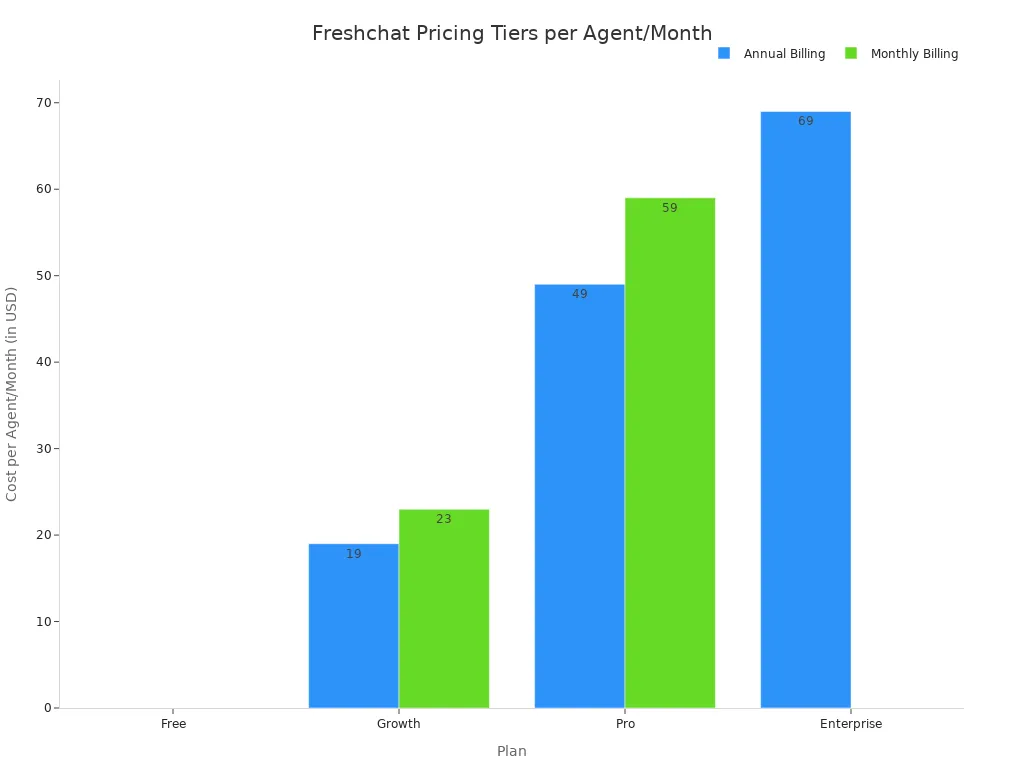
Here is a breakdown of the plans when billed annually:
| Plan | Cost (per agent/month) | Best For |
|---|---|---|
| Free | $0 | Small teams of up to 10 agents. |
| Growth | $19 | Growing teams needing more automation. |
| Pro | $49 | Businesses that require advanced features. |
| Enterprise | From $69 | Large organizations needing enterprise-grade capabilities. |
Monthly billing options are also available at a slightly higher rate. The Enterprise plan requires annual billing.
7. Ada
Best for: Enterprise Automated Experience
Ada is a powerful automation platform designed for large businesses. You can use it to build a fully automated customer experience. The platform focuses on resolving customer issues without needing a human agent. This makes it one of the best customer service tools for enterprises that want to scale their support and reduce costs.
Key Features for AI-Powered Customer Support
Ada provides advanced ai tools for customer service that help you deliver instant, personalized support. The platform uses conversational AI to understand what your customers need and guide them to the right answer. This approach provides excellent ai-driven customer support around the clock.
Key features that power this automation include:
- AI Chatbots: Deploy smart chatbots across your website, mobile app, and messaging channels.
- Intent Detection: The AI understands the goal behind a customer's question to provide accurate answers.
- Personalization: You can connect Ada to your business systems to deliver personalized responses based on customer data.
- Multilingual Support: The platform can communicate with customers in over 50 languages.
- Low-Code Builder: Your team can create and manage automated conversation flows without needing to write complex code.
These customer support tools work together to resolve a high volume of inquiries automatically. The platform also offers ai-powered analytics to give you insights into bot performance and customer behavior.
Pricing
Ada does not publish its pricing publicly. The company uses a usage-based model, so the cost depends on your specific needs. You must contact their sales team for a custom quote.
Ada's pricing generally ranges from $4,000 to $64,000. The final price is based on factors like your monthly conversation volume, team size, and the specific features you require.
Higher-tier plans unlock advanced capabilities like multilingual AI, deeper integrations with CRMs, and the option to remove Ada's branding. This customized approach ensures you get a package tailored to your enterprise automation goals.
8. HubSpot Chatbot Builder
Best for: Businesses within the HubSpot CRM
HubSpot Chatbot Builder is the ideal choice if your business already uses the HubSpot CRM. You can connect your marketing, sales, and service efforts seamlessly. The chatbot works as a native part of your existing system. This deep integration gives you a complete view of every customer interaction. You can build stronger relationships because all your data lives in one place.
Key Features for Speed
You can react to customers more quickly using a chatbot that is fully connected to your contact database. The HubSpot Chatbot Builder automates tasks and gathers information, so your team can focus on high-value conversations. It provides powerful tools to accelerate your customer communications.
- Seamless CRM Integration: The chatbot can pull information from a contact's record to personalize conversations. It also saves the chat transcript directly to the contact's timeline for future reference.
- No-Code Visual Builder: You can create and customize chatbots without writing any code. Use pre-made templates to get started quickly for lead qualification, meeting booking, or support.
- Automatic Lead Qualification: The bot asks qualifying questions and routes high-intent leads directly to your sales team.
- 24/7 Support: You can use the bot to answer common questions or create support tickets automatically, ensuring customers get help even when your team is offline.
Pricing
HubSpot includes its chatbot builder in its free tools, making it very accessible. You can start building basic bots without any cost. More advanced features become available as you move up to paid plans.
The free plan includes conversational bots, allowing you to start automating conversations right away.
For businesses that need more power, the paid Service Hub plans unlock advanced logic and targeting.
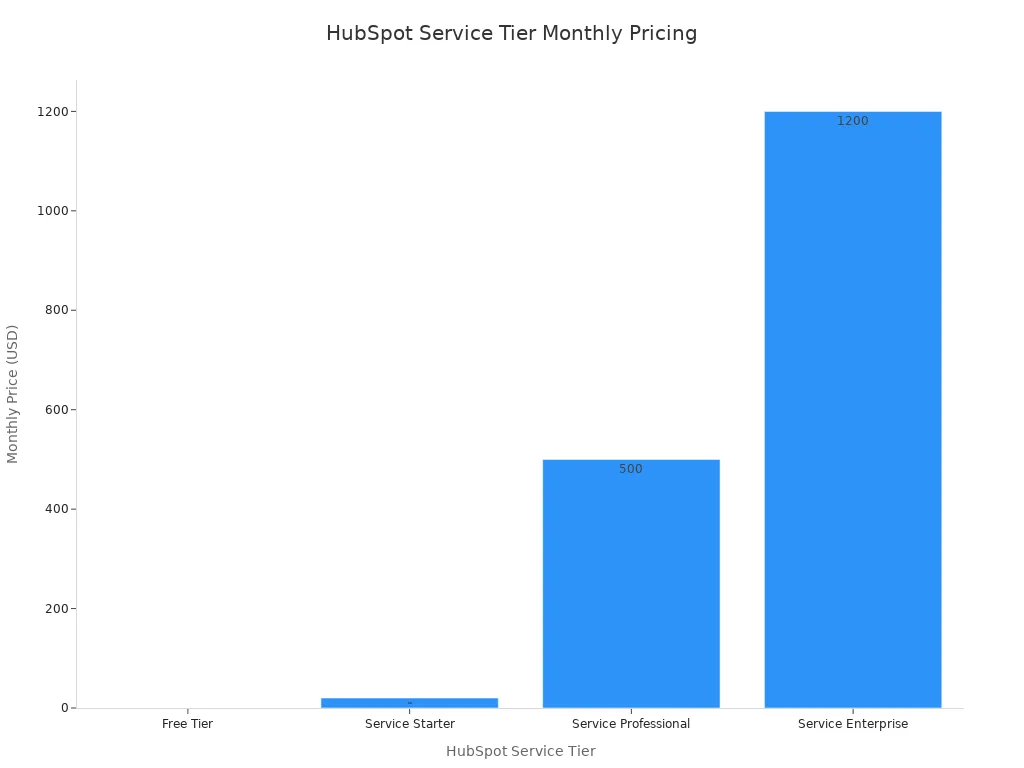
Here is how the chatbot features expand across the different tiers:
| HubSpot Service Tier | Monthly Pricing | Chatbot Features |
|---|---|---|
| Free Tier | Free | Limited programmatic chatbots, live chat |
| Service Starter | $20/month | Same limited programmatic chatbots |
| Service Professional | $500/month | Expanded usage and advanced targeting logic |
| Service Enterprise | $1,200/month | Same features as the Professional plan |
This structure allows you to scale your chatbot strategy as your business grows.
9. Chatfuel
Best for: Messenger & Instagram Automation
Chatfuel is a powerful tool if you want to automate conversations on Facebook and Instagram. You can use it to build chatbots without any coding knowledge. The platform is designed for social media marketing, sales, and support. It helps you engage with your audience directly inside the apps they use every day. This focus makes it one of the best customer service tools for social-first businesses.
Key Features for Speed
You can react to customers more quickly by automating your social media interactions. Chatfuel gives you the tools to provide instant answers and guide users through sales funnels. This ai-driven customer support works 24/7, so you never miss an opportunity to connect with a customer.
- Social Media Auto-Replies: You can automatically reply to comments on your Facebook posts, Instagram posts, and Reels. The bot can also respond to mentions and replies to your Stories.
- AI-Powered Agents: The AI agent qualifies leads, books appointments, and answers frequently asked questions. This frees up your team to handle more important tasks.
- Click-to-Chat Ads: You can connect your Facebook Ads directly to a Messenger conversation. This creates a smooth path for customers from an ad to a chat.
- Instant Support: The chatbot provides instant responses for common support issues. You can streamline order tracking, manage returns, and resolve complaints automatically.
Chatfuel also helps you drive sales. You can send targeted promotions, suggest products, and even process orders directly within the chat.
Pricing
Chatfuel offers several pricing plans based on the number of conversations you have per month. You can start with a free trial to test the platform's features.
The paid plans unlock more conversations and advanced features. For example, the Business plan offers more conversations and priority support. The Enterprise plan provides a custom number of conversations and a dedicated success manager. You should check their website for the most current pricing details, as plans are tailored to your business needs.
10. ManyChat
ManyChat is a powerful platform for automating conversations on social media. You can use it to build chatbots for Instagram, Facebook Messenger, and WhatsApp. The platform helps you create interactive experiences without writing any code. This makes it a top choice for marketers and businesses that want to engage their audience directly on social channels. You can use it to drive sales, qualify leads, and provide instant support.
Best for: Social Media Drip Campaigns
ManyChat excels at creating automated drip campaigns on social media. You can send a sequence of timed messages to users after they interact with you. This allows you to nurture leads, onboard new customers, or promote products over time. These campaigns feel more personal and interactive than traditional email marketing. You can build entire sales funnels inside Messenger or Instagram, guiding customers from initial interest to final purchase.
Key Features for Speed
ManyChat gives you the tools to react to customers more quickly through smart automation. Its features ensure you never miss a chance to engage with your audience, providing 24/7 ai-driven customer support on social media.
- Keyword Triggers: You can set up your chatbot to respond instantly when a user types a specific keyword. This is perfect for answering frequently asked questions automatically.
- Visual Flow Builder: The drag-and-drop interface lets you build complex conversation flows without any coding. You can create paths to qualify leads, take orders, or book appointments.
- Automated Responses: The bot can automatically reply to comments on your posts and mentions in Stories. This immediate engagement helps you capture leads and build community.
- Audience Segmentation: You can tag users based on their actions. This allows you to send highly targeted and relevant follow-up messages quickly.
Pricing
ManyChat offers a flexible pricing structure that scales with your business. You can start with a free plan to test its core features.
- Free Plan: This plan costs $0 and is great for getting started. You can engage up to 1,000 contacts and access basic automation tools for Instagram, Facebook Messenger, and WhatsApp.
- Pro Plan: Starting at $15 per month, this plan unlocks more channels like SMS and email. It includes advanced features, unlimited contacts (with pricing that scales by volume), and removes ManyChat branding.
- Premium Plan: This option offers custom pricing with a fixed monthly rate. It is designed for larger businesses that need the highest level of support, including a dedicated customer success manager and 1:1 onboarding.
The Pro plan's cost increases as your contact list grows, while the Premium plan provides predictable pricing for large-scale operations.
How to Choose the Right Customer Service Tools
Choosing the right chatbot involves more than just picking a name from a list. You need to match the tool to your specific business goals. A thoughtful evaluation ensures you select a platform that helps you grow.
Assess Your Primary Use Case
First, you should define what you want the chatbot to do. Different businesses have different needs. Your primary goal will determine which features are most important.
For customer support, you might want a bot that can:
- Check an order status
- Process returns or exchanges
- Answer frequently asked questions (FAQs)
- Help users reset their passwords
For sales and lead generation, your chatbot could:
- Schedule demos or consultations
- Offer discounts to capture contact information
- Ask questions to qualify new leads
- Route high-value leads to your sales team
Evaluate Integration Capabilities
Your chatbot should work with the software you already use. Strong integration capabilities save your team time and create a better customer experience. You want a tool that connects seamlessly with your existing systems.
Look for integrations with:
- CRM Systems: Connecting to your CRM gives your agents a full view of the customer's history. This context helps them provide faster, more personal support.
- E-commerce Platforms: An integration with your e-commerce backend lets the bot and your agents see purchase history and order details.
- Help Desk Tools: A chatbot that works with your help desk software keeps all conversations and tickets in one organized place.
Consider Scalability and Pricing
You need a solution that can grow with your business. A scalable platform handles more conversations as your company expands. Look for features like no-code builders for quick updates and multi-language support for reaching a global audience.
Pricing models for these customer service tools vary widely. You should understand the different options:
- Subscription-based: You pay a fixed monthly fee per agent or for a feature tier. This model offers predictable costs.
- Usage-based: You pay for what you use, such as per conversation or AI resolution. This can be cost-effective if your volume is low.
- Hybrid: Some plans combine a base subscription with extra fees for additional usage. This offers a balance of predictability and flexibility.
Implementing AI-powered chatbots is a direct path to improve customer satisfaction. These customer service tools help you reduce response time and provide excellent ai-driven customer support. A Juniper Research study even projects that chatbots will save businesses over $8 billion annually.
The best tool for you depends on your company's size, sales channels, and software. You should choose a platform that fits your unique needs.
Take the Next Step: Select one or two tools from this list to trial. You can start tracking key metrics like your Customer Satisfaction (CSAT) score and average response time to see the immediate impact.
FAQ
What is the main benefit of using an AI chatbot?
You can provide instant, 24/7 support to your customers. AI chatbots answer common questions immediately, which reduces wait times. This speed helps you improve customer satisfaction and frees up your team to handle more complex issues.
How do I know which chatbot is right for my business?
You should first define your main goal, such as sales or support. Then, check which tools integrate with your existing software, like your CRM. Finally, compare pricing plans to find a solution that fits your budget and can grow with you.
Can chatbots really improve customer satisfaction?
Yes. These AI-powered customer service tools provide the quick answers that customers expect. In fact, 69% of consumers prefer using chatbots for simple inquiries because of the fast response time. This immediate help leads to a better customer experience.
Are AI chatbots expensive to implement?
The cost varies. Many platforms, like Tidio or HubSpot, offer free plans that are great for small businesses. Other tools use subscription or usage-based pricing. You can often start with a free trial to test the features before committing.
See Also
Discover the 10 Leading Chatbot Solutions for Websites This Year
Unveiling the Top 10 Advantages of Website Chatbot Integration
Explore 10 Prominent Websites Successfully Utilizing Chatbots Today
Elevating E-commerce Customer Happiness: The Chatbot's Impact Explained
Maximizing Your Website: Ten Key Benefits of Chatbot Integration

