Online Chat Widget for Website Setup for Better Customer Service

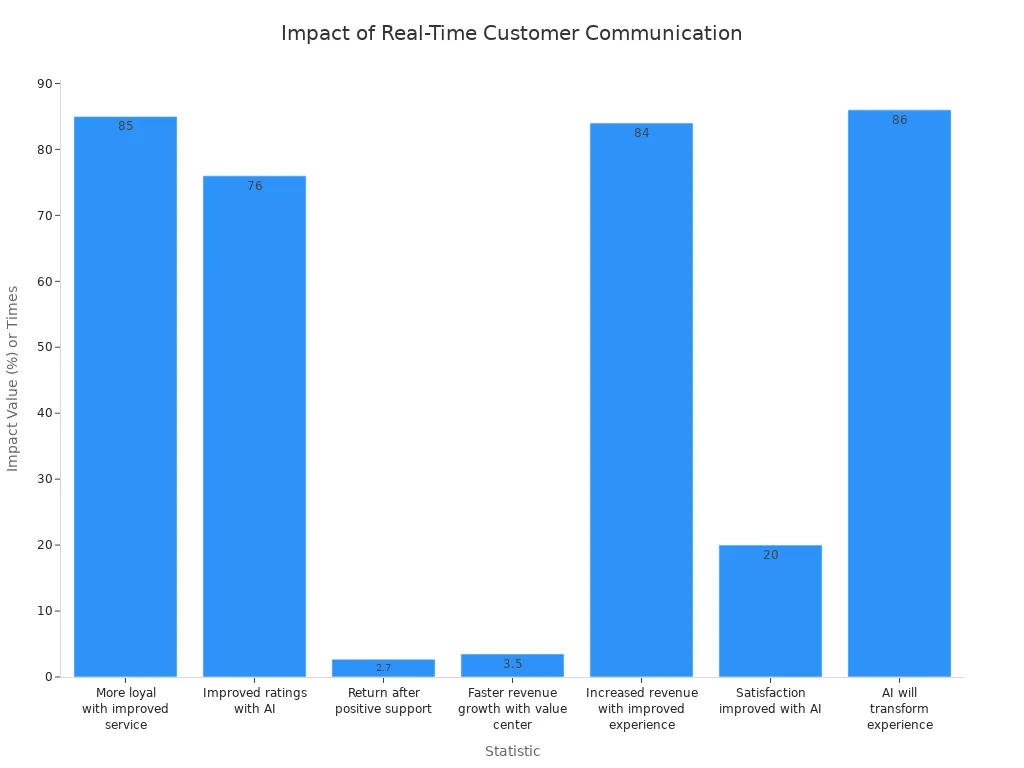
You want your business to grow. Real-time messaging makes a big difference. When you add an online chat widget for website, you help customers get answers fast. This leads to higher satisfaction and more sales. The table below shows how real-time chat and AI help businesses like yours succeed.
| Statistic | Impact on Business Growth and Customer Satisfaction |
|---|---|
| Over 85% of customers say they’re more loyal to a company with improved customer service. | Indicates that enhancing customer service leads to increased customer loyalty, which is crucial for business growth. |
| 76% of customer experience leaders report improved ratings with AI use. | Suggests that AI can enhance customer interactions, leading to better customer satisfaction and potentially higher revenue. |
| Customers are 2.7 times more likely to return after a positive digital support experience. | Highlights the importance of effective customer support in driving repeat business and overall growth. |
| Companies treating customer service as a value center experience 3.5 times faster revenue growth. | Shows that prioritizing customer service can significantly accelerate business growth. |
| 84% of companies improving customer experience report increased revenue. | Demonstrates a direct correlation between customer experience initiatives and revenue growth. |
| Businesses using AI for customer service see a 20% improvement in satisfaction. | Indicates that AI can lead to quicker problem resolution, enhancing customer satisfaction and loyalty. |
| 86% of respondents believe AI will transform customer experience delivery. | Reflects the anticipated impact of AI on future customer interactions, suggesting a shift towards more efficient communication methods. |
You can use this guide to set up an online chat widget for website. Sobot gives you tools to improve customer service with chat. Start using chat on your website and see the change.
What Is an Online Chat Widget for Website?
Definition and Core Functions
A chat widget is a small tool that you add to your website or app. You use it to talk with visitors in real time. This tool sits at the corner of your page and lets people send messages to your team or an automated system. You can answer questions, guide users, and solve problems right away. The chat widget connects with your backend systems, so you can see customer data and give better answers.
You get several important functions with a web chat widget:
- You provide instant support for customer questions.
- You help users through their buying journey.
- You solve issues quickly, which keeps visitors happy.
- You connect the chat widget with CRM and analytics tools for better service.
A chat widget stands out because it offers automation, user-friendly design, and analytics. You can change how it looks to match your brand. You can set up proactive chat triggers to reach out to visitors based on their actions. The on-site chat widget also works well on mobile devices, so customers can get help anywhere.
Customer Service Benefits
When you use a chat widget, you make customer service faster and more personal. You can answer questions right away, which means less waiting for your customers. Many people prefer chat over email or phone support. Studies show that over 41% of consumers choose chat as their favorite way to get help. Nearly 40% are more likely to buy from companies that offer live chat.
Here is a table showing the main benefits of using a chat widget for customer service:
| Benefit | Description |
|---|---|
| Quicker Response Times | You give immediate answers, reducing wait times. |
| Personalized Customer Attention | You offer support that fits each customer’s needs. |
| Improved Customer Satisfaction | Customers feel happier and stay loyal to your business. |
| Multitasking Capability | Customers can chat while doing other things, making support more convenient. |
A chat widget helps you build trust and loyalty. You give your visitors a smooth experience, which leads to better reviews and more sales.
Choosing the Right Chat Widget: Sobot Live Chat Guide
Key Features of Sobot Live Chat
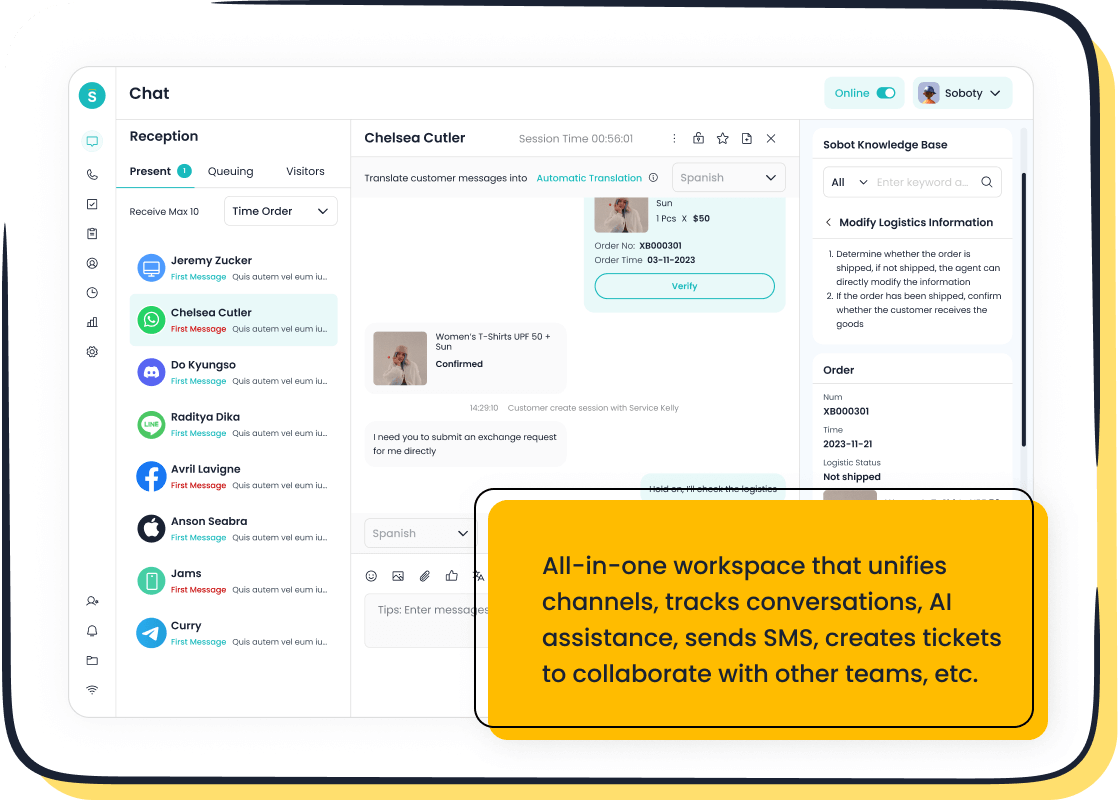
When you choose a chat widget, you want features that help your team and your customers. Sobot Live Chat stands out because it brings advanced AI, strong security, and easy integration with your business tools. You get a unified workspace that connects live chat, chatbot, voice, ticketing, and customer contact center features. This means you can manage all your customer conversations in one place.
Here is a table comparing Sobot Live Chat with other solutions:
| Feature | Sobot Live Chat | Other Solutions |
|---|---|---|
| AI Capabilities | Advanced AI integrated with multiple LLMs | Varies |
| Omnichannel Support | Covers every touchpoint | Limited channels |
| Pricing | Competitive, often lower than others | Higher prices |
| Timely Service | Accessible sales and support anytime | Limited availability |
| Data Privacy & Compliance | Secure AI ensuring compliance | Varies |
You can see that Sobot Live Chat offers more value, especially if you want strong AI and integration.
Omnichannel Support and Integration
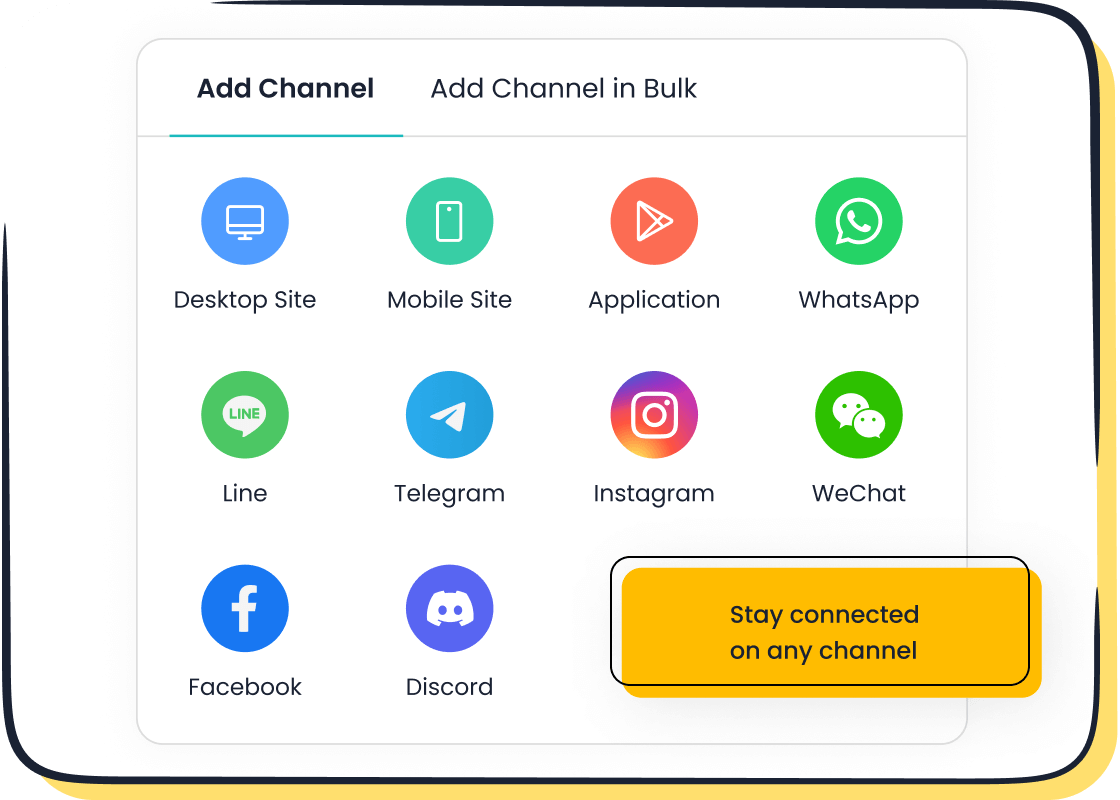
You need to reach your customers wherever they are. Sobot Live Chat supports many channels, including social media, messaging apps, phone, email, and e-commerce platforms. This integration lets you answer questions from Facebook, WhatsApp, Shopify, and more—all in one dashboard.
| Channel Type | Supported Platforms |
|---|---|
| Social Media | Facebook, Instagram, Twitter |
| Messaging Apps | WhatsApp, Telegram, Line |
| Traditional Channels | Phone, Email, SMS |
| Website Live Chat | Yes |
| E-commerce Platforms | Shopify, Amazon, Walmart, Shopee, Lazada |
- Sobot unifies all your customer communication channels.
- You get seamless integration, which improves your team’s efficiency.
- You respond faster and never miss a message.
AI and Analytics Advantages
Sobot Live Chat uses AI to make your service smarter. The AI Agent learns from your knowledge base and gives accurate, human-like answers. The AI Copilot suggests replies and drafts summaries for your agents. The AI Insight tool shows dashboards that help you track and improve your service.
| Feature | Description |
|---|---|
| AI-driven responses | Automates routine inquiries, providing instant support without human intervention. |
| Real-time communication tools | Enables fast and reliable assistance during peak interaction hours. |
| Multi-faceted AI approach | Supports various roles, enhancing service for customers, agents, and administrators. |
Sobot’s integration with advanced language models like OpenAI and DeepSeek helps you deliver better customer service every day.
Setting Up Chat Widget on Your Website
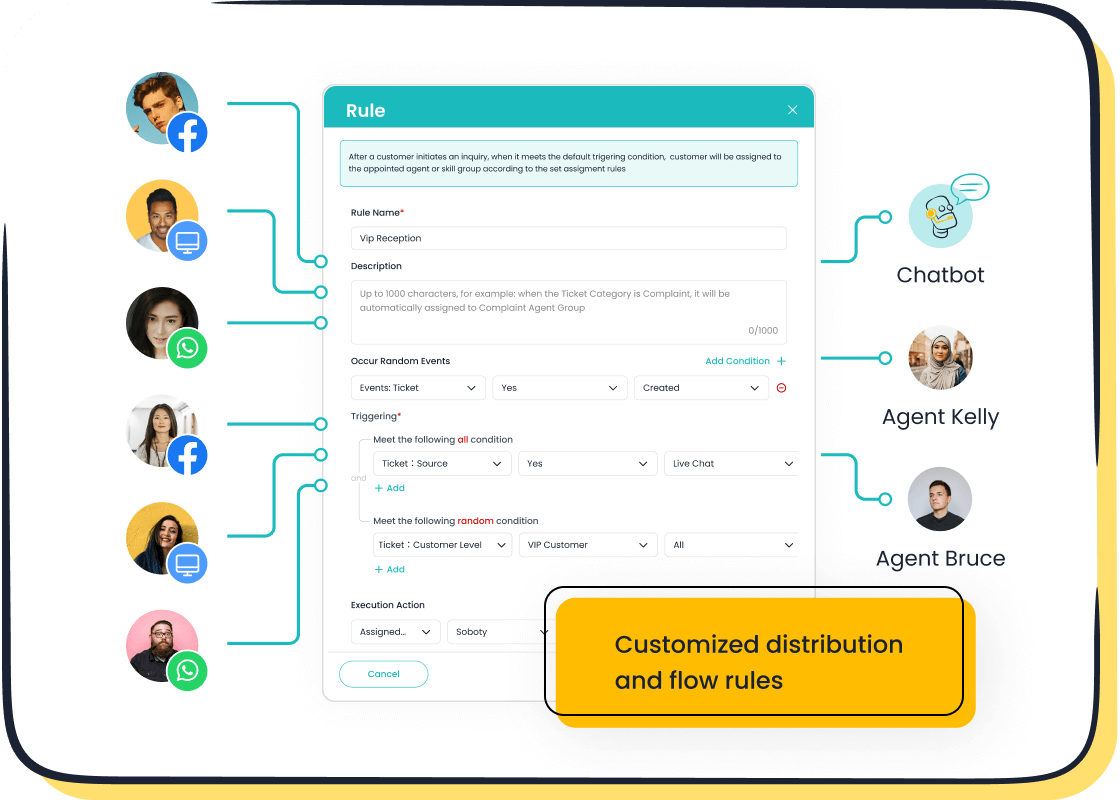
You want to improve customer service. You start by setting up chat widget on your website. Sobot Live Chat gives you a simple process for installation and faster integration. You can use this guide to add a chat widget and create an online chat widget for website setup for better customer service.
Generating and Embedding the Widget Code
You begin with the widget code. Sobot Live Chat provides a unique code for your chat widget. You find this code in your Sobot admin dashboard. You follow these steps:
- Log in to your Sobot account at Sobot Live Chat.
- Go to the "Widget Settings" section.
- Click "Generate Widget Code." Sobot creates a snippet for your chat widget.
- Copy the code. You use this code for installation on your website.
You paste the code into your website’s HTML. You place it before the closing </body> tag. This step ensures faster integration and easy integration. You activate the chat widget and allow visitors to start a chat with your team.
Tip: You can test the chat widget after installation. Open your website in a browser. Look for the chat icon in the corner. Start a chat to check if everything works.
You use this process for online chat widget for website setup for better customer service. You help customers reach you instantly.
Platform-Specific Setup (React, Vanilla JS, Angular, WordPress)
You use different platforms for your website. Sobot Live Chat supports faster integration with React, Vanilla JS, Angular, and WordPress. You follow these platform-specific steps:
React
You use React for your website. You add the chat widget with these steps:
- Open your React project.
- Go to the
public/index.htmlfile. - Paste the Sobot widget code before the closing
</body>tag. - Save the file and restart your development server.
You see the chat widget on your site. You start a chat and check if the widget works. You use this method for online chat widget for website setup for better customer service.
Vanilla JS
You use Vanilla JS for your website. You follow these steps:
- Open your main HTML file.
- Paste the Sobot widget code before the closing
</body>tag. - Save the file and refresh your website.
You activate the chat widget. You start a chat and test the connection. You use this process for installation and faster integration.
Angular
You use Angular for your website. You add the chat widget with these steps:
- Open your Angular project.
- Go to the
src/index.htmlfile. - Paste the Sobot widget code before the closing
</body>tag. - Save the file and rebuild your project.
You see the chat widget on your site. You start a chat and check if the widget works. You use this method for online chat widget for website setup for better customer service.
WordPress
You use WordPress for your website. You follow these steps:
- Log in to your WordPress admin panel.
- Go to "Appearance" > "Theme Editor."
- Select the
footer.phpfile. - Paste the Sobot widget code before the closing
</body>tag. - Save the changes.
You activate the chat widget. You start a chat and test the connection. You use this process for installation and faster integration.
Note: Sobot Live Chat supports easy integration with all major platforms. You can use the widget code for any website builder that allows custom HTML.
You use these steps for online chat widget for website setup for better customer service. You help customers reach you on any platform.
Customizing Widget Appearance
You want your chat widget to match your brand. Sobot Live Chat offers a customizable interface. You adjust colors, fonts, and other features. You use the dashboard to change the look of your chat widget. You create a unique experience for your visitors.
You find these customization options in Sobot Live Chat:
| Customization Feature | Description |
|---|---|
| Color and Font | Change the widget’s colors and fonts to match your brand style. |
| Emojis and Stickers | Add emojis and stickers for a fun chat experience. |
| Chat Window | Adjust the size and layout of the chat window. |
| Business Hours | Set your business hours for chat availability. |
| Welcome Messages | Personalize welcome messages for visitors. |
| Chat Buttons | Customize chat buttons for easy navigation. |
| Agent Avatar | Show agent avatars for a friendly chat interface. |
You use these features to create a chat widget that fits your website. You make your chat widget stand out. You give your customers a better experience.
Tip: You can preview changes before saving. You test the chat widget to see how it looks and feels.
You use customization to improve online chat widget for website setup for better customer service. You help customers feel welcome and comfortable.
You use Sobot Live Chat for easy integration and faster integration. You set up a chat widget that works on any platform. You customize the interface to match your brand. You create an online chat widget for website setup for better customer service. You help your business grow with better chat support.
You use the chat widget to connect with customers. You answer questions in real time. You build trust and loyalty. You use chat to improve customer satisfaction. You use chat to increase sales. You use chat to make your website more interactive.
You use Sobot Live Chat for installation and faster integration. You use the chat widget to give your visitors instant support. You use chat to create a smooth experience. You use chat to make your business stand out.
You use the chat widget for online chat widget for website setup for better customer service. You use chat to help your business grow.
Configuring Sobot Live Chat for Customer Service
Connecting Agents and Channels
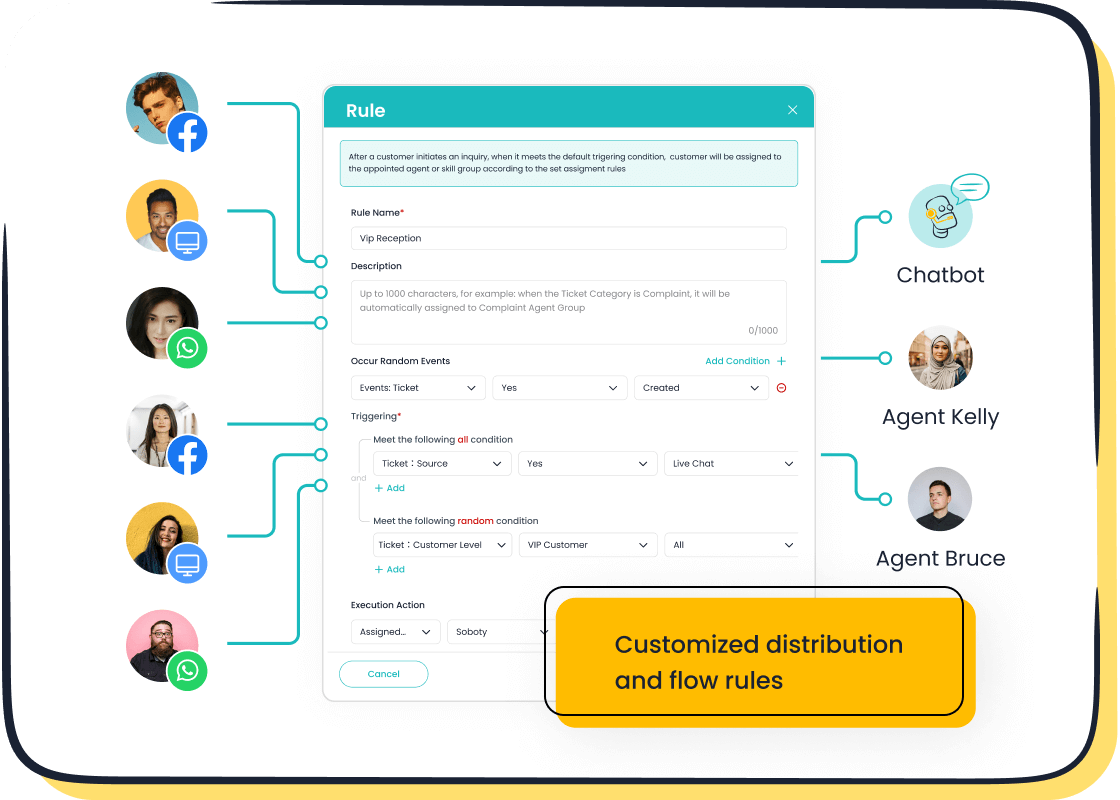
You start by connecting your agents and channels in Sobot Live Chat. You want your team ready to answer every chat. You add agents in the Sobot dashboard and assign them to channels like website, WhatsApp, Facebook, or voice call center. You make sure each agent has access to the right tools, including AI Agent and ticketing system. You follow best practices to get the most from your setup:
- Begin with the most important channels, such as your website and main social media platforms.
- Train your agents regularly so they use chat functionality effectively and keep a human touch.
- Monitor performance metrics and review chat transcripts to improve service.
- Use proactive engagement by setting up prompts that help customers based on their actions.
You build a strong team that responds quickly and gives personal support. You expand channels as your business grows.
Enabling Essential Features
You enable features in Sobot Live Chat that make your customer service efficient. You use tools that help agents respond fast and organize issues. The table below shows the most important features:
| Feature | Description |
|---|---|
| Real-time communication | Agents answer customer questions instantly, improving interaction speed. |
| AI-driven chatbot automation | Chatbot handles common queries, reducing agent workload and boosting efficiency. |
| Omnichannel support | You merge sessions from website, apps, and social media for seamless customer experience. |
| Structured ticketing system | You track issues as tickets, making sure every problem gets solved on time. |
You activate these features in your Sobot dashboard. You use analytics to monitor agent performance and adjust settings for better results. You combine chat with voice and ticketing for a complete contact center solution.
Personalizing Welcome Messages
You personalize welcome messages in Sobot Live Chat to make visitors feel valued. You write friendly greetings that match your brand. You use the dashboard to set custom messages for each channel. You add emojis or agent avatars for a warm touch. You can set different messages for business hours or special events.
Tip: Preview your welcome message before saving. Make sure it sounds inviting and fits your brand style.
You use personalized messages to start every chat on a positive note. You help customers feel comfortable and ready to ask questions. You make your online chat widget for website setup for better customer service stand out.
Enhancing Customer Experience with Sobot Live Chat
AI-Assisted Tools and Automation
You can transform your customer service with Sobot’s AI-assisted tools. These features help you streamline every chat and make your team more efficient. Sobot Live Chat connects with customers across multiple channels, including social media, email, and website. You get instant responses through real-time messaging. The AI-powered chatbot manages basic inquiries, freeing your agents to focus on complex issues. You can customize workflows to fit your business needs. The user-friendly interface makes it easy for everyone on your team to use the system. Mobile access lets you support customers anywhere.
| Feature | Description |
|---|---|
| Multi-Channel Support | Connects with customers via social media, email, chat, etc. |
| Real-Time Messaging | Provides instant responses to customer inquiries. |
| Analytics Dashboard | Offers detailed insights on customer interactions. |
| Customizable Workflow | Allows tailoring of processes to meet specific needs. |
| Integration Capabilities | Easily integrates with other tools and services. |
| User-Friendly Interface | Designed for ease of use for all team members. |
| Mobile Access | Provides access from mobile devices for on-the-go support. |
| Chatbot Functionality | Includes AI-powered bots for managing basic inquiries. |
You use these tools to create an online chat widget for website setup for better customer service. You help customers get answers quickly and improve your team’s productivity.
Built-In Analytics and Reporting
You gain valuable insights with Sobot’s built-in analytics. The dashboard tracks every chat and shows you how your agents perform. You see which channels bring the most traffic. You monitor response times and customer satisfaction scores. Sobot evaluates over 150 indicators, helping you optimize your online chat widget for website setup for better customer service. You use customizable reports to make informed decisions. Data-driven strategies help you boost conversion rates and keep customers happy. For more information, you can visit Sobot’s analytics features.
Tip: Review your analytics regularly. Adjust your workflows to improve service quality.
Satisfaction Surveys and Feedback
You measure customer satisfaction with built-in surveys. Sobot lets you send feedback forms after each chat. You ask customers about their experience and collect ratings. You use this feedback to improve your online chat widget for website setup for better customer service. High satisfaction scores show your team’s success. Positive feedback helps you build loyalty and trust. Sobot’s system makes it easy to track survey results and spot trends. You can read more about customer feedback tools on Sobot’s website.
Note: Use feedback to reward agents and identify areas for training.
Testing and Troubleshooting Your Chat Widget
Testing Functionality and User Experience
You need to make sure your online chat widget for website setup for better customer service works smoothly. Testing helps you catch problems before your customers do. Follow these steps to check the widget’s performance:
- Monitor the chat widget’s performance on your website.
- Make adjustments based on user feedback from real conversations.
- Utilize analytics to maximize effectiveness and spot trends.
You should test the chat widget on different devices and browsers. Try it on mobile phones, tablets, and desktops. Regular testing across platforms ensures compatibility and a positive user experience. You want every visitor to have a seamless chat experience, no matter how they access your site.
Tip: Ask a few team members or friends to use the chat widget and share their feedback. This helps you see the widget from a customer’s point of view.
Common Issues and Solutions
Sometimes, you may face challenges during your online chat widget for website setup for better customer service. Here are some common issues and how to solve them:
| Issue | Possible Cause | Resolution |
|---|---|---|
| Voice session not starting | Microphone permission not granted | Allow microphone access when prompted. |
| No audio output | Speakers muted or disconnected | Check audio settings and ensure device output is active. |
| Widget not appearing | Script not installed correctly | Re-copy and reinsert the <script> tag from the builder. |
| Frequent reCAPTCHA prompts | Rapid connection attempts detected | Slow down reconnection frequency. |
| Unable to record sessions | Feature not supported | Inform users that call recording is unavailable. |
You might also notice issues with Facebook integration. Make sure you connect your Facebook page with the app, whitelist your domain, and install Facebook’s SDK. Check your page for restrictions and set up working hours correctly. If customers cannot send messages, review your settings.
Accessing Sobot Support
You can always reach out to Sobot support if you need help with your online chat widget for website setup for better customer service. Sobot offers technical support, FAQs, and training resources. You get guidance for installation, troubleshooting, and optimizing your chat widget. Email Sobot at marketing@sobot.io or visit the official website for more support options.
Note: Sobot’s support team helps you resolve issues quickly. You keep your online chat widget for website setup for better customer service running smoothly and your customers happy.
You build trust and loyalty by testing, troubleshooting, and using Sobot support. Your online chat widget for website setup for better customer service becomes a reliable tool for your business.
Best Practices for Using Chat Widget to Engage Customers
Quick Response Strategies
You create a strong first impression when you respond quickly. A chat widget helps you deliver instant answers. You personalize welcome messages based on the page your visitor is viewing. You design intelligent conversation flows that guide users to solutions and escalate to agents when needed. You track key performance indicators like first response time, resolution rate, and customer satisfaction. These metrics help you refine your approach. Sobot Live Chat lets you automate greetings and connect visitors to the right agent. You use the chat widget to reduce wait times and boost satisfaction.
Tip: Set up automated responses for common questions. This keeps your online chat widget for website setup for better customer service efficient and reliable.
Proactive Engagement Techniques
You engage customers before they ask for help. The chat widget allows you to tailor experiences based on visitor needs and preferences. Sobot Live Chat uses AI-enabled routing to match customers with agents who fit their communication style. You deploy chatbots to streamline service and reduce response times. You use the chat widget to send proactive messages, offer assistance, and highlight special offers. Personalized interactions make visitors feel valued. You build trust and encourage more conversations.
| Proactive Engagement | How It Helps |
|---|---|
| Personalized chat widget prompts | Guides visitors to relevant information |
| AI-enabled routing | Connects customers to the best agent |
| Chatbot automation | Handles routine questions instantly |
Retaining Visitors and Building Loyalty
You retain visitors by solving their concerns quickly. The chat widget gives your agents visibility and availability, which increases comfort and satisfaction. Automation in the chat widget lowers operational costs and improves productivity. You customize the chat widget to match your branding, making it easy to use and engaging. Analytics from chat widget interactions reveal customer behavior and pain points. You use this data to improve service and create a seamless experience. Automated responses save time for both customers and your team.
"79% of businesses confirm that chat widgets increased their sales, revenue, and customer loyalty."
You build loyalty by personalizing interactions and making every visitor feel understood. The online chat widget for website setup for better customer service helps you turn visitors into repeat customers.
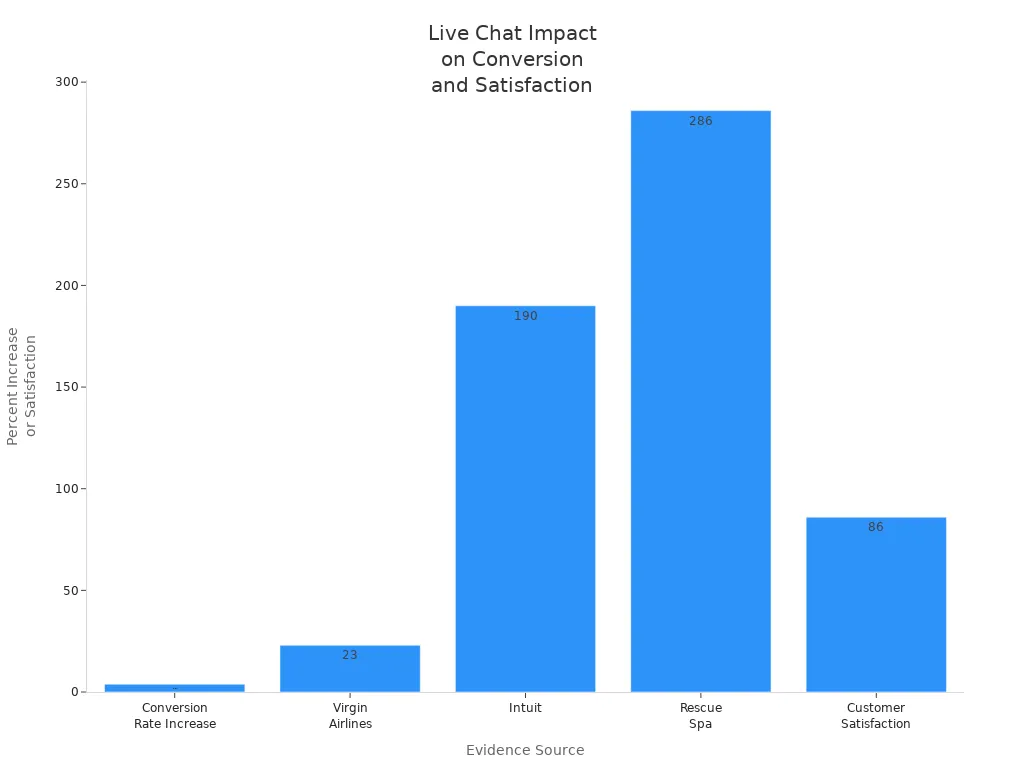
You see real results when you use an online chat widget for website setup for better customer service. Businesses report a 3.84% conversion rate increase and 86% customer satisfaction after adding live chat. Sobot Live Chat gives you automated lead generation, 24/7 support, and easy integration for any business size. You optimize your online chat widget for website setup for better customer service by monitoring analytics and refining design. You build loyalty and boost sales with ongoing improvements.
Keep your online chat widget for website setup for better customer service visible, intuitive, and mobile-friendly. Start your contact journey with Sobot today.
| Outcome | Statistic |
|---|---|
| ROI | Up to 200% |
| Faster resolutions | 90% of businesses |
| Upsell conversions | 23% increase |
You unlock growth with your online chat widget for website setup for better customer service.
FAQ
What is an online chat widget for website setup for better customer service?
You add an online chat widget for website setup for better customer service to connect with visitors in real time. This tool lets you answer questions, solve problems, and guide users. You improve satisfaction and boost sales by offering instant support.
How does Sobot Live Chat help with online chat widget for website setup for better customer service?
You use Sobot Live Chat to unify all customer messages in one workspace. You get AI tools, analytics, and omnichannel support. These features make your online chat widget for website setup for better customer service more efficient and effective.
Can I customize the online chat widget for website setup for better customer service?
Yes, you can. You change colors, fonts, and welcome messages. You add your logo and agent avatars. Sobot lets you match the online chat widget for website setup for better customer service to your brand style.
Is it easy to install the online chat widget for website setup for better customer service?
You follow simple steps to install the online chat widget for website setup for better customer service. You copy the code from Sobot and paste it into your website. You can use it with platforms like WordPress, React, or Angular.
Does the online chat widget for website setup for better customer service support mobile devices?
Yes, it does. You give customers a smooth chat experience on phones, tablets, and computers. Sobot’s online chat widget for website setup for better customer service works on all devices.
See Also
Best Resources for Integrating Social Media Chat Features
Simple Steps to Build a Chatbot for Your Site
Effortless Ways to Integrate a Chatbot on Your Site

