On-Premise vs Cloud Contact Center Pros & Cons


Which contact center model, on-premise or cloud, is right for your business? Your decision hinges on specific needs for control, cost, scalability, and security. An on-premise contact center is a self-hosted solution you own and manage, offering total control but requiring high initial costs. In contrast, the cloud contact center—a contact center as a service (CCaaS) model—is a provider-hosted solution. The market for cloud-based contact centers is growing rapidly, already capturing over 61% of the industry. This implementation for contact center offers flexibility, making the cloud the go-to for many businesses, with solutions like Sobot leading the way.
Key Factors for an On-Premise Contact Center
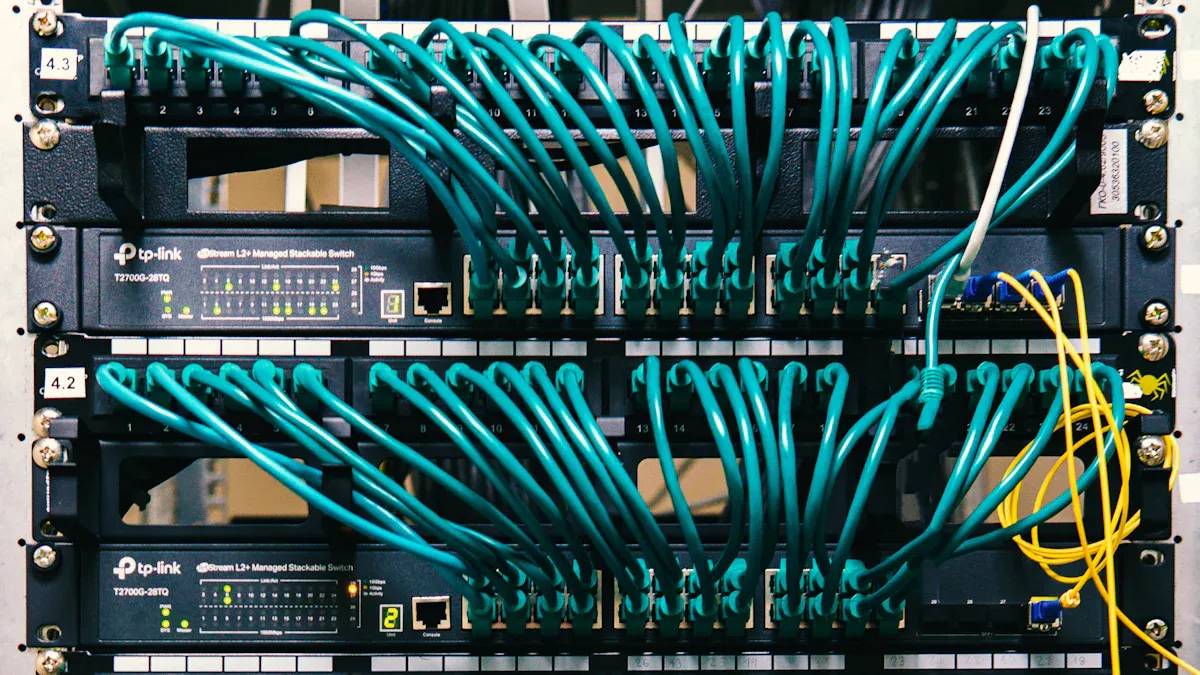
Choosing an on-premise contact center means you are investing in a solution that you host and manage entirely within your own facilities. This model offers distinct advantages and disadvantages that you must weigh against your business goals.
Pro: Total Control and Customization
With on-premise systems, you have ultimate authority over your contact center operations. You control the entire environment, from the hardware to the software. This allows for deep, custom integrations with your core business applications, like a proprietary CRM. You can tailor workflows to match your exact processes and maintain legacy systems that are critical to your operations. This absolute data ownership ensures that all call recordings and customer records are secured on your company's servers.
Pro: Enhanced In-House Data Security
Hosting your data internally gives you direct command over its security. For businesses in highly regulated industries like finance and healthcare, this is a major advantage. You can implement your own advanced security measures and protocols to meet strict data privacy requirements.
The logic is simple: your data is in your building, behind your firewall, and managed by your IT team. This control helps you directly manage security and compliance. For certain standards with very specific rules, like PCI-DSS, in-house management can simplify the compliance process. This level of security is often a necessity, not a choice.
Con: High Upfront Costs and Maintenance
The primary drawback of an on-premise solution is the significant initial cost. You must purchase all the necessary hardware, including servers and networking equipment. You also face substantial software licensing fees.
- Hardware: Servers, networking gear, and agent handsets.
- Software: Licenses can cost between $500–$1,500 per agent upfront.
- Maintenance: Ongoing expenses for IT staff, upgrades, and system upkeep.
These capital expenditures make on-premise systems a costly initial investment.
Con: Limited Scalability and Accessibility
On-premise systems are not built for rapid change. Scaling your contact center operations up or down is a slow and expensive process that involves buying and installing new hardware or decommissioning old equipment. This lack of flexibility can hinder growth. Furthermore, providing remote accessibility for your agents is often complex and less secure than with cloud-native platforms, limiting your ability to adapt to modern, flexible work models. The limited scalability and accessibility are key factors to consider.
On-Premise vs. Cloud: A Factor-by-Factor Implementation
When you evaluate an implementation for a contact center, the key differences between on-premise and cloud models become clear. Understanding these distinctions is crucial for aligning your choice with your financial, operational, and strategic goals. A direct comparison helps reveal which path best suits your contact center operations.
To simplify your decision, let's break down the key differences in a side-by-side comparison. This table highlights how each model performs across cost, scalability, security, and implementation.
| Factor | On-Premise Contact Center | Cloud Contact Center |
|---|---|---|
| Cost Model | Capital Expenditure (CapEx): You make a large upfront investment in hardware and software licenses. This is recorded as an asset on your balance sheet and depreciated over time. | Operational Expenditure (OpEx): You pay a predictable monthly or annual subscription fee. This is treated as an operational cost on your income statement, freeing up capital. |
| Scalability | Rigid: Scaling up requires buying and installing new hardware, a slow and expensive process. Scaling down leaves you with underutilized, costly equipment. | Elastic: You can add or remove agent seats and features on demand. This flexibility allows your contact center to grow with your business or adapt to seasonal peaks seamlessly. |
| Security | In-House Control: Your IT team has full control over security protocols and compliance. You are solely responsible for patching systems, preventing physical breaches, and managing insider threats. | Provider Managed: Security is a shared responsibility. The provider secures the core infrastructure, often holding top-tier certifications like ISO/IEC 27001 and SOC 2 to ensure data protection and compliance. You manage user access and data. |
| Implementation | Slow & Complex: Deployment is a major project. It can take weeks or months and requires significant IT expertise for hardware setup, software installation, and system integration. | Fast & Simple: You can get your cloud-based contact centers up and running in days. The provider handles the backend, so your team can start with minimal setup, often using existing hardware. |
Cost: Capital Expenditure vs. Subscription
The financial approach is one of the most significant key differences. With an on-premise solution, you face a large capital expenditure (CapEx). You purchase servers, networking gear, and software licenses upfront. While this gives you ownership, it also means significant ongoing costs for maintenance, upgrades, and the IT staff needed to manage it all.
In contrast, cloud-based contact centers operate on an operational expenditure (OpEx) model. You pay a predictable subscription fee, which simplifies budgeting and preserves your capital for other business initiatives. This model eliminates the need to worry about hardware obsolescence or unexpected maintenance expenses.
Scalability: Rigid vs. Elastic
Your business needs can change quickly. On-premise systems struggle to keep up. If you need to add 20 agents for a seasonal rush, you must purchase, install, and configure 20 new licenses and potentially more hardware. This process is slow and expensive. This lack of scalability can hinder your ability to respond to market opportunities.
The cloud offers elastic scalability. A cloud contact center allows you to scale your contact center operations up or down with just a few clicks. This agility means you only pay for what you use, ensuring your resources always match your current needs.
Security: In-House Control vs. Provider Managed
For an on-premise setup, security is entirely in your hands. Your team is responsible for everything from physical server security to software patching and ensuring compliance. This offers maximum control but also places a heavy burden on your IT resources and requires specialized expertise to defend against threats.
With cloud-based contact centers, security is a shared responsibility. Leading providers invest heavily in securing their infrastructure and maintaining compliance with global standards. This frees your team to focus on user-level security and business strategy, confident that the underlying platform is protected by experts.
Implementation for Contact Center: Speed & Complexity
Deploying on-premise systems is a long and complex journey. It involves hardware procurement, extensive wiring, software installation, and custom integrations. This entire implementation for contact center can take months before your agents can even take their first call.
A cloud contact center offers rapid deployment. Because the infrastructure is already in place, you can launch your new system in a matter of days or weeks, not months. This speed allows you to start improving your customer experience and boosting efficiency almost immediately.
The Power of Modern Cloud-Based Contact Centers

Modern cloud-based contact centers deliver the agility and innovation that on-premise systems cannot match. You can transform your customer experience by leveraging a platform built for speed, scalability, and intelligence. Sobot’s Cloud Call Center is a prime example of modern cloud CCaaS solutions, offering an all-in-one platform with a guaranteed 99.99% uptime. This level of reliability ensures your contact center operations are always online when your customers need you.
Rapid Deployment and Global Reach with Sobot
You can deploy a cloud contact center in days, not months. This speed allows you to serve a global customer base instantly. Sobot supports this with a network of 110 points of presence worldwide, helping leading brands connect with their customers.
- Samsung
- OPPO
- J&T Express
- Michael Kors
- Weee!
A 99.99% uptime means your system experiences less than five minutes of downtime per month. This high availability gives you the confidence to run your contact center operations without interruption. The robust uptime is a core benefit of the cloud.
Lower Initial Costs and Predictable OpEx
The cloud eliminates the high upfront cost of hardware and software. Instead of a large capital investment, you pay a predictable monthly subscription fee. This operational expenditure (OpEx) model makes budgeting simple and frees up your capital for other business priorities. You no longer need to worry about unexpected expenses for maintenance or upgrades, as the cloud provider handles it all.
Superior Flexibility of a Cloud Contact Center
A key advantage of the cloud is superior scalability and flexibility. You can easily add or remove agents to match seasonal demand or business growth. This model also fully supports modern work environments. Your agents gain secure remote accessibility to all tools and customer data from any location. This empowers you to build a talented team without geographic limits, enhancing your service capabilities.
Built-in Innovation and AI Capabilities
With a cloud-based solution, you always have access to the latest technology. The provider manages all updates, so you benefit from continuous innovation without any manual effort. Sobot integrates powerful features directly into its cloud platform, including:
- An AI-powered Voicebot to handle routine inquiries and provide intelligent self-service.
- A unified workspace that gives agents a complete view of the customer journey.
- Seamless integration with your existing CRM and business tools.
Global brands like Samsung use Sobot to enhance their customer experience. They achieved a 97% customer satisfaction rate and a 30% boost in agent efficiency, proving the powerful impact of a modern cloud contact center. This improved experience is a direct result of leveraging cloud computing.
Making the Right Choice for Your Business
Choosing between on-premise and cloud is a strategic decision. Your final choice should align with your company's budget, IT capabilities, and long-term goals. Let's explore which path is right for you.
When to Choose an On-Premise Solution
You should choose an on-premise solution if your organization requires absolute control over its infrastructure. This model is best for businesses that:
- Have a dedicated in-house IT team ready to manage updates, patches, and maintenance.
- Operate in a highly regulated industry where keeping data on a private, controlled network is a strict compliance requirement.
- Prefer a large, one-time capital expenditure and have the budget for it.
If your business values deep customization and has legacy on-premise systems that are difficult to integrate with the cloud, an on-premise setup gives you the direct control you need. However, this path requires significant internal resources.
When a Cloud Solution is the Better Fit
A cloud solution is the better fit for most modern businesses, especially those prioritizing growth, flexibility, and efficiency. You should opt for the cloud if you want to:
- Launch quickly and reduce costs. Cloud-based contact centers eliminate high upfront hardware costs and can be deployed rapidly.
- Scale with ease. The cloud offers superior scalability, allowing you to add or remove agents to match demand without purchasing new hardware.
- Access global talent. With a cloud platform, your agents can work from anywhere, expanding your hiring pool.
- Leverage advanced features. Cloud providers like Sobot handle all updates, giving you continuous access to innovations like AI and advanced analytics.
For businesses seeking a better return on investment and less dependency on technical staff, cloud-based contact centers are the clear winner.
Considering a Hybrid Approach
What if you are not ready to move your entire contact center operations to the cloud? A hybrid approach offers a practical middle ground. This model blends on-premise components with cloud services, allowing you to modernize strategically.
A hybrid implementation for contact center often involves using cloud-based communication platforms to connect both in-office and remote agents. This ensures everyone has access to the same tools and data. For organizations with extreme security needs, like banks, a private cloud can offer the benefits of the cloud while keeping data in a more controlled environment. This strategy allows you to migrate from legacy on-premise systems at your own pace, balancing innovation with security and stability.
Your choice between an on-premise or cloud contact center is clear. An on-premise setup is for enterprises needing total control and strict security. However, the cloud is the modern standard. A cloud solution like Sobot offers the flexibility, rapid deployment, and scalability that most businesses need. Ultimately, you must align your decision with your strategic goals. Choose the on-premise or cloud model that best serves your customers and your business's future. The right cloud platform will support your growth.
FAQ
What is the main cost difference between on-premise and cloud?
You pay for an on-premise system with a large, upfront capital expense (CapEx). A cloud contact center uses a subscription model. This makes it a predictable operational expense (OpEx). Your choice impacts your company's budget and financial planning.
How long does it take to set up a new contact center?
An on-premise setup can take months. It requires hardware installation and complex configuration. You can launch a cloud contact center, like Sobot, in just a few days. The provider manages the backend infrastructure, which speeds up your deployment significantly.
Which model is better for supporting remote agents?
A cloud contact center is the ideal choice for remote work. It gives your agents secure access to all tools from any location with an internet connection. On-premise systems make remote access more complex and less secure.
Can I switch from on-premise to the cloud later?
Yes, you can migrate from an on-premise system to the cloud. Many businesses move in phases using a hybrid approach. This allows you to modernize your operations at your own pace while minimizing disruption to your customer service.
How do I decide in the on-premise vs cloud contact center debate?
Your decision depends on your specific needs.
- Choose on-premise for total control and strict, in-house security.
- Choose the cloud for flexibility, scalability, and lower initial costs. You should align your choice with your long-term business goals.
See Also
Evaluating Leading Cloud Contact Center Services: A Comprehensive 2024 Review
Exploring the Advantages and Disadvantages of Remote Call Center Operations
A 10-Step Guide to Deploying Effective Omnichannel Contact Center Solutions
The Best Contact Center Solutions: An In-Depth Analysis for 2024
Discovering the Foremost Cloud Contact Centers: A Look Ahead to 2025

