Guide to Live Chat with Facebook Support Integration 2025

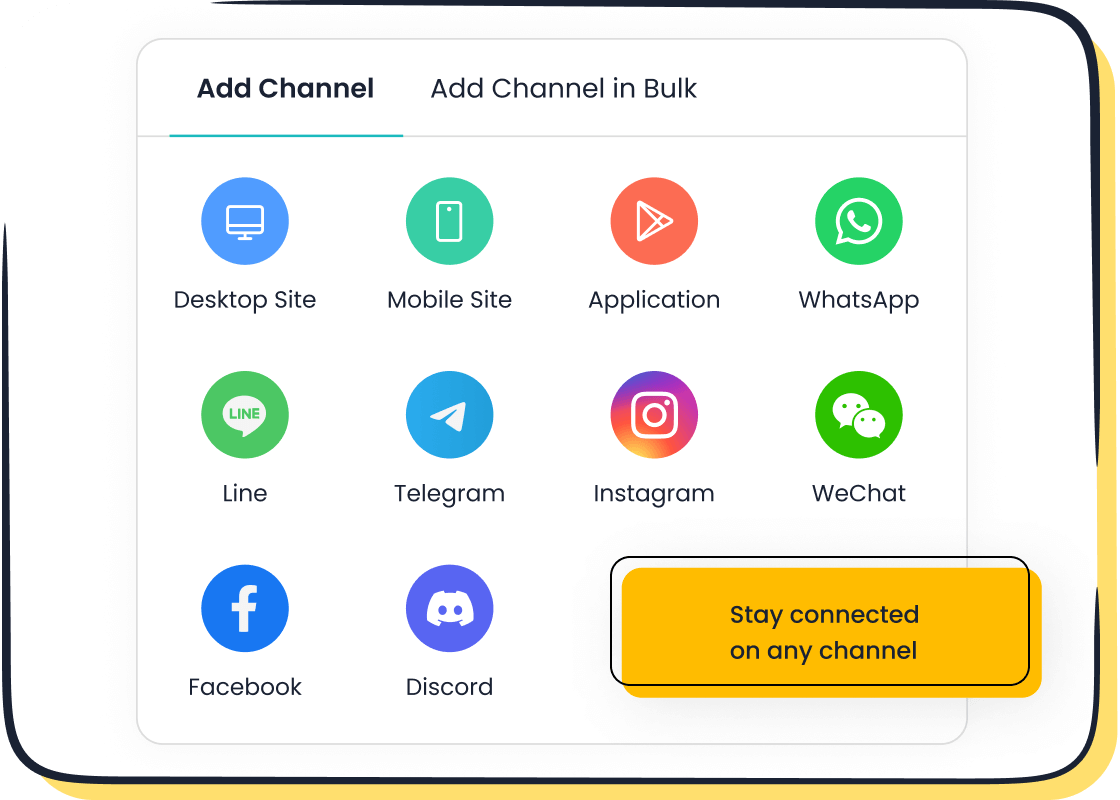
In 2025, integrating Facebook Messenger with live chat platforms has become essential for businesses aiming to enhance customer engagement. This integration allows you to provide real-time communication, ensuring faster response times and improved satisfaction. Tools like Sobot's Live Chat with Facebook support simplify this process by offering seamless connectivity and advanced features. For example, Sobot enables you to unify customer interactions across channels, creating a consistent experience. With over 100,000 active bots on Facebook Messenger, automation trends are reshaping customer support. By adopting this integration, you can build trust, strengthen loyalty, and drive business growth effectively.
Prerequisites for Integrating Facebook Messenger
Setting Up Your Facebook Business Page
Importance of a Business Page for Integration
A Facebook Business Page is essential for integrating Facebook Messenger with live chat platforms. It acts as the foundation for your customer interactions. Without it, you cannot activate Messenger or access its business tools. A well-optimized page also enhances your brand’s credibility and visibility. For example, businesses with complete profiles are 2.5 times more likely to attract customer engagement. This page ensures that your customers can easily find and connect with you, making it a vital step in the integration process.
Steps to Create and Optimize Your Page
- Go to Facebook and select "Create a Page."
- Enter your business name, category, and description.
- Upload a professional profile picture and cover photo.
- Add contact details, including your website and phone number.
- Enable Messenger in the settings to allow direct communication.
- Regularly update your page with posts, offers, and customer reviews.
Optimizing your page ensures better reach and engagement. Use keywords in your description and posts to improve searchability. A complete and active page builds trust and encourages customers to interact with your business.
Permissions and Compliance Requirements
Granting Admin Access for Integration
You need admin access to connect Messenger to a live chat platform. Admin privileges allow you to manage settings, approve integrations, and monitor activity. To grant access, go to your page settings, select "Page Roles," and assign the admin role to the appropriate team member. This step ensures a smooth integration process and prevents unauthorized changes.
Ensuring Adherence to Facebook Policies
Facebook has strict policies for businesses using Messenger. You must comply with guidelines on data privacy, message frequency, and content standards. Violations can lead to penalties or account suspension. Review Facebook’s Business Terms and ensure your practices align with them. For example, always obtain customer consent before sending promotional messages. Staying compliant protects your business and builds customer trust.
Selecting the Right Live Chat Platform
Key Features to Consider
When choosing a live chat platform, look for features that enhance efficiency and customer experience. Key features include omnichannel support, AI-powered tools, and analytics. The platform should integrate seamlessly with Facebook Messenger and other channels. For example, built-in analytics help you track customer interactions and improve service quality. Automation tools like chatbots can handle routine queries, saving time for your agents.
Why Sobot Live Chat is the Best Choice for Integration
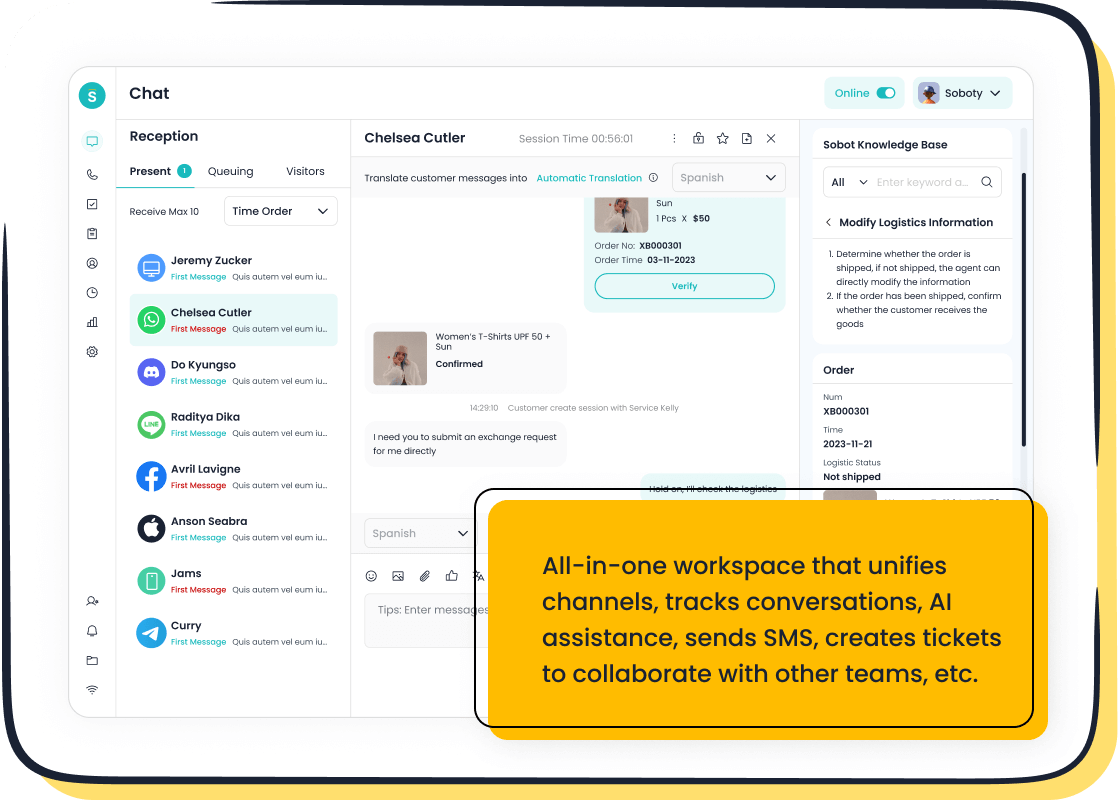
Sobot Live Chat stands out as the ideal platform for Facebook Messenger integration. It offers omnichannel support, allowing you to manage all customer interactions in one place. Its AI-powered tools enhance efficiency by automating repetitive tasks. For instance, Sobot’s chatbots can resolve common queries, enabling faster response times. The platform also provides built-in analytics to help you optimize your service. With Sobot, you can ensure a seamless integration process and deliver exceptional customer experiences. Learn more about Sobot Live Chat here.
Step-by-Step Setup Guide for Facebook Messenger Integration
Configuring Facebook Messenger
Activating Messenger on Your Business Page
To begin integrating Facebook Messenger, you must activate it on your Facebook Business Page. Follow these steps:
- Create a Facebook Page using your personal account.
- Navigate to General Settings and enable the option to receive messages.
- Share your unique Messenger link (m.me/yourusername) with customers.
- Add a "Send Message" button to your page for easy access.
This setup ensures that customers can initiate conversations with your business effortlessly. A functional Messenger setup lays the groundwork for seamless customer interactions and better customer service.
Adjusting Messenger Settings for Business Use
After activation, customize Messenger settings to suit your business needs:
- Set up automated greetings and instant replies to welcome customers.
- Manage notification preferences to stay updated on incoming messages.
- Explore advanced settings to tailor Messenger for your operations.
These adjustments enhance customer support by ensuring prompt responses and a personalized experience. For example, automated greetings can inform customers about your business hours or services.
Connecting Messenger to Sobot Live Chat
Using Sobot’s Integration Tools
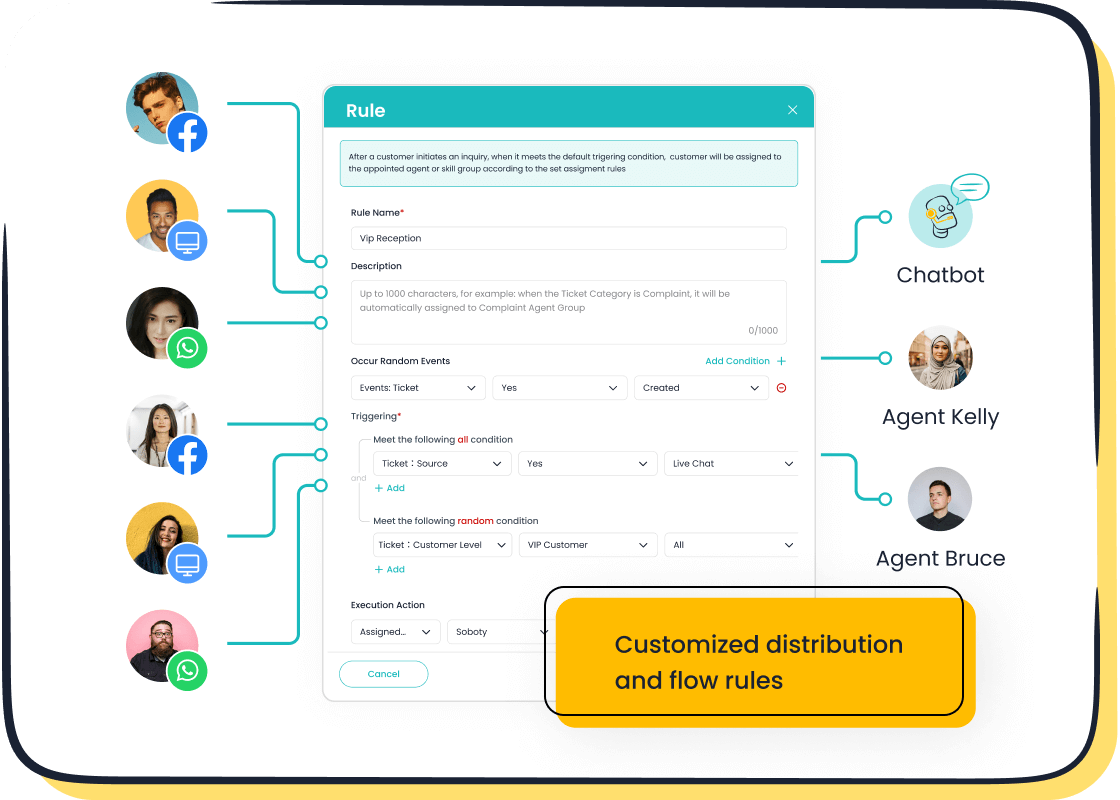
Sobot simplifies the integration process with its user-friendly tools. Start by accessing the integration options in Sobot Live Chat. Enable the Messenger platform to allow real-time conversations. Customize the chat plugin to match your brand’s style and improve user experience. Sobot’s omnichannel support ensures that all customer interactions, including those from Messenger, are unified in one workspace. This feature streamlines communication and boosts efficiency.
Linking Messenger API to Sobot Live Chat
To connect Messenger to Sobot Live Chat, use the Facebook Messenger API. Log in to your Sobot account and navigate to the integration settings. Enter your Messenger API credentials to establish the connection. This step enables seamless data flow between Messenger and Sobot, allowing you to manage conversations efficiently. With Sobot’s AI-powered tools, you can automate routine queries and focus on complex customer needs.
Testing and Troubleshooting the Integration
Conducting Test Chats to Verify Functionality
Testing ensures that the integration works as intended. Initiate test chats through Messenger to verify response times and message accuracy. Check if automated replies and chatbot functions operate correctly. Testing helps identify any gaps in the setup, ensuring a smooth customer experience.
Resolving Common Integration Challenges
If issues arise, follow these troubleshooting steps:
- Identify the root cause of the problem.
- Apply best practices, such as updating API credentials.
- Consult online communities for additional insights.
- Update your software to the latest version.
- Review and refine your settings for optimal performance.
These steps help resolve common challenges, ensuring that your Facebook Messenger integration runs smoothly. Sobot’s support team is also available to assist with any technical difficulties.
Features and Benefits of Facebook Messenger Integration
Enhanced Customer Engagement
Real-Time Communication with Customers
Facebook Messenger enables instant communication, allowing you to respond to customer inquiries without delay. This real-time interaction fosters trust and satisfaction. Compared to traditional support channels, Messenger offers faster and more organized responses. It also ensures seamless management of conversations and customer data, improving response times and engagement.
| Evidence Description | Key Benefit |
|---|---|
| Faster, more organized responses | Enhances customer satisfaction and loyalty |
| Seamless management of conversations and data | Improves response times and engagement |
| Personalization of communication | Strengthens relationships and encourages loyalty |
| Automation and chatbots for 24/7 support | Provides consistent communication and improves customer experience |
Personalized Interactions Through Messenger
Messenger allows you to tailor interactions to individual customer needs. Businesses like Sephora and H&M use Messenger to provide personalized recommendations based on customer preferences. For example:
- Sephora offers beauty consultations and product suggestions.
- H&M provides shopping recommendations based on browsing history.
- Pizza Hut enables order placements and delivery updates.
These personalized interactions strengthen customer relationships and encourage loyalty, making Messenger an essential tool for customer engagement.
Automation and AI-Powered Tools
Leveraging Sobot’s Chatbots for Efficiency
Sobot’s AI-powered chatbots streamline customer support by automating repetitive tasks. These bots handle routine queries, freeing your agents to focus on complex issues. With 24/7 availability, they ensure instant assistance, enhancing customer satisfaction. Using Sobot’s chatbots reduces operational costs while maintaining high service quality.
Automating Routine Queries and FAQs
Automation simplifies handling frequently asked questions. For instance, Sobot’s chatbots can instantly provide answers about business hours, product availability, or order status. This automation ensures consistent communication and improves efficiency. By integrating automation into your Messenger strategy, you can deliver faster responses and better customer experiences.
Data-Driven Insights and Analytics
Tracking Customer Interactions
Tracking metrics like response times, conversion rates, and unique conversations helps you measure the success of your Messenger integration. For example, monitoring the average response time can highlight areas for improvement. Metrics such as the number of abandoned payment sessions or completed transactions provide insights into customer behavior.
Using Sobot’s Analytics Tools for Optimization
Sobot’s built-in analytics tools allow you to optimize customer interactions. These tools track message open rates and user behavior patterns, helping you refine your messaging strategies. They also estimate staffing needs by analyzing ticket volume and monitor team performance through metrics like resolution time. With Sobot, you can make data-driven decisions to enhance your Messenger strategy.
Best Practices for Optimizing Live Chat with Facebook Support
Balancing Automation and Human Support
Designing Effective Chatbot Scripts
Creating effective chatbot scripts is essential for delivering a smooth customer support experience. Keep dialogue nodes simple and engaging to avoid overwhelming users. Personalize responses using customer data to make interactions feel more human. For example, a chatbot on the Facebook Messenger app can greet users by name and suggest solutions based on their previous inquiries. Testing the chatbot in real-world scenarios ensures it performs as expected. Adding interactive elements like quick reply buttons can further enhance user engagement. These practices help you maintain streamlined conversations while improving customer satisfaction.
Ensuring Seamless Transitions to Human Agents
A seamless transition from chatbot to human agent is critical for maintaining context and avoiding customer frustration. Train your agents to recognize when a customer needs personalized support beyond automated workflows. For instance, if a chatbot cannot resolve a billing issue, it should immediately transfer the conversation to a human agent with all relevant details intact. This approach ensures continuity and builds trust. Monitoring interactions and gathering feedback can help refine this balance, ensuring both automation and human support work harmoniously.
Creating a Unified Customer Experience
Integrating Messenger with Other Support Channels
Integrating Messenger with other channels like email, phone, and CRM apps integrated with Facebook ensures a unified customer experience. Use centralized management tools to streamline customer interactions across platforms. For example, Sobot’s Live Chat unifies conversations from Messenger, websites, and other channels into one workspace. This integration eliminates data silos and provides agents with a complete view of customer history. Leveraging AI and analytics tools can further enhance personalization, making every interaction meaningful and efficient.
Training Teams for Multichannel Communication
Effective training prepares your team to handle multichannel communication. Use various methods like text-based guides, email reminders, and visual aids to reinforce key concepts. Understanding employee preferences can make training more impactful. For example, some agents may prefer hands-on practice with tools like Sobot Live Chat, while others benefit from video tutorials. Ongoing training ensures your team stays adept at managing customer interactions across multiple platforms, leading to an improved customer experience.
Continuous Monitoring and Updates
Using Sobot’s Tools for System Optimization
Continuous monitoring is vital for optimizing your live chat system. Tools like Sobot’s built-in analytics track metrics such as response times, chat volume, and customer satisfaction scores. These insights help you identify trends and allocate resources effectively. For instance, analyzing peak chat times allows you to adjust staffing levels, ensuring no customer is left waiting. Regularly reviewing these metrics ensures your system remains efficient and responsive.
Staying Updated with Facebook’s Features and Policies
Facebook frequently updates its features and policies, which can impact your Messenger strategy. Recent changes include a redesigned Pages experience and enhanced privacy settings for younger users. Staying informed about these updates helps you adapt your approach and maintain compliance. For example, focusing on campaign-level reporting can improve ad performance, while the new “Work Accounts” feature simplifies business management. Keeping up with these changes ensures your live chat system remains effective and aligned with Facebook’s guidelines.
Integrating Facebook Messenger with live chat platforms transforms how you engage with customers. It strengthens relationships, creates positive impressions, and boosts satisfaction. Businesses using Messenger often see higher ratings and repeat purchases. With billions of active users, Messenger offers unmatched reach and real-time messaging across devices. Sobot’s Live Chat simplifies this process, centralizing customer service messaging and enabling 24/7 chatbot support. By following the steps outlined, you can enhance efficiency, reduce costs, and deliver exceptional customer experiences. Start leveraging this integration today to unlock long-term growth and customer loyalty.
FAQ
How does Sobot Live Chat improve customer engagement?
Sobot Live Chat enhances engagement by unifying conversations across channels like Facebook Messenger. Its AI-powered tools enable real-time responses and personalized interactions. For example, businesses using Sobot have reported a 38% increase in conversion rates, turning visitors into loyal customers. Learn more here.
Can I integrate Facebook Messenger with other channels using Sobot?
Yes, Sobot supports omnichannel integration. You can connect Facebook Messenger with platforms like WhatsApp, Instagram, and your website. This unified workspace ensures seamless communication and eliminates data silos, improving efficiency and customer satisfaction.
What are the benefits of using Sobot’s analytics tools?
Sobot’s analytics tools track over 150 metrics, including response times and customer satisfaction scores. These insights help you optimize your Facebook Messenger integration. For instance, analyzing peak chat times allows better resource allocation, ensuring no customer waits too long.
Is Sobot Live Chat suitable for small businesses?
Absolutely! Sobot Live Chat offers scalable solutions for businesses of all sizes. Its free trial allows small businesses to explore features like AI chatbots and analytics without upfront costs. This flexibility makes it an excellent choice for growing companies.
How do I start using Sobot Live Chat with Facebook Messenger?
Begin by creating a Sobot account and accessing the integration settings. Follow the step-by-step guide to link your Facebook Messenger API. Once connected, test the setup to ensure smooth functionality. Visit Sobot Live Chat for detailed instructions.
See Also
Excelling In Live Chat For Customer Assistance
Best 10 Live Chat Tools To Use In 2024
Comparing Leading Live Chat Options For 2024

