Live Chat Software Review for Customer Service Teams


Looking for the best chat support services for your team? You have lots of options. Today, many customer service leaders use tools like Front, Zendesk, Intercom, LiveChat, Zoho Desk, Help Scout, Tidio, Freshchat, and sobot. These platforms help you talk with customers in real time and give fast answers. Studies show that live chat makes customers happy by offering quick help and building trust. When you pick the right tool, you boost loyalty and keep people coming back.
Comparison Table of Top Chat Support Services

You want to pick the best chat support services for your team, right? Let’s make it easy. Here’s a quick look at the top tools you’ll see in the market. This table shows you the main features, pricing, and user ratings for each platform. You can spot the differences fast and decide what fits your needs.
Features Overview
| Service | Omnichannel | AI Tools | Analytics | Integrations | Customization |
|---|---|---|---|---|---|
| Sobot Live Chat | ✅ | ✅ | ✅ | ✅ | ✅ |
| Intercom | ✅ | ✅ | ✅ | ✅ | ✅ |
| Zendesk Chat | ✅ | ✅ | ✅ | ✅ | ✅ |
| LiveChat | ❌ | ✅ | ✅ | ✅ | ✅ |
| Freshchat | ✅ | ✅ | ✅ | ✅ | ✅ |
| Tidio | ✅ | ✅ | ✅ | ✅ | ✅ |
Tip: Omnichannel means you can talk to customers on websites, apps, and social media all in one place.
Pricing Summary
| Service | Starting Price (USD/month) | Free Trial |
|---|---|---|
| Sobot Live Chat | Custom, Free Trial | Yes |
| Intercom | $39 per seat | Yes |
| Zendesk Chat | $19 per agent | Yes |
| LiveChat | $20 per agent | Yes |
| Freshchat | $15 per agent | Yes |
| Tidio | $19 per month | Yes |
You can check Intercom pricing, Zendesk pricing, and LiveChat pricing for more details.
User Ratings
| Service | G2 Rating | Capterra Rating |
|---|---|---|
| Sobot Live Chat | 4.7 | 4.8 |
| Intercom | 4.5 | 4.5 |
| Zendesk Chat | 4.3 | 4.4 |
| LiveChat | 4.6 | 4.7 |
| Freshchat | 4.4 | 4.5 |
| Tidio | 4.7 | 4.7 |
You can see that Sobot Live Chat stands out with high ratings and strong features. If you want reliable chat support services, these options give you a good place to start.
Sobot Live Chat Support Services Review
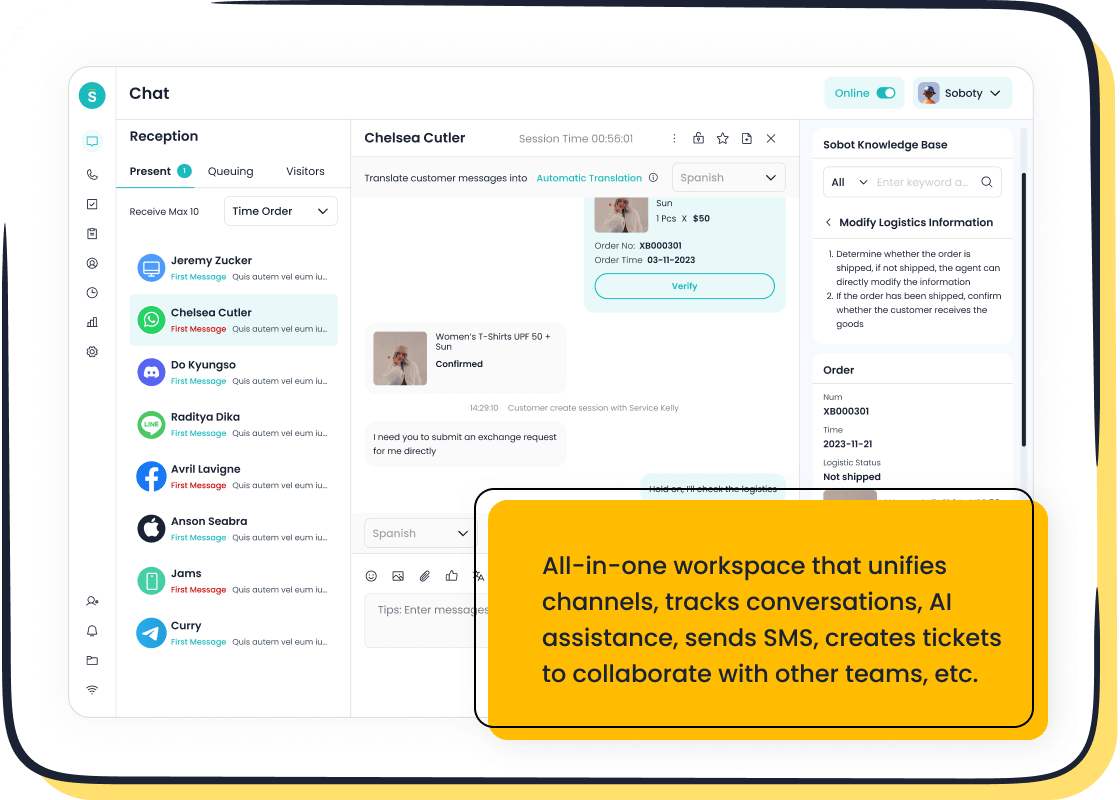
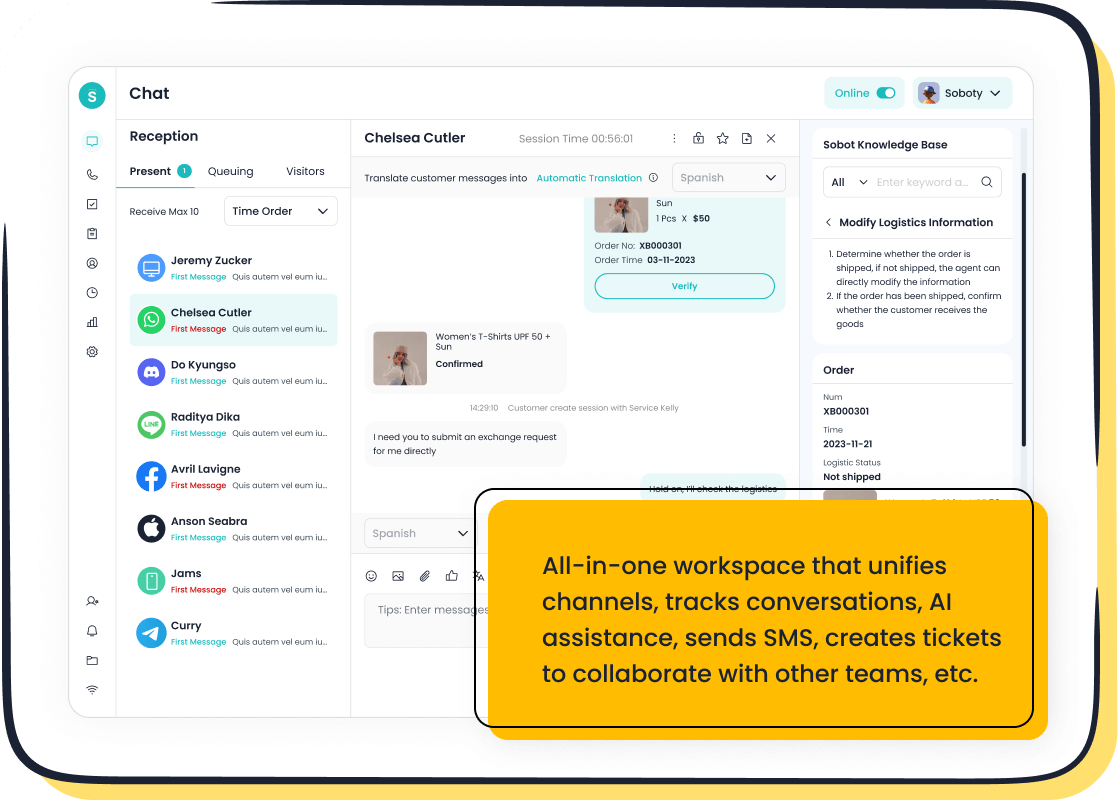
Sobot Overview
You want a platform that makes customer conversations easy. Sobot Live Chat gives you a single workspace where you can manage chats, tickets, and messages from every channel. You can connect with customers on your website, mobile app, or social media like WhatsApp, Facebook, Instagram, Telegram, and Discord. Sobot started in Singapore and now supports over 10,000 brands, including Samsung, OPPO, and Luckin Coffee. You get a stable system with 99.99% uptime and a team that values innovation and efficiency.
Key Features
Sobot Live Chat packs a lot of power into one platform. Here’s what you get:
- Omnichannel support for websites, apps, and social media
- AI-powered tools for fast responses and smart customer profiling
- Built-in analytics with over 300 reports and thousands of indicators
- Seamless integration with Amazon, Shopify, Salesforce, and more
- Customizable widgets and auto-translation for global reach
- Unified workspace for agents to track and respond to all conversations
- Satisfaction surveys and customer segmentation
Note: Sobot also offers chatbot, AI Agent, voice call center, voicebot, ticketing system, and a full customer contact center.
Pros & Unique Advantages
You get some unique benefits with Sobot Live Chat:
- Connect with customers on any channel—never miss a message
- Five-AI system covers omnichannel, scenario-based, and generative AI
- Boost conversion rates by 38% with precise profiling
- Keep all conversations in one place for easy follow-up
- Access rich analytics to improve your service and make smart decisions
| Feature | Sobot Live Chat | Competitors |
|---|---|---|
| Omnichannel | Connects customers from all channels | Often focus on a single core product |
| AI Tools | Five-AI system across multiple dimensions | Limited AI capabilities |
| Analytics | 300+ reports, thousands of indicators | Less comprehensive analytics |
| Integration | Seamless with Amazon, Shopify, Salesforce | May require multiple systems |
Pricing
You can start with a free trial. Sobot offers custom pricing based on your needs. You get flexible plans that fit any business size. For details, visit Sobot’s website.
Best Use Cases
Sobot Live Chat works well for retail, finance, gaming, education, and enterprise services. You can use it to boost sales, handle support, or manage marketing campaigns. If you want chat support services that fit any industry, Sobot is a smart choice.
Intercom Review
Overview
You want a tool that helps your team connect with customers fast. Intercom stands out as one of the most popular chat support services for customer service teams. You can centralize conversations from email, chat, and social media. This platform lets you handle multiple chats at once, so your agents stay productive. Intercom gives you real-time support, which boosts customer satisfaction and keeps your response times low.
Features
Intercom offers a wide range of features that make your customer service smoother:
- Centralized inbox for all channels
- Real-time messaging and chat support services
- Automated workflows and bots for quick answers
- Customer segmentation for targeted support
- Product tours and onboarding tools
- Advanced analytics to track performance
You can see how Intercom helps teams work smarter. At Vend, agent productivity increased by 48%. At tado°, first-response time dropped by 92%. Customer satisfaction scores stayed above 90%.
Pros & Cons
Let’s break down the strengths and weaknesses of Intercom:
Pros:
- Easy to use and set up
- Handles multiple conversations at once
- Improves agent productivity and response times
- Keeps customer satisfaction high
Cons:
- Pricing can get expensive as your team grows
- Some advanced features require higher-tier plans
“With email, our response time used to be in the multi-hour range, but with Intercom we’ve been able to drop that to 10 minutes. Contacts per agent increased by 48% while our CSAT score stayed above 90%.” – Jack Harrison-Sherlock, Product Manager at Vend
Pricing
Intercom offers flexible pricing for different business sizes. You can start with a basic plan for small teams or upgrade as you grow. Here’s a quick look:
| Business Size | Pricing Plan | Key Features |
|---|---|---|
| Small | Lower-tier | Automated messaging, basic support |
| Medium | Mid-tier | Email campaigns, product tours |
| Large | Enterprise | Advanced analytics, comprehensive support |
You can try Intercom with a free trial and see if it fits your chat support services needs.
Best For
Intercom works best for businesses that want to scale their chat support services. If you run a small startup, a mid-sized company, or a large enterprise, you can find a plan that fits. You get tools for real-time support, automation, and analytics. Intercom helps you deliver fast, personalized service and keeps your customers happy.
Zendesk Chat Review
Overview
If you want a well-known name in chat support services, Zendesk Chat stands out. Many customer service teams trust Zendesk because it brings all your conversations into one place. You can talk to customers on your website, social media, or mobile app. Zendesk Chat helps you scale as your business grows. You get a platform with a strong market presence and a reputation for reliability. Many teams like Zendesk Chat for its easy-to-use interface and continuous updates in AI and automation.
Features
Zendesk Chat gives you a full set of features for chat support services. You can use real-time messaging, automated workflows, and customer segmentation. The platform lets you set up chatbots to answer common questions. You also get analytics to track your team’s performance. Zendesk Chat supports integration with other tools, so you can connect your CRM or help desk. You can customize your chat widget, but some users say options are limited. If you want to automate tasks and manage tickets, Zendesk Chat covers those needs.
Pros & Cons
You want to know what works and what doesn’t with Zendesk Chat. Here’s a quick look at what users say:
| Strengths | Weaknesses |
|---|---|
| Ease of use | Challenging to train new agents |
| Scalability | Significant price increase for scaling |
| Continuous innovation in AI | Poor customer service feedback |
| Comprehensive feature set | Longer learning curve |
| Proven reliability and security | High costs for advanced features |
| Excellent automation and workflow | Limited customization options |
Tip: Zendesk Chat gives you powerful automation, but you may need extra training for new agents.
Pricing
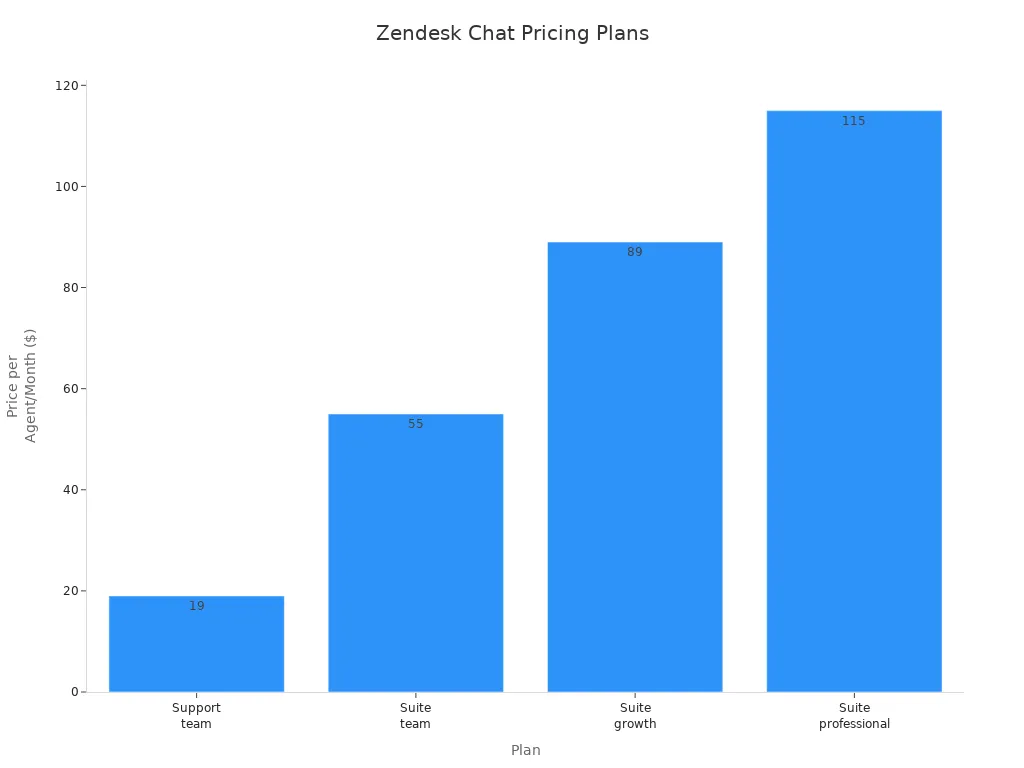
Zendesk Chat offers several plans for chat support services. You can start with the Support Team plan at $19 per agent each month. If you need more features, Suite Team costs $55, Suite Growth is $89, and Suite Professional is $115 per agent per month. For large businesses, Suite Enterprise has custom pricing.
| Plan | Price per Agent/Month |
|---|---|
| Support Team | $19 |
| Suite Team | $55 |
| Suite Growth | $89 |
| Suite Professional | $115 |
| Suite Enterprise | Custom Pricing |
You can try Zendesk Chat with a free trial before you decide.
Best For
Zendesk Chat fits teams that want reliable chat support services and need to scale. If you run a growing business or a large support team, Zendesk Chat helps you manage high volumes of conversations. You get strong automation, analytics, and integration options. Zendesk Chat works best for companies that want a trusted platform with proven results in customer service.
LiveChat Review
Overview
You want a chat support service that feels friendly and fast. LiveChat gives you a platform where you can talk to customers in real time. You can use it on your website or mobile app. Many customer service teams like LiveChat because it helps them connect with people quickly. You get tools that make conversations smooth and easy. LiveChat works for small businesses and big companies. You can set up the system fast and start helping customers right away.
Features
LiveChat brings a lot to the table. You can see how it stands out with these features:
| Feature | Description |
|---|---|
| Seamless Integration | Connects with CRM, e-commerce, and other tools. You can manage data and workflow easily. |
| Customization and Branding | Change chat widgets to match your brand. Your chat support services look professional and consistent. |
| Advanced Reporting and Analytics | Track customer interactions and agent performance. You can use these insights to grow your business. |
| Mobile App Availability | Support customers on-the-go. Your team can help from anywhere. |
| Proactive Chat Invitations | Reach out to customers based on their behavior. You can boost conversions and solve problems faster. |
Tip: You can use LiveChat to send proactive messages. This helps you engage visitors before they leave your site.
Pros & Cons
You want to know what makes LiveChat a good choice for chat support services. Here’s a quick look:
| Advantages of LiveChat | Disadvantages of LiveChat |
|---|---|
| Personal touch | Limited availability |
| Handling complex issues | Higher costs |
| Upselling opportunities | Longer wait times |
LiveChat lets you give a personal touch to every conversation. You can handle tough questions and even upsell products. Some users say costs can be high, and wait times may increase during busy hours.
Pricing
LiveChat offers simple pricing. You pay $20 per agent each month. You can try it for free before you decide. The price includes all main features, so you don’t need to worry about hidden fees. You can add more agents as your team grows. This makes LiveChat flexible for chat support services in any business.
Best For
LiveChat fits teams that want easy setup and quick results. You can use it for chat support services in retail, tech, or education. If you want to give customers a personal experience and handle complex issues, LiveChat works well. You can scale up as your business grows. Many companies choose LiveChat for its reliable tools and friendly interface.
Freshchat Review
Overview
You want chat support services that feel modern and flexible. Freshchat gives you a platform where you can talk to customers in real time. You can use it for messaging, automation, and analytics. Freshchat helps you manage conversations from websites, apps, and social media. You get a unified inbox that keeps everything organized. Many teams like Freshchat because it works for small businesses and large enterprises. You can scale up as your needs grow.
Features
Freshchat packs a lot of features into its chat support services. Here’s what you get:
- Live Chat Messaging: You can chat with customers instantly and personalize your responses.
- Chatbot: Automate support across channels. Bots work 24/7 and use AI to answer questions.
- Unified Inbox: All conversations from different platforms come together in one workspace.
- Analytics: Track ticket volume, agent productivity, and customer satisfaction.
Tip: Freshchat lets you connect with customers on WhatsApp and Facebook Messenger. You can reach people where they spend their time.
Pros & Cons
Let’s look at what makes Freshchat a good choice for chat support services:
Pros
- Easy to set up and use
- Offers a free plan for small teams
- Powerful automation with chatbots
- Supports multiple channels
Cons
- Advanced features cost more
- Some users want deeper customization
Pricing
Freshchat gives you flexible pricing for chat support services. You can start with a free trial or a free plan for up to 10 agents. Paid plans add more features and channels.
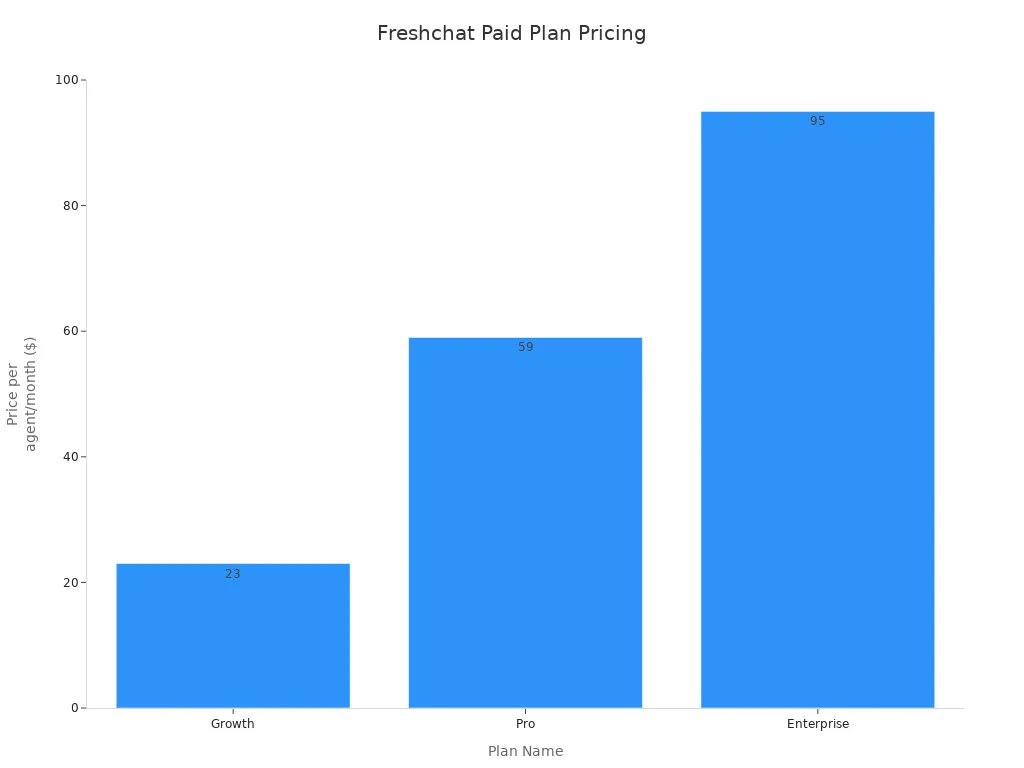
| Plan | Price (per agent/month) | Features |
|---|---|---|
| Free Trial | N/A | 14-day trial with all Enterprise features |
| Free Plan | N/A | Free forever for up to 10 agents, includes ticketing, knowledge base, and pre-built reports |
| Growth | $23 | Adds WhatsApp, Facebook Messenger, and more channels |
| Pro | $59 | Custom dashboards, routing, SLA policies |
| Enterprise | $95 | Skills-based assignments, extra security |
Best For
Freshchat fits many industries. You can use chat support services in healthcare to schedule appointments or answer questions. In telecom, bots help run tests and spot fraud. Retail teams use Freshchat to remind customers about abandoned carts and suggest products. Government offices use chatbots for citizen queries and form filling. Manufacturing teams use chat support services to connect stakeholders and manage engagement tasks.
| Industry | Use Case Description |
|---|---|
| Healthcare | Chatbots help schedule appointments and offer 24/7 support. |
| Telecom | Bots run diagnostic tests and detect fraud. |
| Government | Chatbots answer citizen questions and assist with forms. |
| Retail | Remind customers about carts and suggest products. |
| Manufacturing | Facilitate communication and handle engagement tasks. |
You get chat support services that adapt to your business. Freshchat helps you deliver fast, personalized service and keeps your customers happy.
Tidio Review
Overview
You want chat support services that are smart and easy to use. Tidio gives you both. This platform stands out because it uses AI-powered automations. Its chatbot, Lyro, can answer up to 70% of common customer questions by itself. That means your team can focus on the tough stuff while Lyro handles the basics. Tidio works well for small businesses and growing teams. You get a user-friendly dashboard that brings all your messages together. You can connect Tidio to Shopify, Wix, or WordPress in just a few clicks.
Features
Tidio packs a lot into its chat support services. Here’s what you get:
- AI chatbot (Lyro) that handles most customer questions automatically
- Unified inbox for all your chats, emails, and messenger apps
- Easy integration with Shopify, Wix, and WordPress
- Custom conversation flows you can build without coding
- 24/7 support for your customers, even when your team is offline
- Automation tools to send quick replies and route chats
Tip: You can set up Tidio’s chat support services in minutes, even if you’re not a tech expert.
Pros & Cons
Let’s look at what makes Tidio a good choice for chat support services:
Pros:
- Lyro answers up to 70% of questions, so your team saves time
- User-friendly interface helps you get started fast
- Works with popular platforms like Shopify and Wix
- Unified inbox keeps all messages in one place
- Free plan and clear pricing for small businesses
Cons:
- Like all chatbots, Lyro may not solve every problem. Some customers might want to talk to a real person for complex issues.
Pricing
Tidio offers a free plan, which is great if you want to try chat support services without risk. Paid plans start at $19 per month. You get more features as you upgrade, but even the basic plan covers most needs for small teams. Tidio’s pricing is clear, so you know what you’re paying for.
| Plan | Price (per month) | Key Features |
|---|---|---|
| Free | $0 | Basic live chat, 50 chatbot triggers |
| Starter | $19 | More automation, unlimited chats |
| Growth | $39 | Advanced AI, analytics, integrations |
Best For
Tidio fits small businesses, online stores, and anyone who wants simple chat support services. If you use Shopify, Wix, or WordPress, you’ll love how easy it is to connect. Tidio helps you answer customers fast, boost satisfaction, and grow your business with less effort.
Feature Comparison
When you look at live chat software, you want to know how each platform stacks up. Let’s break down the most important features so you can see which chat support services fit your team best. We’ll look at automation, integrations, customization, analytics, and mobile support. This way, you get a clear picture of what each tool can do for your business.
Automation & Chatbots
Automation and chatbots help your team save time and answer customers faster. You don’t want your agents stuck on simple questions all day. Instead, let smart bots handle the basics while your team focuses on more complex issues.
Here’s a quick comparison of automation and chatbot features:
| Platform | Automation Capabilities | Chatbot Features |
|---|---|---|
| Sobot Live Chat | Flexible flow builder for conversation paths, basic automation | Real-time chat with bots and human agents |
| Intercom | Automated workflows, advanced bots, targeted messaging | Custom bots, product tours, and onboarding |
| Zendesk Chat | Automated triggers, knowledge-base feed | Chatbot extensions for basic conversational flows |
| LiveChat | Automated greetings, canned responses | Chatbot add-ons, simple automation |
| Freshchat | AI-powered chatbots, customizable flow builder | Live chat with human agent intervention |
| Tidio | Drag-and-drop flow builder for automated paths | AI agent for common questions, live chat takeover |
You can see that Sobot Live Chat gives you a flexible flow builder. You can set up conversation paths that match your business needs. The platform lets you use both bots and human agents in real time. This means your customers always get help, even outside business hours. Sobot’s automation helps you handle high volumes without missing a beat.
Other platforms like Intercom and Freshchat also offer strong automation. Intercom stands out with advanced bots and targeted messaging. Freshchat uses AI-powered bots for common questions. Tidio makes it easy with a drag-and-drop builder. Zendesk Chat and LiveChat focus on simple triggers and canned responses.
Tip: If you want to boost efficiency and never miss a customer, look for chat support services with strong automation and chatbot tools.
Integrations
Integrations let you connect your chat platform with other business tools. You might want to link your CRM, e-commerce store, or marketing software. This makes your workflow smoother and keeps all your data in one place.
Let’s see how the top platforms compare:
| Platform | Integration Options |
|---|---|
| Sobot Live Chat | Integrates with Amazon, Shopify, Salesforce, webhooks for lead capture and CRM transfer |
| Intercom | Connects with CRMs, marketing tools, e-commerce, and custom APIs |
| Zendesk Chat | Integrates with Zendesk ticketing, CRMs, and help desk systems |
| LiveChat | Offers API and pre-built integrations for CRM, e-commerce, and business tools |
| Freshchat | Connects with CRMs, marketing automation, and e-commerce platforms |
| Tidio | Integrates with popular CRMs, email marketing, and website builders |
Sobot Live Chat stands out with seamless integration options. You can connect to Amazon, Shopify, Salesforce, and more. The platform uses webhooks for lead capture and CRM transfer, so your agents always have the latest customer info. This helps you deliver a smooth experience from sales to support.
LiveChat and Intercom also offer strong integration features. LiveChat gives you a powerful API and pre-built connections. Intercom connects with many business tools, making it easy to fit into your workflow. Zendesk Chat links with its own ticketing system and other CRMs. Freshchat and Tidio focus on popular platforms like Shopify and email marketing tools.
Note: The right integrations help your team work faster and keep your customer data organized.
Customization
You want your chat widget to match your brand. Customization lets you change colors, add your logo, and adjust the look and feel. This makes your chat support services feel like a natural part of your website or app.
Here’s how customization compares:
- Sobot Live Chat: Lets you customize widgets to match your brand image. You can adjust colors, add logos, and set up rich messaging options. This helps you create a consistent experience for your customers.
- Zendesk Chat: Offers a no-code widget that you can add to your website. You can change the appearance to fit your brand.
- LiveChat: Allows you to style the chat widget for a professional and consistent look.
- Front: Gives you options to align the chat widget with your brand’s style.
- Tidio and Freshchat: Both let you tweak the chat window, so it fits your website’s design.
Sobot makes it easy to create a chat experience that feels unique to your business. You don’t need to know how to code. Just pick your colors, upload your logo, and you’re ready to go.
Pro Tip: A well-branded chat widget builds trust and makes customers feel at home.
Analytics
Analytics help you track how your team is doing. You can see how many chats you get, how fast you respond, and how happy your customers are. Good analytics let you spot trends and make better decisions.
Let’s look at what each platform offers:
- Sobot Live Chat: Brings all your conversations—chat, email, social, and voice—into one view. You get real-time dashboards, intelligent routing, and automation workflows. You can track team performance, customer satisfaction, and interaction trends. Sobot’s analytics help you make smart choices and improve your service every day.
- Intercom: Offers advanced analytics on customer engagement, response times, and agent productivity.
- Zendesk Chat: Gives you robust analytics, including chat volume and satisfaction ratings.
- LiveChat: Provides detailed reports on agent performance and customer interactions.
- Freshchat: Shows real-time analytics on chat volume, response times, and conversion rates.
- Tidio: Tracks conversation volume and response times with real-time analytics.
Sobot’s analytics stand out because you can see everything in one place. You don’t have to switch between tools. This saves time and helps your team stay focused. You can also use built-in reports to measure customer satisfaction and agent performance.
Note: Analytics are your secret weapon. Use them to spot problems early and keep your customers happy.
Mobile Support
Your customers use phones and tablets every day. You need chat support services that work on any device. Mobile support means your team can help customers from anywhere, and your customers can reach you on the go.
Here’s how the top platforms handle mobile support:
- Sobot Live Chat: Supports mobile apps and responsive chat widgets. Your agents can reply from their phones, and customers can chat from any device.
- Intercom: Offers mobile apps for agents and a mobile-friendly chat widget.
- Zendesk Chat: Has mobile apps and a responsive chat interface.
- LiveChat: Provides a mobile app for agents and a chat widget that works on all devices.
- Freshchat: Supports mobile apps and a responsive chat experience.
- Tidio: Lets you manage chats from a mobile app and offers a mobile-ready widget.
With Sobot Live Chat, you never miss a message. Your team can answer questions from the office, at home, or on the move. Customers get the same great service, no matter how they reach out.
Tip: Mobile support keeps your business running smoothly, even when you’re not at your desk.
When you compare these features, you see that Sobot Live Chat brings together strong automation, seamless integrations, easy customization, powerful analytics, and full mobile support. You get a platform that helps your team work smarter and keeps your customers coming back. If you want chat support services that grow with your business and fit any industry, Sobot Live Chat is a top choice.
Choosing Live Chat Software
Selecting the right live chat software can feel overwhelming, but you can make a smart choice by breaking it down step by step. Let’s walk through what you should consider so your team gets the best fit for your business.
Team Size & Needs
Start by thinking about your team and what you want to achieve. Every business is different, so your needs might not match someone else’s. Here’s a simple way to figure out what works for you:
-
Define Your Business Goals
Ask yourself what you want from live chat. Do you want faster responses? More sales? Better customer satisfaction? Write down your main goals. -
Assess Team Size
Count how many people will use the software. A small team might need something simple. A big team may want advanced tools and more automation. -
Prioritize Essential Features
Make a list of must-have features. Maybe you need chatbots, analytics, or omnichannel support. Focus on what will help your team the most. -
Check Usability and Integration
Choose a platform that’s easy for your team to learn. Make sure it works well with your current systems, like your CRM or e-commerce tools. -
Think About Growth
Pick software that can grow with you. If you plan to add more agents or channels, you don’t want to switch platforms later. -
Test with a Free Trial
Try out the software before you commit. Most platforms, including Sobot, offer free trials so you can see how it fits your workflow.
Tip: Sobot Live Chat works for all team sizes, from startups to global brands. You can start small and add more users or channels as your business grows.
Budget
Money matters when you pick new software. You want something that fits your budget now and in the future. Here’s how you can plan:
-
Set a Budget
Decide how much you can spend each month. Remember to include costs for extra features or more users as your team grows. -
Compare Pricing Models
Some platforms charge per agent, while others offer custom plans. Sobot gives you flexible pricing, so you only pay for what you need. -
Look for Value, Not Just Price
The cheapest option isn’t always the best. Think about the features and support you get for your money. -
Plan for Scaling
Make sure the software won’t get too expensive as you add more agents or channels. -
Check for Hidden Costs
Watch out for extra fees for integrations, analytics, or premium support.
Note: Sobot’s flexible pricing adapts as your business changes. You can start with a basic plan and upgrade when you need more features.
Matching Features
You want live chat software that matches your business needs. Not every platform offers the same tools, so it’s important to check what’s included.
- Start with your main goals. Do you want to boost sales, improve support, or both?
- Check if the software supports all your channels—website, app, social media.
- Look for automation and AI features. These help your team handle more chats and give faster answers.
- Make sure the platform integrates with your current tools, like your CRM or online store.
- Test the user experience for both agents and customers. A simple, friendly interface saves time and reduces mistakes.
- Try out analytics and reporting. Good data helps you spot trends and improve service.
- Use free trials or demos to see if the software really fits your needs.
Sobot Live Chat stands out with omnichannel support, AI-powered tools, and deep analytics. You can customize widgets, automate workflows, and connect with popular platforms like Shopify and Salesforce. This makes it easy to match the software to your business goals.
Scalability
Your business might be small today, but you want software that grows with you. Scalability means you can add more users, channels, or features without starting over.
Here’s a quick look at how leading platforms—including Sobot—handle scalability:
| Scalability Feature | Description |
|---|---|
| Start with one seat and scale to thousands | Begin with a single user and expand as your team grows. |
| Add channels as needed | Integrate new communication channels without switching platforms. |
| Cloud-based infrastructure | No hardware needed, so you can scale up quickly and easily. |
| Flexible pricing | Adjust your plan as your needs change, without big jumps in cost. |
Sobot Live Chat lets you start small and scale up as your business grows. You can add new channels, invite more agents, and unlock advanced features when you need them. You never have to worry about outgrowing your chat support services.
Pro Tip: Always choose a platform that can grow with you. Switching software later can be costly and time-consuming.
When you follow these steps, you’ll find live chat software that fits your team, your budget, and your business goals. Sobot Live Chat is a great choice for companies of any size or industry. You get flexibility, powerful features, and the ability to scale as you grow. Take your time, test your options, and pick the chat support services that help your team shine.
You saw how live chat software helps your team work faster and keeps customers happy. Each tool fits different needs. For example, Sobot Live Chat works well for all industries and scales as you grow. Check out this quick guide:
| Software | Best Fit for | Key Features |
|---|---|---|
| Zendesk Chat | Enterprise-Level Solutions | Smart automation, detailed reports |
| Tidio | Small to Medium Businesses | Low-cost, blends live chat, chatbots, email |
| Kayako Live Chat | SaaS, Fintech, eCommerce | Real-time messaging, context-aware AI |
Think about your goals, team size, and budget. Chat support services boost productivity and customer satisfaction. Try a free trial and see what works best for you.
FAQ
What are chat support services?
Chat support services let you talk with customers in real time. You can answer questions, solve problems, and build trust. These tools help your team work faster and keep customers happy.
How do chat support services improve customer satisfaction?
You give quick answers and personal help. Customers feel valued and get solutions fast. Studies show live chat boosts satisfaction scores by up to 90%.
Can I use chat support services on my website and social media?
Yes! Most chat support services work on websites, apps, and platforms like WhatsApp, Facebook, and Instagram. You reach customers wherever they are.
Do chat support services offer automation and chatbots?
Many chat support services include automation and chatbots. You can handle simple questions automatically. Your team focuses on complex issues. This saves time and increases efficiency.
How do I choose the best chat support services for my business?
Start with your goals. Look at features, pricing, and integrations. Try a free trial. Make sure the chat support services fit your team size and industry.
See Also
Best Live Chat Tools You Can Trust in 2024
Ten Essential Live Chat Solutions for 2024
Comparative Review of Live Chat Solutions for 2024

