5 Steps to a Unified Customer Service Platform


You know the customer struggle. Fragmented channels make your customer feel lost, as 55% of consumers feel they are talking to separate departments, not one company. You can fix this. You can integrate customer service platform tools with a clear framework. This integration helps your customer. Sobot knows this journey helps every customer. This guide gives you five steps for a smooth transition and successful integration.
- Assess Systems and Define Goals
- Select the Right Unified Platform
- Plan for Seamless Data Integration
- Integrate and Train Your Team
- Measure and Optimize
A unified platform improves the customer experience. It builds customer loyalty for your business and helps each customer feel valued.
Step 1: Assess Systems and Define Goals
The first step to unify your customer service is a thorough assessment. You need to know where you are before you can plan where you are going. This phase gives you the foundation for a successful project. It provides the business intelligence needed to make smart decisions.
Audit Existing Tools and Channels
First, you must take inventory of your current technology. Many businesses use a mix of tools that do not communicate with each other. Your stack might include:
- Helpdesk software like Zendesk
- Live chat tools such as LiveAgent
- CRM tools with support features
- Social media management tools like Podium
Listing every tool helps you see the full picture. This audit reveals gaps and redundancies in how you serve each customer. It is the starting point for better customer data integration.
Identify Customer and Agent Pain Points
Next, you need to understand the problems your current setup creates. An unresponsive support team is a major issue for any customer. Your agents also face challenges. They waste valuable time switching between screens to find information. This fragmented workflow frustrates both the agent and the customer. Poor integration prevents a single view of the customer. This lack of customer data integration makes personalization difficult. You need strong business intelligence to uncover these issues. Good business intelligence offers powerful customer insights.
Tip: Survey your agents and your customer base. Ask them directly about their biggest challenges. Their feedback provides the intelligence you need to improve.
Set SMART Goals for the New Platform
With your audit and pain points identified, you can set clear goals. Use the SMART framework (Specific, Measurable, Attainable, Relevant, Timely) to guide you. Your goals should directly address the problems you found. For example, you might aim to:
- Reduce customer wait times by 30% in the next quarter.
- Improve first-contact resolution by 15% within six months.
- Increase the quality of customer service responses.
These goals will help you choose the right platform and measure success. A successful integration depends on this clarity. When you integrate customer service platform tools, you need a target. This process ensures your investment in customer data integration and new intelligence tools delivers real value for every customer.
Step 2: Select the Right Unified Platform
After setting your goals, you can now find the right technology. This step is crucial for turning your vision into reality. You need a platform that meets your current needs and grows with your business. The right choice provides powerful business intelligence for every customer interaction.
List Essential Omnichannel Features
Your customers expect a connected experience. In fact, 63% of customers anticipate smooth transitions when moving between different communication channels. A true omnichannel platform makes this possible. You should look for an all-in-one solution that unifies your support. Key features to demand include:
- A Voice Call Center for direct customer conversations.

- Live Chat for real-time website assistance.
- An AI Chatbot to provide instant answers and gather customer data.
- A Ticketing System to manage and track every customer issue.
This combination gives your team the intelligence to handle any customer inquiry efficiently. It is the foundation for better customer data integration.
Compare Vendors on Scalability and Security
Not all platforms are created equal. You must compare vendors on their ability to scale and protect data. Look for a provider with a proven high-stability system, such as one offering a 99.99% SLA. Official partnerships, like being a WhatsApp Business Solution Provider (BSP), also show reliability. A key feature is the ability to achieve seamless data integration with your existing CRM (like Salesforce) and e-commerce platforms (like Shopify). This integration is vital for successful customer data integration.
For security, verify that vendors hold key certifications. These prove their commitment to protecting customer information.
- SOC 2 Type II: Shows a vendor has effective operational controls.
- ISO 27001: An international standard for information security.
This level of business intelligence ensures your customer data integration is secure.
Request Demos and Conduct Team Trials
Finally, you must test the platforms. A demo is your chance to see the software in action and ask tough questions. It helps you gather the final intelligence needed to make a decision. A trial period allows your team to experience the workflow and see how it improves their ability to help each customer.
Tip: During a demo, ask vendors specific questions to gauge their capabilities.
- How does your platform handle integration with our other systems?
- Can you explain how your AI provides actionable business intelligence?
- What security certifications do you have to protect our customer data?
This is the last step before you integrate customer service platform tools. It ensures the platform you choose will truly unify the customer experience.
Step 3: Plan for Seamless Data Integration
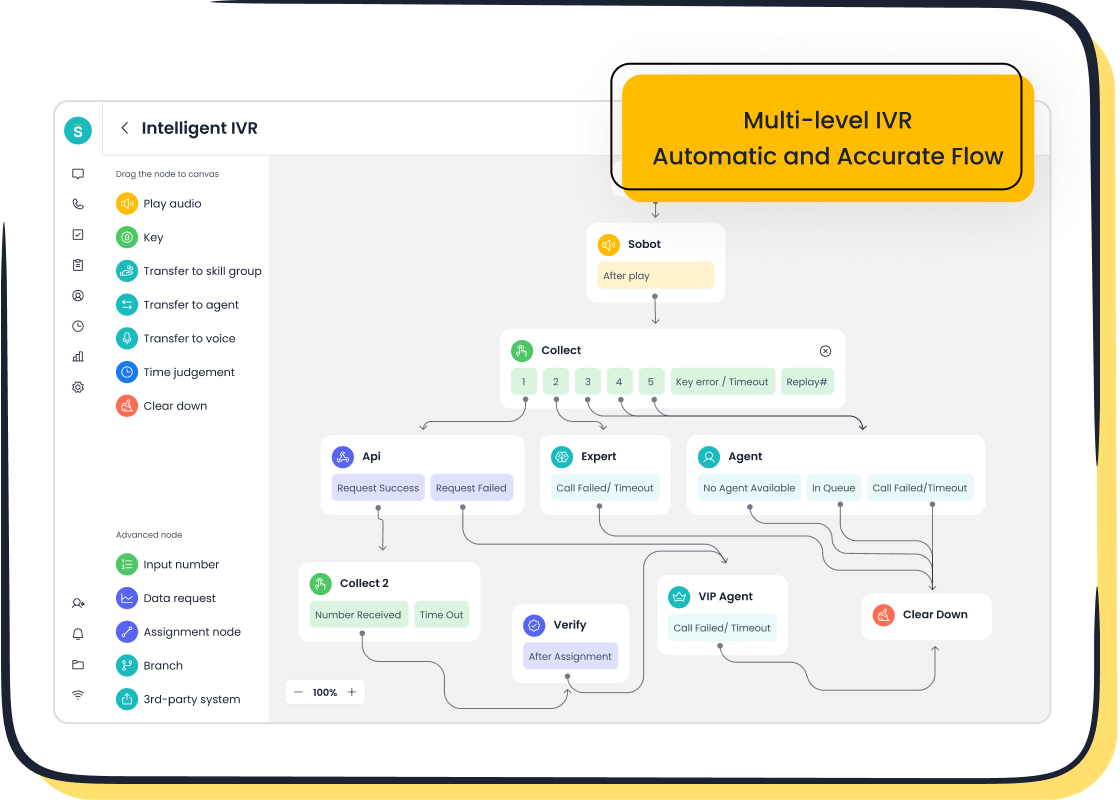
You have selected your platform. Now you need a solid plan. This step ensures a smooth transition from your old systems to the new one. A good plan is the key to successful customer data integration and avoids major headaches. Proper planning makes the entire integration process predictable and manageable.
Develop a Detailed Project Roadmap
A project roadmap is your guide. It outlines every task, timeline, and team member's role. This document ensures everyone is on the same page. Your roadmap should clearly define what success looks like for each customer.
- Set clear goals. Define your objectives and how you will measure them.
- Build your team. Include people from different departments to cover all needs.
- Create a realistic timeline. Work with your new platform partner to set achievable milestones for the integration.
Map the Customer Data Migration Process
Moving your customer data is a critical task. You must map out how information will transfer from old systems to the new unified platform. This process is the core of your data integration architecture. A mistake here can lead to lost information and a poor experience for every customer.
Tip: Start by cleaning your existing data. Removing duplicate or outdated information ensures you only migrate high-quality data. This improves the performance of your new system from day one.
A clear map for customer data integration prevents common problems like system downtime or security risks. Your goal is a complete and accurate transfer of every customer record. This careful approach to customer data integration gives your team a reliable, single view of the customer.
Create a Stakeholder Communication Plan
Everyone involved in the project needs to stay informed. A communication plan details who gets updates, when they get them, and how. This transparency builds trust and reduces resistance to change. Your plan should explain how the new platform will improve the experience for each customer. Clear communication is essential for a seamless data integration. It ensures your team understands the benefits of the new customer data integration. This keeps the project moving forward smoothly and helps every customer feel the positive impact faster.
Step 4: Integrate Your Customer Service Platform and Train Your Team
You have a plan. Now it is time to act. This step brings your new system to life. You will integrate customer service platform tools and prepare your team for success. This process requires careful execution to ensure a smooth transition for every customer.
Implement a Phased Rollout
A big-bang launch is risky. Instead, you should use a phased rollout. This approach helps you manage complexity and reduce risks. You can introduce the new platform to small groups one at a time. This strategy allows for better resource allocation and stakeholder coordination. It also provides a feedback loop. Early users can help you find and fix issues before everyone uses the system. This careful integration ensures your customer data integration is solid. A phased rollout makes the final customer data integration more reliable.
Success Stories:
- AstraZeneca used a phased rollout for its new system. This led to a 20% improvement in system performance.
- Partners HealthCare improved billing accuracy by 25% with a phased approach. This helped create a better experience for each customer.
Conduct Comprehensive Team Training
Your team needs to feel confident using the new tools. Comprehensive training is essential for this. Your training should cover the new systems and tools in detail. You can use practice and role-playing to help agents handle common customer situations. This hands-on practice builds skills and prepares them for real interactions with a customer. The goal is to make your team experts on the new platform. This expertise directly improves the quality of service for each customer. The integration of new tools is only successful if your team can use them well. This training is a key part of your customer data integration strategy.
Create Accessible Support Resources
Training does not end after the first session. Your team needs ongoing support. You should create resources that are easy to find and use. These resources help your team help each customer effectively.
- Online learning modules let agents learn at their own pace.
- Detailed documentation like user manuals provides quick answers.
- Q&A sessions allow your team to ask questions and solve problems together.
These resources support the seamless data integration you worked to achieve. They ensure your team can always find the information they need to support every customer. This finalizes the customer data integration process by empowering your team.
Step 5: Measure and Optimize the Customer Experience
Your unified platform is live. The final step is to measure, learn, and improve. This ongoing process turns good service into a great customer experience. You use data to refine your operations and deliver more value to every customer.
Track KPIs Against Initial Goals
You must track your performance against the goals you set in Step 1. Key Performance Indicators (KPIs) give you the business intelligence to see what works. Your new platform provides the intelligence to monitor these metrics. Focus on a few important ones:
- First Contact Resolution (FCR): Aim for a rate between 70-85% to meet industry standards. This shows you solve a customer issue on the first try.
- Average Handle Time (AHT): Measure the time an agent spends with each customer. This helps you find efficiency gains.
- Customer Satisfaction (CSAT): This score directly tells you how happy each customer is with your service.
This real-time data analysis provides the business intelligence you need to make smart decisions.
Gather Agent and Customer Feedback
Numbers tell part of the story. You also need qualitative feedback. You can gather valuable customer insights by sending follow-up surveys after an interaction. Ask your agents for their thoughts too. They know the new workflows best. This feedback gives you the intelligence to understand the true quality of service for each customer. Analyzing this information helps you identify hidden problems and opportunities for every customer.
Success Story: How OPPO Optimized Its Service Smart device leader OPPO used Sobot to unify its platform. The results show the power of measurement. OPPO achieved an 83% chatbot resolution rate and a 94% positive feedback rate. This efficiency and high customer satisfaction led to a 57% increase in the repurchase rate. These metrics prove that a unified system directly improves the experience for each customer and boosts business growth.
Continuously Iterate and Refine Workflows
You should use your data and feedback to make continuous improvements. Top companies like IBM and Delta constantly refine their processes. This iterative approach helps you adapt to changing customer needs. Small workflow adjustments can lead to big gains. They reduce agent effort and improve the service for each customer. This commitment to optimization is the final piece of business intelligence. It ensures your platform always delivers an excellent experience for every single customer.
You now have a clear path to success. The five steps—Assess, Select, Plan, Integrate, and Measure—provide a repeatable framework. When you integrate customer service platform tools, you make a strategic investment. This integration creates a better experience for every customer. A positive experience for each customer is a strong predictor of loyalty for your brand. This seamless data integration helps every customer feel valued. Your customer will reward you. The integration helps each customer and your business.
Ready to build a better support operation for each customer? Embark on Your Contact Journey by assessing the needs of your customer today.
FAQ
What is a unified customer service platform?
A unified platform brings all your customer communication channels into one place. It combines tools like voice calls, live chat, and ticketing. This gives your team a single view of every customer, making your support faster and more consistent.
How long does the integration process take?
The timeline for integration varies. It depends on the complexity of your current systems and the amount of data you need to move. A phased rollout, as discussed in Step 4, helps you manage the process effectively and ensures a smooth transition.
Can small businesses benefit from a unified platform?
Yes, absolutely. Unified platforms help businesses of any size. They improve efficiency and provide a professional customer experience. Many solutions, like Sobot, offer scalable options that grow with your business, making them a smart investment from the start.
What is the most important first step?
The most important first step is to assess your current systems and define your goals. You need to understand your team's and customers' pain points. This initial assessment guides your entire project and ensures you choose the right solution for your needs.
See Also
A 10-Step Blueprint for Deploying Omnichannel Contact Center Solutions Effectively
Essential Tips for Selecting the Best Social Media Customer Service Software
Understanding Quality Management System Principles for Call Center Excellence
Key Features to Look for in CRM Call Center Software
Your Comprehensive Guide to Omnichannel Call Center Software Selection

