10 Tips for Unified Social Media Engagement


You can transform your social media customer service from a simple support channel into a powerhouse for building your brand's reputation. Many brands struggle with a fragmented social media strategy. This leads to slow responses that hurt customer satisfaction. Your customer expects a fast and helpful interaction.
Did you know? 79% of customers expect a response on social media within 24 hours. Many want a reply in under 60 minutes.
A unified social media strategy is the key to improving the customer experience. This guide will show you how to unify social media customer service. You can build stronger relationships and boost satisfaction with a better social media customer care plan. A platform like Sobot helps create this seamless engagement. This is your roadmap to excellent customer support and better social media customer service.
Foundations of Social Media Customer Care

Before you can master unified engagement, you need to build a strong foundation. These first three tips will help you create the core structure for a successful social media customer service strategy. Think of this as building the command center for your entire operation.
Tip 1: Establish a Unified Brand Voice
How does your brand sound online? Is it funny, serious, super helpful, or a mix of everything? A consistent brand voice is your brand’s personality. It’s how you talk to your customer across all channels. When your voice is consistent, you build trust. Customers know what to expect from you. This reliability is key to earning their loyalty.
A unified voice helps you stand out. In a crowded market, a clear identity makes it easy for people to recognize and connect with you. In fact, brands that present themselves uniformly are 3.5 times more likely to enjoy excellent brand visibility.
💡 Pro Tip: Your brand voice should be consistent, but your tone can adapt. You might be more playful on TikTok and more formal on LinkedIn. The key is that it always feels like it’s coming from the same brand.
- Duolingo uses its green owl mascot, Duo, to create a fun and slightly unhinged personality on TikTok, which is consistent with its goal of making learning fun.
- Ryanair uses a jokey, self-deprecating tone on social media that aligns with its low-cost, no-frills identity.
- The Washington Post adapts its tone to be witty on TikTok, but each post still delivers on its core mission: providing insight into a news story.
To build your unified voice, ask these questions:
- If my brand were a person, what three words would describe its personality?
- What is our relationship with our customers? Are we a teacher, a friend, or an expert guide?
- What words or phrases should we always use? Which ones should we avoid?
Answering these helps you create a guide for anyone managing your social media customer service. This ensures every reply, from handling complaints to answering questions, strengthens your brand identity and boosts customer satisfaction.
Tip 2: Centralize Your Social Media Customer Service
Are your team members jumping between Facebook, Instagram, X (formerly Twitter), and WhatsApp to answer messages? This is a recipe for disaster. Messages get missed. Responses are slow. Two agents might even reply to the same customer. This fragmented approach hurts your efficiency and frustrates your customers.
You need a single source of truth. Centralizing your social media customer service means bringing all your customer conversations from every channel into one place.
Imagine this scenario:
- Before: A customer sends a DM on Instagram about a broken product. An hour later, they send a follow-up on Facebook. A different agent sees the Facebook message but has no idea about the Instagram DM. The customer has to explain their problem all over again. Their satisfaction drops with every repeated word.
- After: Both messages appear in one unified inbox. The agent sees the entire conversation history instantly. They can respond quickly with all the context, providing fast and professional customer service.
This is the power of a centralized platform. Tools like Sobot's Omnichannel Solution create a unified inbox that consolidates messages from all your channels into a single, AI-enhanced workspace. This provides your team with a complete view of every customer interaction.
Here’s how centralizing your multi-channel support helps:
- No More Missed Messages: All inquiries are in one feed, so nothing falls through the cracks.
- Faster Responses: Teams can collaborate, assign conversations, and use automation to improve response times and customer satisfaction.
- Better Teamwork: Agents can leave internal notes on a customer conversation, ensuring a smooth handover if an issue needs escalation. This provides seamless support.
- Increased Efficiency: Companies using Sobot often see a 30-40% improvement in agent efficiency. The AI can handle simple, repetitive questions, freeing up your human agents to focus on complex customer inquiries.
Centralizing your social media strategy is the first technical step toward providing excellent customer support at scale.
Tip 3: Develop Standardized Response Protocols
Once you have a central inbox, you need a plan for how to handle the messages that come in. Standardized response protocols are like a playbook for your customer support team. They provide clear, step-by-step instructions for common situations. This ensures every customer receives the same high level of service, no matter which agent helps them.
Your protocols should define:
- Roles and Responsibilities: Who is responsible for which channels or types of inquiries?
- Response Time Goals (SLAs): How quickly should your team respond to a new message? Set clear Service Level Agreements (SLAs), like "all social media messages will receive a first response within 60 minutes."
- Escalation Paths: What happens when an agent can't solve a problem? Your protocol should define when and how to escalate an issue to a manager or a different department.
- Security and Privacy: How do you handle sensitive customer information? Make sure your team knows how to move a conversation to a secure channel when needed.
Creating these rules is one thing; enforcing them is another. This is where technology can provide powerful support. A platform like Sobot allows you to build these rules directly into your workflow.
With an automated ticketing system, you can:
- Automate Triage: The system can use AI to automatically categorize and assign incoming tickets based on keywords, channel, or customer history. For example, any message containing the word "refund" can be automatically tagged and assigned to the billing support team.
- Enforce SLAs: You can set timers for response and resolution times. If a ticket is approaching its SLA deadline, the system can automatically notify a manager or escalate it to ensure a timely response. The AI can even analyze a customer's language for frustration and proactively escalate the ticket before an SLA is breached.
- Streamline Workflows: For multi-step processes like returns or technical support, the system can guide agents through each step, ensuring no detail is missed. This consistency is vital for customer satisfaction.
By combining clear protocols with smart automation, you empower your team to deliver fast, consistent, and effective social media customer care. This turns your social media engagement from reactive chaos into a streamlined, brand-building machine.
How to Unify Social Media Customer Service

You have built your foundation. Now it is time to construct the operational framework that powers your unified social media strategy. The next three tips focus on the "how"—the specific actions and tools you need to merge your channels, empower your team, and protect your customer. This is where you learn how to unify social media customer service and turn your plan into a high-performing reality.
Tip 4: Integrate Automation with a Human Touch
Your customers want answers now. They do not care if it is midnight or a public holiday. At the same time, they want to feel heard and understood, especially when they are frustrated. This creates a major challenge for your social media customer service team. How can you be both lightning-fast and deeply empathetic?
The answer is to find the perfect balance between automation and human interaction. You can use AI to handle the simple, repetitive tasks so your human agents can focus on the complex, emotional issues where they truly shine.
Think of it this way:
| What AI Does Best ✅ | What Humans Do Best ❤️ |
|---|---|
| Answering common questions instantly (e.g., "What are your hours?") | Handling complex or nuanced problems |
| Providing 24/7 availability for real-time support | Showing empathy and understanding emotions |
| Gathering initial customer information | Building trust and long-term relationships |
| Scaling support without hiring more people | Using critical thinking to solve unique issues |
Many brands successfully automate 40-60% of their initial customer inquiries. The key is not the percentage, but the seamlessness of the experience. A bad handoff from a bot to a human can create more frustration than not using AI at all.
This is where a powerful tool makes all the difference. Sobot's AI-powered Chatbot is designed to be the perfect first line of defense for your social media customer service. It can provide instant, 24/7 responses to common questions across your channels. More importantly, it is built for intelligent escalation.
Scenario Part 1: The Automated Assist A customer sends a DM on Instagram at 10 PM: "My order #12345 hasn't arrived yet."
- Without Automation: The message sits unanswered until the next morning. The customer gets more frustrated.
- With Sobot's Chatbot: The AI instantly responds: "Hi! I can help with that. Let me check the status of order #12345 for you." The bot checks the integrated order system and replies: "It looks like your order was marked as delivered two days ago. Did you receive it?"
The chatbot has handled the initial query, provided immediate engagement, and gathered key information. Now, the conversation can move to the next stage if needed, with a human agent fully prepared to step in. This is how you create an efficient multi-channel support system.
Tip 5: Train Your Team on Unified Engagement
Your technology is only as good as the people using it. You can have the most advanced unified inbox and the smartest AI, but if your team is not trained to use them effectively, your social media strategy will fail. Unified engagement requires a new set of skills that go beyond just answering questions.
Your training program should equip your team to be masters of multi-channel support. Focus on these critical areas:
- Omnichannel Awareness: Your agents need to understand the etiquette for each platform. A reply on X (formerly Twitter) should be concise, while an email can be more detailed. They must provide a consistent level of support and brand voice, whether they are on Facebook, Instagram, or another channel.
- Effective Communication: Train your team to use clear, simple language. They need to know how to guide a conversation toward a positive outcome, even when a customer is angry. Role-playing difficult conversations and reviewing past interactions are great ways to build this skill and improve customer satisfaction.
- Adaptability: The world of social media changes fast. Agents must be able to adapt to new platforms, new features, and unexpected situations. Foster a team culture where agents feel comfortable asking for help and sharing knowledge with one another.
- Tool Proficiency: Your team must be experts on your unified platform. They should know how to manage conversations, use templates, find customer history, and escalate issues according to your protocols. This ensures they can leverage the technology to its full potential.
Ongoing training is not a luxury; it is a necessity for excellent social media customer service. Regular sessions reinforce your brand voice, update your team on new crisis management protocols, and ensure your customer support is always improving.
Tip 6: Know When to Move Conversations Offline
Some conversations should not happen in public. A customer’s angry tweet about a late delivery is one thing. A discussion involving their home address, credit card number, or other personal information is another. Knowing when to move a conversation from a public social media feed to a private, secure channel is crucial for protecting your customer and your brand.
You should move a conversation offline when:
- It involves sensitive personal information (account numbers, addresses, order details).
- The issue is too complex to resolve in a series of short public posts.
- The customer is highly emotional, and a private conversation would be more productive.
- You need to investigate order details, process a refund, or handle other private transactions.
The transition must be smooth. First, always acknowledge the customer's issue publicly. A simple reply like, "We're so sorry to hear about this issue. We want to help you sort this out right away. Please look for a message from us in your DMs," shows other followers that you are responsive. Then, you move the interaction to a secure channel.
But which channel? Email can be slow. Phone calls are not always convenient. This is where a dedicated, secure messaging app becomes invaluable. Sobot's WhatsApp Business API is the perfect solution for this. As an official WhatsApp Business Solution Provider, Sobot offers an end-to-end encrypted channel where you can handle sensitive customer complaints and inquiries with confidence.
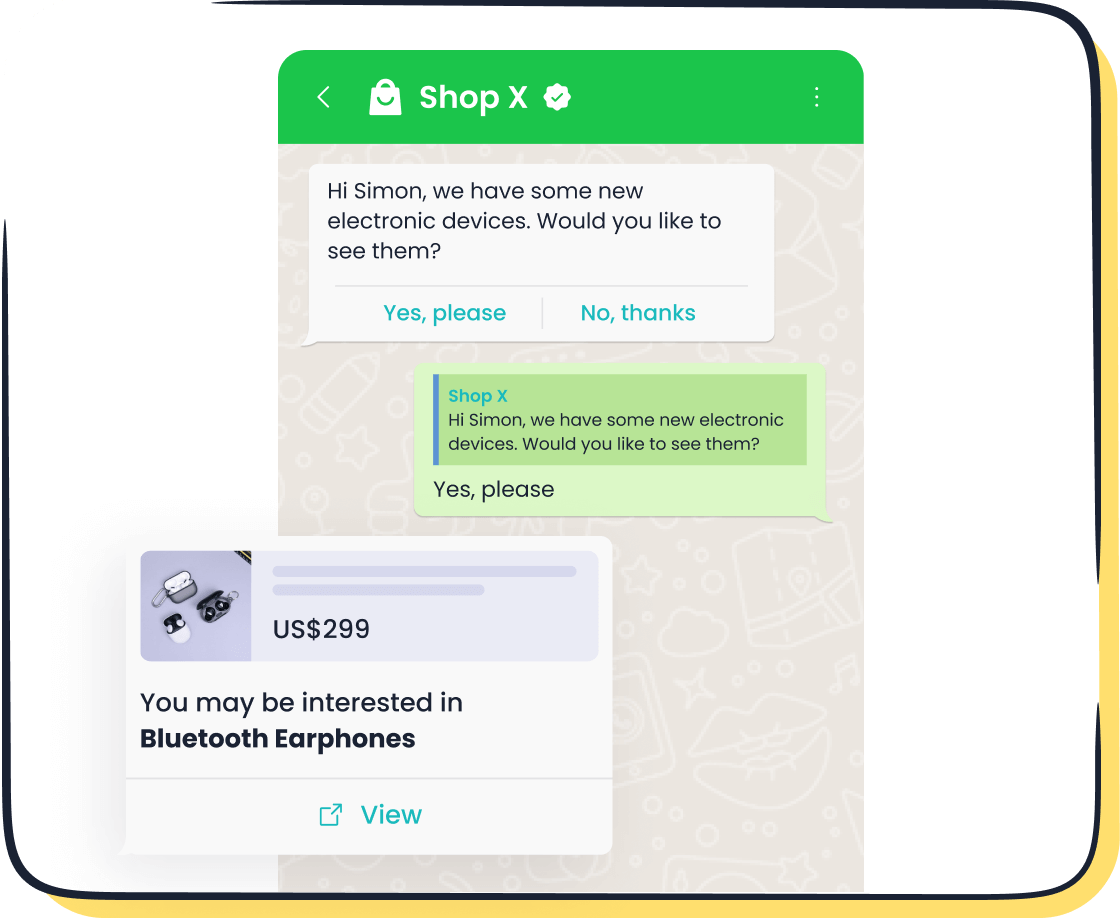
Scenario Part 2: The Secure Resolution The customer from our earlier scenario replies to the chatbot: "No, I never received it! I think it was stolen from my porch."
This conversation now involves a potentially serious and sensitive issue. The AI flags the conversation for a human agent. The agent sees the full history and immediately responds publicly on Instagram: "Thank you for letting us know. This is definitely not the experience we want for you. To protect your privacy while we investigate, could we continue this conversation on WhatsApp? We've just sent you a message there."
Using Sobot's WhatsApp Business API, the agent initiates a secure chat. Because the API allows for multiple logins on a single number, any available agent can pick up the conversation if needed. The agent verifies the customer's identity, processes a replacement order, and offers a discount for the trouble. The entire sensitive interaction happens in a private, encrypted environment.
By moving the conversation to WhatsApp, the agent turns a public problem into a private solution. This protects the customer's data, resolves the issue efficiently, and demonstrates a high level of professionalism and care. This is how to unify social media customer service in a way that builds trust and boosts customer satisfaction.
Social Media Customer Service Best Practices
With your framework in place, you can now focus on the finer points that separate good support from great support. These customer service best practices will help you build relationships, not just close tickets. This is how you turn your social media customer service into a true asset.
Tip 7: Practice Proactive Social Listening
Great social media customer service isn't just about responding; it's about listening. Proactive social listening means you actively search for mentions of your brand, products, and industry, even when you are not tagged. This is your early warning system for potential problems and a goldmine for customer insights.
Effective listening allows you to:
- Spot negative feedback early to protect your brand reputation.
- Discover customer complaints before they go viral.
- Find opportunities for proactive engagement with a customer.
This practice is the core of social media reputation management. By listening, you can turn a customer's public frustration into a positive experience, showing everyone that you care. A good listening strategy helps you understand what people truly think.
Tip 8: Personalize Interactions at Scale
Customers expect you to know them. Over 70% want personalized interactions. True personalization goes beyond using their first name. It means understanding their history with your brand. Your support team needs context to provide excellent customer support.
This is where AI can help your social media strategy. By integrating your tools, you can give your agents a full view of a customer's past purchases and support requests. This allows for deep personalization. The customer feels heard because they do not have to repeat their story. This simple act dramatically boosts customer satisfaction and makes the entire interaction smoother.
Tip 9: Elevating Customer Service on Social Media
Elevating your social media customer service means putting all these pieces together into a cohesive strategy. Your goal is to provide fast, empathetic, and effective support every time.
💡 Customer Service Best Practices Checklist:
- Respond Quickly: Acknowledge every customer inquiry as fast as possible. Aim for a response in under an hour to improve satisfaction.
- Know Your Channels: Use a fun tone on TikTok but provide detailed support on WhatsApp. Match your style to the platform.
- Follow Up: Check in with a customer after you resolve their issue. This small step shows you care and helps ensure their satisfaction.
By focusing on these details, you create a social media customer service experience that builds loyalty and strengthens your brand. This is how you deliver exceptional customer support.
Measuring Your Unified Engagement Strategy
You have built the foundation and the framework. Now, how do you know if your unified engagement strategy is actually working? You cannot improve what you do not measure. The final step is to track the right performance metrics. This data shows you what is working, what is not, and where you can make your customer support even better.
Tip 10: Track Unified Performance Metrics
Tracking metrics turns your gut feelings into hard facts. It provides clear proof of your return on investment (ROI) and guides your future strategy. You need to look beyond simple likes and followers. Focus on data that reflects the health of your customer relationships and the efficiency of your support team.
A unified platform makes this easy by bringing all your data into one place. You can see how your team performs across every channel. This gives you a complete picture of your customer interaction and service quality.
Real-World Proof: The Michael Kors Transformation Luxury brand Michael Kors transformed its customer service by implementing Sobot's unified solution. The results speak for themselves:
- An 83% reduction in response time.
- A 95% customer satisfaction rate.
- A 20% increase in conversion rates.
This shows the powerful impact of a unified strategy on both customer satisfaction and the bottom line. You can read more about their success here.
To measure your own success, start by tracking these key metrics:
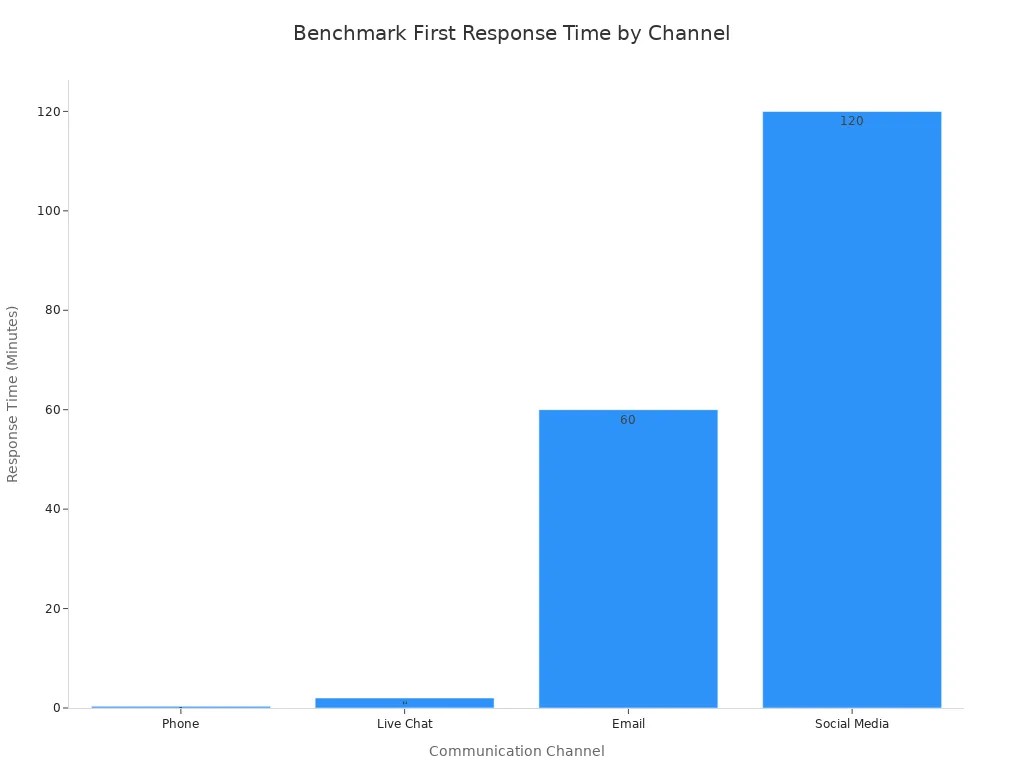
- First Response Time (FRT): How quickly does your team first reply to a customer? Faster responses directly lead to higher customer satisfaction. While a phone call might be answered in seconds, a good benchmark for social media is under two hours.
- Customer Satisfaction (CSAT) Score: After an interaction, ask your customer a simple question: "How satisfied were you with our support?" This gives you a direct measure of their satisfaction.
- Conversion Rate: How many customer conversations lead to a sale or another desired action? This metric connects your support efforts directly to business growth.
Tracking these numbers helps you prove the value of great support. It empowers you to build a stronger case for your team and continue improving the customer experience, which is the ultimate goal for long-term satisfaction and loyalty.
You now know how to unify social media customer service. A unified social media strategy turns your support from just answering questions into a tool for building lasting relationships. This proactive engagement boosts customer satisfaction. Your social media customer service becomes a way to build a real community.
“Audiences now expect brands to behave like people, not institutions. It’s no longer enough to broadcast messages — brands must engage in real conversation.” - Jimi Gibson, VP of Brand Communications at Thrive.
Start today. Pick one tip to improve your social media customer service. Your journey to better customer support and higher customer satisfaction begins with a single step. A great social media strategy will improve every customer interaction and their overall satisfaction. Explore a solution like Sobot to streamline your engagement and support.
FAQ
Why is a unified brand voice so important?
A unified brand voice builds trust and makes your brand recognizable. It ensures customers get a consistent experience, no matter which social media platform they use to contact you. This consistency is key for building customer loyalty and satisfaction.
What is the main benefit of a unified inbox?
A unified inbox puts all your customer messages from every channel into one place. Your team can respond faster and nothing gets missed. This simple change makes your social media customer service much more efficient and effective.
How does automation help with customer support?
Automation handles simple, repetitive questions 24/7. This frees up your human agents to focus on complex problems that require empathy and critical thinking. It helps you provide faster responses and improve overall customer satisfaction.
Can I really handle sensitive issues on social media?
You should always move conversations involving private data to a secure channel. Acknowledge the customer publicly, then switch to a private, encrypted channel like Sobot's WhatsApp Business API to protect their information and resolve the issue safely.
See Also
Selecting the Best Social Media Customer Service Software: 10 Key Tips
Achieving High Customer Satisfaction with Live Chat: 10 Essential Tips
Implementing Omnichannel Contact Center Solutions: A 10-Step Guide
Mastering Depop Live Chat: Quick Tips for Enhanced Success
Integrating Social Media Chat on Websites: Discover the Best Tools

