How to Implement AI in Customer Support


Implementing AI in customer support is a clear, multi-step process. This AI implementation enhances, not replaces, your valuable human agents. This step-by-step guide provides a practical roadmap for successful AI adoption. You can use AI to improve customer satisfaction and efficiency in customer support. The goal of AI in customer service is to create a better customer experience.
For instance, after implementing AI, 46% of financial institutions reported a better customer experience.
Your journey with artificial intelligence starts here. We will explore the best AI customer service tools for growing businesses, like Sobot. This support will help your customers. Effective AI in customer support and AI customer service are achievable with the right strategy. This is your guide to AI. AI is the future of customer support.
Step 1: Assess Your Customer Support Workflow
Before implementing AI, you must first understand your current customer support workflow. A thorough assessment helps you pinpoint exactly where AI can make the biggest impact. This initial step is crucial for a successful AI adoption and sets the foundation for your entire strategy. Analyzing your customer support workflow reveals opportunities for improvement in your AI customer service model.
Identify Key Operational Pain Points
Start by looking at the daily challenges your team and customers face. A clear view of these issues will guide your AI implementation. Many businesses find their customer support workflows suffer from common problems.
Do any of these situations sound familiar?
- Disconnected Channels: Your agents switch between multiple tools for phone, email, and chat. This forces customers to repeat information and slows down your team.
- Overloaded Agents: Your team is burdened with repetitive questions. This leads to burnout and makes it hard to handle complex customer needs.
- Long Wait Times: Customers get frustrated with long holds or being transferred between departments.
- Lack of Self-Service: Your customers cannot find answers on their own because you lack an updated and accurate knowledge base.
Identifying these pain points in your customer support workflow is the first move toward effective AI in customer support.
Set Measurable Goals for AI Integration
After you identify your pain points, you need to set clear, measurable goals for your AI implementation. These goals will help you track the success of your new AI customer service system. Your objectives for implementing AI should directly address the problems you found. For example, if agent overload is an issue, a key goal could be reducing handle time.
You can measure the impact of AI in customer service with specific metrics. Tracking these numbers shows the real value AI brings to your customer support. Consider how AI can transform your key performance indicators.
| Metric | Before AI Implementation | With AI | Business Impact |
|---|---|---|---|
| Automation Rate | 0% | 40-60% | Reduced agent workload |
| Average Handle Time | 15 minutes | 5 minutes | Increased agent capacity |
| First Response Time | 4 hours | < 1 minute | Improved customer satisfaction |
| Cost Per Resolution | $10 | $2-3 | Significant operational savings |
Focus on metrics like Automation Rate to see how many queries the AI resolves alone. Also, track the Escalation Rate to understand which questions still need human support. These goals make your AI in customer support strategy focused and effective. This careful planning ensures your implementation delivers powerful results for your customers and your business.
Step 2: Understand Core AI Customer Service Tools

After assessing your workflows, you need to understand the common AI tools available for customer support. Choosing the right AI solution is key to a successful implementation. These tools help you automate tasks and empower your team. This step introduces you to the core components of modern AI customer service.
AI Chatbots for 24/7 Automated Support
AI chatbots are your frontline virtual agents. They provide instant support to customers around the clock. This is a huge benefit for your AI in customer support strategy. These virtual assistants handle common questions, freeing your human team for complex issues. Implementing AI through chatbots leads to major efficiency gains.
For example, Sobot offers an AI-powered, multilingual, and ChatGPT-enabled chatbot. This tool provides 24/7 self-service, allowing your customers to get help in their native language. This improves the AI customer service experience for a global audience.
Key benefits of using AI chatbots in customer support include:
- Continuous Availability: Your customers get help 365 days a year, which boosts customer satisfaction.
- Scalability: The AI handles sudden increases in questions without extra costs.
- Cost Reduction: You lower operational costs by automating routine support tasks.
AI-Powered Routing for Smart Ticket Triage
AI-powered routing directs customer inquiries to the best-equipped agent. This AI technology analyzes message content, customer history, and urgency. The system ensures that every ticket goes to the right person on the first try. This process creates automated workflows that reduce transfers and escalations. Your AI implementation becomes more effective with smart routing. This is a critical part of AI in customer service. The right AI tools for contact centres make your workflows seamless. This is a key part of your AI adoption.
AI Copilots to Assist Human Agents
AI copilots are powerful tools that work alongside your human agents. They act as an assistant, boosting agent efficiency and confidence. This form of artificial intelligence is vital for modern customer support. These AI-powered solutions help your team deliver faster, more accurate responses. This is a great example of AI in customer support.
For instance, Sobot's AI Copilot assists agents by generating real-time response suggestions and summarizing long conversations. This allows your team to resolve issues much faster. A Microsoft study found that agents using a copilot reduced their case resolution time by 22%. This shows how AI enhances human capabilities in customer support. The AI provides the information, and your agent delivers the personalized touch. This is how you build a great AI customer service team.
Step 3: Choose the Best AI Customer Service Tools for Growing Businesses
Choosing the right AI solution is a major step in your AI adoption journey. For a growing business, the right tools provide a foundation for excellent customer support. You need a platform that unifies your channels, is easy to use, and can grow with you. This is how you find the best AI customer service tools for growing businesses.
Prioritize Omnichannel Integration Capabilities
Your customers connect with you through many channels, like your website, social media, and WhatsApp. A disconnected experience creates frustration. The best AI customer service tools for growing businesses bring all these conversations into one place. This omnichannel approach is vital for modern AI customer service. The AI helps you track customer history across every touchpoint, ensuring a consistent and relevant conversation.
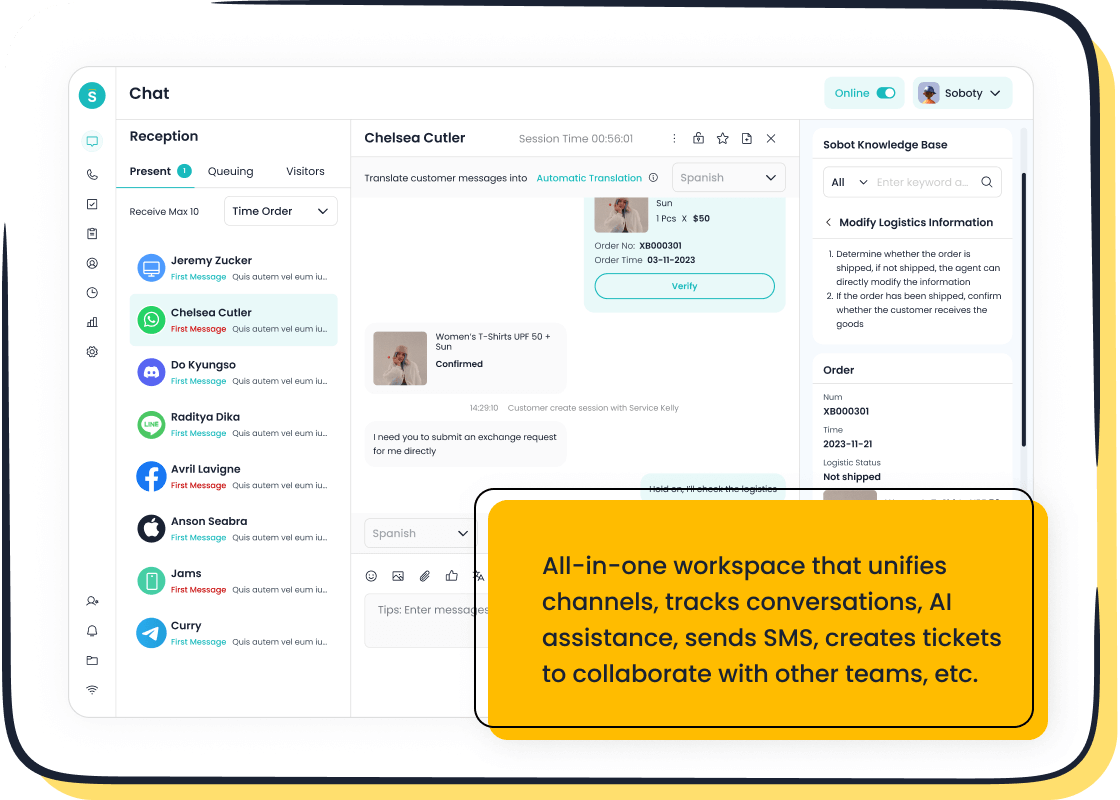
A unified customer contact center is the goal. For example, Sobot Live Chat brings all your channels into a single AI-enhanced workspace. This integration includes voice solutions, live chat, and social media. As an official WhatsApp Business Solution Provider (BSP), Sobot helps you engage customers on their favorite messaging app. This makes your AI in customer support strategy much more effective.
Evaluate No-Code Platforms like Sobot
Implementing AI should not require a team of data scientists. No-code platforms are among the best AI customer service tools for growing businesses because they lower the barrier to entry. Your team can build and manage AI-powered solutions without writing a single line of code. This empowers your customer support experts to create AI chatbots and workflows that solve real problems. This approach makes your AI implementation faster and more affordable. The right AI platform simplifies your entire customer support operation.
Ensure Scalability and Human Handover
Your business will not stand still, and your AI tools shouldn't either. The best AI customer service tools for growing businesses are built to scale. Your AI should handle more queries and users as your company expands.
Equally important is the ability for the AI to hand off a conversation to a human agent. A seamless handover is critical for customer satisfaction.
Pro Tip: The AI should know when to escalate. It must pass the full conversation transcript to the agent. This way, your customers never have to repeat themselves. This smart collaboration between AI and your team defines excellent AI customer service and is a key part of a successful implementation of AI in customer support.
Step 4: Implement Your AI Customer Service System

You have chosen your tools. Now it is time for the implementation. This step turns your strategy into a working AI customer service system. A successful implementation requires careful data preparation, testing, and team training. This process ensures your AI in customer support is effective from day one. Following these steps will help you implement AI solutions smoothly.
Prepare Your Knowledge Base and Data
Your AI is only as smart as the data you give it. A clean and organized knowledge base is the brain of your AI customer service. The AI uses this information to answer questions from your customers. Your first task in implementing AI is to prepare this data. A strong knowledge base powers effective AI chatbots and improves customer satisfaction. This is a vital part of your AI implementation.
Follow these steps to build a powerful knowledge base for your AI:
- Prioritize Quality and Clarity: You should use simple, direct language. Write answers that your customers can easily understand.
- Create a Clear Structure: You need to organize content with a logical hierarchy. Use headings and lists to make information scannable.
- Maintain a Single Source of Truth: You must keep all your support information in one central place. This prevents your AI from giving conflicting answers.
- Focus on Customer Needs: You should structure your content around common questions from customers. This makes your customer support more helpful.
Launch a Pilot Program to Test Performance
You should not launch your new AI system to all customers at once. A pilot program lets you test performance in a controlled way. This is a key part of implementing AI. You can identify and fix problems before a full rollout. This step helps you measure the AI's impact on your customer support goals.
Start with a high-impact, low-risk use case for your AI. For example, you can have the AI handle common questions about order status. This provides immediate value with minimal disruption to your customer support workflow.
Your pilot program should have clear objectives. You need to define what success looks like for your AI adoption. Monitor key metrics to see how the AI performs. This testing phase ensures your AI in customer service meets expectations.
Train Your Team to Collaborate with AI
Your customer support team is essential to a successful AI in customer support strategy. You must train them to work with the new AI tools. The goal is to show them how AI makes their jobs easier, not how it replaces them. Frame the AI as a helpful copilot. This AI assistant can handle repetitive tasks. This frees up your agents to focus on complex issues where customers need a human touch.
Involve your team in the process. Ask for their input on where the AI can help most. This collaboration ensures the AI solves real problems for your customer support agents. Proper training builds confidence and encourages your team to embrace the new AI customer service model. This support helps your team and your customers.
Step 5: A Case Study of AI in Customer Service: OPPO and Sobot
Theory is helpful, but seeing AI in action provides a clear blueprint. You can learn from the success of global brands. Let's explore how OPPO, a leading smart device company, transformed its customer support with Sobot. This case study shows the real-world impact of a strategic AI implementation. This is a great example of AI in customer service.
The Challenge: Managing High Inquiry Volumes
OPPO faced a common problem in customer support. During peak shopping seasons, the company saw a massive surge in questions from customers. This overwhelmed their human agents. The high volume led to long wait times and frustrated customers. Their customer support team needed a better way to manage these inquiries without sacrificing service quality. This is a challenge where implementing AI can make a huge difference. The AI helps manage workflows and support customers.
The Solution: Human-Machine Cooperation
OPPO did not replace its team. Instead, they chose a human-machine cooperation model for their customer support. They implemented Sobot's AI chatbots and ticketing system. This artificial intelligence solution created a powerful partnership.
The AI virtual agents, or virtual assistants, handled the simple, repetitive questions. This freed up human agents to focus on complex issues that required a personal touch. This AI implementation streamlined their entire customer support process. The AI became an essential part of the team.
This approach to AI in customer support allowed OPPO to scale its operations efficiently. The AI chatbots provided instant answers to customers, while the ticketing system organized inquiries for the human team. This is how you build a strong AI customer service system.
The Results: Boosting Efficiency and Repurchase Rates
The results of OPPO's AI implementation were impressive. The new AI in customer service strategy delivered measurable improvements across the board. The AI had a direct, positive impact on both efficiency and customer loyalty. The AI helped OPPO provide better customer support.
The key outcomes for their customer support included:
- An 83% chatbot resolution rate, showing the AI successfully handled most initial inquiries.
- A 57% increase in repurchase rate, proving that great customer support drives business growth.
OPPO also achieved a 94% positive feedback rate from customers. This success story shows how the right AI tools can elevate customer satisfaction and deliver a strong return on investment. The AI helped create happy, loyal customers.
Step 6: Measure and Optimize Your AI Performance
Your AI implementation is live, but the work is not over. You must now measure performance and optimize your system. This final step ensures your AI continues to deliver value. A successful AI adoption depends on continuous improvement. You use data to make your AI smarter and your customer support better. This process turns a good AI into a great one.
Track Key Performance Indicators (KPIs)
You need to track key performance indicators (KPIs) to measure success. These numbers show you how the AI impacts your customer support operations. Tracking KPIs helps you understand the return on your AI investment. Your AI customer service performance becomes clear through this data.
Key metrics for your AI customer service include:
- Self-Service Rate: This shows how often the AI resolves issues without human help. A high rate means the AI is working well.
- Escalation Rate: This tracks how often the AI sends customers to a human agent. It helps you find where the AI needs more training.
- Average Handle Time (AHT): This measures if the AI helps shorten interaction times for your customer support team.
Analyze Customer Satisfaction (CSAT) Scores
KPIs measure efficiency, but customer satisfaction (CSAT) scores measure happiness. You must know how your customers feel about the AI. Low scores can show that your AI is frustrating for users, even if it seems efficient. You can collect this data with short, transactional surveys after an AI interaction.
To get useful feedback, you should keep your surveys brief and send them on the channel where the conversation happened. Analyzing this data helps you find patterns. You can see what the AI does well and where it needs to improve. This is a direct way to listen to your customers and enhance their support experience.
Refine AI with Agent and Customer Feedback
You should use the data you collect to refine your AI. The goal is to create a cycle of continuous improvement for your AI in customer support. Feedback from customers and your customer support team is very valuable. Your agents work with the AI every day. They know its strengths and weaknesses better than anyone.
Ask your team for their thoughts on the AI. Their input can guide your implementation updates. This collaboration makes the AI a better partner for your team. It also improves the overall quality of your customer support. This ongoing refinement ensures your AI investment provides long-term benefits.
This step-by-step guide showed you how to approach your AI implementation. You learned to assess your needs, choose tools, and measure success. The goal of AI is to empower your team. AI creates a better experience for your customers. As OPPO's success with Sobot shows, the right AI strategy boosts efficiency and customer satisfaction. This AI partnership allows your team to provide excellent customer support. The future of AI customer service is a collaboration between AI and humans. This AI support helps your customers.
Ready to begin your AI journey? Explore Sobot's AI solutions or request a demo today to see how AI can transform your customer support for your customers.
FAQ
What is the first step to implement AI in customer support?
You should start by assessing your current customer support workflow. Identify your team's biggest challenges and set clear goals. This first step helps you understand exactly where AI can provide the most value for your business and your customers.
Will AI replace my human customer support agents?
No, AI enhances your team, it does not replace it. AI tools handle repetitive tasks. This frees your agents to focus on complex problems where customers need a human touch. The goal is a partnership between AI and your team.
How long does it take to implement an AI customer service system?
The timeline varies. Using a no-code platform like Sobot can speed up the process significantly. You can launch a pilot program in a few weeks. A full implementation depends on your data preparation and team training.
How do I know if my AI implementation is successful?
You can measure success by tracking key metrics. Look at your self-service rate, escalation rate, and customer satisfaction (CSAT) scores. Positive changes in these numbers show that your AI is improving your support operations and making users happy.
See Also
AI Software: Elevating Customer Service Efficiency and Performance
Transforming Customer Support with AI-Powered Service Agents
Essential Guide: Artificial Intelligence Software for Call Centers

