How to Boost Sales on eBay with Step-by-Step Guidance

If you wonder how to boost sales on eBay, you are not alone. Many sellers face issues like slow delivery, supplier delays, and rising shipping costs that make it tough to sell on eBay. You can reach success even if you are new or struggling. Buyers expect fast replies, clear branding, and smooth service. Tools like Sobot Live Chat and Sobot AI help you connect with shoppers and stand out. This step-by-step guide gives you a beginner's guide on how to sell on eBay, build your brand, and increase your sales every day.
Account Setup

Create Seller Profile
Ready to start selling on eBay? You need to set up your ebay seller account first. Here’s a simple checklist to get you started:
- Go to eBay’s website and register as a seller. Enter your name, address, and payment method.
- If you run a business, use your business name and details. A business account unlocks more features.
- Set up a PayPal account and link it to your eBay seller account. This makes payment processing smooth and secure.
- Learn about eBay’s fees, including listing, final value, payment processing, and shipping costs.
Tip: Double-check your information for accuracy. A complete profile helps buyers trust you from the start.
Build Trust
Buyers want to feel safe when they shop. You can build trust by keeping your seller profile honest and professional. Make sure your item descriptions are clear and accurate. Ship items quickly and use reliable shipping methods. Respond to messages within 24 hours. When you handle issues fast, buyers feel valued.
- Keep your transaction defect rate below 2%. This boosts your visibility and reputation.
- Offer free shipping or run promotions to attract more buyers.
- Ask for feedback after every sale. Positive reviews make your profile stand out.
Prompt shipping and good communication lead to happy buyers and more sales. Tools like Sobot Live Chat help you answer questions fast, so buyers never feel ignored.
Store Branding
Branding sets you apart from other sellers on eBay. Use a consistent logo, color scheme, and store name. This makes your store easy to remember. A strong brand identity can increase your revenue by up to 33% (source). Personalize your store with banners and custom templates. Share your story in your profile to connect with buyers.
- Consistent branding builds loyalty and encourages repeat purchases.
- Match your store’s look to your products and target audience.
- Use professional templates for your listings to look organized and trustworthy.
Buyers love stores that feel familiar. When you create a memorable brand, you turn first-time buyers into loyal fans.
Product Research
Find What Sells on eBay
You want to sell items that people actually buy. Start with eBay’s Best Sellers page. This page shows you which items are hot right now. You can also use tools like AutoDS, Google Trends, and eBay Terapeak to spot trends and see what’s popular. Here’s a quick look at some top tools:
| Tool/Method | Accuracy | Time Efficiency | Cost | Ease of Use |
|---|---|---|---|---|
| AutoDS Tools | High | Very High | Affordable | Easy |
| eBay Best Sellers | Moderate-High | Moderate | Free | Easy |
| Google Trends | High | Moderate | Free | Easy |
| Manual Research | Low-Moderate | Low | Free | Difficult |
| eBay Terapeak | High | Moderate | Included in Seller Hub | Moderate |
Don’t just use one method. Combine these tools to get a full picture. WatchCount is another cool site that shows the most-watched eBay items. If you do your research, you can find products with steady demand and less competition.
Analyze Competition
You need to know what other sellers are doing. Look at their listings, prices, and feedback. Check how they describe their items and which photos they use. Try to spot what makes their listings stand out. If you see a lot of sellers for the same items, think about how you can offer something better—maybe faster shipping or a bonus item.
Tip: Use eBay Terapeak to compare sales data and see which sellers move the most items. This helps you understand what works and what doesn’t.
Set Prices
You want to set your price so buyers choose your items, but you also want to make a profit. Here are some smart pricing tips:
- Add up all your costs—product, shipping, eBay fees, and marketing—before you set your price.
- Check what other sellers charge for similar items. Don’t just copy them. Look at their seller ratings too.
- Avoid dropping your price too low. Price wars can hurt everyone.
- Use eBay’s average selling price tool to see what buyers usually pay.
- Try the Best Offer feature. This lets buyers suggest a price, so you don’t have to lower your listing price.
- Use pricing tricks like $9.99 instead of $10.00. Small changes can make your items look like a better deal.
- Keep an eye on trends and adjust your pricing as needed.
If you want to respond quickly to buyer questions about your items or price, Sobot Live Chat can help. Fast answers can turn a visitor into a buyer.
Optimize Listings
Titles and Descriptions
When you create a listing on eBay, your title is the first thing buyers see. Make it clear and catchy. Use words that buyers type when they search for items. For example, if you sell sneakers, write “Nike Air Max Men’s Running Shoes Size 10” instead of just “Shoes.” This helps your listing show up in more searches.
Your description should answer every question a buyer might have. Write effective product descriptions that include details like size, color, brand, and condition. If you have a story about the item, share it. Buyers love to know why your items are special. Try to avoid long blocks of text. Use bullet points to make your description easy to read.
Tip: Listings with clear, keyword-rich titles and effective product descriptions can get up to 50% more views (source).
Quality Photos
Great pictures make your listing stand out. Use a plain background and good lighting. Show your items from different angles. Take close-ups of any details or flaws. eBay lets you upload up to 12 photos for free, so use as many as you need. Clear pictures help buyers trust your listing and feel confident about what they’re buying.
If you want to answer questions about your items fast, Sobot Live Chat can help. You can chat with buyers in real time and send extra photos if they ask.
Categories and SEO
Choose the right category for every listing. This helps buyers find your items quickly. If you put your listing in the wrong category, it might not show up in search results. Use keywords in your title and description to optimize your listing for eBay’s search engine. Think about what words buyers use when they look for items like yours.
Here’s a quick checklist to optimize your listing for search:
- Pick the most accurate category.
- Add keywords to your title and description.
- Fill out all item specifics (like brand, size, color).
When you optimize your listing, you help more buyers find your items and boost your sales.
How to Sell on eBay: Formats & Pricing
Auction vs. Buy It Now
When you want to sell on ebay, you get to pick between Auction and Buy It Now. Auctions let buyers bid on your item. This works well for rare collectibles or things with hard-to-guess value. You set a starting price, and buyers compete. Sometimes, you get more than you expected. Buy It Now gives shoppers a set price. They can buy right away, no waiting. This is great for popular products or when you want fast sales. Most sellers use Buy It Now for everyday items. If you want to move inventory quickly, Buy It Now is your best bet. Auctions work best when you have something special and want to see how high the price can go.
Tip: Combine both! List your item as Auction with a Buy It Now option. This gives buyers a choice and can boost your sales.
Pricing Strategies
You need a smart plan for how to sell on ebay and set your price. Start by checking what similar items cost. Look at completed sales, not just active listings. Factor in all your costs—product, ebay fees, and especially shipping. Shipping can make or break your profit. Offer free shipping if you can, or use flat-rate shipping to keep things simple. Buyers love free shipping, and your listing may show up higher in search results. If you sell on ebay often, try volume discounts or bundle deals. This helps you move more items and save on shipping. Always review your pricing every week. Trends change fast on ebay.
Promotions
Want to know how to sell on ebay and get noticed? Use ebay promotions. Promoted Listings put your items in front of more buyers. Your product shows up in high-traffic spots, so you get more views and faster sales. You only pay if your item sells within 30 days of a click, so it’s cost-effective. You can set your ad rate, usually between 2% and 7%. Higher rates work well for high-margin or less competitive items. Promoted listings help you stand out, especially in crowded categories. They also work well with other marketing tools and let you track performance. If you want to answer buyer questions fast and close more sales, try Sobot Live Chat. It helps you respond quickly, even when buyers ask about shipping or price. Fast answers can turn a visitor into a buyer.
- Promoted Listings boost visibility and sales volume.
- You only pay when your item sells.
- You can adjust your ad rate for each listing.
- Promotions work best when you monitor results and adjust your strategy.
Note: Always check your shipping costs before running a promotion. High shipping fees can scare buyers away, even if your price looks good.
Customer Service with Sobot Live Chat
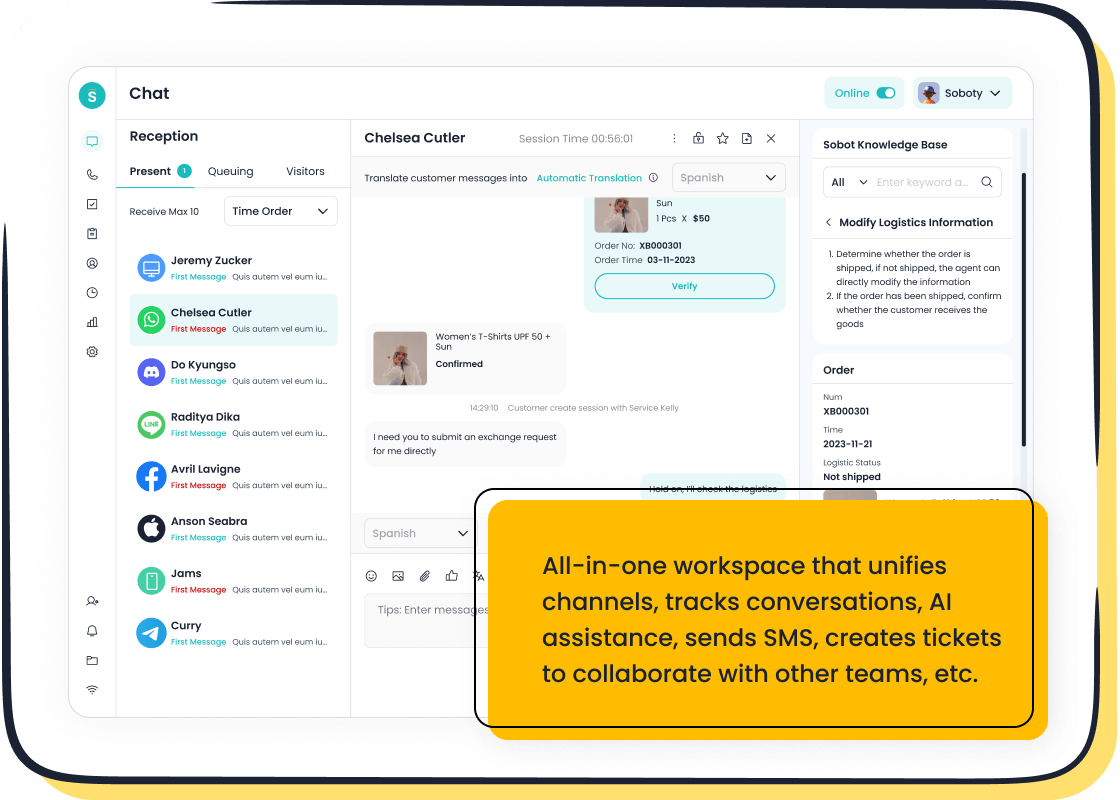
Great customer service can make or break your eBay business. When you answer questions quickly and help buyers feel valued, you stand out from the crowd. Sobot Live Chat gives you the tools to connect with buyers in real time, making every interaction count.
Fast Responses
Buyers expect fast answers. If you reply quickly, you build trust and close more sales. Sobot Live Chat lets you respond to questions right away, whether someone asks about shipping, product details, or returns. You can chat with buyers on your website, app, or even social media. No more missed messages or long wait times. In fact, Michael Kors used Sobot to cut their response time by 83%. Their customer satisfaction rate jumped to 95%, and they saw a 20% boost in conversion rates. Quick replies turn curious shoppers into happy buyers.
Tip: Fast responses show buyers you care. They are more likely to buy from you again.
Omnichannel Support
You never know where your next buyer will come from. Some shop on eBay, others message you on Instagram or WhatsApp. Sobot Live Chat brings all your conversations into one place. You get a single inbox for every channel, so you never lose track of a buyer’s question.
- Omnichannel support creates a smooth shopping journey across eBay and other platforms.
- Real-time inventory updates help prevent overselling.
- Consistent pricing and messages build trust with buyers.
- Unified support means buyers never have to repeat themselves.
- Flexible delivery options make shopping easier.
- Omnichannel sellers keep 89% of customers, while others keep only 33% (source).
When you use Sobot, you give buyers a seamless experience. This leads to more sales and stronger loyalty.
Analytics for Improvement
You can’t improve what you don’t measure. Sobot Live Chat tracks over 150 service indicators. You see which listings get the most questions, how fast you reply, and what buyers ask about most. Built-in analytics help you spot trends and fix problems before they hurt your sales. You can even send satisfaction surveys to buyers after each sale. This feedback helps you keep improving and stay ahead on eBay.
Note: Data-driven decisions help you grow your eBay business and keep buyers coming back.
How to Boost Sales on eBay: Promotion & Tools
eBay Marketing Tools
If you want to know how to boost sales on eBay, start with the tools eBay gives you. These tools help you promote your listing and get more eyes on your products. You can use promotions like targeted sales, discounts, and special offers to create urgency. Try cross-promoting your listings within your eBay store. This encourages buyers to look at more items and can lead to bigger orders.
- Use Seller Hub to manage your listings and track your sales.
- Add call-to-action phrases like “Buy NOW” or “Limited Time Offers” to your listing pages.
- Optimize your listings for mobile shoppers. Most buyers use their phones, so make sure your photos and buttons look great on small screens.
A strong seller reputation also helps. Keep your feedback positive and answer questions fast. These steps make buyers trust you and help you promote your listing to a wider audience.
Social Media Integration
Social media can take your eBay sales to the next level. Share your best listings on platforms like Facebook, Instagram, and WhatsApp. This brings more people to your store and helps you reach buyers who may not search on eBay. You can use eye-catching photos and short videos to show off your products. If you want to answer questions quickly, Sobot Live Chat lets you chat with buyers on social media and your website, all in one place. This makes it easy to keep up with every message and never miss a sale.
Tip: Use hashtags and tag your eBay store in your posts. This helps new buyers find you.
Sobot Analytics
Knowing how to boost sales on eBay means looking at your data. Sobot Analytics gives you clear reports on what works and what doesn’t. You can see which listings get the most clicks, which promotions drive sales, and where your buyers come from. With over 150 service indicators, you get a full picture of your business. Use these insights to improve your listings, adjust your prices, and promote your listing more effectively. Sobot’s analytics help you make smart choices and grow your sales every month.
Monitor & Improve
Track Performance
You want to know what works and what needs fixing in your eBay store. Start by checking your sales numbers, listing views, and conversion rates every week. Look at which products get the most attention from buyers. If you see a drop in sales, check if your prices or photos need an update. Sobot Analytics makes this easy. You get clear reports on your best listings, response times, and even which channels bring in the most buyers. With over 150 service indicators, you can spot trends and make smart changes fast. Sellers who track their performance often see up to 30% more sales (source).
Gather Feedback
Listening to buyers helps you grow. After every sale, ask for feedback from buyers. Their comments show what you do well and where you can improve. Positive feedback builds trust with new buyers. If you get a complaint, fix the problem quickly. Sobot lets you send satisfaction surveys right after a sale. You can see what buyers liked and what they want next time. This feedback helps you make better choices and keeps your store moving forward.
Tip: Thank buyers for their feedback. A simple thank you can turn a one-time shopper into a loyal customer.
Continuous Learning
eBay changes all the time. New trends, rules, and tools pop up every month. Stay ahead by learning something new each week. Read eBay’s seller updates and join online forums. Watch what top sellers do and try their tips. Use Sobot’s analytics to test new ideas and see what works best for your buyers. When you keep learning, you stay ready for anything and keep your sales growing.
Note: Sellers who keep learning and improving often see higher profits and happier buyers.
You now know how to boost sales on eBay. When you sell on ebay, focus on great listings, smart pricing, and top-notch customer service. Sellers who combine these steps see more sales, better feedback, and higher search rankings. Buyers trust sellers who answer fast and ship quickly. Tools like Sobot Live Chat help you connect with buyers and manage your business growth. Start using these tips today and watch your sales and business grow every month.
FAQ
How can I boost sales on eBay quickly?
You can boost sales on eBay by improving your listings, using clear photos, and responding to buyers fast. Sellers who reply within an hour see up to 60% more sales. Try Sobot Live Chat for instant replies and better customer satisfaction.
What tools help me track how to boost sales on eBay?
You can use eBay Seller Hub for basic stats. For deeper insights, Sobot Analytics tracks over 150 indicators. This helps you spot trends, improve listings, and see what works best. Data-driven sellers often grow sales by 30% or more.
Does customer service really affect how to boost sales on eBay?
Yes! Fast, friendly service builds trust. Michael Kors used Sobot to cut response times by 83% and saw a 20% jump in conversions. Buyers love quick answers and smooth support. Great service keeps them coming back.
How do I use social media to boost sales on eBay?
Share your eBay listings on Facebook, Instagram, and WhatsApp. Use hashtags and eye-catching photos. Sobot Live Chat lets you answer questions from all channels in one place. This makes it easy to connect with buyers and boost sales on eBay.
Can Sobot help me learn how to boost sales on eBay?
Absolutely! Sobot offers live chat, analytics, and omnichannel support. You get real-time feedback, instant buyer messages, and clear reports. These tools show you how to boost sales on eBay and keep your business growing every month.
Want to see how Sobot works? Try a free demo here.

