Fast-Track Your Platform Setup in 2025

The question of how long does it take to set up a customer service platform has no single answer. A simple setup serving a few customers may finish in days. A complex project for many customers can extend for months. This timeline difference depends on four key variables.
- Business Complexity
- Customer Data Migration
- System Integrations
- Resource Availability
These elements shape the final customer experience. A successful customer service launch balances speed with meeting high customer expectations to ensure customer satisfaction. A platform like Sobot helps customers navigate this process for an optimal experience.
How Long Does It Take to Set Up a Customer Service Platform?
The question of how long does it take to set up a customer service platform depends on the four core factors this article will detail. A platform like Sobot is designed for fast deployment. However, the final customer service platform setup timeline always depends on a client's specific needs. The goal is to create a great customer experience that boosts customer satisfaction and retention.
Simple vs. Complex Timelines
The timeline for setting up a platform varies significantly. A basic setup can be quick, while a custom build requires extensive development. The complexity of your customer journey and business needs directly impacts how long it takes to set up a customer service platform.
| Platform Type | Setup Time (Approx.) |
|---|---|
| Comprehensive AI (Mid-market SaaS) | 20-40 hours |
| Existing Platforms (Implementation) | 3-6 months |
| Custom Builds | 12+ months |
Key Factors Influencing Your Schedule
Understanding how long it takes to set up a customer service platform starts with evaluating four key areas. Your final customer service platform setup timeline will be shaped by:
- Business Complexity
- Customer Data Migration
- System Integrations
- Resource Availability
Meeting Modern Customer Expectations
A fast setup must be balanced with building a system that delivers an excellent experience. Today, 90% of customers consider an immediate response important when they have a question for customer service. Meeting these high customer expectations is critical for customer satisfaction and increasing customer lifetime value.
A successful launch creates a foundation for positive customer interactions and strong engagement. It addresses customer pain points from the very first day, shaping a positive customer journey and improving customer retention. This requires a plan that meets modern customer expectations for speed, personalization, and efficiency.
A well-integrated platform helps businesses meet these customer expectations by:
- Integrating systems for real-time visibility: This provides a complete view of customer data, orders, and history, leading to more accurate and timely fulfillment.
- Enabling seamless communication across teams: Integrated platforms allow for real-time updates, fostering efficient collaboration and quick responses to customer needs.
- Automating and streamlining processes: Automation helps businesses adapt to shifting customer expectations, improves efficiency, and reduces human error.
Analyzing customer feedback and customer experience metrics after launch will guide the evolution of your platform. This ensures the customer journey continues to improve, boosting engagement and customer lifetime value.
Deconstructing Your Business Complexity

Your business's unique structure is a primary driver of your setup timeline. The number of communication channels, the intricacy of your customer journey, and your team's organization all add layers of complexity. A larger enterprise, for instance, requires a more robust platform than a small business.
| Business Size | Annual Revenue | Platform Focus |
|---|---|---|
| Small Business | Up to $1M | Ease of use, affordability, and core functionalities. |
| Mid-Market Business | $1M - $10M | Advanced targeting, automation, and scalability. |
| Enterprise Business | Over $10M | Highly customizable, AI-driven, and secure platforms. |
Understanding these elements is the first step toward planning a realistic schedule.
Support Channel Configuration
The more ways customers can contact you, the longer your setup will take. Today, customers interact with companies across an average of nine different channels. Managing these separately creates confusion and a disjointed experience.
A modern platform must unify these touchpoints. Sobot's Omnichannel Solution brings all customer interactions from channels like email, chat, social media, and even WhatsApp into a single, AI-enhanced workspace. This approach simplifies agent training, reduces onboarding time, and ensures a consistent customer experience, which is vital for customer satisfaction.
Workflows to Elevate Customer Experience
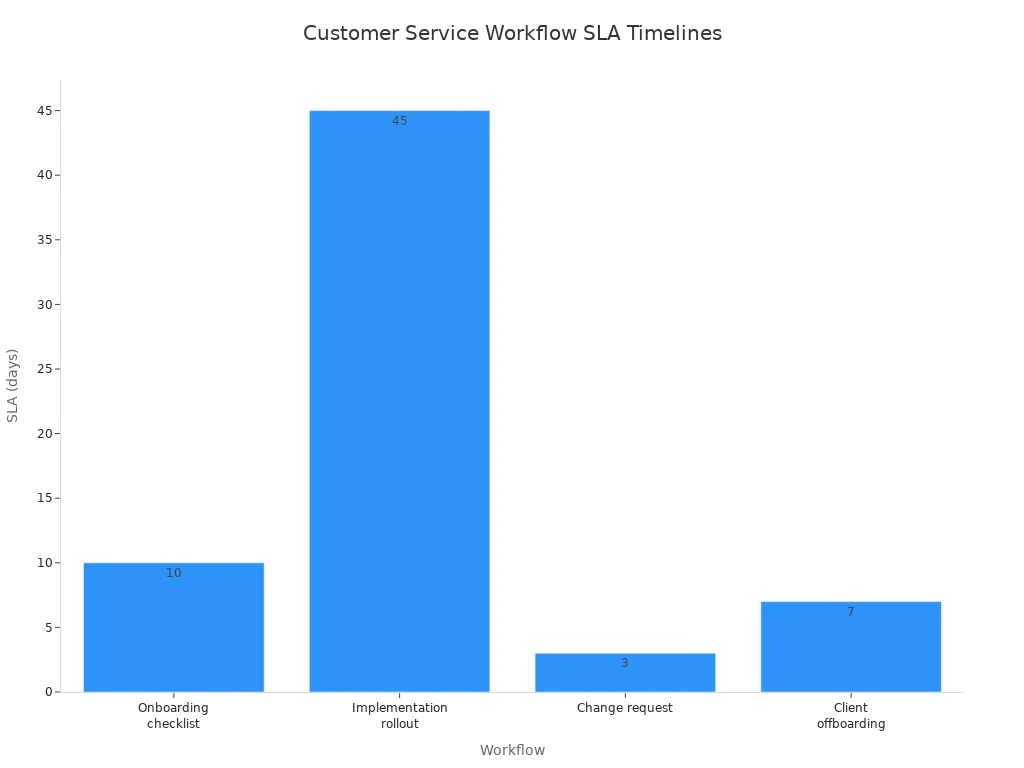
Defining automated workflows is crucial for delivering excellent service, but it requires significant planning. Processes for onboarding, implementation, and change requests have specific Service Level Agreements (SLAs) that your platform must support. A complex implementation rollout, for example, can take up to 60 days to complete.
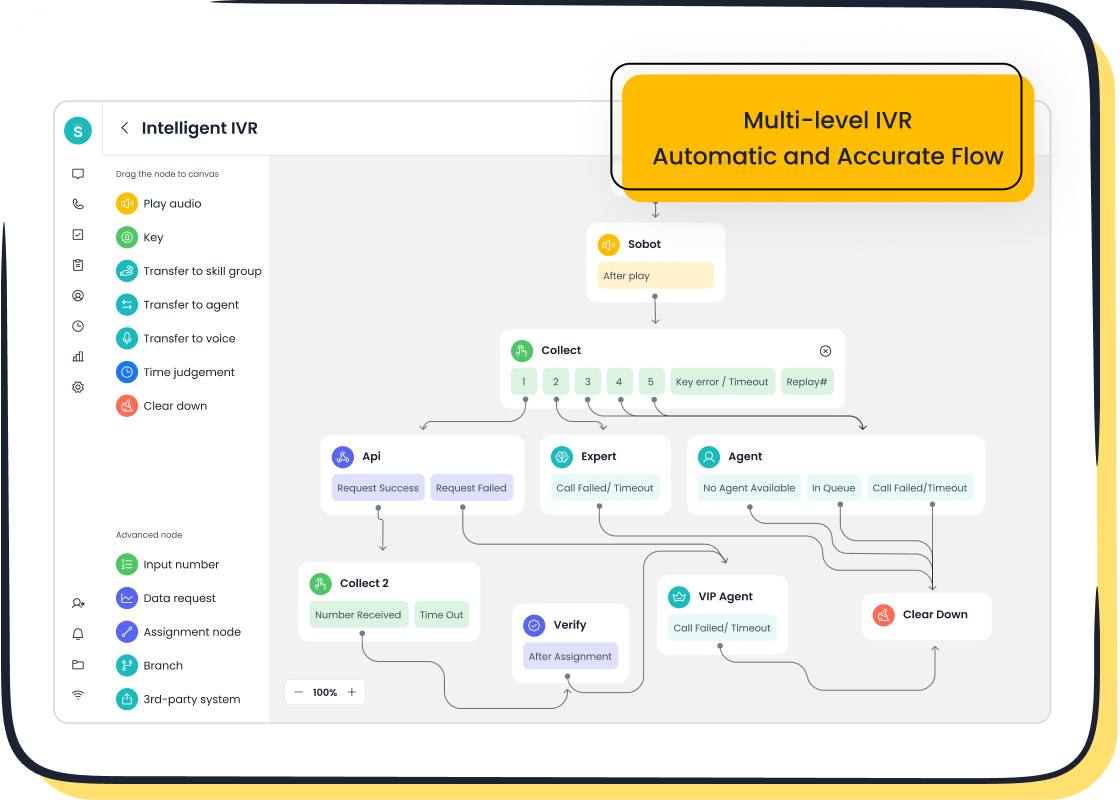
Building these rules from scratch is time-consuming. Platforms like Sobot accelerate this with intuitive tools. The drag-and-drop IVR builder and rule-based ticket routing allow teams to quickly configure complex logic for personalized interactions without extensive coding. This ensures tickets reach the right agent immediately, improving response times and boosting customer satisfaction. A well-designed workflow transforms the customer journey from a series of steps into a seamless experience.
Team Structures and Permissions
For large support teams, configuring user roles and permissions is a common challenge that can delay a project. Assigning too many owners or providing uncontrolled guest access can create security gaps and confusion. A well-defined team structure is essential for a smooth implementation journey and long-term success. It creates clear lines of accountability and empowers teams to work efficiently. This planning phase is critical for building a secure foundation that supports team engagement and protects sensitive customer data.
Scoping Your Data Migration
Data migration is an often-underestimated phase that can significantly extend your setup timeline. Moving historical tickets, contacts, and articles from an old system to a new one is a time-intensive process. Proper planning here is critical for a smooth transition and a successful customer journey from day one. It prevents the loss of valuable customer data and ensures agents have the context they need to provide excellent service.
Volume of Historical Data
The sheer volume of your historical data is a primary factor in your migration schedule. A business with millions of customer records and years of support tickets will require a much longer migration window than a newer company. This historical customer data is vital; it provides context for the ongoing customer journey and helps personalize future interactions. A comprehensive data transfer preserves the continuity of the customer experience, which is essential for customer retention and building long-term customer lifetime value.
Data Cleansing and Field Mapping
Before moving any data, teams must clean and map it correctly. This step addresses common data quality issues and prevents future pain points. Incorrect field mapping can lead to serious problems, as misalignment between old and new fields can cause information loss or incorrect placement. This directly impacts the accuracy of customer data, making it less reliable.
Common data quality issues that slow down migration include:
- Duplicate or inconsistent data: Multiple entries for the same customers or different formats for the same field.
- Data integrity issues: Data becoming corrupted or invalid during the transfer process.
- Schema and compatibility errors: The old and new platforms have different data models, leading to mis-mapped fields.
Proactive data cleansing ensures that the information moved to the new platform is accurate, complete, and ready to use, which is fundamental for customer satisfaction.
Knowledge Base and Article Migration
Migrating your knowledge base is more than a simple copy-and-paste task. It is an opportunity to refine content that empowers both customers and agents. A well-organized knowledge base improves self-service rates, boosts customer engagement, and provides agents with quick answers, leading to higher satisfaction.
This is where a powerful platform can accelerate the process. For example, smart device leader OPPO faced challenges with a large, high-maintenance knowledge base. By implementing Sobot, they used AI to optimize their articles and Q&A pairs. This strategic move streamlined the process and reduced knowledge base maintenance efforts by 90%. The result was an 83% chatbot resolution rate, demonstrating how the right tools can turn a complex migration step into a major win for efficiency and customer feedback. This enhances the entire customer journey and improves engagement.
Planning Your System Integrations

Connecting your new platform to existing business systems is essential for creating a unified customer journey. Integrations eliminate data silos, giving your team a complete view of the customer. The type of integration you choose, however, directly impacts your customer service platform setup timeline.
Standard vs. Custom API Integrations
The path to integration splits into two main routes: standard and custom. The choice between them is a major factor in your project schedule.
- Standard (Native) Integrations: These are pre-built connections that can be activated in minutes or hours. They are designed for common systems and offer a fast, reliable way to sync customer data.
- Custom API Integrations: These are built from scratch to connect with unique or legacy systems. Development can take anywhere from one to two weeks for simple connections to three months or more for complex ones.
Choosing standard integrations whenever possible is a key strategy for a faster launch.
Sobot's Third-Party App Integration
A platform with a strong integration marketplace significantly shortens the setup process. Sobot offers seamless, out-of-the-box integrations with essential business tools like Salesforce and Shopify. This allows businesses to connect their core systems without lengthy development cycles. With a guaranteed 99.99% system stability, these connections are not only fast but also reliable.
This level of integration empowers agents to deliver a superior experience. When customer data from a CRM is available directly within the service platform, agents can offer greater personalization and resolve issues on the first contact, boosting customer satisfaction and long-term engagement.
Connecting Your CRM and ERP
Connecting your Customer Relationship Management (CRM) and Enterprise Resource Planning (ERP) systems is critical for a 360-degree customer view. A CRM integration, for instance, consolidates all customer data, enabling teams to understand the full customer journey and anticipate needs. This leads to higher customer satisfaction and better customer retention.
While CRM connections are often straightforward with platforms like Sobot, ERP integrations can present technical challenges, especially with older systems that lack a modern API. Planning for these connections early helps manage expectations and allocate resources effectively. A successful integration strategy ensures that every team member has the information they need to support customers, turning potential pain points into opportunities for positive engagement and feedback. This enhances the entire customer experience and builds customer lifetime value.
Your Action Plan for a Faster Setup.
A successful launch improves customer satisfaction and boosts customer retention. This plan helps businesses accelerate their setup for a better customer journey. It focuses on strategic decisions that enhance the customer experience and drive long-term customer lifetime value. Positive customer feedback and engagement depend on a well-executed strategy.
- Start with a Minimum Viable Product (MVP): Launch essential channels and workflows first. Plan for phased enhancements to manage complexity and deliver value to customers quickly.
- Prioritize Critical Data: Identify critical data for migration to reduce surprises and enable accurate planning. This ensures a smoother customer journey and better satisfaction.
- Maximize Out-of-the-Box Features: Leverage standard integrations, like those from Sobot, before building custom solutions. This saves time and resources for all customers.
- Empower a Dedicated Team: Assign a project manager with clear authority. Projects with dedicated teams see success rates above 75%, ensuring focus and accountability for a successful customer journey.
FAQ
How should a business begin the setup process?
Businesses should first map their ideal customer journey. This initial step helps define essential workflows for all customers. It creates a clear plan. This plan guides the entire project. A successful customer journey starts with this foundation. Many customers appreciate a well-planned experience.
How can we ensure a smooth journey for customers during the transition?
Teams must communicate changes clearly to all customers. A phased rollout can minimize disruption to the customer journey. This approach allows customers to adapt gradually. It protects the customer experience. A positive customer journey depends on careful management during this critical period.
What role does AI play in a new platform setup?
AI-powered tools like chatbots handle common questions from customers. This frees up human agents for complex issues. It improves the customer journey by providing instant support. This technology is vital for a modern customer experience. It helps a business serve its customers more efficiently.
How do we measure success after launching the new platform?
Teams should track key metrics related to the customer journey. These include first-contact resolution and customer satisfaction scores. Analyzing this data shows if the new system meets the needs of customers. It provides insights to improve the overall customer journey and support every customer effectively.
See Also
Discovering the Leading Cloud-Based Contact Center Solutions for 2025
A 10-Step Guide for Seamless Omnichannel Contact Center Implementation
Enhancing Your Round-the-Clock Live Chat Performance and Productivity
Elevate SaaS Customer Support Through Effective Live Chat Tactics
Quick Solutions to Resolve Common Shopify Live Chat Problems

