Front Software An In-Depth Review

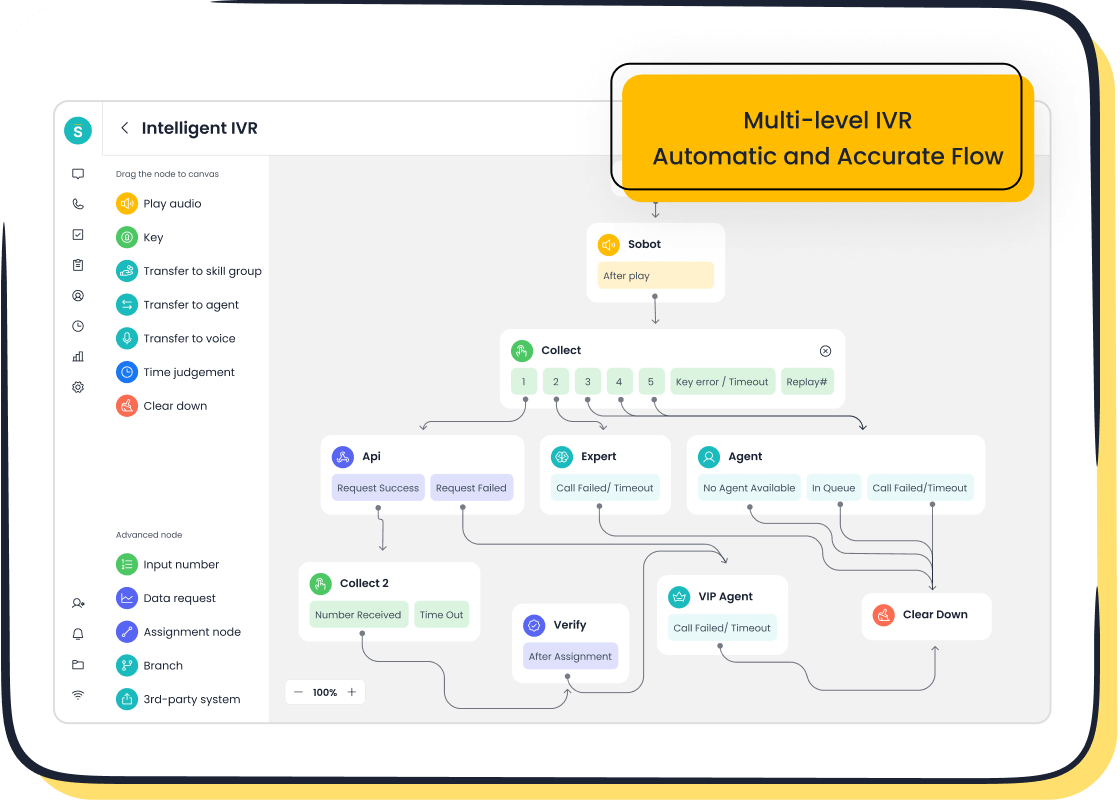
This review examines if Front is the right hub for your business's customer communications. Front is a powerful solution for teams needing strong team collaboration. Its features help manage high-volume messages across multiple channels. However, it may be too complex for solo users. Some teams might prefer a dedicated omnichannel customer service tool like Sobot. Platforms like Front can significantly boost efficiency.
| Metric | Value |
|---|---|
| Faster Response Time | 56 minutes faster |
| Time Saved Per Person/Week | 6 hours |
This platform's features improve team collaboration and streamline customer communications.
What is Front and Who is it For?
Front positions itself as a central hub for all customer communications. This part of the review explores its core purpose and identifies the teams that benefit most from its features.
The Core Function of a Communication Hub
A communication hub consolidates interactions into one place. This simplifies how teams talk to customers. The primary functions of such a platform include:
- Centralized Communication: It provides a single platform, like a shared inbox, for all messages. This creates a complete history and ensures a professional look.
- Enhanced Features: Teams can personalize messages, create recipient groups, and use templates. They can also schedule messages for later.
- Audience Management: Users can build custom audiences, filter recipients, and manage contact groups easily.
- Message Management: The system allows for drafting, scheduling, and tracking messages from a shared inbox.
Ideal User Profile: Support and Sales Teams
Front is designed for teams that handle a high volume of conversations. Sales and customer support teams find its features particularly useful.
Front aims to solve specific problems for these teams. For a support team, it addresses issues like inconvenient communication channels and the inability for customers to find help. For sales teams, it smooths out difficult sales processes and provides better insight into the customer journey. A shared inbox gives everyone on the support team visibility into customer issues.
This collaborative approach helps deliver better customer support and close deals faster.
Who Might Not Benefit from Front?
Front is not a perfect fit for every organization. Its advanced features and pricing may be too much for some businesses. The platform might not be cost-effective for:
- Small teams that only need basic email and ticketing.
- Businesses that can manage their daily chat and email volume without automation.
- Companies looking for a simple, low-cost solution without features they will not use.
For these groups, a simpler tool might be a better investment.
Key Features for Customer Support Teams

Front provides powerful features designed to enhance team collaboration and streamline customer support operations. An honest review of the Front customer service platform shows these tools help teams manage communications effectively. The platform's core features empower a support team to deliver faster and more organized service.
Shared Inboxes for Unified Communication
A shared inbox is a central pillar of Front's system. It consolidates various communication channels into a single view. This approach improves how a support team handles inquiries.
- Front unifies email, SMS, Facebook, and live chat into one shared inbox.
- Other platforms like Missive and Helpwise offer similar features, showing this is a key industry standard.
This unified shared inbox ensures no message gets lost. It gives the entire customer support team visibility into every conversation, creating a complete interaction history.
Collaboration: Comments, Assignments, and Drafts
Strong team collaboration is essential for excellent customer support. Front includes several features to prevent confusion and missed messages. Internal notes allow team members to discuss an issue privately within the email thread. Collision detection locks a message when an agent is replying, which stops two people from sending different answers. Ticket assignment creates clear ownership, ensuring every request goes to a specific person. These team collaboration tools are critical features for efficiency.
Integrations with Your Tech Stack
Modern businesses use many different tools. Front connects with popular CRM and project management software to create a seamless workflow. This integration brings customer data directly into the shared inbox.
For example, teams can connect Front to HubSpot for CRM data or to Asana and ClickUp for project tracking. This allows agents to see the full customer context without switching tabs.
Automation with Rules and Workflows
Automation saves time and reduces manual work. Front allows teams to create rules that manage incoming messages automatically. These simple but effective features can greatly improve response times. A support team can set up rules to:
- Automatically triage messages based on the subject line.
- Create filtered views to distribute the workload evenly.
Analytics for Team Performance
Understanding performance is key to improving customer support. Front’s analytics dashboard provides managers with important data. They can track key metrics to measure team effectiveness and customer satisfaction. Important indicators include:
- Response and resolution times
- Customer satisfaction (CSAT) scores
- Team productivity and workload distribution
These analytics features give leaders the insights needed to optimize team collaboration and service quality. The shared inbox data fuels these reports.
A Balanced Review of Front's Pros and Cons (An Honest Funnel.io Review Comparison)
Every software has its strengths and weaknesses. A thorough review must look at both sides to give a complete picture. This section provides a balanced analysis of Front, drawing from real user reviews and performance data. This honest funnel.io review comparison will help you decide if Front's benefits outweigh its potential drawbacks for your team.
The Pros: Why Teams Love Front
Teams that adopt Front often praise its ability to transform chaotic communication into an organized, collaborative process. The platform excels at bringing people together to work more efficiently. Many positive user reviews point to a core set of features that deliver significant value.
Key advantages frequently mentioned by users include:
- Exceptional Collaboration: Front is widely celebrated as a top-tier collaboration tool. It allows team members to work together directly within a conversation thread.
- Universal Inbox: The platform creates a single, universal inbox for numerous channels. This includes email, SMS, and in-app chats, centralizing all customer interactions.
- Shared Drafts and Comments: Teams can collaborate on a single email draft. They can also add internal comments and tag teammates for input, which keeps discussions right next to the customer message.
These features combine to create a transparent environment. Everyone on the team can see the status of a conversation, who is handling it, and what needs to happen next. This visibility is a major reason why support and sales teams love the platform.
The Cons: Potential Drawbacks to Consider
While Front offers powerful features, it is not without its challenges. A complete review must acknowledge the areas where the platform may fall short for some organizations. Real user reviews often point to several potential drawbacks that businesses should consider before committing.
The learning curve is a significant factor. The official onboarding for a new support representative is a structured three-month process. This period allows new hires to learn the product and adapt, but it highlights that Front is not a simple plug-and-play tool. It requires a real investment in team training.
Other common complaints found in user reviews include:
- Steep Pricing and Scaling Issues: The pricing tiers can be expensive. Upgrading plans or adding more users involves significant cost jumps. Some businesses find it challenging to scale because of limited channels and pre-built integrations, which can lead to higher long-term costs.
- Limited Integrations: While Front offers integrations, the number of native options is limited. Setting up connections with tools like Slack or Zapier can be difficult. Many important integrations require coding knowledge or separate, additional subscriptions.
- Lack of Customization: Users report a lack of general inbox customization. For example, you cannot easily change the order of emails or apply different themes. The absence of a multi-brand feature also means teams must manually tag and sort messages from different brands.
- Usability and Workflow Problems: Some users find the workspace is not always user-friendly and that the menus can feel cluttered. The system sometimes groups unrelated emails together, causing confusion. Furthermore, once a ticket is assigned, other agents may lose visibility, which can sometimes undermine the platform's collaborative purpose.
Front Pricing: Is it Worth the Investment?
Evaluating the cost of Front is a key part of any software review. The platform's pricing is based on a per-seat model, and understanding the value at each level is crucial for making an informed decision. The investment depends on your team's need for its specific collaborative features.
A Breakdown of Pricing Tiers
Front offers several pricing plans designed for different team sizes and needs. The cost increases with each tier, unlocking more advanced features. It is important to note that some AI features, like Autopilot and Smart QA, may require additional charges on top of the base plan price.
The main pricing tiers are as follows:
Key Feature Differences Between Plans
The primary difference between the plans lies in the available features. The Starter plan provides core shared inbox and collaboration tools. Moving up to the Professional and Enterprise tiers unlocks more powerful features.
Higher-tier plans grant access to integrated AI add-ons like Copilot and advanced analytics. These premium features are designed for larger teams that need deeper insights and more automation to manage high communication volumes effectively. The availability of these features justifies the higher cost for organizations that can leverage them.
Which Plan is Right for Your Team?
Choosing the right plan depends on your team's primary function. Front delivers excellent value for teams that rely heavily on email for customer support. Its features transform a standard inbox into a powerful collaborative platform.
For a small team focused on email collaboration, the Starter plan offers essential features. However, teams needing advanced analytics, integrations, and AI-powered features will find better value in the Professional or Enterprise plans. The best choice is the one that provides the necessary features to improve your team's workflow without paying for tools you will not use.
Top Alternatives to the Front Platform
While Front offers a powerful collaborative inbox, it's not the only solution on the market. Depending on your team's specific needs—whether it's a fully integrated contact center, advanced conversational AI, or straightforward simplicity—one of its competitors might be a better fit. This review explores three top alternatives: Sobot, Intercom, and Help Scout.
Sobot: The All-in-One Omnichannel Customer Service Tool
Front centers its platform on a collaborative shared inbox. In contrast, Sobot provides a comprehensive, all-in-one contact center solution. It is designed for businesses that need to manage customer interactions across a wide array of channels seamlessly. Sobot is a powerful omnichannel customer service tool that unifies communications into a single platform.
Sobot integrates a Voice Call Center, an AI Chatbot, and a full Ticketing System into one workspace. This makes it a true omnichannel customer service tool. Key features that set Sobot apart include:

- Unified Workspace: Sobot consolidates channels like voice, email, live chat, and social media. This eliminates the need for agents to switch between different systems.
- Advanced AI System: The platform's AI automates workflows, provides conversational intelligence, and ensures data security.
- Broad Channel Coverage: It supports a wide range of platforms, including e-commerce sites like Shopify, social media like WhatsApp, and official company websites.
Real-World Success: The electronics giant OPPO provides a powerful example of Sobot's impact. By implementing Sobot's solutions, OPPO achieved an 83% chatbot resolution rate and a 94% positive feedback rate. This demonstrates the platform's ability to improve efficiency and customer satisfaction.
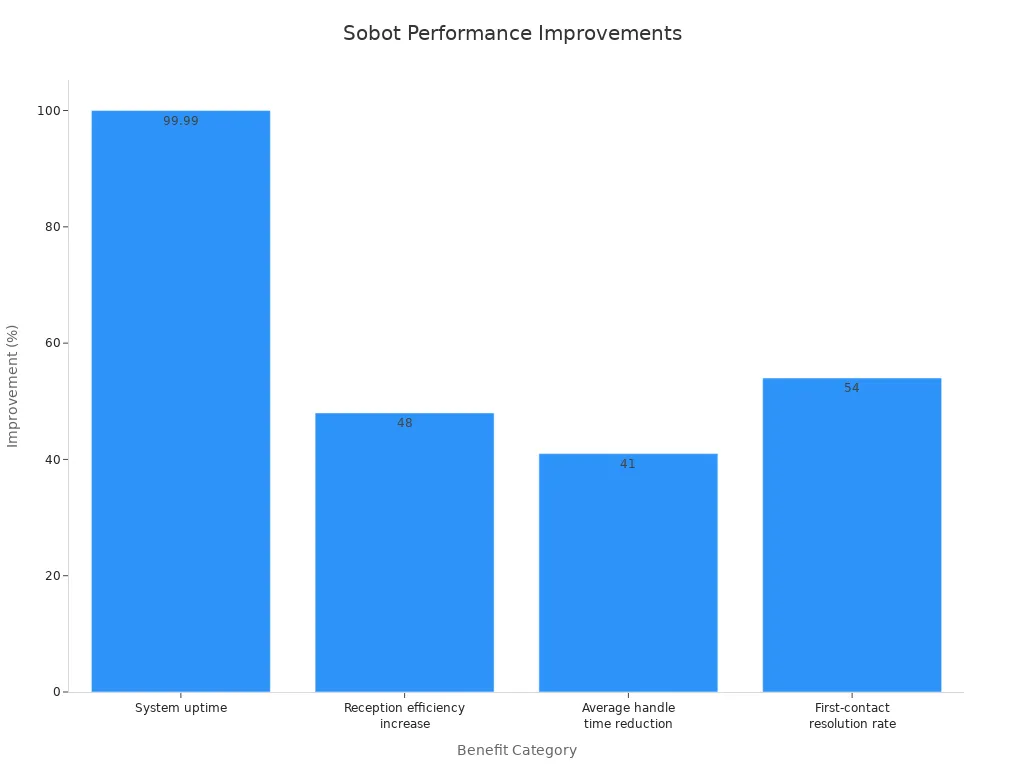
Sobot also emphasizes reliability and trust. It guarantees 99.99% system uptime with a Service Level Agreement (SLA) and is an official WhatsApp Business Solution Provider (BSP). This makes it a dependable choice for businesses that cannot afford downtime. For companies seeking a complete omnichannel customer service tool, Sobot offers a robust and integrated alternative to Front's shared inbox focus.
Intercom: For Conversational Support
Intercom positions itself as a leader in conversational support. Its primary goal is to resolve customer questions through messaging-based engagement. This approach allows customers to start, stop, and restart conversations without losing context, combining the best of real-time chat and asynchronous email.
A key use case for Intercom is handling repetitive, routine questions with its AI, Fin. This frees human agents to focus on more complex issues. The system gathers important customer data upfront and passes it to agents, making support more efficient.
| Feature | Intercom | Front |
|---|---|---|
| Starting Price | Starts at $74/month for basic features. | Starts at $49/month per user for basic features. |
| Pricing Model | Tiered pricing based on features and user 'seats'. | Per-user pricing with different feature tiers. |
| Key Cost Drivers | Number of active users, feature bundles, and message volume. | Number of users, specific integrations, and analytics access. |
| Value Proposition | Strong for proactive customer engagement and marketing automation. | Excellent for teams needing a unified shared inbox for collaboration. |
While powerful, Intercom's pricing can become expensive as teams grow or require more advanced features. It is an excellent choice for businesses focused on proactive customer engagement and marketing automation within their product.
Help Scout: For Simplicity and Small Teams
For small teams that prioritize simplicity and ease of use, Help Scout is a strong alternative. It consistently receives high marks for user satisfaction and its friendly interface. The platform is built around a straightforward shared inbox, making it ideal for managing customer communications collaboratively without unnecessary complexity.
Help Scout's core strengths include:
- Simplicity and Ease of Use: Teams can get started quickly and manage operations effectively.
- Streamlined Workflows: The platform offers simple processes that are perfect for smaller teams.
- Straightforward Ticketing: It excels at email-based support with a user-friendly system.
When comparing collaboration features, Help Scout is more basic than Front. It focuses on internal notes and tagging, whereas Front offers real-time comments and joint drafting.
"I love that Help Scout has no per-seat or AI usage fees." - Menn T, Head of Customer Support
Help Scout's pricing is also a major draw. It offers a free plan with unlimited users (with contact limits) and includes its AI features without extra charges. This makes it a very cost-effective omnichannel customer service tool for teams that need a human-centered experience without a steep price tag. It is an excellent omnichannel customer service tool for businesses that value simplicity and predictable costs.
This review finds Front is a premium platform for customer communications. It excels at team collaboration. Its main benefits are centralized messaging and powerful team collaboration features. However, its high cost and learning curve are notable drawbacks.
If your main goal is seamless team collaboration in a shared inbox, Front is a strong choice. For businesses needing a complete contact center with integrated voice and AI, an omnichannel solution like Sobot offers a more practical alternative.
FAQ
What is the main purpose of Front?
Front acts as a customer communication hub. It brings messages from channels like email, SMS, and chat into one shared inbox. This helps teams collaborate and manage customer conversations together.
Is Front a good choice for small businesses?
Front can be expensive for very small teams. Its features are powerful for managing high message volumes. Businesses with simpler needs might find other tools more cost-effective. An honest review of the Front customer service platform shows it's best for growing teams.
How is Front different from Sobot?
Front focuses on a collaborative shared inbox for communication. Sobot offers a complete, all-in-one contact center solution.
Sobot includes:
- Voice Call Center
- AI Chatbot
- Ticketing System
This makes Sobot a true omnichannel platform.
Does Front include AI features?
Yes, Front offers AI features on its higher-tier plans. These tools, like Copilot and advanced analytics, help automate tasks and provide performance insights. Some AI add-ons may have an additional cost.
See Also
Comparing Leading Voice of Customer Software Solutions for Your Business
Reviewing the Best Free Chat Software Options for Businesses
Your Ultimate Guide to Selecting the Best Live Chat Software
The 10 Best Customer Service Software Platforms for 2024
A Comparison of Leading Interactive Voice Response Software Systems

