Enterprise Contact Center Software Buying Guide for Businesses


Selecting enterprise contact center software shapes your business success. When you align your contact center software with strategic goals, you see real results. For example, analytics-driven recommendations helped a telecom provider cut annual costs by 50% and improved customer loyalty for an automaker, raising its Net Promoter Score from -29 to +70. Innovative, customer-focused solutions like Sobot and Sobot AI deliver strong outcomes for leading brands:
| Company | Customer Satisfaction | Efficiency Gain |
|---|---|---|
| Samsung | 97% CSAT | — |
| Agilent | — | 6x |
| Opay | 90% CSAT | — |
This guide gives you a step-by-step guide to use when choosing the right contact center software provider, enhancing the customer experience, and maximizing the use of contact center software for your business.
Business Needs Assessment
Customer Contact Goals
You need to set clear goals before choosing contact center software. Start by deciding what you want your customer service team to achieve. Do you want to improve customer satisfaction, increase first contact resolution, or reduce wait times? Many businesses use customer service software to handle support, sales, and technical questions. You should also define how you will measure success. Common metrics include customer satisfaction scores, net promoter scores, and average handle time.
Tip: Integrate your contact center software with a Voice of the Customer platform to collect feedback and close the loop on service improvements.
A solution like Sobot helps you reach these goals by offering multi-channel support, speech analytics, and seamless CRM integration. These features let you track performance and respond quickly to customer needs.
Channel and Volume Requirements
You must understand which channels your customers use most. Some prefer phone calls, while others like live chat, email, or social media. Your contact center software should support all these channels to deliver a smooth experience.
| Metric | Description | Why It Matters |
|---|---|---|
| Ticket volume by channel | Number of tickets per channel | Helps you plan staffing |
| Tickets opened vs. solved | Opened tickets compared to resolved tickets | Shows if you need more resources |
| Response time | Time to first agent action | Impacts customer satisfaction |
| First contact resolution | Percentage resolved on first contact | Improves efficiency and satisfaction |
Sobot’s omnichannel customer service software unifies all channels in one workspace. This makes it easy for your team to manage high volumes and deliver fast responses.
Growth and Scalability
Your business will grow, so your contact center software must keep up. Look at your current systems and predict future needs. Ask yourself if your software can handle more customers, new channels, or sudden spikes in demand.
- Review your current technology and workflows.
- Analyze trends in customer interactions.
- Identify bottlenecks that could slow growth.
- Plan for both short-term and long-term needs.
- Choose software with scalability and flexibility, such as cloud-based platforms and AI-powered automation.
Sobot’s customer service software offers cloud deployment, AI chatbots, and easy CRM integration. These features help you scale operations without losing performance or security. As your business expands, you stay ready for new challenges.
Essential Features in Enterprise Contact Center Software

Choosing the best contact center software means looking for the right contact center features that drive results. You need tools that help your team work smarter, keep customers happy, and protect your business. Here are the must-have features every enterprise contact center software should offer:
Omnichannel Support
Modern customers expect to reach you on any channel—phone, chat, email, or social media. The best contact center software brings all these channels together in one place. Sobot’s omnichannel solution gives your agents a unified workspace, making it easy to manage every conversation. This approach improves first-call resolution and boosts customer satisfaction.
| Use Case | Outcome / Benefit |
|---|---|
| CPS Group (Tech Recruitment) | 60% reduction in phone bills, improved productivity, seamless CRM integration, remote work enablement, faster role filling, and exceptional service delivery. |
| Customer Service Industry | Omnichannel support via phone, email, chat, social media; AI chatbots deflect call volume; customer sentiment tracking. |
Omnichannel routing and multichannel support help you deliver seamless experiences and stand out from competitors.
AI and Automation
AI and machine learning are transforming call center software. Sobot’s AI-powered Voicebot and automation tools handle repetitive tasks, freeing agents for complex issues. You see faster response times and lower costs. The voice bot market is growing by over 21% each year, and AI can cut labor costs by $80 billion by 2026.
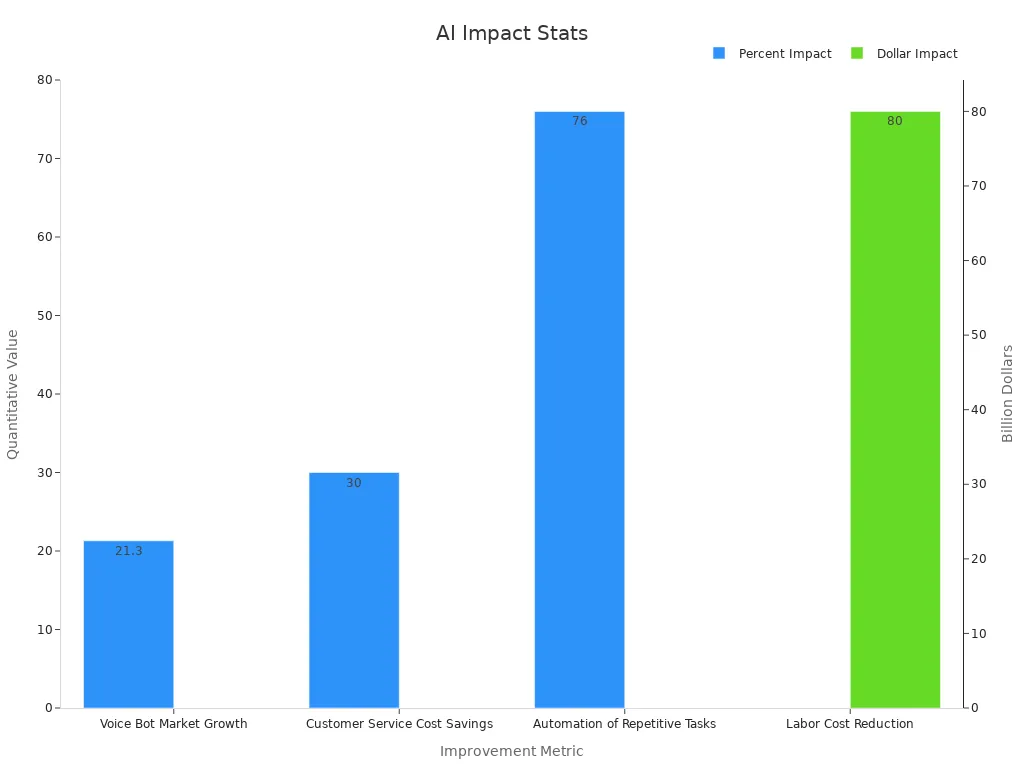
AI-driven contact center features also improve first call resolution and reduce average handling time, making your call center service more efficient.
CRM Integration
The best contact center software connects smoothly with your CRM. Sobot’s call center software offers seamless integration, so agents see all customer data in one place. Real-time data sync, click-to-dial, and unified call logging boost agent productivity by 25% and increase customer retention by 15%. These contact center features help you personalize service and automate workflows.
Analytics and Reporting
You need strong analytics to track performance. The best customer service software provides real-time dashboards and detailed reports. Sobot’s analytics tools let you monitor agent performance, call volume, and customer satisfaction. Key metrics include first call resolution, average handle time, and Net Promoter Score (NPS).
| Metric Category | Key Metrics / Examples | Purpose / Insights |
|---|---|---|
| Agent Performance | Schedule adherence, First Call Resolution (FCR), Average Handle Time (AHT), Transfer rates | Evaluate agent efficiency, adherence to SLAs, identify training needs |
| Customer Satisfaction | CSAT, Net Promoter Score (NPS), Customer Effort Score (CES), Churn prediction analytics | Assess service quality, customer loyalty, and retention risks |
Security and Compliance
You must ensure security and compliance in your contact center software. Data breaches are costly, with noncompliance raising breach costs by 12.6% (IBM). Sobot’s call center software uses encrypted data transfer and meets strict compliance standards. With 28% of organizations facing breaches in the past three years, robust security is a must-have feature for any software contact center solutions.
Tip: Always choose the best call center phone system with built-in security and compliance tools to protect your business and your customers.
Integration and Usability
Seamless System Integration
You need contact center software that connects smoothly with your existing tools. Seamless integration lets your team work faster and smarter. When you bring together systems like CRM, ticketing, and analytics, you get a complete view of every customer. For example, a business that unified Salesforce and Oracle EBS gained a 360-degree operational view and improved delivery control. This led to better efficiency and more confidence in their processes.
| Aspect | Details |
|---|---|
| Problem/Goal | Needed integration services to unify systems for end-to-end delivery control; lacked in-house expertise; required architectural consultation. |
| Solution | Redefined delivery lifecycle with sprint-based integration releases; created centralized architectural team; rebuilt implementations to improve performance. |
| Results | Built a highly available real-time data store; achieved 360-degree operational view via Salesforce and Oracle EBS integration; gained control and maturity in delivery processes. |
| Business Outcome | Improved operational efficiency and confidence in integration capabilities, enabling ambitious future objectives. |
Sobot makes integration easy. You can connect Sobot’s contact center software with your CRM and technology management systems in just a few steps. This ease of integration helps you avoid delays and keeps your business running smoothly.
User Experience
You want your agents to feel comfortable using your contact center software. A simple, clean interface means less training and fewer mistakes. When software has strong ease of use, agents can focus on helping customers instead of learning new tools. Tampa General Hospital saw a 47% increase in online appointment scheduling after integrating their systems, showing how a good user experience drives results.
Sobot designs its platform for ease of use. Agents get a unified workspace where they can see all customer messages, tickets, and data in one place. This setup reduces confusion and helps your team deliver better service.
Customization Options
Every business has unique needs. Customization lets you adjust your contact center software to fit your workflows. You can set up custom dashboards, automate tasks, and create rules for routing calls or messages. This flexibility helps you respond quickly to changes in your business.
Sobot offers many customization options. You can tailor the platform to match your brand and processes. With Sobot, you get the tools to build a contact center that grows with you.
Deployment Options: Cloud vs On-Premise

Cloud-Based Call Center Software
Cloud contact center software gives you flexibility and speed. You do not need to buy or maintain servers. You pay for what you use with a SaaS model. This approach helps you control costs and scale your team quickly. You can support customers on voice, video, SMS, social media, live chat, and chatbots—all from one platform.
- You get real-time analytics, supervisor monitoring, and advanced call routing with AI.
- Workforce management tools automate scheduling and forecasting.
- Security features include encryption, multi-factor authentication, and compliance with GDPR and HIPAA.
- Cloud deployment supports remote workforces and enables fast implementation.
Sobot’s cloud contact center software lets you integrate with CRM and ticketing systems. You can launch new channels or scale up during busy seasons without delay. Many businesses choose cloud solutions for their reliability and ability to support omnichannel engagement. The COVID-19 pandemic accelerated this shift, and most organizations plan to keep cloud deployments for the long term.
On-Premise Solutions
On-premise call center software gives you full control over your data and security. You manage everything on your own servers. This setup requires a large upfront investment in hardware and IT staff.
| Aspect | On-Premise Call Center Software | Cloud Call Center Software |
|---|---|---|
| IT Management | High internal resources needed | Provider handles maintenance |
| Costs | High upfront and ongoing costs | Lower, predictable expenses |
| Accessibility | On-site only | Accessible anywhere |
| Innovation & Updates | Manual, slow updates | Automatic, frequent updates |
| Scalability | Difficult and expensive | Easy and fast |
| Security & Compliance | Full internal responsibility | Shared with provider |
| Remote Work | Complex and costly | Designed for remote agents |
On-premise solutions can limit remote work and slow down innovation. You may face challenges with scaling and keeping up with new features. Many organizations now move to cloud-based call center software for better agility and cost savings.
Hybrid Approaches
Hybrid deployment combines the best of both worlds. You use automation and AI for routine tasks, while human agents handle complex or sensitive issues. This model lets you transition smoothly between automated and live support. Research shows hybrid models improve customer experience and business outcomes.
You can keep sensitive data on-premise and use cloud contact center software for flexibility and scale. Sobot supports hybrid deployments, allowing you to blend automation with human expertise. This approach helps you manage costs, boost efficiency, and deliver a superior customer experience.
Step-by-Step Guide to Choosing the Right Contact Center Software Provider
Choosing the right contact center software provider can transform your business. This step-by-step guide helps you make an informed decision by focusing on what matters most: performance, reliability, and support. You want the best contact center software that fits your needs today and supports your growth tomorrow.
Vendor Evaluation Criteria
When you evaluate vendors, you need to look beyond just price. The best contact center software providers stand out by delivering measurable results and strong support. Use these criteria to compare your options:
- Integration capabilities: Check if the software connects easily with your CRM, workforce management, and analytics tools.
- Support services: Look for 24/7 support, onboarding help, and ongoing training.
- Software functionalities: Make sure the platform offers omnichannel support, AI automation, analytics, and security.
- Cost considerations: Review the total cost of ownership, including setup, training, and support. Calculate ROI based on real operational data.
- Workforce efficiency: Assess how the software improves agent productivity and reduces average handle time.
- Employee satisfaction: Ask for feedback from current users to see how the system impacts daily work.
- Scalability: Ensure the solution grows with your business and handles spikes in volume.
- Vendor responsiveness: Evaluate how quickly the provider responds to issues or requests.
You can use structured scorecards and KPIs to compare vendors. Many businesses involve teams from finance, IT, and operations to make an informed decision. Track vendor performance against service level agreements and use both quantitative and qualitative data for a complete view.
Tip: Ask vendors for case studies and references. Real-world results show how the best contact center software performs under pressure.
Sobot as a Provider Example
Sobot stands out as a leader in enterprise contact center software. You see this in the numbers and in customer stories. Over 70% of Sobot’s business comes from system upgrades, showing strong trust and satisfaction among existing clients. Sobot’s AI-driven solutions have reduced customer waiting times by 35%. This means your customers get faster answers and better service.
Sobot’s omnichannel integration solves the problem of disconnected systems. For example, a major fresh food e-commerce company unified all its channels with Sobot, improving both agent efficiency and customer experience. Sobot’s customer service software supports global brands like OPPO, Samsung, and Agilent.
OPPO used Sobot’s chatbot and ticketing system to handle high volumes during shopping festivals. The result: an 83% chatbot resolution rate, a 94% positive feedback rate, and a 57% increase in repurchase rate. Sobot helped OPPO reduce knowledge base maintenance by 90%, freeing up resources for more complex tasks.
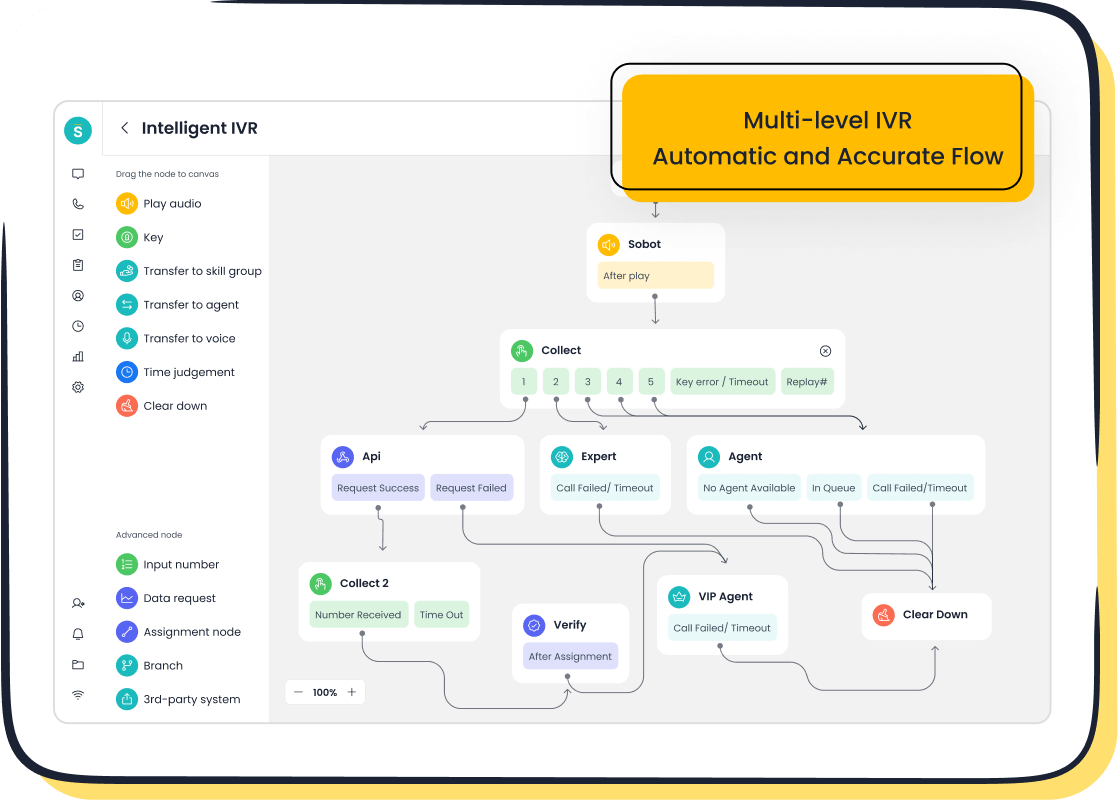
Sobot’s best contact center software offers features like AI-powered voicebots, unified workspaces, and global telephony. You get a stable system with 99.99% uptime and seamless integration with your existing tools. These strengths make Sobot a top choice when choosing the right contact center software provider.
Support and Onboarding
Strong support and onboarding set the best call center phone system apart. You want a provider that helps your team succeed from day one. Sobot delivers comprehensive support services designed to boost agent performance and customer satisfaction.
- Call and screen recording: Use these tools for coaching and compliance.
- Quality evaluation and scoring: Identify strengths and areas for improvement.
- Speech analytics: Gain insights into customer sentiment and compliance risks.
- Real-time reporting: Monitor key metrics instantly to keep your team on track.
- AI-driven insights: Detect trends and address issues before they grow.
- Integration with CRM and workforce management: Align data and streamline operations.
Sobot also offers knowledge management and learning systems. These tools help agents find accurate information fast, improving first call resolution and reducing average hold time. Scalable training programs ensure your team stays up to date with new features.
You can measure onboarding success with metrics like time to value, feature adoption rate, and activation rate. Fewer onboarding support tickets mean a smoother experience for your team. Sobot’s support team stays available to answer questions and resolve issues quickly, helping you get the most from your investment in the best customer service software.
Note: The right support and onboarding process can make or break your call center service. Choose a provider that invests in your long-term success.
Pricing and ROI Analysis
Pricing Models
You need to understand how pricing works before you choose the best contact center software. Pricing models can vary based on your business goals, costs, and market needs. Here is a table that breaks down the main elements:
| Pricing Element | Description | Application to Enterprise Contact Centers |
|---|---|---|
| Foreign Market Objectives | Sets goals like growth or market entry, depending on your target clients. | Aligns pricing with your business strategy. |
| Costs | Covers software, support, and profit margins. | Helps you set competitive and profitable prices. |
| Market Demand | Looks at what customers can pay and how much they need your service. | Guides you to price based on demand and affordability. |
| Competition | Compares your prices to others in the market. | Helps you stay competitive and win more clients. |
| Pricing Summary | Combines all factors for a balanced approach. | Ensures you make smart pricing decisions. |
Sobot offers flexible pricing for its contact center software, making it easy for you to match your budget and growth plans.
Total Cost of Ownership
When you invest in contact center software, you must look beyond the sticker price. The total cost of ownership (TCO) includes many factors:
- List all costs: software, hardware, licenses, training, support, and upgrades.
- Ask vendors for a full breakdown, including hidden fees.
- Consider non-monetary costs like downtime or lost productivity.
- Compare TCO across different options to see long-term value.
- Ongoing costs include employee turnover, training, and technology maintenance.
- Shrinkage, or paid but unproductive time, adds to your expenses.
- Compliance with regulations like GDPR or CCPA can increase costs.
- Subscription models may lower upfront costs but add recurring payments.
Sobot’s cloud-based contact center software helps you control TCO by offering predictable pricing, easy scaling, and strong support.
ROI Considerations
You want to see a clear return on your investment in the best contact center software. Calculate ROI by looking at both financial and qualitative benefits:
- Add up all costs: subscription fees, onboarding, and training.
- Measure gains: faster response times, higher customer satisfaction, and improved agent productivity.
- Include strategic benefits: better compliance, data security, and business growth.
- Use the formula: (Value - Costs) / Costs.
For example, Sobot’s unified workspace and AI automation help you boost productivity and reduce manual work. Over three to five years, these gains can deliver strong ROI and support your long-term goals.
Tip: Always review ROI over several years to capture the full value of your contact center software investment.
Testing and Validation
Free Trials and Demos
You should always start with a free trial before making a final decision on contact center software. A free trial gives you hands-on experience with the platform, helping you see if it fits your business needs. Most users decide whether to continue using a product within just three days, not the full 30-day trial period that many providers offer. This means you should focus your evaluation early in the trial to get the most value.
- Free trials help you understand product value and reduce risk.
- Only about 20% of users become true evaluators, showing high engagement and willingness to pay.
- Most users (70%) sign up by accident and do not engage, so focus on those who actively use the trial.
- Usage analytics during the trial help you track engagement and spot any issues.
Sobot offers a free trial and live demo for its contact center software, allowing you to explore features like AI-powered voicebots and omnichannel support. Make sure to read reviews and test demos to compare real-world performance.
User Feedback and Reviews
You should always check user feedback and reviews before choosing a contact center solution. Real customer experiences reveal strengths and weaknesses that you might not notice during a trial. Many users praise platforms that offer seamless integration, strong AI features, and easy setup. For example, Sobot users highlight the unified workspace and fast onboarding process, which help teams deliver better service.
- Look for feedback on call quality, integration, and ease of use.
- Pay attention to comments about customer support and system reliability.
- Reviews often mention how well the software handles high volumes and complex workflows.
User reviews give you confidence that the software will perform as promised in your business environment.
Final Checklist
Before you make your final choice, use a detailed checklist to validate your decision. A good checklist covers:
- Multi-channel communication and AI features.
- CRM integration and KPI monitoring.
- Security, compliance, and workflow automation.
- Alignment with your business goals.
- Real-world testing through a free trial or demo.
- Input from IT, customer service, and end-users.
- Scoring and benchmarking for each solution.
Tip: Document your evaluation process and results. This helps you make a transparent and confident decision.
Sobot provides resources and support to guide you through each step, ensuring your contact center software meets all your requirements.
Choosing the right contact center software shapes your customer experience and business growth. You need a step-by-step approach to compare features, integration, and ROI. Sobot’s contact center software delivers 99.99% uptime, AI-powered automation, and seamless CRM integration. Over 10,000 brands trust Sobot to unify channels and boost efficiency. Request a demo today to see how Sobot’s contact center software can help you achieve your goals. Always prioritize your business needs, integration, and long-term value when selecting contact center software.
FAQ
What is enterprise contact center software?
Enterprise contact center software helps you manage customer interactions across channels like phone, chat, and email. You can use it to improve response times, track performance, and boost customer satisfaction. Sobot’s contact center software supports over 10,000 brands worldwide.
How does omnichannel support improve customer experience?
Omnichannel support lets your customers reach you on their preferred channel. You can respond faster and keep conversations consistent. Sobot’s omnichannel solution unifies all channels in one workspace, increasing agent productivity by up to 30% and improving customer satisfaction scores.
Why should you choose cloud-based call center software?
Cloud-based call center software gives you flexibility and scalability. You can support remote agents, launch new channels quickly, and reduce IT costs. Sobot’s cloud contact center software offers 99.99% uptime and global telephony, making it a reliable choice for growing businesses.
How does AI-powered automation benefit your contact center?
AI-powered automation handles repetitive tasks, freeing your agents for complex issues. You can reduce average handle time and improve first contact resolution. Sobot’s AI-powered Voicebot and chatbots help you deliver 24/7 customer service and boost efficiency.
What security features should you look for in the best contact center software?
You should look for encrypted data transfer, compliance with regulations like GDPR, and real-time monitoring. Sobot’s contact center software uses advanced security protocols and meets strict compliance standards, helping you protect customer data and maintain trust.
Tip: Always review your provider’s security certifications and uptime guarantees before choosing the best contact center software.
See Also
Evaluating Artificial Intelligence Solutions For Enterprise Call Centers
Best Cloud-Based Contact Center Services Reviewed For 2024
Leading No-Cost CRM Software Options For Call Centers 2024