Choosing a Customer Support Platform for SMBs


Choosing the right customer support platform for smbs is about finding the correct features for your budget. Your small businesses needs a solution that grows with you. This comprehensive guide helps you find the best customer service software for your needs.
Quick Answers: Top Customer Service Software
- All-in-One Solution: Look at Sobot.
- Deep CRM Integration: Consider HubSpot Service Hub.
- Budget-Friendly Start: Try Zoho Desk.
This guide reviews many customer service software platforms. It helps you compare the top customer support platform options. You can make a confident choice for your businesses.
Key Factors for Small Businesses: A Buyer's Guide

This guide helps you evaluate the best customer service software for your needs. You should focus on four key areas. These factors will help you choose a platform that supports your team and improves customer satisfaction.
Core Features You Actually Need
You should list the key features of customer service tools your team cannot live without. Many businesses start with a shared inbox or a basic ticket management system. You might also need live chat support for instant engagement. Good customer service tools offer omnichannel communication. This unifies conversations from email, chat, and social media. Look for automation tools and customer feedback tools to boost efficiency. A strong customer engagement platform helps you build lasting relationships.
Scalability and Future Growth
Your business will grow. Your customer service software must grow with you. A scalable platform handles more users and support channels easily. Consider these strategies for growth:
- Build a self-serve knowledge base. This empowers customers to find answers on their own.
- Use AI-powered automation. Chatbots can handle simple questions, freeing up your agents.
- Adopt an omnichannel strategy. A unified cloud inbox delivers a consistent customer experience.
These features ensure your cloud-based customer service can scale. This improves customer satisfaction without overwhelming your team.
Pricing and Total Cost of Ownership
Your budget is important. You must look beyond the monthly subscription price. Many platforms have hidden costs.
For example, training can be a major expense. The average organization spent $1,308 per employee on training in 2019. You may also face fees for ongoing support, integrations, or essential add-on features.
Calculate the total cost of ownership. This includes all potential expenses over time. This gives you a true picture of the investment for your small businesses. The benefits of customer support software should outweigh these costs.
Ease of Use and Implementation
The best customer support platform for smbs is one your team will actually use. Complicated software creates frustration. It also leads to low adoption. Platforms like Freshdesk and Help Scout are known for being easy to use. They require minimal training. A clean interface and simple setup process improve engagement. This focus on user experience helps your team deliver better customer satisfaction and a superior customer experience. Your cloud platform should be simple to deploy and manage.
Top 15 Customer Support Platforms for SMBs in 2026
Now you have a framework for making your decision. Let's explore the top platforms on the market. This review of the best customer service software will help you find the perfect fit for your team and customers.
Sobot: For Integrated Omnichannel Communications
- Best for: Businesses seeking a powerful, all-in-one contact center to unify all customer conversations and improve operational efficiency.
- Key SMB Features:
- True Omnichannel Communication: Sobot centralizes every channel into one AI-powered contact center. It integrates e-commerce sites (Shopify, Amazon), social media (Facebook, Instagram), and messaging apps. As an official WhatsApp Business Solution Provider (BSP), it offers robust WhatsApp API tools for customer engagement.
- AI-Powered Automation: You can use an AI-powered chatbot and voicebot to provide 24/7 self-service. These tools handle common questions, freeing up your agents for more complex issues.

- **Unified Cloud Contact Center**: The platform combines a voice call center, live chat, and a ticketing system. This eliminates the need to buy and manage multiple systems.
- **Advanced Analytics**: You get access to over 300 statistical reports. These reports help you monitor processes, inspect quality, and gain deep insights into your support operations.
- Pricing Summary: Sobot offers scalable plans suitable for growing businesses. You can start with a basic plan and expand as your needs grow.
| Plan | Monthly Cost | Conversations per Month |
|---|---|---|
| Basic | $49 | 1,000 |
| Pro | $149 | 10,000 |
| Enterprise | Custom Quote | N/A |
- Pros:
- Increased Efficiency: By unifying all channels and using AI-powered automation, your team can handle more conversations with less effort.
- Cost-Effective: You get a comprehensive solution with a single subscription. This avoids the cost and complexity of integrating separate tools for voice, chat, and email.
- Seamless Integration: The platform connects easily with your existing tools, providing a single source for customer data and enabling proactive outreach.
- High Stability: Sobot guarantees 99.99% system uptime, ensuring your customer service is always available.
HubSpot Service Hub: For All-in-One CRM Integration
- Best for: Businesses already using or planning to use the HubSpot CRM that want to align their sales, marketing, and service teams.
- Key SMB Features:
- Native CRM Integration: Service Hub is built on the HubSpot CRM. This gives your support team a complete history of every customer interaction with sales and marketing.
- Help Desk & Ticketing: You can use robust ticketing features to track, manage, and prioritize customer inquiries efficiently.
- Knowledge Base: Build a self-service library of help articles. This empowers customers to find answers on their own and reduces ticket volume.
- Live Chat & Bots: Add live chat to your website for real-time support. You can also create conversational bots to qualify leads and answer common questions.
- Pricing Summary: HubSpot offers a free plan with basic tools, including ticketing and live chat. Paid plans start at $45/month (billed annually) and unlock more advanced automation and reporting.
- Pros:
- Provides a single view of the customer for all teams.
- Strong automation tools help streamline routine tasks.
- Excellent for creating a seamless customer experience from first contact to post-sale support.
- Cons:
- Advanced features can become expensive quickly.
- The platform has a learning curve for new users.
- Customization options can be limited in lower-tier plans.
Zendesk: For Scaling with Your Business
- Best for: Growing businesses that need a scalable, enterprise-grade customer support platform for smbs with powerful reporting.
- Key SMB Features:
- Omnichannel Support: The Suite Team plan integrates email, social media, messaging, and a help center into one workspace.
- Ticketing System: You get a powerful system for tracking and managing customer issues with workflows based on business rules.
- Reporting & Analytics: Access ready-to-use dashboards to monitor key metrics like response times and customer satisfaction.
- AI Agents: Even the entry-level suite includes AI agents to help manage conversations and provide instant answers.
- Pricing Summary: The Support Team plan starts at $19 per agent/month (billed annually) for basic ticketing. The more comprehensive Suite Team plan starts at $55 per agent/month (billed annually).
| Plan | Price (Billed Annually) | Price (Billed Monthly) |
|---|---|---|
| Support Team | $19 / agent / month | $25 / agent / month |
| Suite Team | $55 / agent / month | $69 / agent / month |
- Pros:
- The platform is highly scalable and can grow with your business.
- Strong reporting tools provide deep insights into team performance.
- It is a recognized and trusted brand in the customer service software space.
- Cons:
- The per-agent pricing model can become costly as your team expands.
- Many advanced features are locked behind more expensive plans.
- The extensive feature set can create a steep learning curve for new teams.
Freshdesk: For Feature-Rich Affordability
- Best for: Small businesses looking for a user-friendly platform with a rich feature set at a budget-friendly price point.
- Key SMB Features:
- Omnichannel Inbox: You can consolidate conversations from email, chat, phone, and social media into a single view.
- Automation Tools: Use automated routing and pre-built templates to handle tickets faster. A no-code workflow builder helps you manage complex tasks.
- AI Capabilities: The platform includes an AI Copilot to help agents draft responses and an AI Agent to resolve queries autonomously.
- Self-Service Portal: You can create a knowledge base to help customers find their own answers, reducing your ticket volume.
- Pricing Summary: Freshdesk offers a free plan for up to 10 agents. Paid plans start at $15 per agent/month (billed annually), with key features available even in lower tiers.
- Pros:
- The intuitive interface requires minimal training for your team.
- It offers a great balance of powerful features and affordable pricing.
- Complimentary onboarding and support help you get started quickly.
- Cons:
- Some users report occasional system lags during high-volume periods.
- Advanced customization for reporting can be challenging.
- The mobile app lacks some features found on the desktop version.
Zoho Desk: For Businesses on the Zoho Ecosystem
- Best for: Businesses that already use other Zoho products and want a tightly integrated, context-aware help desk.
- Key SMB Features:
- Seamless Zoho Integration: Zoho Desk connects perfectly with Zoho CRM and over 55 other Zoho apps, providing a unified view of the customer.
- Multichannel Support: Your agents can manage tickets from email, social media, live chat, and web forms in one place.
- AI Assistant (Zia): Zia, the AI assistant, helps agents with reply suggestions, predicts customer sentiment, and can even handle service conversations.
- Agent Productivity Tools: Features like Work Modes and a knowledge base help agents prioritize tickets and reduce response times.
One company reported that its average agent response time dropped from seven hours to three hours after implementing Zoho Desk.
- Pricing Summary: Zoho Desk has a free plan for up to 3 agents. Paid plans start at a very affordable $14 per agent/month (billed annually).
- Pros:
- Unbeatable value if you are already invested in the Zoho ecosystem.
- Strong automation and AI features help improve team productivity.
- The platform scales easily to support business growth and global expansion.
- Cons:
- The greatest benefits are realized when used with other Zoho apps.
- It can feel overwhelming if you are not familiar with the Zoho interface.
- Some advanced integrations may require technical expertise.
Help Scout: For a Human-Centric Approach
- Best for: Businesses that want to provide personalized, human support without the impersonal feel of a traditional ticketing system.
- Key SMB Features:
- Shared Inbox: Manage all your customer emails in a collaborative inbox that feels like a personal email.
- Live Chat: Add a simple, clean chat widget (called Beacon) to your site for real-time engagement and self-service.
- Knowledge Base: Create help articles that are easy for customers to find and use.
- Customer Profiles: See past conversations and customer data right next to every message.
- Pricing Summary: Plans start at $20 per user/month (billed annually). This includes the shared inbox, knowledge base, and reporting.
- Pros:
- The focus on human interaction helps build strong customer relationships.
- The interface is clean, simple, and very easy for teams to learn.
- Pricing is straightforward and includes most key features in the standard plan.
- Cons:
- It lacks some of the advanced automation and AI features of other platforms.
- Reporting is less robust compared to more data-heavy platforms.
- It may not be the best fit for high-volume, purely transactional support.
Intercom: For Proactive, Chat-First Support
- Best for: Businesses that want to proactively engage customers through chat, onboard new users, and provide targeted support.
- Key SMB Features:
- Proactive Messaging: You can send targeted outbound messages, banners, and product tours to alert customers to issues or guide them through new features.
- Business Messenger: A highly customizable chat widget for your website and app that supports live chat, bots, and self-service.
- AI Chatbot (Fin): Use an advanced AI bot to provide instant, accurate answers drawn from your help center content.
- Shared Inbox: A collaborative inbox for your team to manage conversations from chat, email, and social media.
- Pricing Summary: The "Essential" plan starts at $39 per seat/month. Pricing is usage-based, which can be complex. A "Starter" plan for very small businesses begins at $74/month (includes 2 seats).
- Pros:
- Excellent for proactive customer engagement and onboarding.
- The AI chatbot is one of the most powerful on the market.
- The messenger is highly customizable and offers a great user experience.
- Cons:
- The pricing model can be confusing and expensive for businesses with many users or high engagement.
- It is heavily focused on chat, so it may not be ideal for voice-centric support teams.
- Some users find the interface complex to navigate initially.
Gorgias: For E-commerce and Social Media Support
- Best for: E-commerce businesses, especially those on Shopify, that need to manage high volumes of support requests from social media and email.
- Key SMB Features:
- Deep E-commerce Integration: It integrates with Shopify, BigCommerce, and Magento to show customer order data right next to each ticket.
- Social Media Management: You can manage comments, messages, and ad comments from Facebook and Instagram directly within Gorgias.
- Automation Rules: Automate responses to common questions like "Where is my order?" using pre-made templates and customer data.
- Unified Customer View: It combines conversations from email, chat, phone, and social media into a single customer timeline.
- Pricing Summary: Plans are based on ticket volume, starting at $50/month (billed annually) for 300 tickets.
- Pros:
- The deep Shopify integration is a game-changer for online retailers.
- Excellent for managing customer service on social media platforms.
- Powerful automation helps e-commerce teams work much more efficiently.
- Cons:
- The ticket-based pricing can become expensive for fast-growing stores.
- It is highly specialized for e-commerce, so it may not be the best fit for other industries.
- Reporting features are not as advanced as some competitors.
Front: For Collaborative Team Inboxes
- Best for: Teams that need to manage shared inboxes like
support@orsales@with a high degree of internal collaboration. - Key SMB Features:
- Unified Workspace: Front combines email, chat, and social media messages into a single collaborative workspace.
- Internal Collaboration: You can comment on emails internally and assign messages to teammates without forwarding or creating more email clutter.
- Automation & Workflows: Automatically assign, tag, and categorize messages to optimize your team's workflow.
- Deep Integrations: It connects with CRMs like Salesforce and other apps like Slack and Trello to bring context into your inbox.
- Pricing Summary: Plans start at $59 per seat/month (billed annually) with a minimum of 2 seats.
- Pros:
- It is far more powerful than a traditional shared inbox like in Google or Outlook.
- It greatly improves internal team collaboration and efficiency.
- Strong automation capabilities help keep your inbox organized.
- Cons:
- The pricing is high, especially for small teams.
- It is primarily focused on email and internal collaboration, not broad customer support features.
- It lacks some of the advanced analytics found in other dedicated customer service tools.
Tidio: For Live Chat and AI on a Budget
- Best for: Small businesses and solopreneurs who need a simple, affordable live chat and chatbot solution.
- Key SMB Features:
- Free Plan: The free plan is very generous, offering up to 3 operators, 500 emails, and 100 unique chatbot engagements per month.
- Visual Chatbot Editor: You can build chatbots easily with a drag-and-drop editor and pre-built templates for lead generation or cart abandonment.
- Live Chat Tools: Features include live typing previews and a list of visitors currently on your site.
- App Integrations: It connects with popular platforms like Shopify, WordPress, and Mailchimp.
- Pricing Summary: Tidio offers a robust free plan. Paid plans are modular, with the Communicator plan starting at $29/month for more live chat features and the Chatbots plan starting at $29/month for unlimited chatbot triggers.
- Pros:
- The free plan is one of the best available for live chat.
- The chatbot builder is very easy to use, even for non-technical users.
- The pricing structure is flexible and affordable.
- Cons:
- The free plan has strict limits on chatbot usage.
- It lacks advanced features like a full ticketing system or voice support.
- Managing conversations from Instagram and WhatsApp requires higher-tier plans.
LiveAgent: For Multi-Channel Support at a Low Cost
- Best for: Businesses looking for a comprehensive, multi-channel help desk with a wide range of features at a very competitive price.
- Key SMB Features:
- Universal Inbox: Collects tickets from email, chat, social media, and phone calls into one dashboard.
- Live Chat: A fast and customizable live chat widget with proactive chat invitations.
- Call Center: You can build a virtual call center with IVR (Interactive Voice Response) and call routing.
- Gamification: Use rewards, badges, and leaderboards to motivate your support agents.
- Pricing Summary: A limited free plan is available. Paid plans are very affordable, starting at $9 per agent/month for ticketing and $29 per agent/month for ticketing and chat.
- Pros:
- It offers an incredible number of features for the price.
- The platform supports a very wide range of communication channels.
- The gamification features are a unique way to boost agent engagement.
- Cons:
- The interface can feel dated and cluttered compared to more modern platforms.
- Setup and configuration can be complex due to the sheer number of options.
- Some users report that customer support can be slow to respond.
Nextiva: For Unified Communications
- Best for: Businesses that want to combine their phone system, video conferencing, and customer support tools into a single cloud platform.
- Key SMB Features:
- Unified Communications (UCaaS): Nextiva integrates telephony, video, and chat into one system, streamlining both internal and external connections.
- Omnichannel Tracking: You can easily respond to customers across multiple channels with a full view of their context and history.
- AI-Powered Insights: The platform provides sentiment detection and intelligent routing to help you deliver more refined service.
- Streamlined Workflow: Deep integrations allow you to automate workflows and reduce manual tasks, boosting team productivity.
- Pricing Summary: Pricing is bundled and starts around $23.95 per user/month for the Essential plan, which includes voice, video, and team messaging.
- Pros:
- It simplifies your tech stack by combining communication and support.
- The unified cloud system improves internal collaboration and decision-making.
- The learning curve is relatively flat since employees use one set of tools for all channels.
- Cons:
- It may be more than what a business needs if they only require a simple ticketing system.
- The customer support features are not as deep as dedicated platforms like Zendesk or Sobot.
- Pricing can be higher than standalone help desk software.
Kustomer: For a Data-Rich Customer Timeline
- Best for: Data-driven businesses that want a complete, chronological view of every customer interaction to provide highly personalized service.
- Key SMB Features:
- Unified Customer Timeline: Kustomer aggregates every interaction from email, chat, SMS, and social media into a single, chronological conversation.
- Rich Contextual Data: It integrates with platforms like Shopify to pull in order history, customer value, and past preferences.
- AI-Powered Automation: Use AI to classify conversations, suggest replies, and automate workflows.
- Single Platform: The platform is built on a native CRM, eliminating the need to switch between different systems.
- Pricing Summary: Pricing starts at $89 per user/month (billed annually) for the Enterprise plan, making it a premium option.
- Pros:
- The customer timeline provides unparalleled context for agents.
- It enables a highly personalized and empathetic customer experience.
- It helps eliminate the need for customers to repeat themselves.
- Cons:
- The price point is high for most small businesses.
- It is a complex platform that requires significant setup and configuration.
- The focus is heavily on data, which may be overkill for businesses with simpler needs.
LiveChat: For Dedicated Live Agent Service
-
Best for: Businesses that want to focus on providing excellent real-time support through a dedicated, feature-rich live chat tool.
-
Key SMB Features:
- Chat Widget: A customizable and easy-to-install chat widget for your website and mobile apps.
- AI Assistant: Copilot, an AI assistant, provides reply suggestions and chat summaries to help agents work faster.
- Engagement Tools: You can use targeted messages and pre-chat surveys to engage visitors proactively.
- Basic Reporting: Track key metrics like chat volume, response times, and customer satisfaction.
-
Pricing Summary: Plans are priced per agent. The Starter plan is $20/agent/month (billed annually).
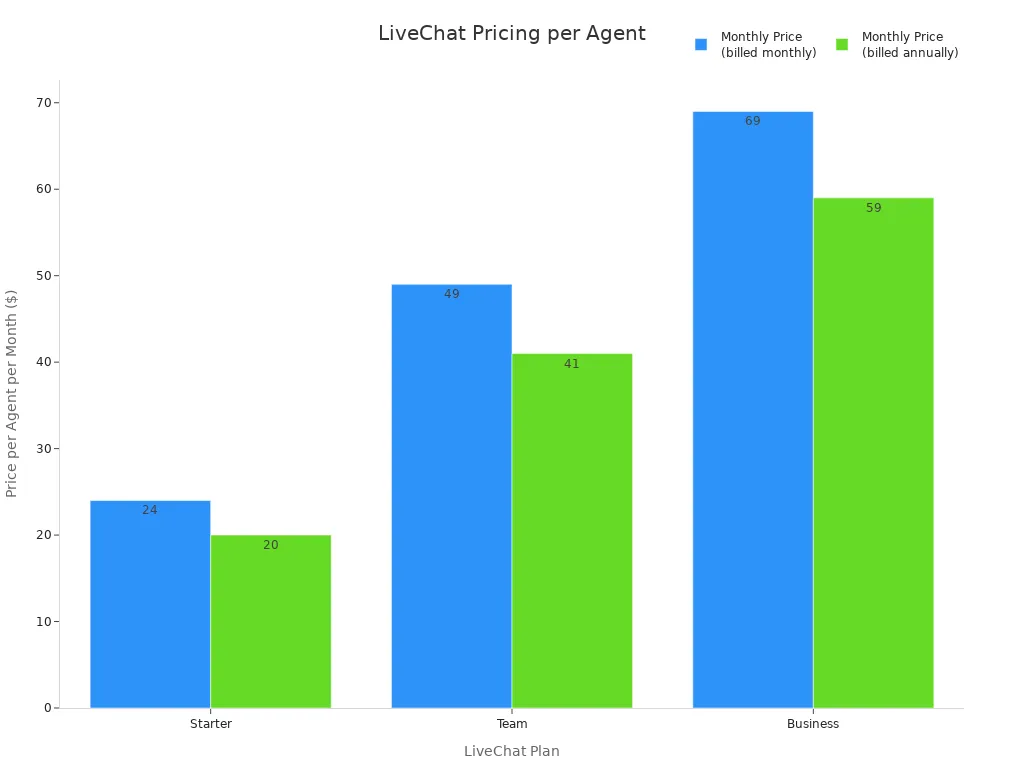
Image Source: statics.mylandingpages.co -
Pros:
- It is a powerful and reliable tool focused purely on live chat.
- The interface is clean and easy for agents to use.
- The AI assistant features help improve agent efficiency.
-
Cons:
- It is expensive for what it offers, especially compared to tools like Tidio.
- Support for channels like WhatsApp and SMS requires marketplace add-ons.
- It is not a full customer service software solution; it's primarily a chat tool.
Gladly: For a Radically Personal Customer View
- Best for: Brands that want to build deep loyalty by treating customers as people, not tickets, with a continuous conversation history.
- Key SMB Features:
- People-Centric Model: Gladly organizes all communication around the customer, not tickets. This creates a single, lifelong conversation thread across all channels.
- Rich Customer Profiles: Agents see a complete customer history, including past conversations and purchases, in one view.
- All-Channel Support: You can manage voice, IVR, email, chat, SMS, and social messaging from a single platform.
- Proactive Communication: Use proactive chat to engage customers at key moments in their journey.
- Pricing Summary: Gladly offers a single plan with all features included. Pricing starts at $150 per support hero/month, with a minimum of 10 users, making it an enterprise-focused solution.
- Pros:
- It provides a truly personal customer experience that builds loyalty.
- Agents are more efficient because they have full context in one place.
- The all-in-one pricing model is simple and includes all channels.
- Cons:
- The high price and minimum user count put it out of reach for most small businesses.
- The lack of a traditional ticketing system can be a difficult adjustment for some teams.
- It is less focused on transactional efficiency and more on relationship building.
You can now choose the right customer support platform for smbs. First, define your essential features and budget. Next, consider your growth plans. This guide helps small businesses shortlist the best customer service software. You should test your top 2-3 choices with your team. Hands-on use is the only way to ensure the platform improves customer satisfaction and your customer experience.
The best customer support platform is one your team actually uses. It helps your businesses serve customers today and gives you room to grow tomorrow.
FAQ
What is a cloud customer support platform?
A cloud platform hosts your support software on the internet. You access it through a web browser. This cloud model removes the need for on-site servers. A good cloud system offers high security and reliability for your business data. This cloud approach is very flexible.
How do I know when to upgrade from a shared email inbox?
You should upgrade when your team struggles to track conversations. A dedicated cloud platform improves customer engagement. If emails get lost or responses are slow, it is time for a better cloud solution. Look for a system that organizes your support tickets efficiently.
What are the key customer support trends for 2026?
Key trends include using AI for instant answers and providing omnichannel support. Customers expect seamless engagement across all channels. These trends show a move toward proactive, personalized service. A modern cloud platform helps you adopt these new methods. A flexible cloud system supports future trends.
Why is a unified cloud inbox important?
A unified cloud inbox puts all customer messages in one place. Your team can see emails, chats, and social media comments together. This cloud setup prevents missed messages. It gives your agents a full view of the customer's history for better service.
See Also
Selecting Social Media Customer Service Software: Ten Essential Tips for Success
Elevate Your SaaS Customer Support Using Effective Live Chat Strategies
Best Live Chat Software Solutions for Small Businesses in 2024
Your Comprehensive Guide to Selecting the Ideal Chatbot Software
Become a Live Chat Expert for Superior Customer Support Interactions

