CRM Implementation Tips for Indian Sales and Support Teams


You face the challenge of getting your sales and support teams in India to use a new CRM every day. The most important tip for CRM implementation is to involve your team from the start. When you focus on user adoption, you see better customer engagement, higher retention, and more efficient workflows. CRM helps you capture feedback, build service-level agreements, and map customer journeys. Sobot brings expertise in customer relationship management with tools like chatbot, live chat, voice, and ticketing systems. These solutions help you deliver the best CRM in India experience.
Assessing Sales Team Needs for CRM

Identifying Pain Points
Before you start with CRM implementation, you need to understand the real challenges your sales team faces in India. Many teams struggle with daily tasks that slow down their progress and affect revenue. You might notice these common pain points:
- Inefficiencies in managing leads
- Difficulties in tracking customer interactions
- Lack of visibility into sales pipelines
- Challenges in closing deals
- Repetitive manual tasks that take up valuable selling time
- Lack of structured data leading to missed opportunities
- Poor communication and collaboration within sales teams
- Inability to track customer interactions efficiently
- Slow sales cycles due to disorganized workflows
When you identify these issues, you can see why setting up a CRM is important. CRM software helps you organize information, improve data quality, and streamline your sales process. This step is key for successful CRM implementation and for building a strong foundation for your business.
Tip: Talk to your team and ask them about their daily struggles. Their feedback will help you choose the right CRM and avoid common mistakes during implementation.
Setting CRM Goals
Once you know the pain points, you should set clear goals for your CRM. Start by looking at your current business status and decide what you want to achieve with CRM implementation. Good CRM strategies come from your company’s main goals for customer relationships.
You can use best practices like the SMART method to set goals that are:
- Specific
- Measurable
- Achievable
- Relevant
- Time-bound
For example, you might want to increase sales by 10% in the next quarter or improve customer retention by 5% year-over-year. Defining these goals helps you measure success and keeps your team focused. When you set clear targets, CRM software becomes a tool that drives results and supports your growth in India.
Choosing the Best CRM in India
Evaluating CRM Features for Indian Businesses
You want to find the best crm in india for your team. You need to look for features that match your business needs and support your growth. Many Indian companies choose crm software that helps them manage leads, track sales, and improve customer relationships. Here are the top features you should consider:
- Lead and contact management helps you store customer data and manage inquiries.
- Sales pipeline tracking gives you visual dashboards for deal stages and projected revenue.
- Task and follow-up reminders make sure you never miss a chance to connect with a customer.
- Analytics and reporting let you track performance, sales, customer behavior, and ROI.
- Tool integrations allow you to connect with WhatsApp, email, and other platforms for smooth workflows.
- Mobile-friendly interface supports your field sales teams with real-time updates.
- Scalability lets you add users and features as your business grows.
You also need to think about local needs. Many crm systems in India offer multi-language support. This helps your team work in their preferred language. You can also find crm tools that localize workflows to match Indian business practices. Compliance automation helps you follow local rules, such as consent management and language approvals.
Tip: Choose a crm solution that offers customizable modules. This lets you fit the tool to your business. Companies like Zoho and Freshworks provide regional language options and training pipeline materials in local languages. This makes onboarding easier for your team.
When you ask how to choose the best crm, look for these best practices:
- Make a list of your must-have features.
- Check if the crm tool supports your industry and business size.
- Test the mobile app for field sales teams.
- Ask about local support and training options.
- Review integration options with your current tools.
- Make sure the crm software can grow with your business.
Many Indian businesses have seen success by picking the right crm. For example, a retail company improved its sales pipeline tracking and increased revenue by using a crm that matched its workflow. A financial services firm boosted customer retention by choosing a crm solution with strong analytics and local language support.
Sobot Integration with CRM Systems

You want your crm to work well with other tools. Sobot makes this easy. Sobot Voice for Sales integrates with popular crm systems like Salesforce and HubSpot in less than 30 minutes. This means you can connect your sales crm software with your contact center for a seamless workflow.
Here is how Sobot Voice for Sales integration benefits your business:
| Benefit | Description |
|---|---|
| Increased Customer Retention | AI CRMs help you keep customers by providing personalized experiences that meet their needs. |
| Improved Customer Satisfaction | Real-time personalization makes customer interactions better, leading to higher satisfaction. |
| Streamlined Operational Efficiency | Automation of repetitive tasks lets your team focus on complex issues, improving efficiency. |
| Enhanced Engagement | Predictive analytics and AI tools help you interact with customers in smarter ways. |
You can deploy Sobot Voice for Sales in under a week. Most teams start using it within an hour. The platform supports global phone number coverage, high-quality caller ID, and local numbers. These features help you reach more customers and build trust. The open API lets you connect Sobot with your crm tool or ERP system for smooth data flow.
Note: Sobot’s user-friendly interface and quick training help your team adopt new workflows fast. You can see a return on investment in as little as six months.
Many Indian companies have improved their sales and support operations with Sobot integration. For example, a large retail chain used Sobot Voice for Sales with its crm software to double conversion rates and boost outbound productivity. A financial services provider saw a 79% increase in productivity after connecting Sobot with its crm solution.
When you choose a crm, make sure it works with tools like Sobot. This gives you a complete view of your customer and helps you deliver better service. You can manage leads, track sales, and support customers from one place.
Callout: Sobot’s compatibility with leading crm systems and its advanced features make it a top choice for Indian businesses looking to improve crm implementation and drive revenue growth.
By following these steps and focusing on integration, you set your team up for success. You get the most out of your crm investment and see real results in customer satisfaction and business performance.
CRM Implementation Roadmap
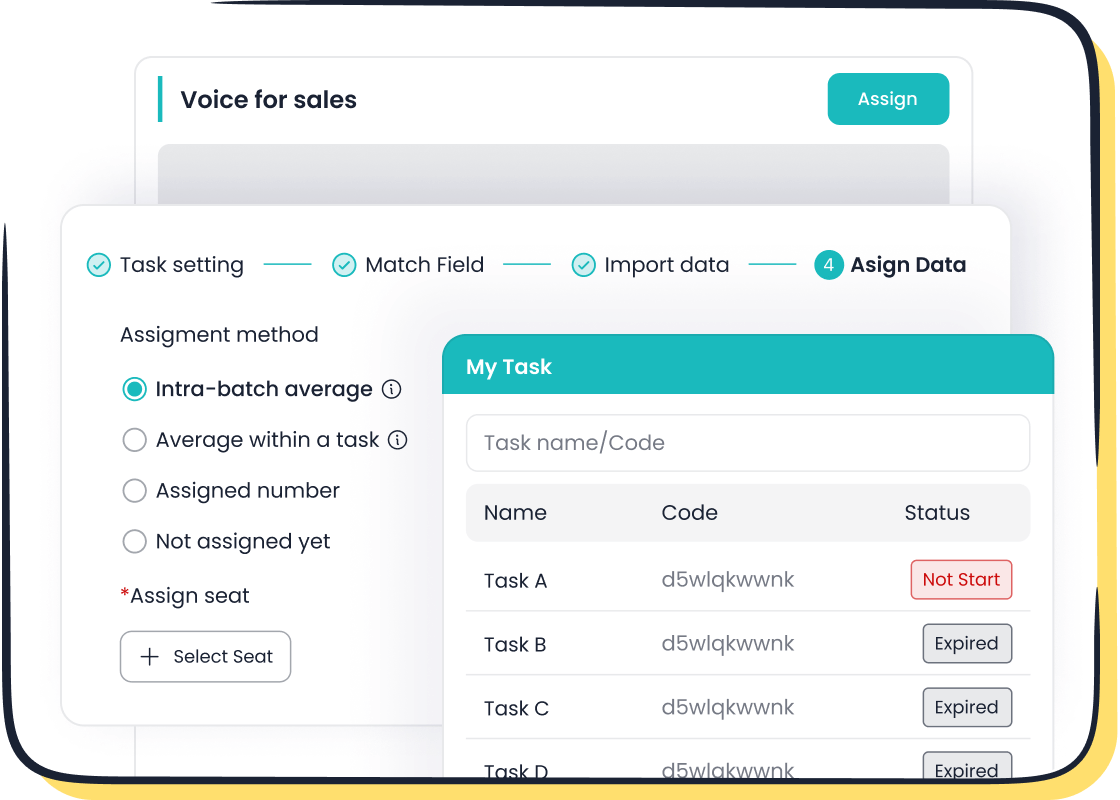
A comprehensive implementation plan helps you avoid common mistakes and ensures your CRM delivers value from day one. You need to follow clear steps for data preparation, workflow customization, and partner selection. This roadmap will guide you through each stage of CRM implementation, making your transition smooth and effective.
Data Preparation and Migration
You must start with your data. Clean, accurate data forms the backbone of any successful CRM implementation. Many Indian businesses face challenges with legacy data, duplicates, and inconsistent formats. These issues can slow down your CRM software implementation and affect reporting accuracy.
Follow these best practices for preparing and migrating your sales data:
- Conduct a Data Audit and Cleanse: Review your existing data. Remove errors, duplicates, and outdated information.
- Define Data Mapping and Transformations: Match your old data fields to the new CRM structure. This step ensures all important information transfers correctly.
- Choose the Right Data Migration Tools: Select tools that work with your CRM. For example, Sobot Voice for Sales integrates with Salesforce and HubSpot, making migration easier.
- Run Data Migration Testing: Test a small batch of data first. This helps you catch problems before moving everything.
- Validate and Clean Up the Migrated Data: Check your new CRM for errors or missing data. Fix any issues before your team starts using the system.
Tip: Involve your sales and support teams in the data review process. Their feedback helps you spot missing or incorrect information.
You should always focus on data quality. Good data leads to better customer insights, more accurate reporting, and higher revenue. Sobot’s support team can guide you through each step, ensuring your migration goes smoothly.
Customization for Sales and Support
Every business has unique processes. You need to customize your CRM to match your sales and support workflows. This step helps your team work faster and improves customer experience.
Indian companies often use modular CRM features. These allow you to tailor the system to your industry and business needs. Many admins prefer user-friendly interfaces with drag-and-drop builders. These tools make it easy to adjust workflows without coding. Custom CRMs also integrate with tools like email and ERP systems, which boosts usability.
| Customization Approach |
|---|
| Modular features tailored to your industry and client needs |
| User-friendly interfaces with drag-and-drop workflow builders |
| Seamless integration with existing tools like email and ERP systems |
You can use Sobot Voice for Sales to automate outbound calls, manage leads, and track customer interactions. The platform’s open API lets you connect with your CRM software, creating a unified workspace for your team. Sobot’s ticketing system and live chat features also help you manage support requests and customer conversations in one place.
Note: Avoid over-customizing your CRM. Too many changes can make the system hard to maintain. Focus on features that support your main business goals.
Working with a CRM Implementation Partner
Choosing the right CRM implementation partner is key to a smooth rollout. A good partner helps you plan, configure, and launch your CRM. They also provide training and ongoing support.
Here are the main criteria you should use when selecting a CRM implementation partner:
| Criteria | Description |
|---|---|
| Define Your Objectives | Set clear goals for your CRM, such as improving sales efficiency or customer service. |
| Identify Pain Points | List your current challenges, like data entry issues or collaboration struggles. |
| Determine the Scope | Decide which CRM modules you need and if you require custom development. |
| Assess Internal Resources | Check your team’s technical skills and see where you need outside help. |
| Set a Budget and Timeline | Plan for all costs, including support, to avoid surprises. |
| Research and Shortlist Partners | Look for reliable partners with strong reputations. |
| Evaluate and Select | Choose partners based on technical skills and cultural fit. |
Sobot offers expert guidance and support throughout your CRM implementation. The Sobot team helps you define your objectives, map your workflows, and train your staff. You get access to resources and best practices that make your CRM rollout faster and more effective. Sobot’s quick deployment and user-friendly interface mean your team can start using the system in less than a week.
Callout: Sobot’s CRM implementation partner services ensure you avoid common pitfalls and maximize your CRM investment.
Many Indian businesses struggle with change management, process immaturity, and integration complexity during CRM implementation. You can avoid these pitfalls by working with an experienced partner like Sobot. The Sobot team helps you communicate changes, train users, and optimize your workflows before automation. This approach leads to a successful CRM implementation and long-term business growth.
| Pitfall Type | Description |
|---|---|
| Change Management | Lack of training and communication can slow adoption. |
| Process Immaturity | Automating poor processes creates more problems. |
| Data Quality Issues | Bad data reduces CRM effectiveness. |
| Integration Complexity | Difficult integrations can cause delays and confusion. |
| Customization Complexity | Too many custom features make the system hard to manage. |
You should always keep your goals clear and your processes simple. Work closely with your CRM implementation partner to ensure your CRM supports your sales and support teams. Sobot’s ongoing support and training help you adapt to new workflows and get the most from your CRM investment.
By following this roadmap, you set your business up for a successful CRM implementation. You improve customer relationships, boost revenue, and create a foundation for long-term growth.
Training and Adoption for Sales Teams
Effective Onboarding Strategies
You want your sales team to get the most out of your CRM from day one. A strong onboarding plan helps your team understand the new sales CRM software and use it with confidence. Start with regular training sessions. These sessions help your team learn each sales stage and how to use the CRM for daily tasks. Over half of CRM users in India prefer live training, so offer group sessions and webinars. You can also provide self-paced courses for those who want to learn at their own speed.
Make sure you include CRM training in every new hire’s onboarding. Assign a point person to monitor CRM performance and answer questions. Create a centralized knowledge base where your team can find answers and best practices. Remind your team to keep data quality high by entering accurate and up-to-date information. Encourage everyone to follow best practices in customer communication and workflow management.
Sobot Voice for Sales makes onboarding easy. Its user-friendly interface and quick deployment mean your team can start using the CRM in less than a week. Many teams begin making calls and tracking leads within an hour. You can even run a trial to let your team explore features before full implementation.
Ongoing Support and Feedback
Training does not stop after onboarding. You need ongoing support to drive successful CRM implementation and business growth. Offer regular webinars and refresher courses to keep your team updated on new features. Use feedback forms and team meetings to gather suggestions for improvement.
A dedicated support person helps solve problems quickly. Sobot provides fast support and resources to help your team succeed. You can use analytics to track user training progress and customer engagement. This helps you spot areas for improvement and boost revenue.
Here are examples of Indian companies that saw great results after CRM adoption:
| Company Name | Challenges Faced | CRM Benefits | Results |
|---|---|---|---|
| MoneyNotSleep | Fragmented data, remote work | Centralized data, automated workflows | Sales activity increased by 150% |
| Ajay Modi Travels | Industry decline, more inquiries | Efficient account management, automation | Sales up 30%, customer satisfaction up 20% |
| Learn Digital Academy | Inefficient data management | Streamlined enrollments, improved productivity | Productivity improved by 30% |
| Upanal CNC Solutions | Need for clear sales pipeline | Transparency, custom reports | Improved efficiency, reduced errors |
With the right onboarding and support, your sales team in India can achieve a successful CRM implementation and see real business growth.
Omnichannel CRM for Customer Experience
Integrating Sobot Omnichannel Solution
You want your sales and support teams to connect with customers on every channel. Omnichannel CRM brings all your customer conversations into one place. This helps you organize leads, track messages, and respond faster. Sobot Omnichannel Solution gives you a single workspace for chat, email, voice, and social media. You can see every order, message, and customer history in one view. This makes it easy to follow up and solve problems quickly.
Here are some ways omnichannel CRM improves your daily work:
| Feature | Benefit |
|---|---|
| Centralised Lead Capture | Organizes leads from various sources into one pipeline, reducing manual work. |
| Automated Reminders | Ensures no follow-up is missed by sending notifications to the team. |
| Real-time Dashboards | Provides instant reports on sales and performance metrics. |
| Workflow Automation | Streamlines tasks like sending emails and updating records. |
| Unified Customer History | Offers a complete view of customer interactions for better support. |
Sobot Omnichannel Solution also uses AI to automate simple requests, like order status or delivery updates. This saves your team time and lets them focus on complex issues. You can align your service goals and policies across all teams. This makes your CRM solution more powerful and easier to use.
Enhancing Customer Communication
You improve customer communication when you use an omnichannel CRM. Your team can access customer details instantly, log notes after calls, and update deal stages on the go. You also receive real-time alerts for new leads or urgent tasks. This helps you respond faster and build trust.
Sobot’s Omnichannel Solution helped Opay, a leading financial service platform, transform its customer service. After using Sobot, Opay saw customer satisfaction scores rise by over 30%, Net Promoter Score increase by over 35%, and conversion rates grow by more than 15%.
| Improvement Area | Description |
|---|---|
| Enhanced Customer Experience | Proactive, personalized service leads to increased customer happiness and recommendations. |
| Retention and Loyalty | Effective strategies reduce churn and ensure stable revenue streams. |
| Operational Efficiency | Technology streamlines interactions, resolving issues faster and minimizing errors. |
| Resolution Rates | BPOs using AI and omnichannel platforms achieved up to 80% resolution rates. |
| Customer Satisfaction (CSAT) | Dramatic improvements in CSAT were reported, indicating higher customer satisfaction levels. |
You get a 360-degree view of each customer. This helps you plan better and deliver personalized service. Omnichannel CRM gives you the tools to boost customer satisfaction and make your business more efficient in India.
You can achieve CRM success in India by following a clear roadmap. Start by defining your goals and involving your sales team early. Clean your data, customize the CRM, and train everyone well. Regularly check system use and keep improving. Here is a quick checklist:
- Set clear objectives.
- Choose the right CRM.
- Migrate and clean data.
- Customize for your workflows.
- Train your teams.
- Monitor adoption and results.
Sobot’s solutions help you connect with every customer and boost your business. Explore Sobot to make your CRM journey easier.
FAQ
What is the most important step in CRM implementation for Indian sales teams?
You should focus on user adoption. Involve your team early. This ensures CRM Implementation Tips for Indian Sales and Support Teams work well. Your team will use the system daily and see better results.
How does Sobot help with CRM integration?
Sobot offers fast integration with popular CRM systems. You can connect Sobot Voice for Sales in less than 30 minutes. This makes CRM Implementation Tips for Indian Sales and Support Teams easier and more effective.
Why should you choose an omnichannel CRM?
You get all customer conversations in one place. This improves response time and customer satisfaction. CRM Implementation Tips for Indian Sales and Support Teams recommend omnichannel solutions for better communication.
How long does it take to see results from CRM implementation?
Most teams see results within six months. You notice better sales tracking and customer engagement. CRM Implementation Tips for Indian Sales and Support Teams show that quick wins build confidence.
See Also
Enhance SaaS Customer Support Using Live Chat Techniques
Key Attributes of Effective CRM Call Center Solutions
Best Approaches for Managing Quality in Call Centers
Ten Essential Steps for Omnichannel Contact Center Setup
AI-Powered Customer Service Agents Transform Support Experience

