Your 2026 Customer Service Platform Guide

Choosing the right customer service platform is a major challenge for small businesses. You need a tool that boosts customer satisfaction and efficiency without breaking your budget. This comprehensive guide simplifies your decision. It provides a clear path for businesses looking to evaluate different customer support platforms.
Your Roadmap to Success: This guide offers a curated list of top platforms for 2026. We establish a comparison standard for customer service platforms, including powerful solutions like Sobot, to help you find the perfect fit for your growth.
The 15 Best Customer Service Software Platforms of 2026:
You are ready to find the perfect tool for your business. We have researched and analyzed dozens of options to create this definitive list. Here you will discover the 15 best customer service software platforms for 2026. Our evaluation focused on the features that matter most to growing businesses. We looked at affordability, ease of use, and the ability to scale with you.
This list will help you compare the top contenders in the market. Each review breaks down key features, pricing, and unique strengths. You can use this information to see how each solution could fit into your daily operations. Finding the right customer service software is a major step toward building stronger customer relationships and improving your team's efficiency. We aim to make that step easier for you.
A Tool for Every Team: The best customer service software is the one that solves your specific challenges. Think about your team's size, your budget, and your future goals as you explore these options. This guide provides the details you need to make a confident choice.
The following sections offer a deep dive into each of our top picks. We provide a clear and honest look at what makes each platform stand out. Get ready to explore the solutions that can transform your customer support from a cost center into a powerful growth engine.
1. Zendesk:
Zendesk is a well-known name in the customer service software space. It offers a robust and scalable platform designed to manage customer interactions and improve team efficiency. You will find it is a powerful tool for businesses aiming to deliver exceptional customer experiences.
Key Features:
Zendesk provides a comprehensive set of tools to manage your support operations. The key features of customer service tools like this one are built around a central hub.
- Unified Ticketing System: The platform converts all customer inquiries from email, chat, and social media into tickets. Your team can manage, track, and prioritize these tickets from a single workspace.
- AI and Automation: You can use AI-powered bots to provide instant answers and automate ticket routing. This frees up your agents to focus on more complex issues.
- Omnichannel Support: This customer support software allows you to connect with customers on their preferred channels. You can manage conversations from web chat, messaging apps, and phone calls all in one place.
- Self-Service Help Center: You can build a knowledge base or help center. This empowers customers to find answers on their own, reducing ticket volume.
- Extensive Integrations: Zendesk connects with hundreds of other business apps. This allows you to sync data and streamline workflows across your entire tech stack.
Pricing:
Zendesk’s pricing can be complex, so you should evaluate the total cost carefully.
- Suite Team: Starts at $55 per agent, per month.
- Suite Growth: Priced at $89 per agent, per month, which most businesses need for essential features.
- Suite Professional: Costs $115 per agent, per month for enterprise-level needs.
Note on Total Cost: Be aware of potential extra costs. Implementation services can start around $8,000, and premium support add-ons can significantly increase your annual expense.
Pros:
The benefits of this platform are clear for growing teams. It is a highly scalable help desk software that can grow with your business. The powerful automation tools help streamline your support process, which is one of the main benefits of customer support software. Its extensive integration marketplace allows you to create a truly connected customer experience.
Cons:
The primary drawback is the cost. The pricing structure can feel unclear, and the total expense often exceeds the base subscription price. Smaller businesses might find the entry-level plans limiting, pushing them toward more expensive tiers to get the functionality they need to boost customer satisfaction.
2. HubSpot Service Hub:
HubSpot Service Hub is a powerful customer service software integrated directly into the HubSpot CRM platform. You get a complete view of your customer's journey, which helps your team provide personalized and effective support. This connection makes it a strong choice if you already use other HubSpot tools.
Key Features:
HubSpot offers a unified system to manage all your support activities. This customer support software helps you track and resolve issues efficiently.
- AI-Powered Help Desk: You get a central workspace to manage all customer inquiries. The system uses AI to help you prioritize tickets and assign tasks automatically. This makes your team's workflow smoother.
- Flexible Ticketing System: Your team can create tickets in multiple ways. You can log a ticket from a contact's record, create one manually for a phone call, or have the system automatically generate tickets from emails and chats.
- Customer Feedback Tools: You can easily collect feedback to improve customer satisfaction. The platform lets you send out surveys like Net Promoter Score (NPS) to measure loyalty or Customer Effort Score (CES) to see how easy it was for a customer to get help.
- Self-Service Portal: You can build a customer portal where people find answers on their own. This reduces the number of tickets your team has to handle and improves the overall customer experience.
Pricing:
HubSpot's pricing is based on different tiers. You should review the features in each plan to find the right fit.
| Tier | Starting Price (per month) | Included Seats | Additional Seat Cost (per month) |
|---|---|---|---|
| Starter | $20 | 1 | $20 |
| Professional | $100 | 1 | $50-$100 |
| Enterprise | $150 | 1 | $75-$150 |
Note: While HubSpot offers free tools, a dedicated free tier for the Service Hub is not available.
Pros:
The biggest advantage of this help desk software is its deep integration with the HubSpot CRM. This gives your team a 360-degree view of every customer. The platform is also user-friendly, making it easy for your team to get started. The focus on collecting feedback helps you create better customer experiences.
Cons:
The cost can increase quickly. As your team grows, adding more seats to this customer support software gets expensive, especially on the Professional and Enterprise plans. Businesses that are not already using the HubSpot ecosystem might find it less appealing than standalone solutions.
3. Freshdesk:
Freshdesk is a popular customer service software known for its user-friendly interface and strong feature set. You will find it is a great option for businesses that want a powerful yet intuitive platform to manage support operations and improve the customer experience.
Key Features:
Freshdesk provides a complete toolkit to streamline your support processes. This customer support software unifies customer interactions from various channels. You can manage email, chat, phone, and social media communications from a single platform. This ensures your team handles customer inquiries efficiently.
- AI and Automation: The platform uses AI to reduce manual work. It automates ticket creation from emails and social media messages. AI-powered routing also directs inquiries to the most qualified agent based on their skills and availability.
- Robust Automation Tools: You can configure automation rules to handle repetitive tasks. This includes ticket assignments, follow-ups, and notifications. These tools reduce the manual workload for your agents and improve their productivity.
- Self-Service Options: You can create a comprehensive knowledge base. This allows customers to find answers to their questions independently, which helps lower your ticket volume.
Pricing:
Freshdesk offers several pricing tiers, including a free plan for small teams.
| Plan | Price (per agent/month, billed annually) |
|---|---|
| Free | $0 (up to 10 agents) |
| Growth | $15 |
| Pro | $49 |
| Enterprise | $79 |
Note: The free plan offers basic ticketing and a knowledge base. You will need a paid plan to access automation and other advanced features.
Pros:
The main advantage of this help desk software is its ease of use. Your team can get started quickly with minimal training. The free plan is very generous, making it an excellent choice for startups. The platform's automation capabilities help you scale your support without adding more staff.
Cons:
While the entry-level plans are affordable, the cost can increase as you move to higher tiers for more advanced features. Some users report that the more powerful customization options in this customer support software can be complex to set up. This may require more technical expertise to get the most out of the platform and boost customer satisfaction.
4. Sobot: All-in-One Contact Center:

Sobot offers a powerful, all-in-one contact center designed to unify your customer communications. You will find it is an excellent choice for businesses seeking a single platform to manage every interaction. This customer support software focuses on creating a seamless omnichannel customer support experience.
Key Features:
Sobot integrates advanced technology to streamline your operations and enhance the customer experience. Its comprehensive feature set helps you manage customer inquiries efficiently.
- True Omnichannel Integration: You can consolidate conversations from every channel into one unified workspace. This includes social media, messaging apps like WhatsApp, email, phone calls, and website live chat.
- Comprehensive AI System: The platform uses a five-part AI system to automate tasks and assist your team. This includes an AI Chatbot and Voicebot for 24/7 support, an AI Agent to resolve common questions, and an AI Copilot that provides real-time suggestions to your human agents.
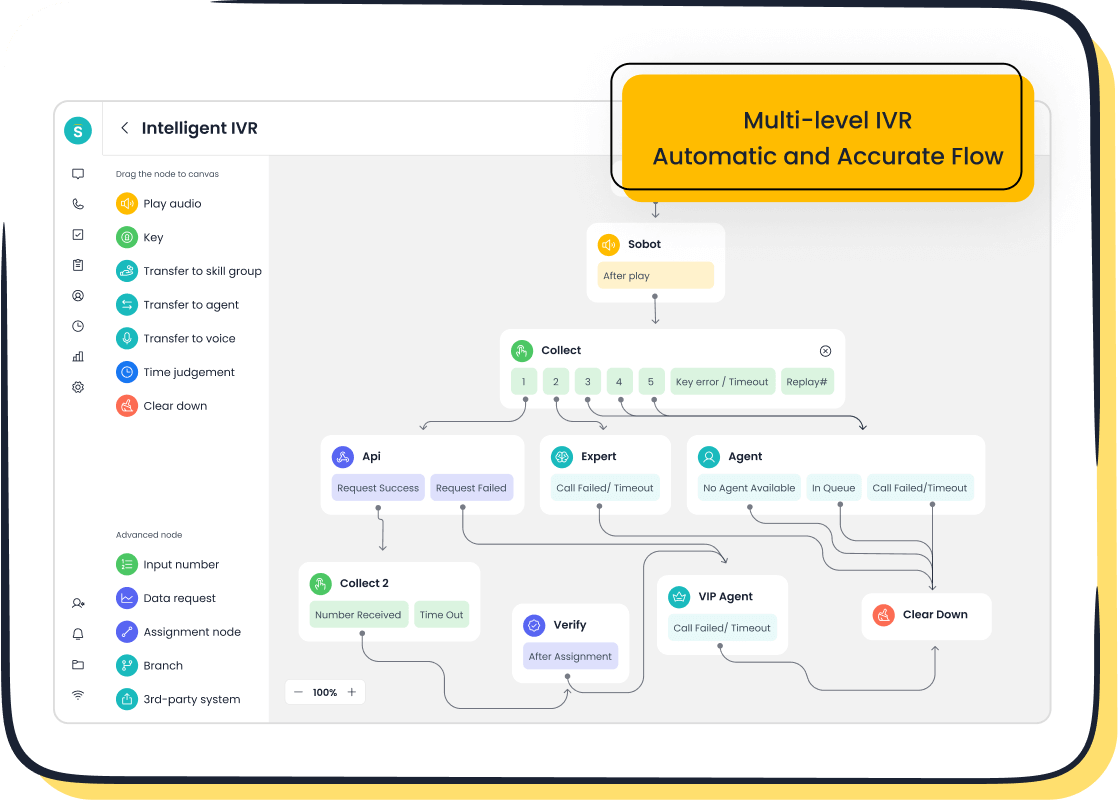
- Enterprise-Grade Cloud Call Center: You get a robust voice solution with features like an intelligent IVR for smart call routing, call recording, and real-time monitoring. Sobot also provides global number availability in over 50 countries.
- Official WhatsApp BSP: As an official WhatsApp Business Solution Provider, Sobot enables you to engage with customers on their preferred messaging app at scale.
Pricing:
Sobot provides customized pricing based on your specific business needs.
To get a detailed quote, you need to contact their sales team. This approach ensures you only pay for the features and scale your business requires. You can reach them at
marketing@sobot.io.
Pros:
This customer support software delivers exceptional reliability and a forward-thinking approach to omnichannel customer support. You can count on its 99.99% system uptime to keep your support operations running smoothly. The platform’s powerful AI and automation capabilities help you increase efficiency and boost customer satisfaction. For businesses with a global audience, the ability to secure local phone numbers worldwide is a significant advantage. This customer service software truly centralizes your entire contact journey.
5. Intercom:
Intercom is a popular customer support software known for its focus on conversational relationships. You will find it excels at proactive customer engagement through its messenger-first approach. This platform helps you build a better customer experience by communicating with users directly on your website and in your app.
Key Features:
Intercom provides a suite of tools designed for real-time communication and support. This customer service software helps you manage conversations and automate workflows effectively.
- Shared Omnichannel Inbox: You can manage all customer inquiries from live chat, email, and social media in one place. This gives your team a full timeline of every interaction for complete context.
- No-Code Automation Builder: The platform offers a visual builder to create automated workflows. You can automatically tag conversations, route tickets to the right specialists, and use the AI chatbot, Fin, for instant assistance.
- Messenger-Based Ticketing: You can track and resolve issues directly within the chat messenger. The system keeps a clear record of troubleshooting steps with statuses like Open, Pending, and Closed.
- Self-Service Help Center: You can build a robust knowledge base with articles and tutorials. This empowers customers to find answers on their own, which reduces repetitive questions for your team.
Pricing:
Intercom’s pricing is based on features and the number of seats.
| Plan | Starting Price (per month) | Key Focus |
|---|---|---|
| Starter | $74 | Very small businesses |
| Pro | Custom | Scaling support & engagement |
| Premium | Custom | Advanced scale & security |
Note: The Pro and Premium plans require you to contact sales for a custom quote. Costs can also increase with add-ons for features like proactive support.
Pros:
This customer support software shines in its ability to proactively engage users. The platform's product tours and outbound messages help you guide new customers and announce features. Its user-friendly chat interface is excellent for real-time support, which can significantly boost customer satisfaction.
Cons:
The main drawback is the cost. Intercom can be expensive, especially as you add more features or require advanced plans. The platform’s extensive capabilities might also be more complex than what a very small business needs, making it a better fit for companies focused on scaling their customer engagement efforts.
6. Zoho Desk:
Zoho Desk is a context-aware customer support software that helps you place customers at the heart of your company. You will find its powerful tools and affordable pricing make it a strong contender for businesses of any size. It is designed to improve agent productivity and boost customer satisfaction.
Key Features:
This help desk software offers a rich set of features to manage your support operations. You can leverage its AI and self-service capabilities to deliver a better customer experience.
- Context-Aware AI (Zia): Zoho's AI, Zia, provides intelligent assistance. It can analyze the sentiment of customer inquiries, automatically tag tickets with relevant keywords, and suggest knowledge base articles to your agents. This helps your team resolve issues faster.
- Omnichannel Communication: You can manage conversations from email, phone, social media, and live chat in one unified platform. This ensures no customer message gets lost.
- Self-Service Portals: You can build a comprehensive help center with a knowledge base and community forums. This empowers your customers to find answers on their own, which reduces your team's workload.
- Automation and Workflows: You can automate routine tasks like ticket assignment and notifications. This frees up your agents to focus on more complex problems.
Pricing:
Zoho Desk offers a flexible pricing structure, including a free plan.
| Plan | Price (per agent/month, billed annually) |
|---|---|
| Free | $0 (up to 3 agents) |
| Standard | $14 |
| Professional | $23 |
| Enterprise | $40 |
Note: The free plan is a great starting point, but you will need a paid plan to access advanced features like AI and multi-channel support.
Pros:
This customer support software provides excellent value. Its free plan is very useful for small teams. The platform's AI, Zia, offers powerful automation that many competitors charge more for. If you already use other Zoho products, this customer service software integrates seamlessly, creating a unified business ecosystem.
Cons:
The sheer number of features can be overwhelming for new users. You may face a learning curve when setting up advanced customizations. While it integrates with many third-party apps, the deepest and most seamless connections are within the Zoho suite.
7. Gorgias:
Gorgias is a customer support software designed specifically for e-commerce businesses. You will find it is a powerful tool if you run an online store on platforms like Shopify, Magento, or BigCommerce. The platform excels at centralizing customer interactions and order data in one place.
Key Features:
This customer service software helps you streamline all your support tasks. It integrates deeply with your e-commerce platform to provide a complete view of the customer.
- Unified E-commerce Workspace: You can manage customer inquiries from email, live chat, social media, and SMS in one inbox. It pulls in order details directly, so your team has full context without switching tabs.
- AI-Powered Automation: The platform uses AI to automate responses for routine questions. You can set up automated workflows to handle low-value queries, recommend products, or send FAQs, which frees up your agents.
- Personalized Communication: You can deliver personalized responses about order updates, shipping, and returns. This integration helps you build customer loyalty and improve your brand's reputation.
- Omnichannel Support: Gorgias allows you to connect with shoppers across multiple channels. You can reach customers on their preferred platforms, including email, social media, WhatsApp, and voice.
Pricing:
Gorgias bases its pricing on the number of tickets your team handles per month.
| Plan | Monthly Price (Billed Annually) | Included Tickets/Month |
|---|---|---|
| Starter | $50 | 50 |
| Basic | $250 | 400 |
| Pro | $750 | 2,000 |
Note: Plans scale based on ticket volume. If you exceed your monthly ticket limit, you will be charged for additional tickets, which can increase your costs.
Pros:
The biggest advantage of this customer support software is its deep integration with e-commerce platforms. This connection allows your team to edit orders and issue refunds directly from the helpdesk. The powerful automation rules are excellent for handling repetitive questions, which significantly improves your team's efficiency and the overall customer experience.
Cons:
The main drawback is the pricing model. Since it is based on ticket volume, your costs can become unpredictable and expensive during busy seasons like holidays. Its specialized focus on e-commerce also means it may not be the best fit for businesses outside the retail sector.
8. Help Scout:
Help Scout is a customer support software designed for teams that value a personal touch. You will find it focuses on delivering a great customer experience without the complexity of other platforms. It is an excellent choice for businesses that want to keep their support conversations human.
Key Features:
This help desk software provides a clean and collaborative environment for your team. It centers around a shared inbox that feels just like a regular email client.
- Collision Detection: You can see in real-time when a teammate is viewing or replying to an email. This feature prevents your team from sending duplicate responses.
- Internal Notes: You can leave private notes on conversations to collaborate with your team. Use @mentions to notify specific agents for help on a ticket.
- Previous Conversations: The platform gives you a full history of a customer's past interactions. This context helps your agents provide more personalized and effective support.
- Built-in Reporting: You can track key metrics like email volume and team performance. These reports help you understand customer needs and how your team is doing.
Pricing:
Help Scout offers straightforward, per-user pricing.
| Plan | Price (per user/month, billed annually) |
|---|---|
| Standard | $20 |
| Plus | $40 |
| Pro | $65 |
Note: The Standard plan is a great starting point for small teams. You will need the Plus plan to access advanced features like custom fields and more integrations.
Pros:
This customer support software is known for its simplicity and ease of use. Your team can get started with minimal training. The platform's focus on a clutter-free interface helps agents concentrate on the customer, not the tool. It is a customer service software that promotes a more personal and less robotic style of communication, which can significantly improve customer satisfaction.
Cons:
The simplicity of this customer support software can also be a limitation. It lacks some of the advanced automation and AI features found in more complex platforms. Businesses that need extensive customization or a built-in call center may find Help Scout too basic for their needs.
9. Front:
Front is a customer communication platform that unifies all your channels into a single inbox. You will find it is designed to improve team collaboration and make customer interactions more efficient. This platform helps your team provide faster, more organized responses.
Key Features:
This customer support software offers a modern, collaborative approach to managing inquiries. It brings all your communication tools together for streamlined workflows.
- Omnichannel Inbox: You can consolidate messages from email, live chat, social media, and WhatsApp into one unified view. This gives your team a complete picture of every customer conversation.
- AI-Driven Intelligence: The platform uses AI to automate tasks. It can organize conversations, detect customer sentiment, and route messages to the right person. This helps your team resolve issues faster.
- Team Collaboration Tools: You can use internal comments to discuss customer issues with teammates directly within a thread. This feature helps you work together without forwarding emails or switching apps.
- Workflow Automation: You can build smart workflows to organize, route, and resolve issues efficiently. This reduces manual work and ensures no message is missed.
Pricing:
Front’s pricing is based on different tiers and the number of users.
| Plan | Price (per seat/month, billed annually) | Minimum Seats |
|---|---|---|
| Starter | $19 | 2 |
| Growth | $59 | 5 |
| Scale | $99 | 10 |
| Premier | $229 | 50 |
Note: Each plan has a minimum seat requirement. This makes it important to consider your team's size when evaluating the cost.
Pros:
The main benefit of this help desk software is its focus on team collaboration. It turns your inbox into a powerful workspace where your team can work together to solve customer problems. The unified inbox is excellent for businesses that manage high volumes of communication across many channels. This approach helps improve response times and boost customer satisfaction.
Cons:
The primary drawback is the cost and the minimum seat requirements. This pricing model can make it an expensive choice for very small businesses or solo entrepreneurs. This customer support software is powerful, but its extensive features might be more than a small team needs, making it a better fit for growing companies focused on scaling their collaborative support efforts.
10. LiveAgent:
LiveAgent is a versatile customer support software that offers a wide range of features at an affordable price. You will find it is a strong choice for businesses that need a comprehensive solution for managing customer communications across multiple channels.
Key Features:
This platform provides a powerful set of tools to improve your team's efficiency and the customer experience. You can manage all interactions from one place.
- Universal Inbox: The system gathers all communications into a universal inbox. You can manage every channel from a single dashboard.
- Hybrid Ticket Stream: You can follow a customer's entire resolution journey. This feature shows you interactions across different channels in one continuous thread.
- Built-in CRM: The platform includes a CRM right in the inbox. Your agents can see customer information, past tickets, and purchase history without switching tools.
- Real-time Live Chat: You can communicate with website visitors in real time. The chat buttons are customizable to match your brand. You can also set up proactive invitations to engage potential customers.
- Agent Collaboration: An internal chat tool helps your team work together. Agents can share files and click on ticket IDs to quickly get context.
Pricing:
LiveAgent offers several plans with clear, per-agent pricing.
| Plan | Price (per agent/month) | Key Features |
|---|---|---|
| Small | $9 | Ticketing |
| Medium | $29 | Ticketing + Chat |
| Large | $49 | Ticketing + Chat + Call |
| Enterprise | $69 | All-inclusive |
Note: You can start with a free trial to test the features. The pricing is straightforward, making it easy to calculate your costs.
Pros:
This help desk software provides excellent value for its price. The all-in-one nature of the platform means you get live chat, ticketing, and a call center without needing separate tools. Its interface is clean and easy to navigate. This makes onboarding your team a simple process. The robust feature set helps you deliver fast and effective support.
Cons:
The sheer number of features in this customer support software can feel overwhelming at first. You may need some time to explore and configure all the settings to fit your workflow perfectly. Some advanced customization options might require a bit of a learning curve for new users.
11. Tidio:
Tidio is a customer support software that focuses on live chat and AI-powered automation. You will find it is an excellent tool for small businesses that want to engage website visitors in real time and automate common questions.
Key Features:
Tidio combines live chat, chatbots, and email marketing into one simple platform. This helps you provide instant support and capture leads effectively.
- AI Chatbot (Lyro): You can use Lyro, an advanced AI chatbot, to answer up to 70% of customer questions instantly. It learns from your FAQs to provide human-like conversations.
- Live Chat Widget: The platform offers a customizable customer chat widget for your website. You can see what visitors are typing in real time, which helps you prepare answers faster.
- Unified Inbox: You can manage all your communications from live chat, email, and Messenger in one shared inbox. This keeps your team organized.
- Visual Chatbot Builder: You can create your own chatbots without any coding. The visual editor lets you build automated workflows with a simple drag-and-drop interface.
Pricing:
Tidio offers a very generous free plan and affordable paid tiers.
| Plan | Price (per month, billed annually) | Key Focus |
|---|---|---|
| Free | $0 | Basic live chat & email |
| Starter | $29 | Chatbot templates & analytics |
| Communicator | $29 | Unlimited conversations |
| Chatbots | $29 | AI chatbot (Lyro) |
Note: The free plan includes 50 live chat conversations and 100 AI chatbot triggers per month, making it a great starting point.
Pros:
The biggest advantage of this platform is its powerful free plan and ease of use. You can set it up on your website in minutes. The AI chatbot, Lyro, is one of the most advanced in its price range, offering significant value by automating support. This customer support software is perfect for businesses focused on converting website traffic into customers.
Cons:
While the free plan is great, you will find that many key features are split across different paid plans. This can make the pricing confusing if you need both advanced chatbot and live chat features. This platform may be too simple for larger companies that require complex ticketing systems or deep integrations found in more enterprise-focused customer support software.
12. Nextiva:
Nextiva is a platform that excels at unifying all your business communications. You will find it is a strong choice if your business relies heavily on phone support. It combines your phone system, video conferencing, and customer messaging into one powerful solution.
Key Features:
This platform integrates all customer interactions into a single AI-powered system. It helps you manage the entire customer journey.
- Unified Communications: You can bring together your phone, video, and messaging tools. This allows your agents to collaborate with specialists easily to solve customer problems.
- Intelligent Call Management: The system uses an Interactive Voice Response (IVR) to greet customers and route them. It also uses skills-based routing to send callers to the agent best equipped to help.
- CRM Screen Pops: When a call comes in, a pop-up window shows your agent the caller's information. This includes their name, account details, and past interactions, which helps your team provide personalized service.
- AI and Automation: Nextiva uses AI to improve efficiency. Features like real-time speech-to-text and sentiment analysis help your agents understand a customer's tone and find solutions faster.
Pricing:
Nextiva’s pricing is based on the number of users and the plan you choose.
| Plan | Starting Price (per user/month) | Key Focus |
|---|---|---|
| Essential | $18.95 | Basic business phone service |
| Professional | $22.95 | Unlimited calling & conferencing |
| Enterprise | $32.95 | Advanced integrations & analytics |
Note: These prices are for teams of 20-99 users. The cost per user decreases as your team size grows.
Pros:
The main advantage of this customer support software is its all-in-one approach to communication. It creates a single hub for all interactions, which boosts agent productivity. The platform's robust call center features, like queue callbacks and detailed analytics, are excellent for teams managing high call volumes. This customer support software helps you streamline operations and improve the customer experience.
Cons:
The platform's primary strength is its voice communication features. If your business does not rely heavily on phone support, you might find that it offers more than you need. The extensive range of features can also present a learning curve for new teams trying to get started.
13. Ada:
Ada is a customer support software that puts artificial intelligence at the forefront. You will find it is designed for businesses that want to automate a large portion of their customer interactions. This platform helps you resolve customer issues instantly without human intervention.
Key Features:
Ada provides a powerful suite of AI-driven tools to manage and automate your support. It focuses on creating a seamless, self-service customer experience.
- AI Agent: The platform's core is an AI Agent that can handle complex, multi-step conversations. It understands customer intent and provides personalized answers 24/7.
- No-Code Builder: You can create and launch automated conversation flows without writing any code. The drag-and-drop interface makes it easy to design and update your chatbot's responses.
- Proactive Campaigns: You can use the platform to send targeted, automated messages to customers. This helps you announce new products or guide users through your website.
- Smart Handoffs: When an issue is too complex for the AI, Ada smoothly transfers the conversation to a human agent. It provides the agent with the full context of the interaction.
Pricing:
Ada offers custom pricing tailored to your business needs.
You must contact their sales team to get a quote. The cost typically depends on factors like your monthly conversation volume and the specific features you require. This model is common for enterprise-focused AI solutions.
Pros:
The main benefit of this platform is its powerful automation. It can significantly reduce the number of tickets your support team handles, which frees them up for more strategic work. The AI is capable of resolving a high percentage of customer inquiries on its own. This leads to faster response times and can improve customer satisfaction.
Cons:
The primary drawback is the cost. Ada is an enterprise-level solution and can be very expensive, making it inaccessible for most small businesses. This customer support software also requires a significant investment of time to train the AI and build effective conversation flows. Its deep focus on automation may not be the right fit if you prioritize human-led support.
14. ActiveCampaign:
ActiveCampaign is a platform that excels at customer experience automation. You will find it is a powerful choice if your goal is to blend marketing, sales, and support. The platform focuses on creating personalized journeys for every customer.
Key Features:
This platform provides a suite of tools that go beyond traditional support. It helps you manage the entire customer lifecycle.
- Unified Inbox: You can manage all your customer conversations from email and other channels in one central place. This keeps your team organized and provides a full view of each customer's history.
- Powerful Automation Recipes: You can use pre-built automation workflows to handle tasks. This includes sending welcome emails, tagging contacts based on behavior, and creating support tickets automatically.
- Integrated CRM: The platform includes a sales CRM to track deals and manage your pipeline. This connection helps your support team see the full customer context, from prospect to loyal advocate.
- Site & Event Tracking: You can monitor how customers interact with your website. This data helps you trigger automated messages and personalize your customer engagement efforts.
Pricing:
ActiveCampaign’s pricing is based on the number of contacts and the feature tier.
| Plan | Starting Price (per month, billed annually) | Key Focus |
|---|---|---|
| Plus | $49 | Automation & CRM |
| Professional | $149 | Personalization & Split Automation |
| Enterprise | Custom | Advanced Reporting & Customization |
Note: These prices are for 1,000 contacts. The cost increases as your contact list grows.
Pros:
The main strength of this customer support software is its best-in-class automation. It allows you to create highly sophisticated workflows that nurture leads and support customers. For businesses focused on marketing and sales, it offers incredible value by combining multiple tools into one. It is one of the more flexible customer engagement solutions available.
Cons:
The platform's primary focus is on marketing and sales automation, not dedicated support. As a customer support software, it lacks some of the advanced ticketing features found in specialized helpdesks. The sheer number of features can also be overwhelming, and you may face a steep learning curve to use it to its full potential.
15. Pipedrive:
Pipedrive is a sales-focused platform that helps you manage the entire customer journey. You will find it is an excellent tool if your support process is closely tied to your sales activities. It is designed as a customer relationship management tool first, with features that also support your service efforts.
Key Features:
This platform helps you organize and track all customer interactions in a visual way. It provides tools to streamline your workflows and keep your data in one central hub.
- Visual Sales Pipelines: You can build intuitive, visual pipelines to track workflows and outreach efforts. This helps you see where every customer is in their journey.
- Contact Management: The system centralizes all customer information. You can enrich contacts with key details, track communication history, and segment leads based on their behavior or location.
- Workflow Automation: You can eliminate manual tasks by automating your processes. This includes scheduling follow-up reminders and sending personalized emails based on customer preferences.
- Insights and Reports: You can create customizable dashboards to monitor team performance and other key metrics. This helps you analyze results and optimize your strategies.
Pricing:
Pipedrive offers several plans based on features and the number of users.
| Plan | Price (per user/month, billed annually) |
|---|---|
| Essential | $14.90 |
| Advanced | $27.90 |
| Professional | $49.90 |
| Enterprise | $99 |
Note: The Essential plan provides basic contact management. You will need a higher-tier plan to access the more advanced automation and reporting features.
Pros:
The main advantage of this platform is its strong focus on sales and its visual interface. It makes tracking deals and customer interactions very simple. The workflow automation is powerful, helping you save time on repetitive tasks. For businesses where sales and support are closely linked, this customer support software provides a unified view of the customer.
Cons:
The primary drawback is that Pipedrive is not a dedicated customer support software. It lacks advanced ticketing features that specialized helpdesks offer. If your business needs a robust system for managing a high volume of complex support tickets, you might find this platform too limited for your needs.
How to Choose the Right Customer Service Platform:
Choosing your next customer service platform requires a clear plan. You need a solid comparison standard for customer service platforms to evaluate your options. This guide helps you look beyond flashy features. It focuses on the core functions that will drive growth for small businesses in 2026. A good comparison standard for customer service platforms helps you make a confident decision.
A Comparison Standard for Customer Service Platforms:
You should create a checklist based on your unique needs. A strong comparison standard for customer service platforms measures how each tool meets your goals. Think about your team's size, your budget, and your future plans. This comparison standard for customer service platforms will be your guide. It ensures you select from platforms that truly fit your business.
Evaluating Omnichannel Support like Sobot's Solution:
Looking ahead to 2026, omnichannel customer support is no longer a luxury; it is a necessity. True omnichannel customer support, like the solution offered by Sobot, unifies every customer touchpoint.
Your evaluation of omnichannel customer support should confirm the platform provides:
- A unified workspace for agents to see all interactions.
- Support for all channels, from social media and email to voice.
- Seamless integration with your CRM to centralize customer data.
A complete omnichannel customer support system ensures a consistent experience for your customers. This approach is key to building strong relationships. Effective omnichannel customer support is a core part of modern service.
The Role of AI and Automation:
AI and automation are major customer service software trends. AI-driven customer support handles repetitive tasks, which frees up your team. Research shows automation can improve resolution times by up to 77%. AI chatbots can answer common questions instantly. This allows your agents to focus on complex problems. Intelligent routing also sends tickets to the right person automatically. This boosts your team's efficiency.
Assessing Integrations with Your Existing Tools:
Your new platform must work with the tools you already use. Most businesses need their systems to connect with a CRM. You should also check for integrations with communication tools like Slack and project management apps like Asana. These connections create a smooth workflow. They prevent data silos and help your team work more efficiently.
Key Selection Criteria for Small Businesses:
Selecting the right customer service platform is a strategic decision for small businesses. You need to look beyond the initial price tag and feature list. These key criteria will help you make a choice that supports your team and fuels your growth.
Calculating the Total Cost of Ownership (TCO):
You must look at the complete financial picture. The subscription fee is only one part of the total cost. To understand the true investment, you should calculate the Total Cost of Ownership (TCO).
Consider both initial and ongoing expenses. This gives you a realistic budget for the long term.
- Acquisition Costs: These are the upfront expenses. They include the software license, initial customization, server requirements, and any costs for training your team.
- Lifetime Costs: These are recurring expenses. They cover ongoing technical support, day-to-day administration time, and future system updates or customizations.
Ensuring Scalability for Future Growth:
Your chosen platform should grow with you. A scalable solution handles increasing customer interactions without a drop in performance. Look for cloud-based platforms that eliminate the need for on-premise hardware. This allows you to scale your operations flexibly. Key features that indicate scalability include workflow automation, AI-powered chatbots, and true omnichannel support. These tools help your team work efficiently as your business expands.
Prioritizing Ease of Use and Team Onboarding:
A powerful platform is useless if your team cannot use it. You should prioritize a system with an intuitive interface. For onboarding, create a clear plan to help your team adopt the new tool.
📝 Onboarding Checklist:
- Provide interactive walkthroughs to guide users step-by-step.
- Create a self-service resource hub with video tutorials and FAQs.
- Offer role-specific training materials to help everyone learn effectively.
A smooth onboarding process ensures your team feels confident and uses the platform to its full potential.
Analyzing Reporting and Analytics Features:
Data helps you make smarter decisions. The right analytics show you what is working and where you can improve. Your platform should allow you to track key performance indicators (KPIs) that matter to small businesses.
Important metrics to monitor include:
- First Contact Resolution (FCR): The percentage of issues solved in the first interaction.
- Customer Satisfaction (CSAT): Measures how happy customers are with your support.
- Average Resolution Time: The average time it takes to solve a support ticket.
Tracking these numbers helps you optimize performance and improve the customer experience.
Choosing the right customer service platform is a strategic investment in your business. It strengthens customer relationships and drives long-term growth. The best choice always depends on your unique business needs, budget, and future goals. You can use this guide as your checklist to make a confident decision. Looking ahead, AI-driven and proactive service will define success. The right platform is the foundation you need to build that future.
FAQ
What is the most important feature in a customer service platform?
The most important feature depends on your needs. However, a unified omnichannel inbox is critical. It lets you manage all customer conversations from email, chat, and social media in one place. This creates a seamless customer experience and improves team efficiency.
How much should I budget for a customer service platform?
Your budget will vary. You can find free plans for very small teams. Paid plans often start around $15-$25 per agent each month. Remember to calculate the Total Cost of Ownership (TCO), which includes setup fees and other hidden costs.
How long does it take to set up a new platform?
Setup time depends on the platform's complexity. You can set up simple tools like Tidio in minutes. More comprehensive systems like Sobot or Zendesk may take longer. You should plan for team training to ensure everyone can use the new tool effectively.
Why is AI important for customer support in 2026?
AI helps your team work smarter. AI chatbots provide instant answers to common questions 24/7. This frees up your agents to handle more complex issues. AI improves your response times and boosts overall customer satisfaction.
See Also
Leading Customer Support Platforms: A 2024 Review of the Top Ten
Evaluating Premier Cloud-Based Contact Center Services: A 2024 Analysis
Comprehensive Review of Leading Contact Center Solutions for the Year 2024
Discovering the Best Voice of Customer Software: Top Ten Picks for 2024
Essential Tips for Selecting Social Media Customer Service Software Effectively

