10 Best Contact Centers for Customer Service 2026

Choosing the right contact center for customer service is crucial. Many businesses see customer satisfaction jump by 25% after adopting unified solutions. The market for contact center software is expanding rapidly. Your choice of a customer service platform impacts your customer support quality.

Here are the 10 best call center providers and contact center software solutions for 2026.
- Sobot: Best All-in-One Omnichannel Contact Center
- Nextiva: Best for Sales and Marketing Calls
- Talkdesk: Best for AI-Powered Automation
- Genesys Cloud CX: Best for Enterprise Omnichannel Experience
- RingCentral: Best for UCaaS Integration
- Zendesk Suite: Best for Integrated Help Desk
- Dialpad: Best for Voice Intelligence
- Five9: Best for Large-Scale Outbound Operations
- RingCX: Best for Small Business Simplicity
- Freshdesk Contact Center: Best for Affordability
Quick Comparison: Top Call Center Software Solutions To help you decide, this table summarizes the top call center software.
| Provider | Best For | Starting Price | Standout Feature |
|---|---|---|---|
| Sobot | All-in-One Omnichannel | Contact for quote | Official WhatsApp BSP & 99.99% Stability |
| Nextiva | Sales & Marketing | $23.95/user/mo | Integrated CRM & Sales Tools |
| Talkdesk | AI-Powered Automation | $75/user/mo | 100+ AI-powered features |
| Genesys Cloud CX | Enterprise Omnichannel | $75/user/mo | Advanced Workforce Engagement |
| RingCentral | UCaaS Integration | $40/user/mo | Deep integration with RingCentral MVP |
| Zendesk Suite | Integrated Help Desk | $55/agent/mo | Unified Ticketing & Help Center |
| Dialpad | Voice Intelligence | $80/user/mo | Real-time AI transcription & analysis |
| Five9 | Large-Scale Outbound | Contact for quote | Predictive & Power Dialers |
| RingCX | Small Business Simplicity | $20/user/mo | Simple, AI-first design |
| Freshdesk | Affordability | Free plan available | Budget-friendly entry point |
Comparing Top Call Center Software Solutions

Choosing the right platform is a major decision for your business. You need to find the right call center software solutions for your team. The market is full of options, and your choice directly impacts your success. In fact, 80% of organizations expect to compete almost entirely on customer experience. This makes your selection of a contact center for customer service more critical than ever.
The landscape of customer support is changing fast. Modern contact center software uses cloud-based technology to offer powerful features. This shift helps you meet rising customer expectations. For example, 70% of support executives plan to invest more in AI. This technology helps you personalize interactions and predict customer needs. The right cloud-based solution can transform your support from a cost center into a growth driver. We will explore the best call center providers to help you find the perfect fit.
A poor customer experience has real costs. Research shows that 73% of consumers will switch to a competitor after just a few bad experiences. The right call center software helps you prevent this.
This guide will break down the top call center software solutions. We will look at their features, pricing, and unique strengths. You can use this information to compare the leading cloud contact center platforms. This will help you understand which solutions best match your specific goals, whether you need better customer experience management or more efficient operations. Let's dive into the details of each call center software.
1. Sobot: Best All-in-One Omnichannel Contact Center
Overview
Sobot provides an all-in-one customer service platform that unifies your customer communications. It combines Voice, Live Chat, AI Chatbots, and a Ticketing System into a single, powerful workspace. This integration helps businesses deliver efficient customer support across every channel. As an official WhatsApp Business Solution Provider (BSP), Sobot allows you to connect with customers on one of the world's most popular messaging apps, streamlining your omnichannel support strategy. This makes it a top choice among call center software solutions.
Key Product Features
You gain access to core omnichannel features designed for modern customer support. The platform connects all your channels into one desk, giving your agents a complete view of every interaction. Key features include:
- Chatbot: Automates customer interactions with 24/7 service and provides answers from your FAQ and knowledge base.
- Live Chat: Delivers omnichannel support on your website, app, and social media with features like smart reply and rich media.
- Call Center: Offers intelligent call routing with IVR, call recording, and real-time transcripts to ensure clear and stable communication.

Advantages
Sobot guarantees 99.99% system stability, supported by a global network that ensures your contact center is always operational. This reliability helps you improve customer experience management and gain valuable performance insights. The platform delivers proven results for companies worldwide.
For example, the online supermarket Weee! used Sobot to boost its agent efficiency by 20%. The company also achieved an impressive 96% customer satisfaction score and cut resolution time in half. You can read the full story here.
These outcomes show how the right contact center software can directly improve your key performance metrics.
Pricing
Sobot offers flexible pricing solutions tailored to your specific needs. Instead of a one-size-fits-all approach, you can choose from several models. Options include subscription-based plans for predictable costs, usage-based plans for businesses with fluctuating demand, and custom enterprise packages. To get a detailed quote for this call center software, you should contact their sales team directly.
2. Nextiva: Best for Sales and Marketing Calls
Overview
Nextiva offers a unified communications platform that excels in supporting sales and marketing teams. You can use its tools to manage customer interactions and drive revenue growth. The platform combines phone, video, and messaging into one system. This integration helps businesses streamline their outreach and improve customer support. If your goal is to enhance sales campaigns, this contact center software provides specialized features to help you succeed.
Key Features
You get access to a suite of tools designed to boost sales productivity. The call center software includes features that help your team focus on high-value leads and close deals faster.
- Lead Scoring: An algorithm identifies your most promising leads so your team can prioritize its efforts.
- Call Scripting: You can create conversation guides to ensure message consistency and train new agents effectively.
- Intelligent Routing: The system directs prospects to the right agent based on their needs, reducing wait times.
- Real-time Dashboards: You can monitor live analytics on call volumes and team activity to track performance.
- STIR/SHAKEN Compliance: This feature authenticates your caller ID, preventing your outbound calls from being marked as spam.
Pros and Cons
Nextiva provides powerful solutions, but you should consider both its strengths and weaknesses.
Pros: 👍
- Strong focus on sales and marketing tools.
- Unified platform for voice, video, and messaging.
- High-quality voice service and reliability.
Cons: 👎
- The signup process can feel pushy and complicated.
- Team collaboration tools are less advanced than some competitors.
- Users report difficulties with contract terms and auto-renewal.
Pricing
Nextiva’s pricing is structured in tiers. The entry-level plan starts at $23.95 per user per month. More advanced plans offer additional features like integrations with popular CRM platforms. To get the best fit for your team, you will need to book a demo with a sales representative. They can provide a personalized quote based on your specific needs. These call center software solutions are generally more expensive than some alternatives on the market.
3. Talkdesk: Best for AI-Powered Automation
Overview
Talkdesk is a cloud-based contact center software focused on artificial intelligence. You can use its platform to build a strategy around automation-driven support. It provides solutions that help businesses enhance agent productivity and improve the customer experience. If your goal is to reduce manual tasks and provide smarter customer support, Talkdesk offers a powerful set of tools designed for the job.
Key Features
You get access to a wide range of AI-based tools that work together to streamline operations. These features provide agents with real-time assistance and automate customer interactions from start to finish. Key AI features include:
- Autopilot: An AI-powered virtual agent for voice and digital channels.
- Copilot: Delivers real-time suggestions and guidance to human agents.
- Identity: Provides biometric authentication to secure interactions.
- AI Trainer: Allows you to train and manage AI models with no code.
Pros and Cons
Talkdesk receives positive feedback for its reliability, but you should also consider its potential downsides.
Pros: 👍
- Strong focus on AI and automation features.
- Reliable performance with consistent uptime.
- User-friendly interface that is easy to navigate.
- Scalable solutions that can adapt to growing demands.
Cons: 👎
- Can be expensive, especially for smaller teams.
- Implementation and setup can be time-consuming.
- Some users report that the user experience needs improvement.
- Customer support experiences can be inconsistent.
Customer reviews often show this mix of experiences. Some users praise its reliability, while others point to support challenges:
“TalkDesk has been reliable and above the rest. We started with ShoreTel and switched to TalkDesk and the improvements are not measurable.” “I have reached out to support on several occasions. I tried to explain the problems I was having but they could not figure it out.”
Pricing
Talkdesk offers several pricing tiers, with its entry-level plan starting at $75 per user per month. This makes it one of the more premium call center software solutions on the market. The higher-priced plans unlock more advanced AI features and integrations. To find the right plan, you will need to contact their sales team for a custom quote based on your specific needs for call center software.
4. Genesys Cloud CX: Best for Enterprise Omnichannel Experience
Overview
Genesys Cloud CX is a leading contact center software designed for large organizations. You can use this platform to manage a wide range of customer interactions across many channels. It provides powerful solutions for businesses that need to deliver a seamless and connected customer journey. If your goal is to unify your global customer support operations, Genesys offers the scale and features required for enterprise-level customer experience management.
Key Features
You get a comprehensive suite of tools built for sophisticated omnichannel support. The platform ensures your agents have all the context they need for every conversation. Key features include:
- Unified Agent Desktop: Consolidates all customer data and interaction history into a single interface for agents.
- Seamless Channel Switching: Allows customers to move from chat to email to phone without losing conversation history.
- AI-Powered Tools: Uses chatbots and predictive analytics to provide instant answers and suggest next steps for agents.
- Advanced Routing: Directs customers to the best agent using skills-based routing and intelligent automation.
- Real-time Analytics: Offers detailed dashboards and reporting to track performance and identify areas for improvement.
Pros and Cons
Genesys provides a robust platform, but you should weigh its advantages against its drawbacks.
Pros: 👍
- Highly scalable to support large, global teams.
- Extensive features for true omnichannel support.
- Powerful analytics and workforce management tools.
- Strong integration capabilities with other enterprise systems.
Cons: 👎
- Can be complex to implement and manage.
- Higher cost makes it less suitable for small businesses.
- The user interface can feel overwhelming for new users.
- Some features may require additional professional services to configure.
Pricing
Genesys Cloud CX is a premium call center software. Pricing starts at $75 per user per month. This entry-level plan provides basic voice capabilities. More advanced plans unlock the full suite of omnichannel features, AI, and workforce engagement tools. To get an accurate quote for these call center software solutions, you will need to contact the Genesys sales team.
5. RingCentral: Best for UCaaS Integration
Overview
RingCentral offers a powerful platform for businesses that want to merge their contact center with their internal communications. You can unify your customer-facing teams and internal experts into one ecosystem. This approach creates a seamless integration between your Unified Communications (UCaaS) and Contact Center (CCaaS) solutions. The platform is designed to improve how your entire organization delivers customer support.
“RingCentral’s CE Bundle exemplifies the integrated UC-CE convergence that IDC identifies as one of the fastest-growing segments in business communications.” — Denise Lund, Research Director at IDC
Key Features
You get a set of features designed to break down communication silos. This contact center software ensures your agents can easily connect with experts across your company to solve customer issues faster.
- Unified Ecosystem: Agents can access a shared company directory with real-time presence indicators. This lets them see who is available to help instantly.
- Omnichannel Routing: You can manage customer queries from email, SMS, social media, and chat. The system uses automatic call distribution (ACD) to send customers to the right agent.
- Ask an Expert: This unique feature allows agents to message any employee on the RingCentral platform directly during a live interaction for immediate help.
- Advanced Analytics: You can access detailed reports and analytics to track performance and identify bottlenecks in the customer journey.
Pros and Cons
RingCentral provides robust solutions, but you should consider its strengths and weaknesses.
Pros: 👍
- Excellent integration between UCaaS and CCaaS platforms.
- Strong outbound calling features with multiple dialer modes.
- Integrates with over 300 business applications like Salesforce and HubSpot.
Cons: 👎
- The user interface can be complex and difficult to navigate.
- The most useful features are locked behind expensive premium plans.
- Some users report issues when setting up and customizing integrations.
Pricing
RingCentral’s call center software pricing starts at $40 per user per month. This plan includes basic features. You will need to upgrade to more expensive tiers to access the full suite of omnichannel tools, advanced analytics, and 24/7 support. For a detailed quote on these call center software solutions, you should contact their sales team.
6. Zendesk Suite: Best for Integrated Help Desk
Overview
Zendesk Suite is a popular choice for businesses that want to build their customer service around a powerful, integrated help desk. You can use this platform to bring all your customer support tools and channels together. It combines a ticketing system, knowledge base, and messaging into a single workspace. This approach helps your team manage conversations efficiently and provides a consistent experience for your customers.
Key Features
You get a comprehensive set of features designed to organize and streamline your customer support operations. The platform excels at centralizing information so your agents have everything they need.
- Unified Ticketing System: Funnels all customer interactions from email, chat, and social media into one place for easy management.
- Help Center: Allows you to build a self-service knowledge base where customers can find answers on their own.
- Workflow Automation: You can set up rules to automatically route tickets, send alerts, and manage service level agreements (SLAs).
- Omnichannel Support: Your agents can manage conversations from multiple channels within a single interface, providing a seamless experience.
- Analytics and Reporting: The call center software provides real-time reports and customizable dashboards to track team performance and uncover trends.
Pros and Cons
Zendesk offers robust solutions, but you should consider its strengths and weaknesses.
Pros: 👍
- Excellent, feature-rich help desk and ticketing system.
- Highly customizable with over 1,800 apps and integrations.
- Scalable plans that can grow with your business.
Cons: 👎
- Can be more expensive than other options, especially for larger teams.
- Some users report a steep learning curve due to its many features.
- Advanced features are locked behind higher-priced plans.
Pricing
Zendesk’s pricing for its contact center software starts at $55 per agent per month when billed annually. The platform offers several tiers, each adding more advanced capabilities. This structure allows you to choose the plan that best fits your team's size and needs. For a full seamless integration, you may need a higher-tier plan.
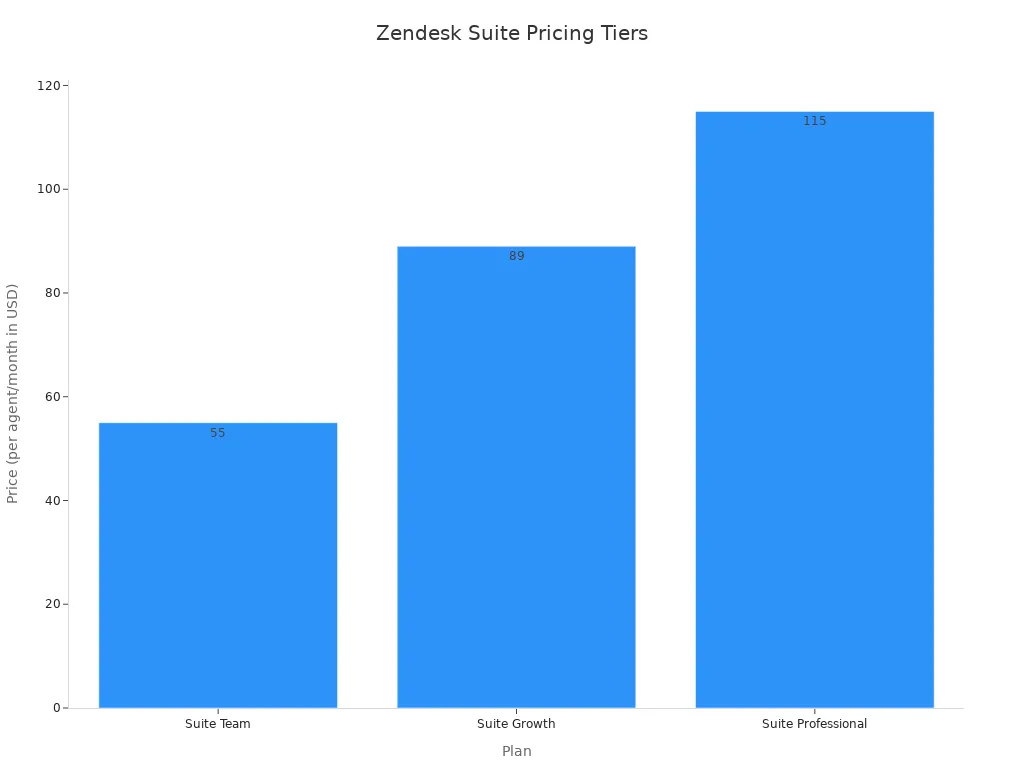
Here is a quick breakdown of the entry-level plans. These call center software solutions are designed to scale as you grow.
| Plan | Price (per agent/month, billed annually) | Key Inclusions |
|---|---|---|
| Suite Team | $55 | Ticketing, messaging, knowledge base, basic bots |
| Suite Growth | $89 | All Team features + SLAs, multilingual support |
| Suite Professional | $115 | All Growth features + skills-based routing, HIPAA compliance |
7. Dialpad: Best for Voice Intelligence
Overview
Dialpad is a contact center software built around AI-powered voice intelligence. You can use its platform to turn your business conversations into valuable data. It helps businesses understand what happens on every call without needing to listen to recordings manually. If your goal is to improve agent coaching and uncover trends from phone interactions, Dialpad provides the tools to do it automatically.
Key Features
You get a powerful suite of AI tools that analyze calls as they happen. This gives you real-time insights to improve performance. The platform uses Natural Language Processing (NLP) to provide you with useful customer insights and real-time data. Key features include:
- Real-time Transcription: Get an accurate, live transcript of every call. You can even customize it with your business-specific vocabulary.
- Live Sentiment Analysis: AI monitors call sentiment, helping supervisors spot and join difficult calls before they escalate.
- Voicemail Transcription: The system automatically transcribes all voicemails, so you can read them instead of listening.
- Post-Call Summaries: Receive automated call notes and summaries in your inbox after each conversation ends.
Pros and Cons
Dialpad offers strong AI features, but you should consider its reliability and support.
Pros vs. Cons 👍👎
| Pros | Cons |
|---|---|
| Built-in AI capabilities in all plans | Video meeting participants are limited to 10 |
| Live agent support included in all plans | 100% uptime guarantee only in the Enterprise plan |
| Simple to use on desktop and mobile | Video recordings require a separate purchase |
User reviews often highlight its ease of use for small teams but also point to technical issues. Many users praise the AI transcriptions, but some report frequent dropped calls and slow customer support.
Pricing
Dialpad’s call center software pricing starts at $80 per user per month. This plan includes the core AI and voice intelligence features. You will need to upgrade to the Pro or Enterprise plan for more advanced capabilities and 24/7 support. These higher-tier solutions unlock better performance insights. To get the right package, you should evaluate which call center software solutions best fit your team's needs.
8. Five9: Best for Large-Scale Outbound Operations
Overview
Five9 is a cloud-based contact center software built for businesses that manage high-volume outbound campaigns. You can use its powerful tools to run large-scale sales, telemarketing, or collection operations efficiently. The platform provides the necessary infrastructure to support thousands of calls while maintaining compliance and agent productivity. If your goal is to maximize outreach and connect with as many customers as possible, Five9 offers specialized solutions to help you succeed.
Key Features
You get access to a suite of features designed specifically for outbound efficiency. This call center software helps you automate dialing and guide agents through conversations. Key features include:
- Predictive and Progressive Dialers: These tools automatically dial numbers from your lists, connecting agents only to live calls.
- Agent Call Scripting: You can provide your team with scripts to ensure consistent messaging and improve performance.
- Do Not Call (DNC) Compliance: The system helps you manage compliance with calling regulations automatically.
- Real-time Analytics: You can monitor campaign performance and agent activity with live dashboards to make quick adjustments.
Pros and Cons
Five9 delivers a robust platform for outbound teams, but you should consider its strengths and weaknesses.
Pros: 👍
- Industry-leading dialer technology for high-volume calling.
- Highly scalable to support large, enterprise-level teams.
- Strong analytics and reporting for campaign optimization.
Cons: 👎
- Can be complex and expensive for small businesses.
- The user interface may require significant training.
- Full omnichannel features require higher-priced plans.
Pricing
Five9 offers several plans for medium and large businesses. The pricing for these call center software solutions is quote-based, so you will need to contact their sales team for exact figures. However, their pricing structure gives you an idea of the investment.
The entry-level plans for either voice-only or digital-only customer support start at $119 per user per month. To get a blended solution with both voice and digital channels, you must upgrade to a higher-tier plan like Premium or Optimum. These more comprehensive plans unlock enterprise-level workforce management and quality tools.
9. RingCX: Best for Small Business Simplicity
Overview
RingCX is a contact center software designed for the modern small business. You can get this platform running quickly, often in just one day. It provides powerful tools without the usual high cost or complexity. This makes it a great choice for any small business that needs to improve its customer interactions. The system is built to be an AI-first, intelligent solution for businesses that want enterprise-grade features in a simple package.
Key Features
You get a rich set of features that help your small business deliver excellent customer support. The platform integrates voice, video, and over 20 digital channels into one clean interface.
- AI-Powered Tools: The system includes AI for post-call transcriptions and real-time sentiment analysis, giving you insights without extra effort.
- Intelligent Routing: You can automatically send calls and messages to the right agent, improving efficiency.
- Unified Analytics: Access real-time and historical dashboards to get a complete view of your contact center's performance.
- Extensive Integrations: With over 400 native integrations, you can connect to tools like Salesforce and Zendesk, allowing the platform to grow with your small business.
Pros and Cons
RingCX offers many advantages for a small business, but you should consider the full picture.
Pros vs. Cons 👍👎
| Pros | Cons |
|---|---|
| Very easy and fast to set up and deploy. | May lack the deep customization of larger enterprise systems. |
| Affordable, all-inclusive pricing is great for a small business. | As a newer product, some advanced features may still be in development. |
| Strong, seamlessly integrated AI features. | The simple interface might not suit teams needing complex workflows. |
| Excellent 99.99% uptime guarantee. | Limited video meeting participants compared to other solutions. |
This call center software is ideal for a small business that values simplicity over complexity.
Pricing
RingCX offers straightforward pricing that is very attractive for a small business. The plan starts at $20 per user per month. This single price includes voice, video, and over 20 digital channels. A major benefit for any small business is that it includes unlimited domestic inbound and outbound calling minutes, which helps you avoid surprise costs. These call center software solutions provide significant value, making it easier for a small business to compete.
10. Freshdesk Contact Center: Best for Affordability
Overview
Freshdesk Contact Center is a cloud-based call center software designed for businesses seeking an affordable entry point. You can use this platform to set up your customer support phone system without a large upfront investment. It integrates with the broader Freshworks ecosystem, offering solutions that help you manage customer conversations effectively. If your main goal is to get a reliable phone system running on a budget, this contact center software provides a strong starting point.
Key Features
You get access to essential features that help you manage calls and improve team performance. The platform is built to be user-friendly, allowing you to configure call flows for international numbers with ease.
- Smart Call Management: Includes features like call routing, call recording, and voicemail transcription to organize your operations.
- Real-time Dashboards: You can monitor call volumes and agent performance to make informed decisions.
- IVR (Interactive Voice Response): Lets you set up automated menus to guide callers to the right department or information.
- Free Basic Plan: Offers a no-cost option for small teams to get started with fundamental call center capabilities.
Pros and Cons
Freshdesk offers great value, but you should consider its limitations. Many users praise its superb call quality and user-friendly interface. However, some report issues that could impact your operations.
Pros: 👍
- Very cost-effective, with an excellent free plan available.
- Effortless setup and comprehensive reporting tools.
- The call recording feature is instrumental in improving service quality.
Cons: 👎
- Outbound call costs can be high.
- Customer support response times are sometimes slow.
- The mobile app interface feels outdated.
Pricing
Freshdesk stands out with its pricing, which includes a free plan for unlimited agents. This makes it one of the most accessible call center software solutions for new businesses. Paid plans unlock more advanced features and increase the number of included minutes.
- Free: $0/agent/month. Includes basic call queues and inbound caller ID.
- Growth: $15/agent/month (billed annually). Adds 2,000 incoming minutes per month.
- Pro: $39/agent/month (billed annually). Adds 3,000 incoming minutes and advanced call management.
- Enterprise: $69/agent/month (billed annually). Adds 5,000 incoming minutes and voicebots.
How to Choose Your Contact Center Software Solutions
Selecting the right contact center for customer service is a strategic decision. You need a platform that aligns with your goals for customer experience management. This guide will help you evaluate the key factors to find the best contact center software solutions for your team.
Essential Features in Contact Center Software
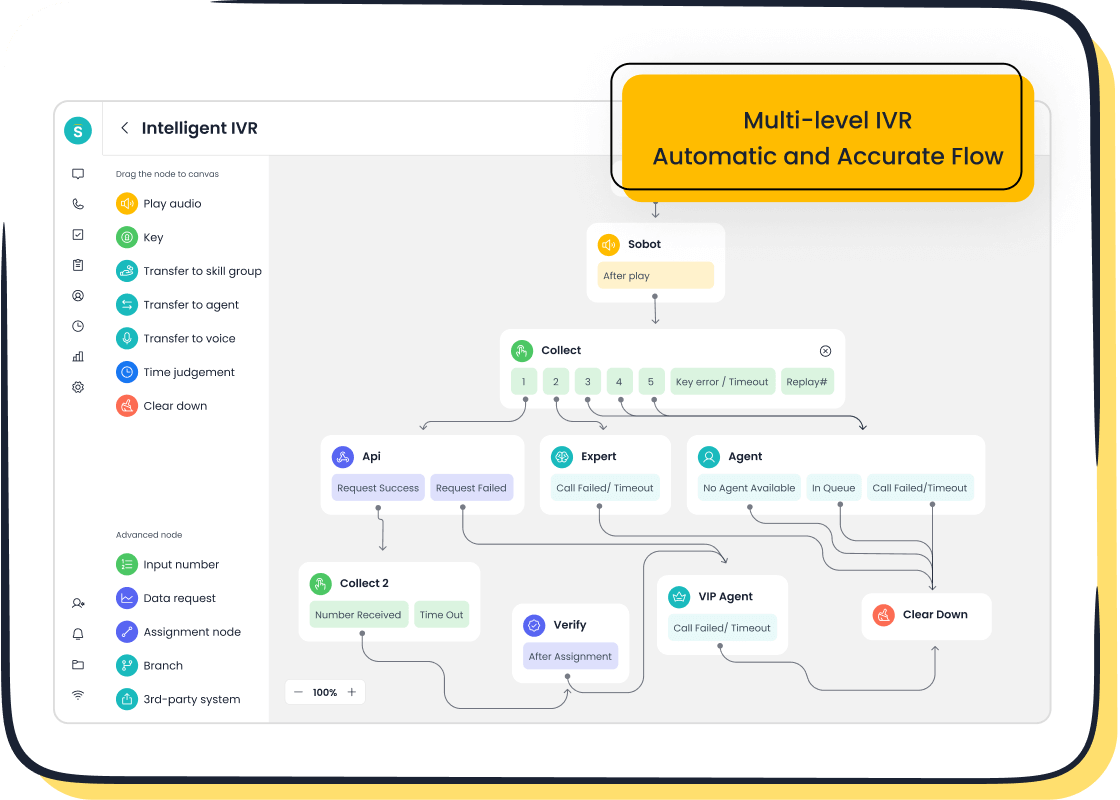
Your chosen contact center software must provide a complete toolkit. A true omnichannel approach is essential for modern customer support. It unifies all your customer communications into one workspace. For example, the Sobot Omnichannel Solution integrates voice, chat, and social media, giving agents a single view of the customer. This provides efficient customer support.
Look for these critical features:
- AI-Enabled Tools: Intelligent routing and real-time sentiment analysis improve interactions.
- Automation: AI agents and smart IVR handle routine questions, freeing up your team.
- Omnichannel Engagement: You need consistent omnichannel support across voice, email, and social media.
- Cloud-Based System: This offers flexibility for remote work and scales with your business.
Understanding Pricing and Total Cost
The subscription price is only part of the total cost. You must consider other expenses to understand the full investment. A small business needs to be especially aware of these costs.
Hidden costs can include staffing, training, and integrating other technologies. Inefficient operations also add to your expenses. For instance, agents switching between many apps can increase handle times and create fatigue. This is a common challenge for a small business.
Evaluating CRM and System Integrations
Your customer service platform should connect with your other tools. Strong integration capabilities are vital for efficient customer support. A small business benefits greatly when its call center software works with its CRM. This creates a single source of truth for customer data. Many platforms offer native integrations with popular systems like Salesforce, HubSpot, and Zendesk. This connectivity is crucial for your customer experience strategy. A small business can use these integrations to streamline workflows. Every small business should check for these connections.
Assessing Scalability and Vendor Support
Your needs will change as your business grows. A small business must choose a vendor that can scale. The platform should handle seasonal demand spikes and support your expansion. A flexible pricing model helps a small business manage costs. Also, evaluate the vendor's support. Good vendor support is key for any small business. It ensures you get help when you need it. This is important for customer experience management. A small business should ask for examples of how the vendor has helped other businesses grow. This provides valuable performance insights and ensures you have a partner for the long term.
Choosing the right contact center for customer service is a key investment. It improves your operational efficiency and customer satisfaction. The ideal call center software depends on your unique needs, whether you are a small business or a larger enterprise. Your customer experience management strategy requires the right solutions. For a small business, efficient customer support is vital.
Use this guide to shortlist vendors. You can book demos to see platforms in action. A small business can start with an all-in-one customer service platform like Sobot. This shows you how integrated tools provide real-time, efficient customer support for your small business. These tools help all businesses grow.
FAQ
What is a contact center?
A contact center is a central point where you manage all customer communications. Unlike a traditional call center, it handles interactions across many channels. These include phone, email, live chat, and social media. It unifies your customer support into one system.
Why is an omnichannel approach important?
An omnichannel approach lets you provide a seamless customer experience. Customers can switch between channels, like chat and phone, without repeating themselves. This improves satisfaction and makes your support team more efficient. It creates a single, unified conversation with your customer.
What should a small business look for in contact center software?
You should look for affordability, ease of use, and scalability. Contact Center Software Solutions for Small Businesses must be simple to set up and manage.
Tip: 💡 Look for platforms with all-in-one pricing and strong integration options to support your growth without adding complexity.
How does AI help in a contact center?
AI automates many tasks for you. It can power chatbots for 24/7 support, transcribe calls in real time, and analyze customer sentiment. This frees up your agents to focus on complex problems, which improves both efficiency and the quality of your support.
See Also
Evaluating Leading Contact Center Platforms: A Comprehensive 2024 Review
Discovering the Foremost Cloud Contact Center Providers for 2025
Assessing Premier Cloud Contact Center Services: An In-Depth 2024 Analysis
Exploring the Best 10 Call Center Analytics Software Solutions for 2024
Ranking the Top 10 Customer Service Software Platforms This Year

