10 Tips for Querying Conversation Data Effectively


Querying conversation data plays a vital role in enhancing customer service and operational efficiency. By analyzing recorded interactions, you can uncover valuable insights into customer behavior and preferences. For instance, businesses using tools like Sobot's Live Chat have reported significant improvements in response times and customer satisfaction. Mastering conversation recording and query techniques allows you to streamline workflows, resolve issues faster, and deliver personalized experiences. This approach not only boosts efficiency but also strengthens customer relationships, ensuring long-term success.
Understand the Basics of Conversation Recording and Query
What is Conversation Data?
Definition and examples of conversation data in customer service.
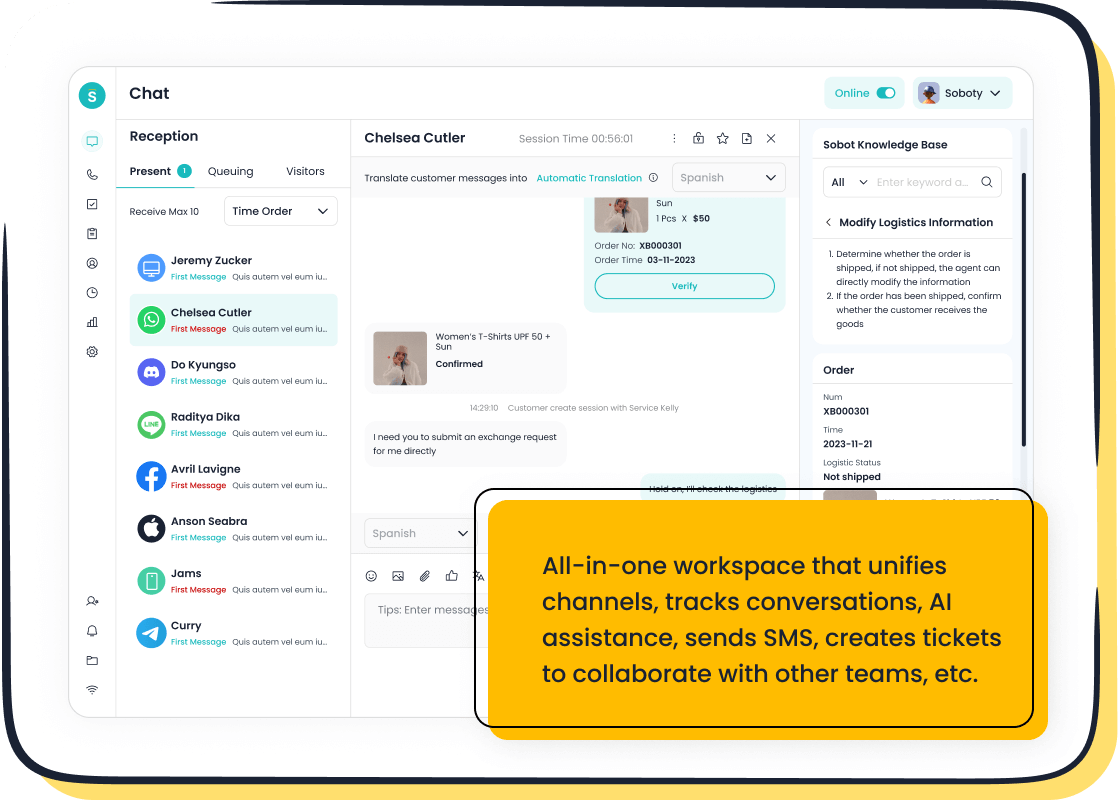
Conversation data refers to the recorded interactions between customers and businesses across various communication channels. These interactions can include live chat messages, emails, phone call transcripts, and social media exchanges. For example, when a customer contacts support via Sobot Live Chat, the system captures the entire conversation, including timestamps and agent responses. This data serves as a valuable resource for understanding customer needs and preferences.
Importance of conversation recording for customer insights.

Recording and analyzing conversations allow you to identify trends and patterns in customer behavior. For instance, you can determine frequently asked questions or common pain points. This insight helps you improve your services and tailor your offerings to meet customer expectations. Tools like Sobot Live Chat enhance this process by centralizing all interactions in one workspace, making it easier to analyze and act on the data.
How APIs Facilitate Data Access
Overview of APIs and their role in querying conversation data.
APIs, or Application Programming Interfaces, act as bridges between different software systems. They enable you to access and retrieve conversation data efficiently. For example, a REST API allows you to query specific datasets, such as customer inquiries from the past month. This capability is essential for businesses aiming to analyze large volumes of data without manual effort.
Examples of API use cases in customer support.
APIs streamline customer support by automating data retrieval and integration. For instance, using Sobot's REST API, you can pull conversation data to generate reports on agent performance or customer satisfaction. Another use case involves integrating APIs with CRM systems to provide agents with real-time customer information, enhancing the quality of support.
Master API Documentation for Effective Querying
Navigating API Endpoints
Identifying endpoints for conversation data retrieval.
API endpoints act as gateways to access specific datasets, such as customer conversations or agent performance metrics. To retrieve conversation data effectively, you must first identify the correct endpoint in the API documentation. For example, Sobot's REST API provides endpoints tailored for retrieving chat histories, customer profiles, or analytics. Each endpoint is designed for a specific purpose, so understanding its function is crucial. Always refer to clear documentation to ensure you’re using the right endpoint for your query.
Understanding endpoint parameters and their applications.
Query parameters play a vital role in customizing API requests. They allow you to filter, sort, or paginate data, ensuring you retrieve only the information you need. For instance, you can use parameters to query conversations from a specific date range or filter by customer sentiment. To use parameters effectively:
- Study the API documentation to understand available parameters, their formats, and how to include them in requests.
- Respect rate limits to avoid overloading the server.
Parametrization not only optimizes your queries but also reduces unnecessary data retrieval, saving time and resources.
Authentication and Security
Best practices for API authentication (e.g., API keys, tokens).
Authentication ensures only authorized users can access sensitive data. Common methods include API keys, OAuth tokens, and session-based authentication. For example, Sobot's REST API uses secure tokens to validate requests. To enhance security:
- Use passwordless authentication methods like biometrics or hardware tokens.
- Adopt AI-powered threat detection to identify suspicious activity.
- Implement a zero-trust model, requiring continuous verification for every query.
These practices protect your data while maintaining seamless access for authorized users.
Ensuring secure access to sensitive customer data.
Securing customer data during API querying is non-negotiable. Start by encrypting data in transit using SSL/TLS protocols. Limit access to sensitive endpoints through strict authorization policies. Additionally, monitor API activity for anomalies, such as unusual query patterns, and set up alerts for potential threats. For example, Sobot's Live Chat API ensures secure data handling by integrating robust encryption and access controls. These measures safeguard customer trust and comply with data protection regulations.
Optimize API Performance for Better Results
Implement API Optimization Techniques
Use caching to reduce redundant API calls.
Caching is a powerful technique for improving API optimization. It stores copies of frequently accessed data, reducing the need to fetch the same information repeatedly. This approach leads to faster response times and more efficient use of server resources. For example, when querying customer service data through a REST API, caching can store common queries like customer profiles or frequently asked questions. This reduces server load and enhances user experience. Implementing caching strategies, such as using in-memory caches or content delivery networks (CDNs), ensures smoother operations and quicker results. Tools like Sobot Live Chat can benefit from API caching by delivering real-time insights without delays.
Batch requests to minimize server load and improve efficiency.
Batching requests is another effective API optimization technique. It combines multiple queries into a single request, reducing network overhead and improving throughput. For instance, instead of making separate API calls for each customer interaction, you can batch them into one request. This minimizes latency and decreases the number of HTTP connections required. By batching requests, you can streamline operations and achieve faster results. Sobot's REST API supports batching, allowing businesses to handle large-scale queries efficiently while maintaining system stability.
Enhance Query Efficiency
Filter data to retrieve only relevant information.
Implementing filtering is essential for optimizing API queries. By retrieving only the data you need, you can reduce processing time and improve performance. For example, filtering by keyword allows you to focus on specific customer interactions, such as complaints or positive feedback. This targeted approach saves resources and ensures more accurate results. Sobot's Live Chat API enables data filtering, helping businesses analyze customer conversations effectively and make informed decisions.
Use pagination to manage large datasets effectively.
Pagination is a crucial technique for handling large datasets in API queries. It breaks down data into smaller, manageable chunks, making it easier to process and display. For instance, when querying thousands of customer interactions, pagination allows you to retrieve results page by page. This prevents system overload and ensures smooth performance. Sobot's REST API supports pagination, enabling businesses to manage extensive conversation data efficiently while maintaining high query reliability.
Handle Errors and Maintain Query Reliability
Error Codes and Debugging
Common API error codes and their meanings.
When querying data through a REST API, you may encounter various error codes. Understanding these codes helps you identify and resolve issues quickly. Here are some common ones:
- 404 Not Found: The requested URL does not exist on the server.
- 401 Unauthorized: Authentication is required to access the API.
- 403 Forbidden: You lack permission to access the resource.
- 400 Bad Request: The request was incorrectly formatted.
- 429 Too Many Requests: The request limit has been exceeded.
- 500 Internal Server Error: A general server issue occurred.
- 503 Service Unavailable: The server is temporarily unable to handle the request.
For example, if you receive a 401 error while using Sobot's REST API, ensure your authentication token is valid. These codes act as a guide to pinpoint the root cause of the problem.
Strategies for debugging and resolving query issues.
Debugging API queries requires a systematic approach. Start by isolating the problem. Break the system into smaller sections to identify where the issue occurs. Use tools like logging to track critical events and errors. For instance, Sobot's Live Chat API allows you to monitor performance metrics, such as response times and error rates, to detect anomalies.
Other effective strategies include:
- Implementing automated testing to catch bugs early.
- Using binary search to locate defects.
- Collaborating with your team to share insights.
Switching to a different activity can also provide fresh perspectives. These best practices ensure efficient debugging and reliable query performance.
Retry Logic and Failover
Implementing retry mechanisms for temporary failures.
Temporary failures, such as network interruptions, require robust retry mechanisms. Follow these steps to implement an effective strategy:
- Determine if the error is transient, like a 503 Service Unavailable.
- Ensure the request is idempotent to avoid unintended side effects.
- Use exponential backoff to increase the delay between retries, reducing server strain.
- Configure retries for specific conditions, such as HTTP status codes.
For example, Sobot's REST API supports automatic retry logic, allowing you to handle temporary failures without manual intervention. These mechanisms enhance the reliability of your queries while minimizing resource usage.
Ensuring system reliability with failover strategies.
Failover strategies act as a safety net during system outages. They redirect requests to backup systems, ensuring uninterrupted service. For instance, a cloud storage provider might store data across multiple data centers. If one center fails, the system redirects requests to another location.
Sobot's Live Chat API benefits from similar reliability measures. Its robust infrastructure ensures 99.99% system stability, even during high-traffic periods. By implementing failover strategies, you can maintain consistent query performance and safeguard customer trust.
Leverage Advanced Query Features for Insights
Aggregations and Analytics
Using aggregation functions to analyze conversation trends.

Aggregation functions help you uncover trends in conversation data by summarizing large datasets into meaningful insights. For example, calculating the average response time across all customer interactions can reveal how quickly your team addresses inquiries. This metric allows you to identify areas for improvement and set performance benchmarks. Similarly, aggregating sentiment scores from customer feedback helps you gauge overall satisfaction levels. Tools like Sobot's Live Chat API simplify this process by providing built-in analytics that evaluate over 150 indicators, including customer sentiment and agent efficiency. By leveraging these functions, you can make data-driven decisions to enhance your service quality.
Examples like average response time and sentiment analysis.
Imagine you want to measure the effectiveness of your support team. Using a REST API, you can query conversation data to calculate the average response time for each agent. If one agent consistently takes longer, you can provide targeted training to improve their performance. Sentiment analysis offers another powerful use case. By analyzing customer messages, you can identify whether interactions are positive, neutral, or negative. This insight helps you address issues proactively and improve customer satisfaction. Aggregation functions transform raw data into actionable insights, enabling you to optimize your operations.
Real-Time Data with Webhooks
Setting up webhooks for instant updates on new conversations.
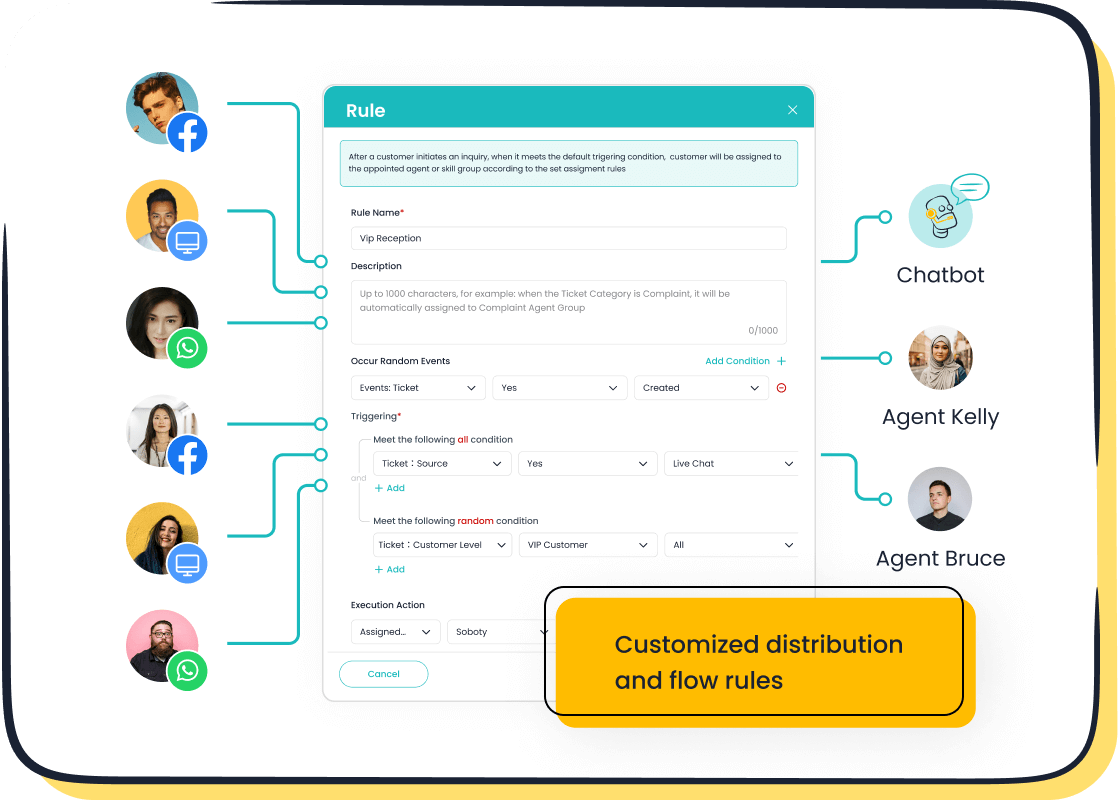
Webhooks enable real-time updates by pushing data to your system whenever an event occurs. For instance, when a customer starts a new chat, a webhook can instantly notify your application. This eliminates the need to repeatedly query the REST API for updates, saving bandwidth and resources. Setting up webhooks involves subscribing to specific events through your API provider. Sobot's Live Chat API supports webhook integration, allowing you to receive instant notifications for events like new messages or completed conversations. This real-time capability ensures you stay updated without manual intervention.
Reducing the need for frequent polling.
Polling involves sending repeated API requests to check for updates, which can strain your system and increase latency. Webhooks solve this problem by delivering data as soon as events occur. For example:
- They reduce bandwidth usage by eliminating unnecessary queries.
- They improve user experience by minimizing delays in data updates.
- They enhance efficiency by automating event-driven workflows.
By integrating webhooks, you can streamline your operations and focus on delivering exceptional customer service. Sobot's robust API infrastructure ensures reliable webhook performance, helping you maintain a seamless flow of information.
Integrate Sobot Live Chat for Seamless Querying
Unified Workspace for Conversation Data
How Sobot Live Chat centralizes customer interactions.

Sobot Live Chat provides a unified workspace that consolidates customer interactions across multiple channels. Whether customers reach out via websites, apps, or social media platforms like WhatsApp or Facebook, all conversations are stored in one place. This centralization eliminates the need to switch between platforms, saving time and reducing errors. For example, when querying customer data through Sobot's rest api, you can access complete chat histories, agent responses, and customer profiles from a single interface. This streamlined approach ensures you have all the information you need to deliver efficient and personalized support.
Benefits of integrating Live Chat with API querying.
Integrating Sobot Live Chat with api querying offers numerous advantages for customer service operations:
- Enhanced customer engagement
- Improved response times
- Personalized experiences
- Efficient support processes
- Advanced natural language processing capabilities
- Omnichannel support for cohesive customer experiences
- Powerful analytics and reporting tools
These benefits allow you to optimize workflows and make data-driven decisions. For instance, by using Sobot's rest api, you can query real-time data to monitor agent performance or analyze customer sentiment. This integration empowers your team to provide faster, more accurate support, ultimately boosting customer satisfaction.
AI-Assisted Tools for Enhanced Efficiency
Using AI to analyze and query conversation data.

AI-assisted tools in Sobot Live Chat simplify the process of analyzing and querying conversation data. These tools automate complex tasks, such as language detection, sentiment analysis, and entity recognition. For example, when querying data through Sobot's rest api, AI can preprocess and clean the data, ensuring accuracy and compliance with privacy standards. This automation reduces manual effort and enhances the quality of insights.
Examples of AI-powered insights in customer service.
AI-powered tools provide actionable insights that improve customer service. Key features include:
- Data import from various channels into one system.
- Data preprocessing to clean and standardize information.
- Sentiment analysis to gauge customer satisfaction.
- Dashboards and visualizations for deeper insights.
- Prescriptive analytics to suggest real-time actions based on past interactions.
For instance, Sobot Live Chat uses AI to analyze customer conversations and recommend solutions to agents in real time. This capability helps you resolve issues faster and improve the overall customer experience. By leveraging these tools, you can transform raw data into meaningful insights that drive business growth.
Test and Debug Your API Queries
Tools for API Testing
Using platforms like Postman or Insomnia for query validation.
Testing your API queries ensures they function as expected and return accurate data. Tools like Postman and Insomnia simplify this process by providing user-friendly interfaces for crafting and validating REST API requests. For example, you can use Postman to test a query that retrieves customer interaction data from Sobot's Live Chat API. These platforms allow you to input parameters, headers, and authentication tokens, then view the response in real time. This helps you confirm that your API delivers the correct data and status codes. By testing early and often, you can catch errors before they impact your operations.
Ensuring accurate and efficient API responses.
Accurate API responses are critical for maintaining system reliability. To achieve this, validate all responses for correct status codes, headers, and data formats. Automating repetitive test cases can save time and improve accuracy. For instance, you can automate tests to ensure that your REST API consistently returns valid customer data when queried. Additionally, focus on security by testing for proper authentication and encryption. These practices ensure your API queries remain efficient and secure, enabling seamless data retrieval.
Monitoring and Logging
Keeping logs of API requests and responses for troubleshooting.
Monitoring and logging API activity provide valuable insights into system behavior. By keeping detailed logs of requests and responses, you can identify issues like slow response times or high error rates. For example, if a query to Sobot's REST API fails, reviewing the logs can reveal whether the issue lies in the request parameters or the server response. Regularly analyzing these logs helps you detect anomalies and troubleshoot problems effectively. This proactive approach minimizes downtime and ensures reliable data access.
Identifying patterns to improve query performance.
Analyzing logs over time can uncover trends in API usage. For instance, you might notice that certain queries consistently take longer to execute. This insight allows you to optimize those queries by refining parameters or implementing caching. Monitoring tools can also highlight bottlenecks, such as high traffic during specific hours, enabling you to adjust server resources accordingly. By identifying and addressing these patterns, you can enhance the performance of your REST API and ensure smooth data retrieval for your operations.
Collaborate and Stay Updated
Team Collaboration on API Queries
Sharing best practices and templates within your team.
Collaboration improves the efficiency and accuracy of your API queries. Sharing best practices ensures everyone on your team follows consistent methods. For example, you can create a shared document with query templates for common tasks like retrieving customer data or analyzing conversation trends. These templates save time and reduce errors by providing a clear structure for crafting requests. Using tools like Sobot Live Chat's unified workspace, your team can access centralized data, making it easier to collaborate on query designs. Regular team discussions also help refine these practices and address challenges collectively.
Examples of collaborative query design for customer success.
Collaborative query design leads to better customer outcomes. Imagine your team working together to design a query that identifies frequent customer complaints. By pooling knowledge, you can create a more effective query that filters data by keywords or sentiment. This insight allows you to address issues proactively, improving customer satisfaction. Sobot's REST API supports such collaborative efforts by providing detailed documentation and robust analytics tools. These features enable your team to design queries that align with your business goals and enhance service quality.
Keeping Up with API Changes
Monitoring version updates and deprecations.
Staying updated on API changes is crucial for maintaining query efficiency. Monitor version updates and deprecations regularly to avoid disruptions. Many providers, including Sobot, announce changes in advance and offer migration guidance. Use API gateways to centralize version management and route requests efficiently between versions. This approach ensures your queries remain functional and up-to-date. For example, if a REST API endpoint is deprecated, you can quickly switch to the new version without affecting your operations.
Adapting to new features for improved querying.
Adapting to new API features enhances your querying capabilities. When providers introduce updates, they often include tools that improve data retrieval or analysis. For instance, a new filtering parameter might allow you to refine your queries further, saving time and resources. Sobot's REST API frequently adds features like advanced analytics and real-time data access, enabling you to extract deeper insights. By embracing these updates, you can optimize your queries and stay ahead in delivering exceptional customer service.
Focus on User Experience in API Querying
Enhancing Response Times
Minimizing latency in API queries for better user experience.
Reducing latency in API queries is essential for delivering a seamless user experience. Slow responses can frustrate users and hinder productivity. To minimize latency, you can:
- Aggregate resource requests to reduce network calls.
- Optimize API endpoints for faster data retrieval.
- Use cache-first strategies for frequently accessed data.
- Compress data to reduce transfer size.
- Implement CDNs to serve assets closer to users.
For example, when using a REST API like Sobot's Live Chat API, caching customer interaction data can significantly improve response times. This ensures users experience faster query results, enhancing satisfaction and efficiency.
Examples of preloading and asynchronous requests.
Preloading and asynchronous requests further improve user experience by reducing delays. Preloading involves fetching data in advance, ensuring it is ready when needed. For instance, preloading customer profiles during login can speed up subsequent queries.
Asynchronous requests allow your application to handle multiple queries simultaneously. They return responses instantly while processing continues in the background. This prevents users from waiting during lengthy operations. For example, Sobot's REST API supports asynchronous requests, enabling real-time updates without interrupting workflows. These techniques ensure smooth interactions and keep users engaged.
Clear and Informative Error Messages
Providing user-friendly error messages for failed queries.
Clear error messages are vital for maintaining a positive user experience. When an API query fails, the message should explain the issue and guide users toward a solution. For instance, instead of displaying "400 Bad Request," provide a message like, "Invalid parameter format. Please check the API documentation."
Sobot's REST API ensures user-friendly error handling by offering detailed messages for common issues. This approach reduces confusion and helps users resolve problems quickly.
Suggestions for resolving common issues.
To address common API query challenges:
- Read the API documentation to understand endpoints and parameters.
- Handle parameters correctly to avoid formatting errors.
- Use debugging tools to identify and fix issues.
Authentication errors often occur due to missing headers or incorrect credentials. Rate limiting can also cause problems if you exceed usage limits. Monitoring these aspects ensures smoother API interactions and a better user experience.
Mastering the art of querying conversation data can transform your customer service operations. By applying strategies like filtering, pagination, and asynchronous processing, you can optimize your API queries for faster response times and better resource management. For instance, smaller page sizes reduce network load, while asynchronous processing ensures APIs handle requests efficiently, even during high traffic. These practices not only improve application performance but also enhance user satisfaction.
Sobot Live Chat simplifies this process by offering a unified workspace and robust REST API capabilities. Its tools enable you to analyze data effectively, retrieve insights in real time, and deliver personalized support. By leveraging these features, you can streamline workflows, boost efficiency, and strengthen customer relationships. Start implementing these tips today to unlock the full potential of your data and elevate your service quality.
FAQ
What is the best way to start querying conversation data?
Begin by identifying your goals. Do you want to analyze customer satisfaction or agent performance? Use tools like Sobot Live Chat's REST API to retrieve relevant data. Start small by querying specific datasets, such as conversations from the past week, and expand as needed.
How can I ensure my API queries are secure?
Use secure authentication methods like API keys or OAuth tokens. Encrypt data with SSL/TLS protocols to protect it during transit. For example, Sobot Live Chat's REST API employs robust encryption and access controls, ensuring sensitive customer data remains secure.
What should I do if my API query fails?
Check the error code first. For instance, a "401 Unauthorized" error may indicate an invalid token. Use debugging tools like Postman to test your query. Sobot's REST API provides detailed error messages, helping you quickly identify and resolve issues.
How does Sobot Live Chat improve querying efficiency?
Sobot Live Chat centralizes customer interactions, making data retrieval seamless. Its REST API supports features like filtering, pagination, and batching. These tools help you query only the data you need, reducing server load and improving response times.
Can I analyze real-time conversation data?
Yes, you can use webhooks to receive instant updates. For example, Sobot Live Chat's REST API allows you to set up webhooks for events like new messages. This eliminates the need for frequent polling and ensures you stay updated in real time.
See Also
Essential Strategies for Achieving Depop Live Chat Success
Simple Ways to Integrate Chatbot Examples on Your Website
Comprehensive Guide to Using Pre-Chat Forms in Salesforce

